
Boxlight P8 WX31NXT
Boxlight P8 WX31NXT DLP Projector User Manual
Model: P8 WX31NXT
1. Introduction
This manual provides comprehensive instructions for the setup, operation, maintenance, and troubleshooting of your Boxlight P8 WX31NXT DLP Projector. Please read this manual thoroughly before using the projector to ensure proper functionality and to prevent damage.
2. Safety Information
- Do not block ventilation openings.
- Do not look directly into the projector lens when the lamp is on.
- Use only the power cord supplied with the projector.
- Refer all servicing to qualified service personnel.
- Keep the projector away from water and moisture.
3. Package Contents
Verify that all items are present in your package:
- Boxlight P8 WX31NXT DLP Projector
- Remote Control
- Power Cable
- HDMI Cable
- User Manual (this document)
4. Product Overview
Familiarize yourself with the various parts and connections of your projector.
4.1 Top View and Control Panel
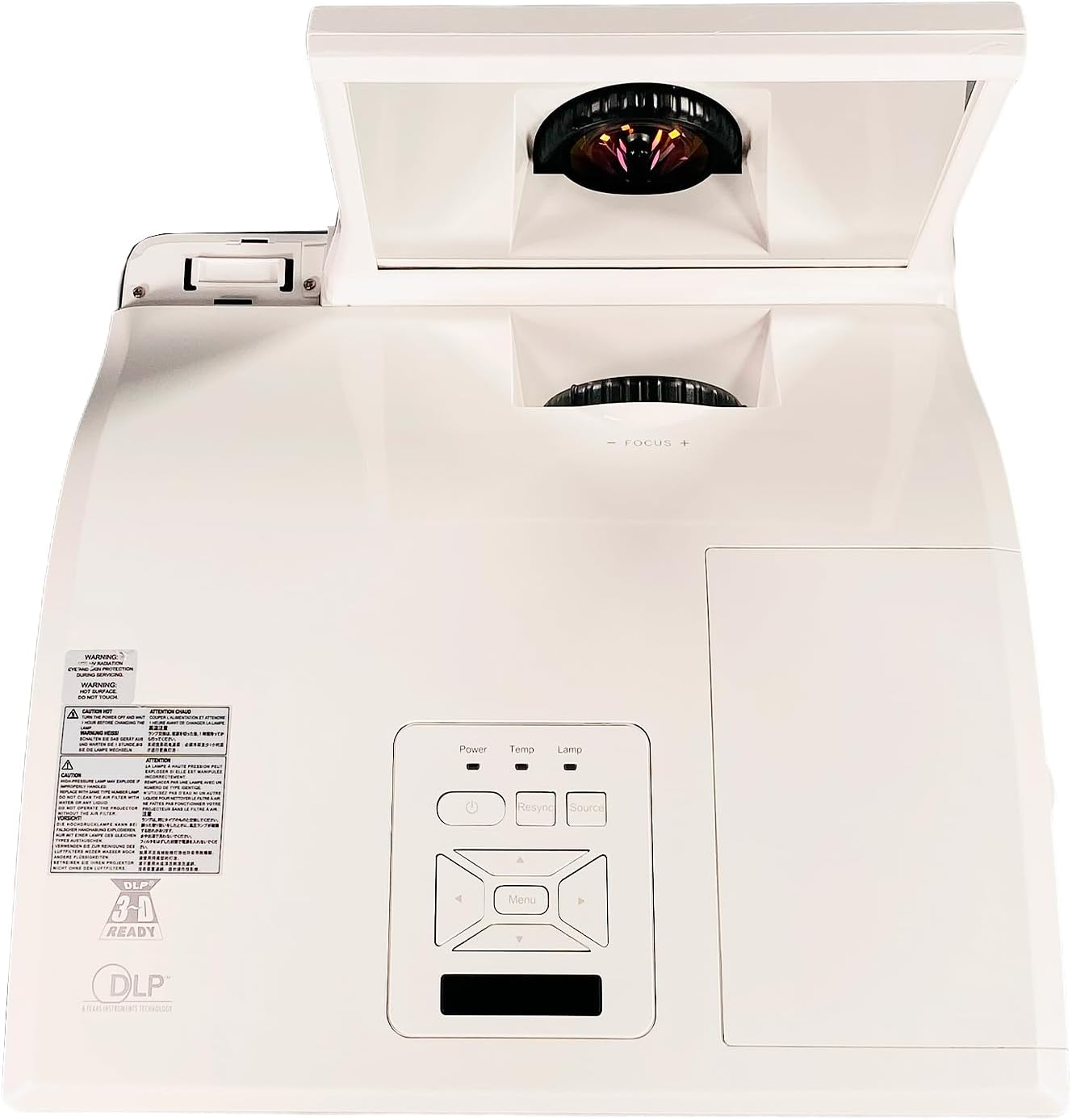
Figure 4.1: Top view of the projector, showing the control panel with Power, Temp, Lamp indicators, and navigation buttons. The ultra-short throw lens assembly is visible at the front.
The top of the projector features the main control panel, allowing direct access to power, source selection, and menu navigation. The ultra-short throw lens is located at the front, protected by a movable cover.
4.2 Rear Panel Connections

Figure 4.2: Rear panel of the projector, displaying various connectivity options including HDMI, VGA, S-Video, Composite, Audio In/Out, Mini USB, RS232, and LAN ports.
The rear panel provides a comprehensive array of input and output ports for connecting various devices:
- HDMI: Digital video and audio input.
- VGA In 1 & 2: Analog video inputs for computers.
- VGA Out: Analog video output for a monitor.
- S-Video: Analog video input.
- Video (Composite): Analog video input.
- Audio In (L/R), Audio In 1 & 2, Microphone: Various audio inputs.
- Audio Out: Audio output.
- Mini USB: For service or control.
- RS232: Serial control port.
- LAN: Network connectivity.
- DC Out 12V: Power output.
4.3 Side View and Ventilation

Figure 4.3: Side view of the projector, highlighting the ventilation grilles essential for heat dissipation. The ultra-short throw lens assembly is also visible.
The sides of the projector feature ventilation grilles to ensure proper airflow and prevent overheating. Do not obstruct these grilles during operation.
4.4 Product Label

Figure 4.4: Product label located on the bottom of the projector, displaying model number P8 WX31NXT, serial number (e.g., 330900834210132), input power requirements, and regulatory compliance marks.
The product label contains important information such as the model number, serial number, and electrical specifications. This information is crucial for support and warranty purposes. For technical support, you can contact Boxlight at +1-360-464-2119 (International) or +1-866-972-1649 (USA and Canada), or visit www.boxlight.com.
5. Setup
5.1 Projector Placement
As an ultra-short throw projector, the P8 WX31NXT is designed to be placed very close to the projection surface. Position the projector on a stable, flat surface directly in front of the screen or wall. Ensure there is adequate space around the ventilation grilles for airflow.
5.2 Connecting Power
- Connect the supplied power cable to the AC inlet on the projector's rear panel.
- Plug the other end of the power cable into a grounded electrical outlet.
5.3 Connecting Input Sources
Choose the appropriate cable for your source device and connect it to the corresponding port on the projector's rear panel (refer to Figure 4.2).
- HDMI: For digital video and audio from devices like laptops, Blu-ray players, or streaming boxes.
- VGA: For analog video from computers. Use VGA In 1 or VGA In 2.
- S-Video/Composite Video: For older video sources.
- Audio: Connect external audio sources to the Audio In ports if not using HDMI for audio.
6. Operating the Projector
6.1 Powering On/Off
- To Power On: Press the Power button on the control panel or remote control. The power indicator will illuminate.
- To Power Off: Press the Power button twice. The projector will initiate a shutdown sequence.
6.2 Selecting Input Source
Press the Source button on the control panel or remote control repeatedly to cycle through available input sources (HDMI, VGA 1, VGA 2, S-Video, Video, etc.) until your desired source is displayed.
6.3 Adjusting Focus
The projector features a manual focus adjustment. Rotate the focus ring near the lens assembly until the projected image is clear and sharp.
6.4 Menu Navigation
Press the Menu button on the control panel or remote to access the On-Screen Display (OSD) menu. Use the arrow buttons to navigate through options and the Enter button to select. Press Menu again to exit.
Common menu settings include:
- Image Settings: Brightness, Contrast, Color, Aspect Ratio.
- Display Settings: Keystone correction, Position.
- System Settings: Language, Timer, Lamp settings.
7. Maintenance
7.1 Cleaning the Lens
Gently wipe the projector lens with a soft, lint-free cloth specifically designed for optical surfaces. Do not use abrasive cleaners or excessive force, as this can scratch the lens.
7.2 Cleaning Air Filters
Regularly clean the air filters to maintain optimal performance and prevent overheating. Refer to the projector's specific filter location (usually on the side or bottom) and cleaning instructions. Typically, filters can be cleaned with a soft brush or vacuum cleaner.
7.3 Lamp Replacement
The projector lamp has a finite lifespan. When the lamp indicator illuminates or the image brightness significantly decreases, the lamp may need replacement. Consult a qualified technician or refer to the detailed lamp replacement guide for your specific model. Always use genuine Boxlight replacement lamps.
8. Troubleshooting
| Problem | Possible Cause | Solution |
|---|---|---|
| No image displayed | Power cable disconnected; Incorrect input source selected; Source device not powered on. | Check power connections; Select correct input source; Ensure source device is on. |
| Image is blurry | Focus not adjusted; Projector too close/far from screen. | Adjust the focus ring; Reposition the projector. |
| Projector overheats and shuts down | Ventilation blocked; Dirty air filter. | Ensure clear airflow around projector; Clean air filters. |
| Remote control not working | Batteries depleted; Obstruction between remote and projector. | Replace batteries; Remove obstructions; Point remote directly at IR receiver. |
9. Specifications
| Feature | Detail |
|---|---|
| Model | Boxlight P8 WX31NXT |
| Display Technology | DLP |
| Brightness | 3100 ANSI Lumens |
| Native Resolution | WXGA (1280 x 800) |
| Aspect Ratio | 16:10 |
| Contrast Ratio | 3000:1 |
| Throw Type | Ultra Short Throw |
| Connectivity | HDMI, VGA (x2 In, x1 Out), S-Video, Composite Video, Audio In (x3), Audio Out, Microphone, Mini USB, RS232, LAN, DC Out 12V |
| Product Dimensions | 14.45 x 14 x 5.32 inches |
| Input Power | AC 100-240V~ 50/60 Hz 3.6A |
10. Warranty and Support
For warranty information and technical support, please refer to the official Boxlight website or contact their customer service directly. Keep your purchase receipt and the projector's serial number (found on the product label, e.g., 330900834210132) readily available when contacting support.
Boxlight Contact Information:
- International Technical Support: +1-360-464-2119
- USA and Canada Technical Support: +1-866-972-1649
- Website: www.boxlight.com
Related documentsP8 WX31NXT


Ask a question about this manual
Ask about setup, troubleshooting, compatibility, parts, safety, or missing instructions. Manuals+ will review the question and use this page’s manual context to help answer it.