Introduction
This manual provides detailed instructions for the setup, operation, and maintenance of your Kingdom V5 Wireless Microphone System. This professional system is designed for clear audio transmission in various environments, including churches, bands, and events. It features a robust receiver and four high-quality podium microphones, each with independent volume control and built-in condenser elements.
Package Contents
Verify that all items listed below are present in your package:
- 1x Kingdom V5 Wireless Receiver
- 4x Kingdom Podium Microphones
- 1x Power Adapter for Receiver
- 2x Receiver Antennas
- 1x 1/4" Audio Cable
- User Manual (this document)
Product Overview
System Components
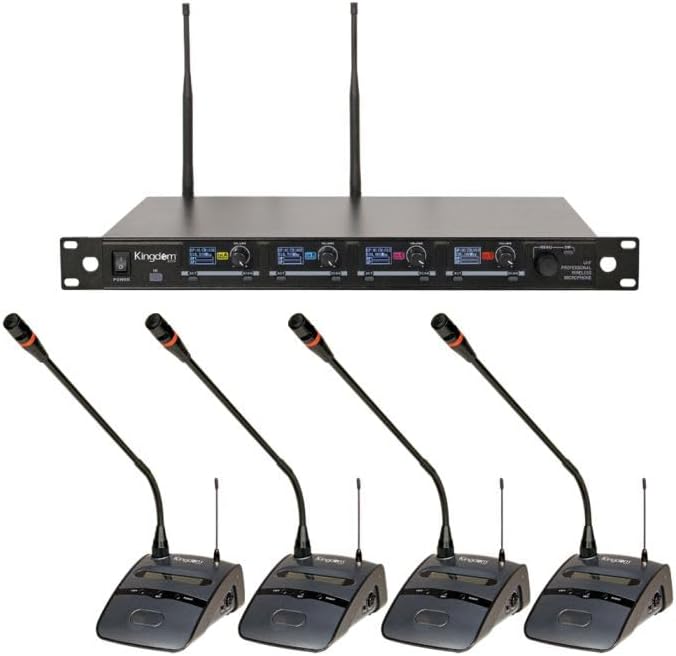
Figure 1: Complete Kingdom V5 Wireless Microphone System, showing the main receiver unit and four individual podium microphones.
Podium Microphone Features
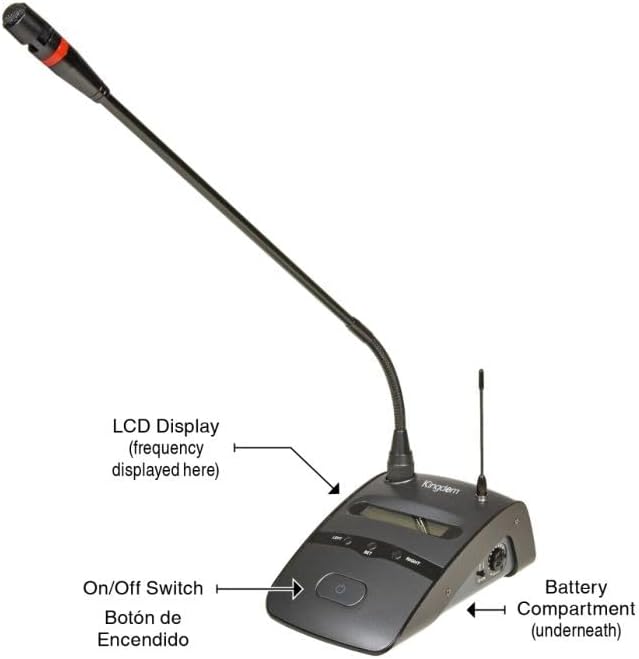
Figure 2: Detailed view of a single podium microphone, highlighting the LCD display for frequency, the power switch, and the battery compartment location.
- LCD Display: Shows current operating frequency and battery status.
- On/Off Switch: Controls power to the microphone.
- Battery Compartment: Located underneath, holds batteries for operation.
- Gooseneck Microphone: Flexible design for optimal positioning.
Receiver Rear Panel Connections
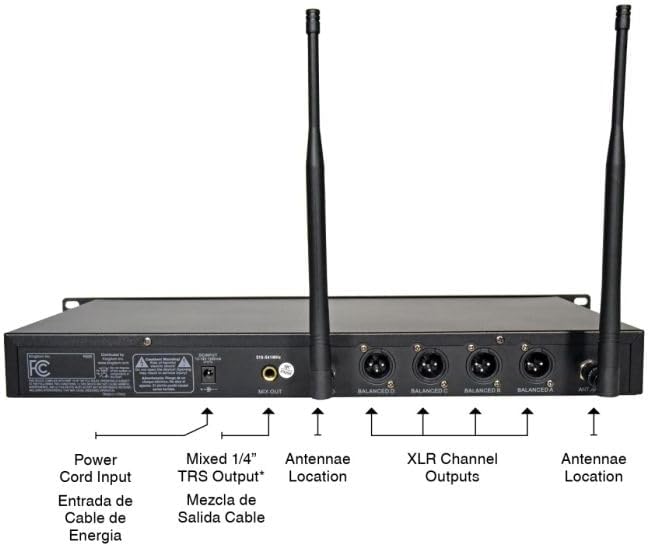
Figure 3: Rear view of the receiver, illustrating the power cord input, mixed 1/4" TRS output, individual XLR channel outputs (Balanced A, B, C, D), and antenna connection points.
- Power Cord Input: Connects to the included power adapter.
- Mixed 1/4" TRS Output: Provides a combined audio output for all channels.
- XLR Channel Outputs (Balanced A, B, C, D): Individual balanced audio outputs for each microphone channel.
- Antennae Locations: Connect the two included antennas for optimal wireless reception.
Setup Instructions
- Receiver Placement: Position the receiver in a central location, away from large metal objects or other wireless devices that may cause interference. Ensure line-of-sight to the intended microphone usage area for optimal signal.
- Connect Antennas: Screw the two included antennas firmly into the "Antennae Location" ports on the rear of the receiver. Adjust them vertically for best reception.
- Power Connection: Connect the power adapter to the "Power Cord Input" on the receiver's rear panel, then plug the adapter into a standard AC power outlet. Do not power on the receiver yet.
- Audio Output Connection:
- For individual microphone outputs, connect XLR cables from the "XLR Channel Outputs" (Balanced A, B, C, D) to your mixer or PA system's input channels.
- For a combined output, connect a 1/4" TRS cable from the "Mixed 1/4" TRS Output" to a single input on your mixer or PA system.
- Microphone Battery Installation: Open the battery compartment on each podium microphone (typically underneath). Insert two fresh AA batteries, observing correct polarity. Close the compartment securely.
- Power On: First, power on your mixer or PA system. Then, power on the Kingdom V5 receiver using the front panel power switch. Finally, power on each podium microphone using its individual On/Off switch.
- Frequency Synchronization: The system should automatically synchronize frequencies. If a microphone does not connect, refer to the receiver's display and the microphone's LCD to ensure they are on the same channel. Manual frequency adjustment may be required in environments with high interference. Consult the full product manual for detailed frequency calibration procedures if automatic synchronization fails.
- Initial Sound Check: Speak into each microphone and adjust the individual volume controls on the receiver, as well as the input gain on your mixer/PA system, to achieve desired audio levels without distortion.
Operating Instructions
- Microphone Usage: Position the podium microphone approximately 6-12 inches from the speaker's mouth for optimal sound pickup. The gooseneck design allows for flexible adjustment.
- Volume Control: Each microphone channel on the receiver has an independent volume knob. Adjust these to balance the audio levels of all active microphones.
- Monitoring Battery Life: The microphone's LCD display indicates battery status. Replace batteries promptly when the low battery indicator appears to avoid unexpected signal loss.
- Wireless Range: The system operates effectively within its specified range. Obstacles such as walls, large crowds, or other electronic devices can reduce the effective range. Maintain line-of-sight between microphones and the receiver whenever possible.
- Power Down Sequence: To prevent pops or damage to your sound system, always power off microphones first, then the receiver, and finally your mixer/PA system.
Maintenance
- Cleaning: Use a soft, dry cloth to clean the receiver and microphones. Avoid using liquid cleaners or solvents, which can damage the components.
- Battery Replacement: Regularly check and replace microphone batteries. Remove batteries if the microphones will not be used for an extended period to prevent leakage.
- Storage: Store the system in a cool, dry place, away from direct sunlight and extreme temperatures. When transporting, use appropriate padding to protect components.
- Antenna Care: Handle antennas carefully. Ensure they are securely attached but do not overtighten.
Troubleshooting
If you encounter issues with your Kingdom V5 Wireless Microphone System, refer to the table below for common problems and solutions.
| Problem | Possible Cause | Solution |
|---|---|---|
| No sound from microphone | Microphone off, low batteries, receiver off, incorrect cable connection, frequency mismatch. | Ensure microphone and receiver are powered on. Replace batteries. Check all audio cables. Verify microphone and receiver are on the same frequency channel. |
| Intermittent signal / Signal drops | Out of range, interference from other devices, weak batteries, antenna obstruction. | Move microphone closer to receiver. Check for sources of interference (Wi-Fi routers, other wireless systems). Replace microphone batteries. Ensure antennas are unobstructed and properly positioned. Consider manual frequency calibration if interference persists. |
| Poor sound quality / Distortion | Input gain too high, microphone too close to sound source, interference. | Reduce receiver channel volume or mixer input gain. Maintain appropriate distance from microphone. Check for interference. |
| Humming or buzzing noise | Ground loop, faulty cable, electrical interference. | Ensure all equipment is plugged into the same power circuit. Try different cables. Check for nearby electrical devices causing interference. |
Specifications
| Brand | Kingdom |
| Model Name | SYSV5P4_N |
| Number of Channels | 4 |
| Microphone Form Factor | Microphone System (4 Podium Microphones) |
| Polar Pattern | Unidirectional |
| Connectivity Technology | Wireless, XLR |
| Connector Type | XLR (Receiver outputs) |
| Special Features | Volume Control (per channel), Wireless Operation |
| Compatible Devices | PA System, Audio Mixers |
| Power Source | Corded Electric (Receiver), Battery (Microphones) |
| Recommended Uses | Singing, Speech, Live Events |
Warranty and Support
For warranty information, technical support, or service inquiries, please refer to the official Kingdom website or contact their customer service department. Keep your purchase receipt as proof of purchase for warranty claims.
You can visit the Kingdom Store for more information: Kingdom Official Store


