

1. Introduction
This manual provides essential information for the safe assembly, operation, maintenance, and troubleshooting of your ZWHEEL ZRINO DUO Electric Scooter. Please read this manual thoroughly before first use to ensure proper handling and to maximize the lifespan of your device. Retain this manual for future reference.
The ZWHEEL ZRINO DUO is a DGT-homologated electric scooter designed for adult use, featuring a powerful motor, advanced suspension, and regenerative braking for an efficient and comfortable urban mobility experience.
2. Safety Guidelines
Always prioritize safety when operating the electric scooter. Failure to follow safety instructions can result in serious injury or damage to the scooter.
- Always wear a helmet and appropriate protective gear (knee pads, elbow pads, gloves).
- Ensure the scooter is fully charged and all components are securely fastened before each ride.
- Adhere to local traffic laws and regulations, including DGT homologation requirements.
- Do not ride in adverse weather conditions (heavy rain, snow, ice).
- Avoid riding on uneven or slippery surfaces.
- Maintain a safe distance from pedestrians and other vehicles.
- Do not perform stunts or aggressive maneuvers.
- The maximum weight limit for the rider is 120 kg.
- Do not allow children to operate the scooter.
3. Package Contents
Verify that all items are present in the package:
- Electric Scooter
- User Manual
- Tool Kit
- Electric Scooter Charger

Image: The ZWHEEL ZRINO DUO electric scooter shown next to its packaging box, highlighting the "5 years warranty" and "DGT Homologated" labels.
4. Setup and Assembly
Your ZWHEEL ZRINO DUO scooter comes partially assembled. Follow these steps for initial setup:
- Unfolding the Scooter: Carefully lift the handlebar stem until it locks into place. Ensure the folding mechanism is securely engaged.
- Handlebar Attachment: Attach the handlebars if they are separate, ensuring all cables are properly connected and secured. Use the provided tool kit to tighten any screws.
- Initial Charge: Before first use, fully charge the scooter's battery. Connect the charger to the charging port and then to a power outlet. The indicator light on the charger will change when charging is complete.
- Tire Pressure Check: Verify that the 10-inch tubeless tires are inflated to the recommended pressure.

Image: The ZWHEEL ZRINO DUO electric scooter in its folded position, demonstrating its compact storage capability.
5. Operating Instructions
5.1 Power On/Off and Display
Press and hold the power button on the multifunctional display to turn the scooter on or off. The display provides real-time information such as speed, battery level, and selected speed mode.

Image: A close-up view of the ZWHEEL ZRINO DUO's large multifunctional display, showing various operational data and control buttons.
5.2 Speed Modes
The ZRINO DUO offers 4 speed modes, allowing you to adjust your speed according to riding conditions and local regulations:
- Mode 1: 6 km/h
- Mode 2: 10 km/h
- Mode 3: 20 km/h
- Mode 4: 25 km/h (Maximum speed)
Use the buttons on the display to cycle through the speed modes.
5.3 Braking System
The scooter is equipped with a dual braking system and a regenerative braking system (AER). Applying the brakes not only slows the scooter but also recharges the battery, extending your range.
5.4 App Connectivity
Connect your scooter to the ZWHEEL app (ZRINO DUO) for additional features and controls. Refer to the app's instructions for pairing and usage.
6. Maintenance
Regular maintenance ensures optimal performance and longevity of your ZWHEEL ZRINO DUO scooter.
- Tires: Regularly check the pressure of the 10-inch tubeless tires. Inspect for wear and tear or punctures.
- Brakes: Periodically check the brake levers and discs for proper function and wear. Adjust or replace components as needed.
- Suspension: The quadruple hybrid suspension system requires minimal maintenance. Keep the suspension components clean and free of debris.
- Battery: To prolong battery life, avoid fully discharging the battery frequently. Store the scooter in a cool, dry place and charge it periodically if not in use for extended periods.
- Cleaning: Use a damp cloth to clean the scooter. Avoid using high-pressure water jets or harsh chemicals, which can damage electronic components.
- Fasteners: Periodically check all screws and bolts for tightness, especially after riding on rough terrain.

Image: Close-up of the front wheel and the robust hydraulic suspension system of the ZWHEEL ZRINO DUO.
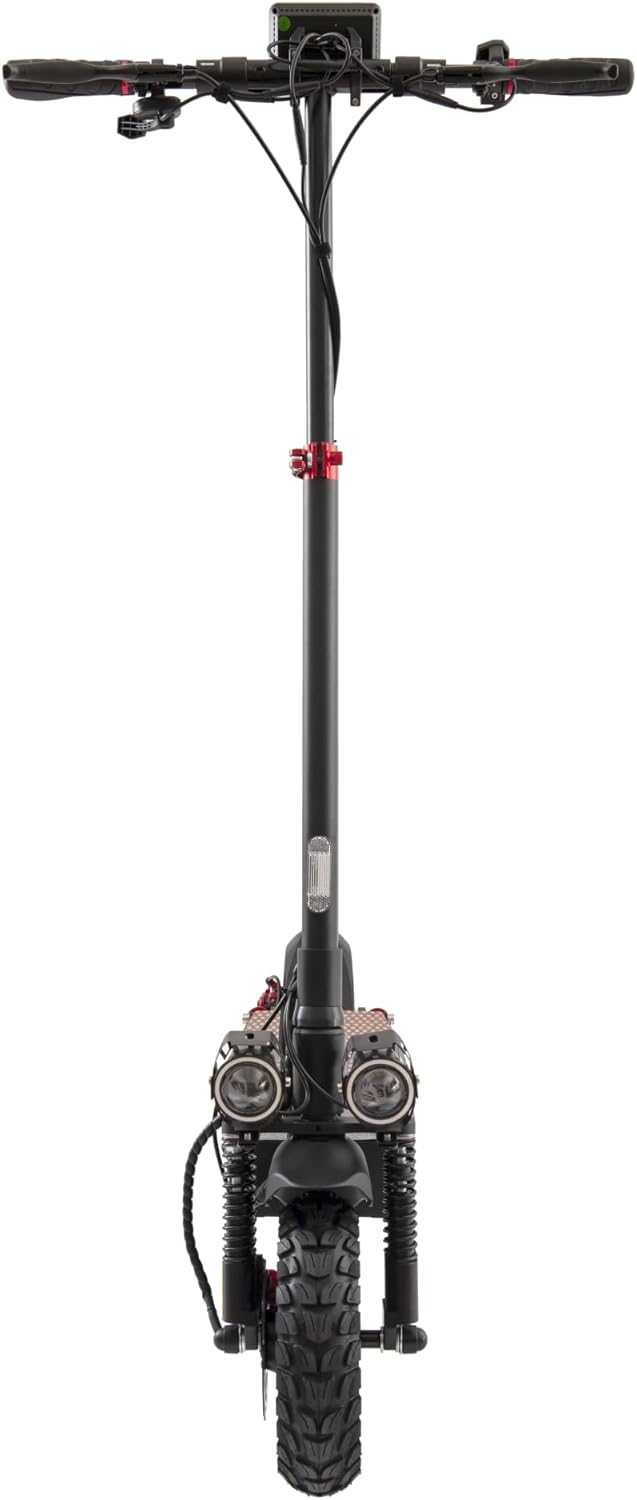
Image: Close-up of the rear wheel and disc brake assembly, showing the robust construction.
7. Troubleshooting
This section addresses common issues you might encounter with your ZWHEEL ZRINO DUO scooter.
| Problem | Possible Cause | Solution |
|---|---|---|
| Scooter does not power on | Low battery, loose connections, power button malfunction. | Charge the battery. Check all cable connections. If the issue persists, contact support. |
| Reduced range or power | Under-inflated tires, battery degradation, riding conditions (hills, heavy load). | Check tire pressure. Ensure battery is fully charged. Adjust riding style. |
| Brakes feel weak | Worn brake pads, loose brake cable, air in hydraulic system. | Inspect brake pads and cables. Adjust brake tension. For hydraulic issues, seek professional service. |
| Unusual noises during operation | Loose components, debris in wheels/brakes, motor issue. | Inspect the scooter for loose parts. Clean wheels and brakes. If motor noise persists, contact support. |
For issues not listed here or if solutions do not resolve the problem, please contact ZWHEEL customer support.
8. Specifications
Key technical specifications for the ZWHEEL ZRINO DUO Electric Scooter:
- Model Name: Zrino Duo Homologado
- Motor Power: 600W-2000W Max
- Battery: 12.5Ah High-Performance Cells (HPB)
- Max Range: Up to 45 km
- Max Speed: 25 km/h
- Suspension: Quadruple Hybrid (Hydraulic and Spring) Front and Rear
- Tires: 10-inch Tubeless Off-Road Pneumatic
- Braking System: Dual Disc Brakes with Regenerative Braking (AER)
- Water Resistance: IP54
- Max Load: 120 kg
- Dimensions (Unfolded): 118 cm (L) x 60 cm (W) x 133 cm (H)
- Weight: 26.8 kg
- Frame Material: Aluminum
- Special Features: Adjustable handlebar height, Lights, Wide platform, Multifunctional display, Turn signals (DGT Homologated)

Image: The ZWHEEL ZRINO DUO electric scooter displayed alongside its key specifications, including motor power, autonomy, suspension type, tire size, and maximum load.

Image: An overhead view of the ZWHEEL ZRINO DUO electric scooter with its length, width, and height dimensions clearly marked.
9. Warranty and Support
ZWHEEL offers a comprehensive warranty and support for your electric scooter.
9.1 Warranty Information
Your ZWHEEL ZRINO DUO Electric Scooter comes with a 5-year warranty. This warranty covers manufacturing defects and ensures peace of mind. For specific terms and conditions, please refer to the official ZWHEEL website or contact customer service.
Warranty Extension: You may be eligible to extend your coverage up to 5 years. Follow these steps:
- Verify your purchase date on the invoice. The purchase must be after March 15, 2024.
- Access the "5-year coverage extension" portal on the official ZWHEEL website.
- Enter your personal data, vehicle details, upload the purchase invoice, and submit the form.
- You will receive a confirmation email within 2-3 business days.

Image: Infographic detailing the three-step process to extend the ZWHEEL electric scooter's warranty coverage up to 5 years.
9.2 Customer Support
ZWHEEL provides extensive after-sales service with over 90 official technical assistance points in Spain. If you have any questions, require technical assistance, or need to claim warranty service, please contact ZWHEEL directly through Amazon or visit their official website for contact details. They are committed to providing professional service.


