
TOMZON D15
Tomzon D15 Mini Drone User Manual
Model: D15
Introduction
Welcome to the user manual for your Tomzon D15 Mini Drone. This guide provides essential information for setting up, operating, and maintaining your drone, ensuring a safe and enjoyable flight experience. The D15 is a foldable quadcopter designed for beginners and enthusiasts, featuring a 1080P FPV camera, gesture control, and various intelligent flight modes.
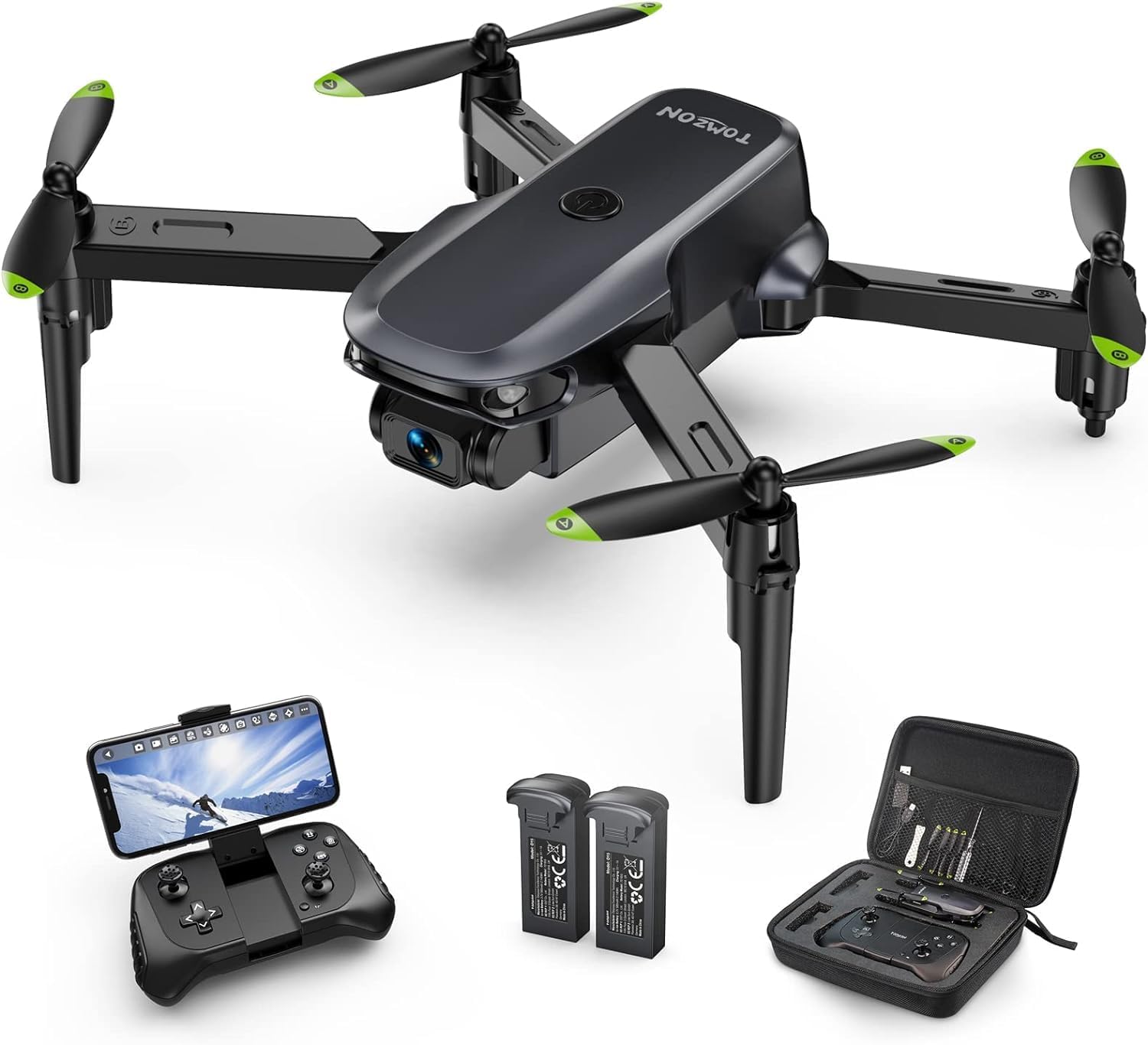
Image: The Tomzon D15 Mini Drone, its remote controller, two batteries, and a carrying case with accessories.
Package Contents
Before you begin, please verify that all components are present in your package:
- Tomzon D15 Mini Drone
- Remote Controller
- 2 x Lithium Polymer Batteries
- USB Charging Cable
- Spare Propellers
- Propeller Guards
- Screwdriver
- User Manual (this document)
- Carrying Case

Image: All components included in the Tomzon D15 Mini Drone package, including the drone, remote, batteries, and tools.
Setup Guide
1. Charging the Batteries
The drone comes with two modular Lithium Polymer batteries. Ensure both batteries are fully charged before first use.
- Connect the USB charging cable to the battery.
- Plug the other end of the USB cable into a 5V/1A USB adapter (not included) or a computer USB port.
- The indicator light on the battery will show charging status (refer to battery instructions for specific light patterns).
- Charging typically takes approximately 60-90 minutes per battery.
2. Installing Drone Battery
Insert a fully charged battery into the battery compartment at the rear of the drone until it clicks into place.
3. Unfolding the Drone
Gently unfold the drone's arms until they are fully extended and locked into position. The drone is designed to be foldable for portability.

Image: Illustration showing the compact folded size (4.4x1.9x1.8 inches) and the expanded unfolded size (6.7x5.6x1.8 inches) of the Tomzon D15 Mini Drone.
4. Installing Propeller Guards
For enhanced safety, especially for beginners, attach the propeller guards to each arm of the drone.
5. Remote Controller Setup
Insert 3 AAA batteries (not included) into the remote controller. Ensure correct polarity.
6. App Installation (Optional for FPV/Advanced Features)
To access FPV (First Person View) and advanced features like gesture control and trajectory flight, download the official Tomzon drone app from your smartphone's app store (Android 5.0+ or iOS 9.0+).
Operating Instructions
1. Power On and Pairing
- Place the drone on a flat, level surface.
- Press and hold the power button on the drone until the indicator lights flash.
- Turn on the remote controller. The remote will automatically pair with the drone. A solid light on both indicates successful pairing.
2. Calibration
After pairing, perform a gyroscope calibration. Push both joysticks on the remote controller to the bottom-right corner simultaneously until the drone's lights flash rapidly and then turn solid. This ensures stable flight.
3. Take-off and Landing
- One-Button Take-off: Press the one-button take-off/landing button on the remote. The drone will automatically ascend to a stable altitude.
- Manual Take-off: Push both joysticks to the bottom-left corner simultaneously to unlock the motors. Then, slowly push the left joystick (throttle) upwards to take off.
- One-Button Landing: Press the one-button take-off/landing button again. The drone will automatically descend and land.
- Manual Landing: Slowly pull the left joystick (throttle) downwards until the drone lands. Once landed, push both joysticks to the bottom-left corner to lock the motors.

Image: Visual representation of Altitude Hold, Headless Mode, and One Key Take-off/Landing functions, simplifying flight for beginners.
4. Flight Controls
The remote controller uses a standard mode 2 configuration:
- Left Joystick (Throttle/Yaw):
- Up/Down: Ascend/Descend
- Left/Right: Rotate Left/Right (Yaw)
- Right Joystick (Pitch/Roll):
- Up/Down: Fly Forward/Backward (Pitch)
- Left/Right: Fly Left/Right (Roll)
5. Special Features
- Altitude Hold: The drone maintains a stable altitude automatically, making it easier to control.
- Headless Mode: In this mode, the drone's orientation is relative to the pilot, eliminating the need to adjust its position before flight.
- 3 Speed Adjustments: Cycle through low, medium, and high speeds to match your skill level and flying environment.
- 3D Flip: Press the 3D flip button on the remote and move the right joystick in any direction to perform an aerial flip.
- Gesture Control: When using the app, make a "V" sign or palm gesture to the camera to trigger photo or video recording.
- Gravity Control: Tilt your smartphone (with the app open) to control the drone's flight direction without the remote.
- Trajectory Flight: Draw a flight path on your smartphone screen within the app, and the drone will follow it automatically.

Image: The Tomzon D15 Mini Drone executing dynamic 3D flips, showcasing its acrobatic capabilities.

Image: A person using a V-sign hand gesture to activate the drone's camera for a photo or video, demonstrating the FPV transmission and gesture selfie feature.

Image: Depiction of the Custom Flight Path feature, where users can draw a route on their phone, and Gravity Control, allowing drone movement by tilting the phone.
6. 1080P HD FPV Camera
The D15 drone is equipped with a 1080P HD camera for real-time FPV viewing via the mobile app, with a transmission range of up to 164 feet. The camera angle can be manually adjusted by 90 degrees. Note that an SD card is not supported for direct storage on the drone.

Image: The Tomzon D15 Mini Drone's 1080P Full HD camera, highlighting its capability for high-definition FPV (First Person View) transmission.
Maintenance
- Propeller Inspection: Regularly check propellers for damage (bends, cracks). Replace any damaged propellers immediately using the provided spare parts and screwdriver.
- Cleaning: Use a soft, dry cloth to clean the drone body and camera lens. Avoid using liquids or harsh chemicals.
- Battery Care:
- Do not overcharge or over-discharge batteries.
- Store batteries in a cool, dry place away from direct sunlight.
- If storing for extended periods, charge batteries to approximately 50% capacity.
- Storage: When not in use, fold the drone and store it along with the remote and accessories in the provided carrying case to protect it from dust and damage.
Troubleshooting
| Problem | Possible Cause | Solution |
|---|---|---|
| Drone does not respond to remote. | Not paired; low battery (drone or remote); interference. | Ensure drone and remote are powered on and paired. Recharge batteries. Fly in an open area away from obstacles and other wireless devices. |
| Drone drifts during flight. | Not calibrated; uneven surface at take-off; wind. | Perform gyroscope calibration on a flat surface. Avoid flying in windy conditions. |
| Poor FPV image quality or no image. | Weak Wi-Fi signal; app not connected; camera lens dirty. | Ensure strong Wi-Fi connection between phone and drone. Reconnect app. Clean camera lens. Stay within FPV transmission range (164 feet). |
| Short flight time. | Battery not fully charged; old battery; aggressive flying. | Ensure batteries are fully charged (approx. 10 minutes per battery). Consider replacing old batteries. Fly more gently. |
| App issues (e.g., "app is out of date"). | App compatibility with newer OS versions; outdated app version. | Check for app updates in your app store. If issues persist, try using an older device with compatible OS version if available, or contact Tomzon support for app-related assistance. |
Specifications
| Feature | Detail |
|---|---|
| Brand | TOMZON |
| Model Name | D15 |
| Color | Black |
| Video Capture Resolution | 1080p |
| Connectivity Technology | Wi-Fi |
| Skill Level | Beginner |
| Item Weight | 52 Grams (1.83 ounces) |
| Maximum Range (FPV) | 164 Feet |
| Material | Plastic |
| Battery Type | Lithium Polymer |
| Batteries Included | Yes (2) |
| Recommended Age | 12 - 17 years |
| Folded Dimensions | 4.4 x 1.9 x 1.8 inches |
| Unfolded Dimensions | 6.7 x 5.6 x 1.8 inches |
| Special Features | Gesture Control, 3D Flip, Foldable, First Person View (FPV), Adjustable Camera, Altitude Hold, Headless Mode, One-Button Takeoff/Landing, 3 Speed Modes, Gravity Control, Trajectory Flight |
Warranty and Support
For warranty information, technical support, or any inquiries not covered in this manual, please contact TOMZON customer service directly. Refer to the product packaging or the official TOMZON website for the most up-to-date contact details.
Important Note: As noted in some user reviews, the companion app for this drone may experience compatibility issues with newer operating systems. Please check for the latest app updates or contact TOMZON support for assistance with app-related concerns.
Ask a question about this manual
Ask about setup, troubleshooting, compatibility, parts, safety, or missing instructions. Manuals+ will review the question and use this page’s manual context to help answer it.