
1. Introduction
The Hantek TO1112D is a versatile, multi-functional instrument designed for a wide range of electrical testing and measurement applications. It integrates the capabilities of a digital storage oscilloscope, an arbitrary function signal generator, and a high-precision multimeter into a single, portable device. Featuring a 7-inch full touch screen, the TO1112D offers an intuitive user interface and robust performance for professionals and enthusiasts alike.
This manual provides detailed instructions for the safe and effective use of your Hantek TO1112D, covering its features, setup, operation, and maintenance.
2. Product Overview and Components
The Hantek TO1112D is equipped with a large, high-resolution touch screen and a durable design, including a unique suspension foot for hands-free operation. It is built to be anti-falling and anti-seismic, ensuring durability in various working environments.

Figure 2.1: Front view of the Hantek TO1112D Multi-Functional Oscilloscope, showing the 7-inch full touch screen and side control buttons.
2.1 Included Components
Upon unboxing your Hantek TO1112D, please verify that all the following components are present:
- Hantek TO1112D Multi-Functional Oscilloscope Unit
- Meter pack (carrying case)
- Oscilloscope probe *1
- 18W adapter *1 (for fast charging)
- Type-C Charging cable *1
- Alligator clip thread *2
- Multimeter pen *1
- User Manual (this document)

Figure 2.2: All components included in the Hantek TO1112D package, including the device, carrying case, probes, adapter, and cables.
2.2 Physical Features
The device features a Type-C interface for charging and data transfer, compatible with standard mobile phone chargers. It also includes a USB-A port for additional connectivity.

Figure 2.3: Side view of the Hantek TO1112D, highlighting the Type-C charging port and USB-A port.
The integrated suspension foot allows for convenient positioning and hands-free operation, enhancing usability in various work settings.

Figure 2.4: Rear view of the Hantek TO1112D with its integrated kickstand deployed, providing stable support for desktop use.
3. Setup
3.1 Initial Charging
- Connect the provided Type-C charging cable to the TO1112D's Type-C port.
- Plug the other end of the cable into the 18W adapter, then connect the adapter to a power outlet.
- Allow the device to charge fully before first use. The charging indicator on the screen will show the battery status. The built-in high-capacity detachable lithium battery provides long endurance.
3.2 Powering On/Off
- Power On: Press and hold the power button located on the side of the device until the screen illuminates.
- Power Off: Press and hold the power button until a shutdown prompt appears on the screen. Confirm to power off the device.
3.3 Connecting Probes and Leads
- Oscilloscope Probes: Connect the oscilloscope probe(s) to the BNC connectors on the device. Ensure a secure connection.
- Multimeter Leads: Insert the multimeter pens into the appropriate input jacks for voltage, current, or resistance measurements. Observe polarity when connecting.
- Signal Generator Output: Connect the alligator clip threads or other appropriate cables to the signal generator output port when using the arbitrary function generator.
4. Operating the Device
The Hantek TO1112D features a user-friendly interface accessible via its 7-inch touch screen. Navigation is primarily done through touch gestures and on-screen menus.

Figure 4.1: The Hantek TO1112D's touch screen interface displaying waveform measurements, demonstrating its intuitive operation.
4.1 Digital Storage Oscilloscope (DSO) Function
The TO1112D operates as a 2-channel digital storage oscilloscope with a bandwidth of up to 110MHz and a sampling rate of 250MSa/s. It features an 8M large storage depth for capturing detailed waveforms.
- Trigger Modes: Supports various trigger types including Edge, Slope, Pulse Width, Video, and Timeout. Access these settings via the on-screen menu to stabilize waveforms.
- Measurement Functions: Offers up to 42 automatic measurement functions for comprehensive waveform analysis. Select desired measurements from the display menu.
- Waveform Control: Adjust vertical scale (Volts/Div), horizontal scale (Time/Div), and position using touch gestures or dedicated on-screen controls.
4.2 Arbitrary Function Signal Generator (AFG)
The integrated signal generator (available on TO1112D model) provides a maximum output frequency of 25MHz with 12-bit high resolution and a 200Ms/s sampling rate.
- Waveform Selection: Built-in variety of arbitrary waveforms. Select the desired waveform type (e.g., sine, square, triangle, pulse) from the AFG menu.
- Modulation: Supports AM/FM modulation for advanced signal generation.
- Output Impedance: High resistance and low resistance output can be switched as needed.
4.3 Digital Multimeter (DMM) Function
The high-precision multimeter function allows for accurate measurements of AC and DC voltage, current, resistance, capacitance, and diode/on-off tests.
- Data Recording: The multimeter includes a data recording function, enabling long-term monitoring and recording of changes in voltage, current, resistance, and other data.
- Trend Chart Generation: Recorded data can be used to generate trend charts for analysis.
4.4 Data Management
The device supports one-key waveform storage, allowing for convenient and fast saving of measurement data and waveforms for later review or analysis.
5. Maintenance
5.1 Cleaning
- Regularly clean the device's exterior with a soft, dry cloth.
- For stubborn dirt, use a slightly damp cloth with a mild, non-abrasive cleaner. Ensure no liquid enters the device's ports or openings.
- Avoid using harsh chemicals, solvents, or abrasive materials, as they can damage the screen or casing.
5.2 Battery Care
- The TO1112D is equipped with a detachable lithium battery. For optimal battery life, avoid fully discharging the battery frequently.
- If storing the device for an extended period, charge the battery to approximately 50-70% capacity.
- Use only the provided 18W charger and Type-C cable for charging to prevent damage to the battery or device.
5.3 Storage
- Store the device in a cool, dry place, away from direct sunlight, extreme temperatures, and high humidity.
- When not in use, it is recommended to store the TO1112D in its meter pack (carrying case) to protect it from dust and physical damage.
6. Troubleshooting
This section addresses common issues you might encounter with your Hantek TO1112D. If the problem persists after following these steps, please contact customer support.
- Device does not power on:
- Ensure the battery is sufficiently charged. Connect the device to the charger and wait for a few minutes before attempting to power on again.
- Verify that the power button is pressed and held correctly.
- No waveform displayed on oscilloscope:
- Check if the oscilloscope probe is securely connected to both the device and the circuit under test.
- Verify the probe's attenuation setting matches the setting on the oscilloscope.
- Adjust the vertical scale (Volts/Div) and horizontal scale (Time/Div) to ensure the waveform is within the display range.
- Check the trigger settings. An incorrect trigger level or mode can prevent stable waveform display.
- Multimeter readings are inaccurate:
- Ensure the multimeter pens are correctly inserted into the appropriate jacks for the measurement type (voltage, current, resistance).
- Verify the measurement range is appropriate for the expected value.
- Check the continuity of the multimeter leads.
- Signal generator output is not as expected:
- Confirm the correct waveform type, frequency, and amplitude are selected in the AFG settings.
- Ensure the output cables are securely connected.
7. Specifications
The following table details the technical specifications of the Hantek TO1112D Multi-Functional Oscilloscope:
| Feature | Specification |
|---|---|
| Model | TO1112D |
| Channels | 2 Analog channels |
| Bandwidth | 110MHz |
| Sampling Rate | 250MSa/S |
| Storage Depth | 8Mpts |
| Signal Source | 25MHz (for TO1112D) |
| Display | 7" TFT LCD Touch Screen, 800*480 resolution |
| Multimeter Functions | AC/DC Voltage, Current, Resistance, Capacitance, Diode, On-off measurement, Data Recording |
| Battery | Built-in high capacity detachable lithium battery (2 AA batteries required, included) |
| Charging | Type-C interface, supports 18W fast charging protocols |
| Package Dimensions | 17.2 x 9.4 x 3.9 inches |
| Item Weight | 4.7 Pounds |
| Manufacturer | Hantek |
| First Available Date | August 18, 2023 |
The TO1112D model includes the 25MHz signal source, distinguishing it from other models in the TO1000 series.
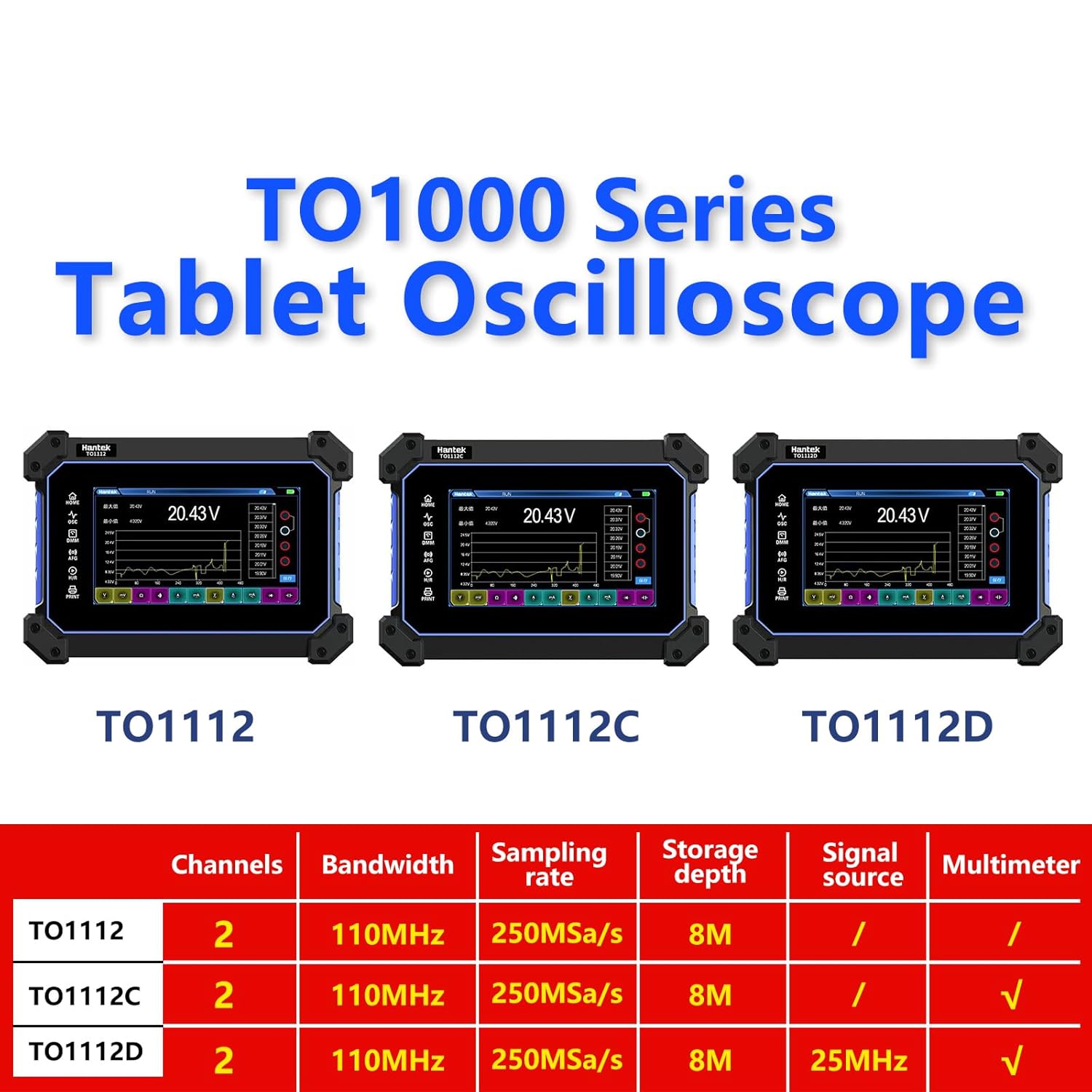
Figure 7.1: Comparison of Hantek TO1000 Series models, highlighting the features of TO1112, TO1112C, and TO1112D.
8. Warranty and Support
For information regarding the product warranty, please refer to the warranty card included with your purchase or visit the official Hantek website. Warranty terms and conditions may vary by region and retailer.
For technical support, product inquiries, or service requests, please contact Hantek customer service through their official channels. You can also visit the Hantek Store on Amazon for additional product information and support resources.