
1. Introduction
The Hantek TO1254D is a versatile handheld digital oscilloscope designed for a wide range of electronic measurement and analysis tasks. This device integrates multiple functions including a 4-channel digital storage oscilloscope, an arbitrary function signal generator, a high-precision multimeter, a data recorder, a frequency meter, and an FFT spectrum analyzer. Its touch screen interface and portable design make it suitable for both field and laboratory use.

Figure 1.1: Front view of the Hantek TO1254D oscilloscope with a hand interacting with the touchscreen display, showing multiple waveforms.
2. Safety Information
Please read and understand all safety instructions before operating the Hantek TO1254D. Failure to follow these instructions may result in injury or damage to the device.
- Electrical Safety: Always ensure proper grounding when connecting to circuits. Do not exceed the maximum input voltage ratings specified in the technical specifications.
- Probe Usage: Use only probes supplied or approved by Hantek. Ensure probes are correctly rated for the voltage and current being measured.
- Environmental Conditions: Operate the device within specified temperature and humidity ranges. Avoid exposure to moisture, dust, or corrosive environments.
- Maintenance: Refer all servicing to qualified personnel. Do not attempt to open or modify the device.
3. Package Contents
Verify that all items listed below are present in your package. If any items are missing or damaged, contact your supplier.

Figure 3.1: Typical package contents.
- Hantek TO1254D Digital Oscilloscope Unit
- Oscilloscope Probes (Quantity: 3)
- Multimeter Pens (Quantity: 2)
- 18W Adapter
- Type-C Charging Cable
- Meter Pack (Carrying Case)
- User Manual (this document)
4. Product Overview
The Hantek TO1254D features a robust design with a 7-inch TFT LCD capacitive touch screen for intuitive operation. It includes multiple input ports for oscilloscope channels, multimeter connections, and USB for data transfer and charging.
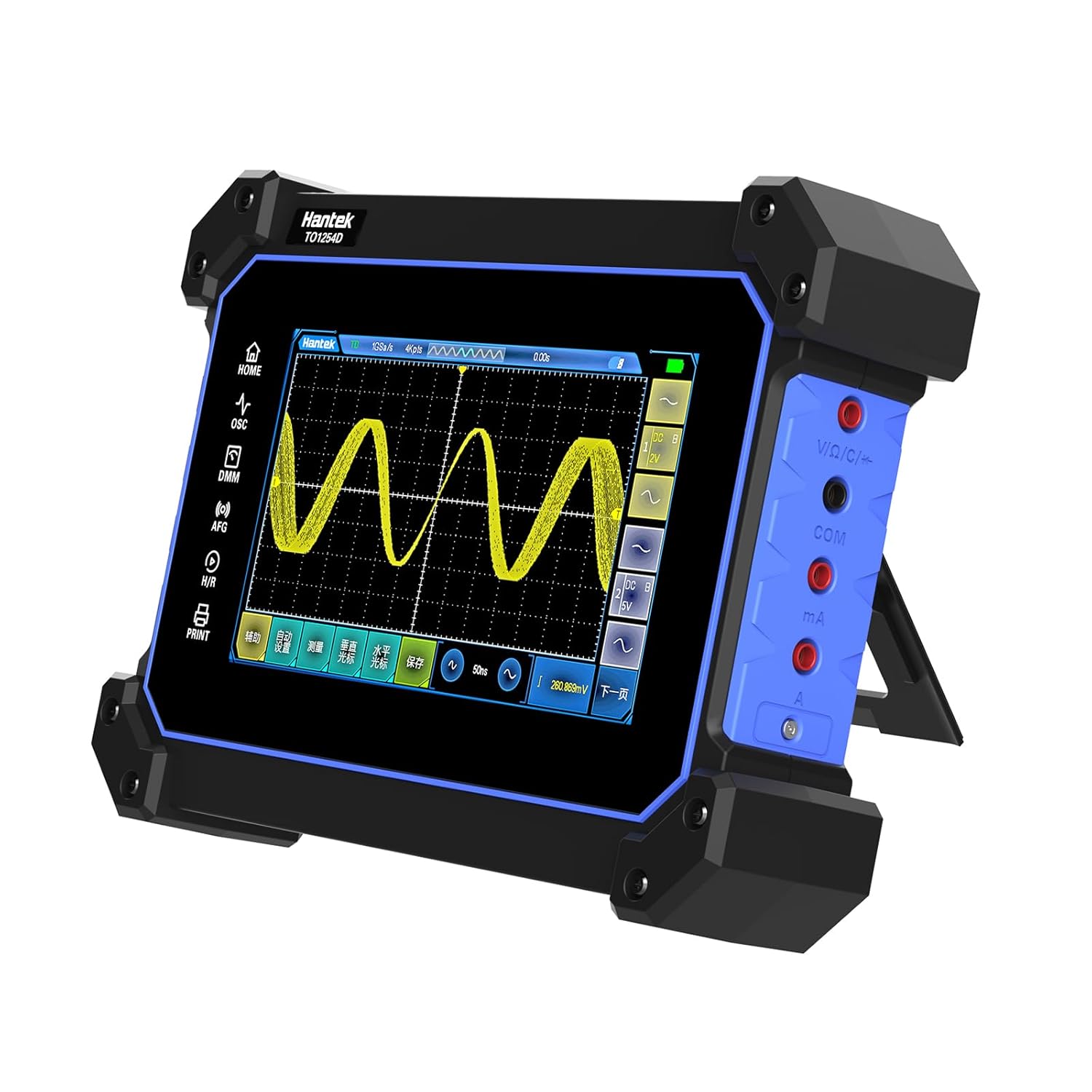
Figure 4.1: Angled view showing multimeter input jacks and kickstand.
4.1 Key Features
- 7-inch TFT LCD Capacitive Touch Screen: Provides a clear and responsive interface for waveform display and settings adjustment.
- Multi-functionality: Integrates digital storage oscilloscope, arbitrary function signal generator, high-precision multimeter, data recorder, frequency meter, and FFT spectrum analyzer.
- High Performance Oscilloscope: 4 channels, up to 250MHz bandwidth, 1GSa/s sampling rate, and 8M storage depth.
- Signal Generator: Built-in arbitrary waveforms with up to 25MHz output frequency.
- Digital Multimeter: Measures AC/DC voltage, current, resistance, capacitance, diode, and on-off. Includes data recording.
- Connectivity: USB ports for charging and data transfer.
- Portable Design: Handheld form factor with an integrated kickstand for hands-free operation.

Figure 4.2: Key features and specifications overview.
5. Setup
5.1 Initial Charging
Before first use, fully charge the device. Connect the supplied Type-C charging cable to the device's USB-C port and the 18W adapter to a power outlet. The charging indicator will show the charging status.

Figure 5.1: USB ports and charging connection.
5.2 Power On/Off
Press and hold the power button located on the side of the device to turn it on or off. The device will boot to the main menu.
5.3 Kickstand Usage
The integrated kickstand allows for convenient hands-free operation. Pull out the kickstand from the rear of the device to position it on a flat surface.

Figure 5.2: Device with kickstand extended.
6. Operating the Device
The Hantek TO1254D features a touch screen interface for most operations. Navigate through menus and adjust settings by tapping and swiping.

Figure 6.1: Touchscreen interaction with menus.
6.1 Digital Storage Oscilloscope (DSO)
Access the oscilloscope function from the main menu. This mode allows for waveform visualization and analysis.
- Channel Connection: Connect oscilloscope probes to the BNC input channels (CH1-CH4).
- Vertical Settings: Adjust voltage per division (V/div) and vertical position for each channel.
- Horizontal Settings: Adjust time per division (s/div) and horizontal position to control the time base.
- Triggering: Set trigger type (edge, slope, pulse width, video, timeout), source, and level to stabilize waveforms.
- Measurements: Utilize the built-in measurement functions to automatically display parameters like Vpp, Vmax, Vmin, Freq, Period, etc. The device supports up to 42 measurement functions.
- Storage Depth: The 8M storage depth allows for capturing longer signal durations at high sample rates.

Figure 6.2: Oscilloscope displaying multiple waveforms.
6.2 Arbitrary Function Signal Generator (AFG)
The AFG allows you to generate various waveforms for testing circuits.
- Waveform Selection: Choose from built-in arbitrary waveforms (sine, square, triangle, etc.).
- Frequency and Amplitude: Set the desired output frequency (up to 25MHz) and amplitude.
- Output Connection: Connect the signal generator output to your test circuit.

Figure 6.3: Arbitrary Function Signal Generator interface.
6.3 High-Precision Multimeter (DMM)
The integrated multimeter provides standard electrical measurements.
- Connection: Use the supplied multimeter pens and connect them to the dedicated multimeter input jacks on the side of the device.
- Measurement Modes: Select desired measurement mode: AC/DC voltage, current, resistance, capacitance, diode test, or continuity (on-off).
- Data Recording: The multimeter features a data recording function to monitor and log changes in voltage, current, resistance, and other data over time, generating a trend chart.

Figure 6.4: Digital Multimeter function display.
6.4 Other Functions
The Hantek TO1254D also includes:
- Data Recorder: For logging measurement data over extended periods.
- Frequency Meter: For precise frequency measurements.
- FFT Spectrum Analyzer: For analyzing the frequency components of a signal.
7. Maintenance
7.1 Cleaning
To clean the device, use a soft, dry cloth. For stubborn dirt, a slightly damp cloth with mild detergent can be used. Do not use abrasive cleaners or solvents. Ensure no liquid enters the device.
7.2 Battery Care
The device uses Lithium Ion batteries. To prolong battery life:
- Avoid fully discharging the battery frequently.
- Store the device with a partial charge (around 50%) if not used for extended periods.
- Charge the device using only the supplied or approved charging accessories.
8. Troubleshooting
This section addresses common issues you might encounter with your Hantek TO1254D.
- Device does not power on: Ensure the battery is charged. Connect the charger and attempt to power on. If the issue persists, contact support.
- No waveform displayed: Check probe connections. Verify channel settings (V/div, offset). Adjust trigger settings (level, source, mode). Ensure the input signal is within the device's measurement range.
- Multimeter readings are incorrect: Ensure multimeter pens are correctly connected to the appropriate jacks for the selected measurement type. Check the integrity of the pens and cables.
- Touch screen unresponsive: Try restarting the device. Ensure the screen is clean and dry.
9. Specifications
Detailed technical specifications for the Hantek TO1254D.
| Feature | Specification |
|---|---|
| Model Number | TO1254D (Item model number: stinf-do-0118) |
| Oscilloscope Channels | 4 Channels |
| Bandwidth | Up to 250 MHz |
| Sampling Rate | 1 GSa/s (Real-time) |
| Storage Depth | 8 Mpts |
| Display | 7-inch TFT LCD Capacitive Touch Screen |
| Trigger Types | Edge, Slope, Pulse Width, Video, Timeout |
| Measurement Functions | Up to 42 automatic measurements |
| Signal Generator Output Frequency | Up to 25 MHz |
| Multimeter Functions | AC/DC Voltage, Current, Resistance, Capacitance, Diode, On-off measurement, Data Recording |
| Integrated Functions | DSO, AFG, DMM, Data Recorder, Frequency Meter, FFT Spectrum Analyzer |
| Batteries | 4 Lithium Ion batteries (included) |
| Package Dimensions | 12.36 x 9.69 x 4.13 inches |
| Item Weight | 4.81 Pounds |
| Manufacturer | Hantek |
| Date First Available | August 18, 2023 |
10. Warranty and Support
Hantek products are designed for reliability and performance. For warranty information, technical support, or service inquiries, please refer to the warranty card included with your product or visit the official Hantek website. Keep your purchase receipt as proof of purchase for warranty claims.