
KENRONE KR-BL4585
Contents
KENRONE Smart Biometric Fingerprint Bike Cable Lock (Model KR-BL4585) Instruction Manual
Your guide to setting up and using your KENRONE Smart Bike Lock.
1. Introduction
The KENRONE Smart Biometric Fingerprint Bike Cable Lock offers a keyless anti-theft solution for securing your bicycle. This lock features biometric fingerprint recognition, allowing for quick and convenient unlocking without the need for physical keys. It is designed with durable materials and is waterproof for outdoor use.
2. What's Included
Upon unboxing, please ensure all the following items are present:
- 1x Smart Biometric Fingerprint Bike Cable Lock
- 1x Mounting Bracket
- 1x USB Charging Cable
- 1x Instruction Manual

Image: The Smart Biometric Fingerprint Bike Cable Lock, mounting bracket, USB charging cable, and instruction manual.
Video: Product Unboxing Demo Video. This video demonstrates the contents of the KENRONE Smart Bike Lock package.
3. Setup
3.1 Initial Charging
Before first use, fully charge the lock using the provided USB charging cable. The charging port is located under a protective cover on the lock body.

Image: The fingerprint reader and USB charging port with its protective dust cover.
3.2 Mounting the Lock
The included mounting bracket allows for convenient attachment of the lock to your bicycle frame or seat post.
- Attach the mounting bracket to a suitable part of your bike (e.g., seat post, frame tube) using a screwdriver (not supplied).
- Securely tighten the bracket.
- Simply snap the fingerprint lock into the carabiner of the bracket.

Image: Step-by-step guide for installing the mounting bracket and attaching the lock to a bicycle.
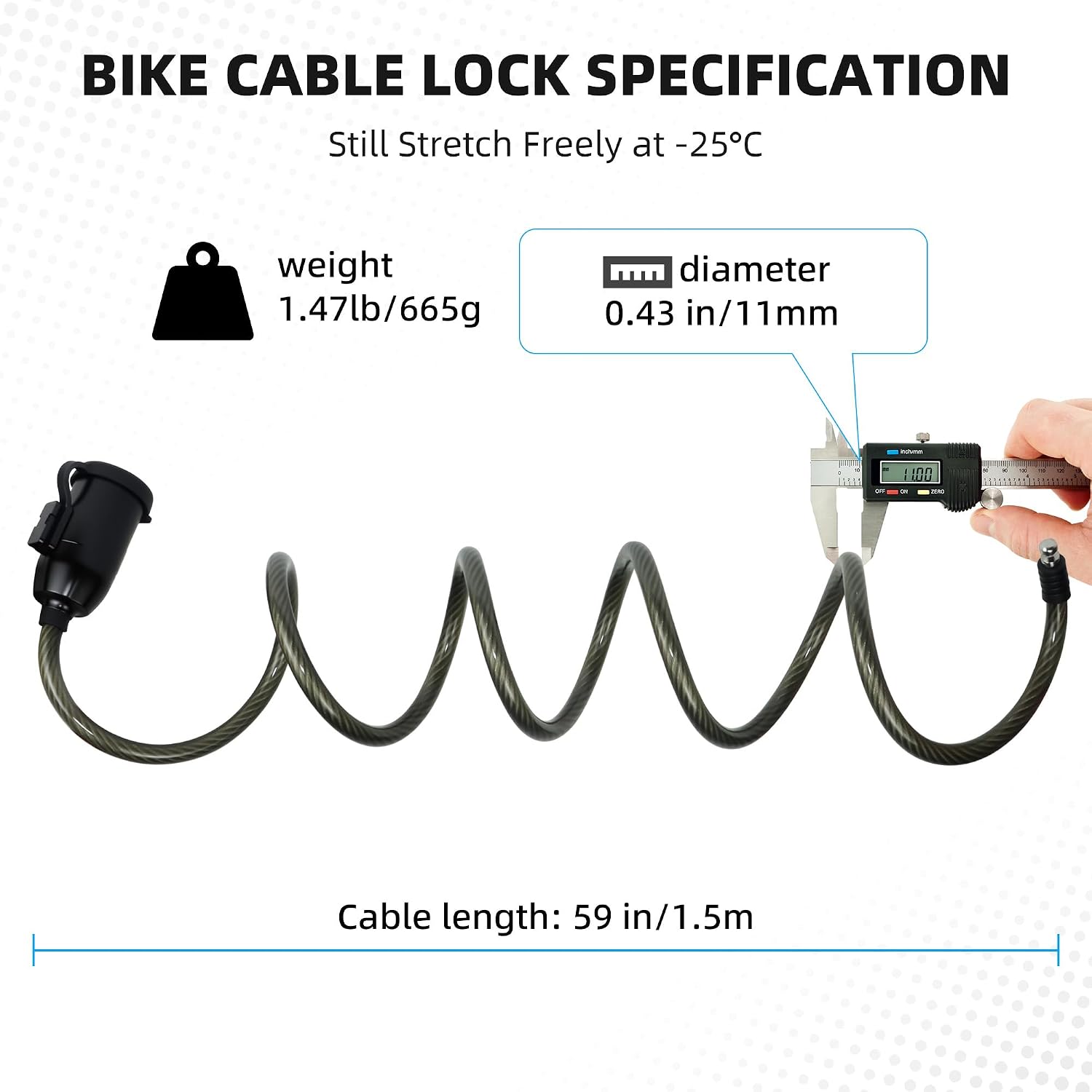
Image: The smart bike lock securely attached to a bicycle's seat post using the mounting bracket.
4. Operating Instructions
4.1 Registering Administrator Fingerprints
The lock supports up to 2 administrator fingerprints. These fingerprints have special privileges, such as adding or deleting other user fingerprints.
- Long press the fingerprint sensor until the blue light flashes (approximately 3 seconds). Release the finger.
- Continuously press the fingerprint sensor, changing the position slightly each time, until the green light turns on. This indicates successful registration.
- Repeat for a second administrator fingerprint if desired.
Video: Fingerprint entry for cable locks. This video demonstrates the process of registering fingerprints on the lock.
4.2 Registering User Fingerprints
The lock can store up to 48 user fingerprints. These users can unlock the device but cannot manage other fingerprints.
- Using an already registered administrator fingerprint, long press the sensor until the blue light flashes. Do not release.
- While the blue light is flashing, have the new user continuously press their finger on the sensor, changing the position slightly, until the green light turns on.
- The new user fingerprint is now registered.
4.3 Unlocking the Lock
To unlock the device, simply place a registered fingerprint on the sensor. The lock will open automatically if the fingerprint is recognized.

Image: The smart bike lock demonstrating its 0.5-second fast fingerprint recognition for unlocking.
Video: Bike lock use scene demonstration. This short video shows the lock being used in a practical scenario.
4.4 Locking the Lock
To lock the device, simply insert the cable end into the lock body. It will automatically secure itself.

Image: The smart bike lock highlighting its keyless locking mechanism, where the cable simply snaps into place.
5. Maintenance
5.1 Battery Life and Charging
The lock is equipped with a rechargeable Lithium Polymer battery. A full charge (approximately 3 hours) provides up to 12 months of standby time. Recharge the lock when the battery indicator shows low power.
5.2 Waterproof and Weather Resistance
The lock has an IP66 waterproof rating, making it suitable for use in rainy outdoor weather and extreme temperatures ranging from -25℃ to 65℃. Always ensure the charging port's protective cover is securely closed when not charging to prevent water and dust ingress.
Image: The smart bike lock in use during rainy weather, demonstrating its IP66 waterproof capability.
Image: Close-up of the smart bike lock showing the dust and waterproof cover protecting the fingerprint reader and USB port.
6. Troubleshooting
| Problem | Possible Cause | Solution |
|---|---|---|
| Fingerprint not recognized. | Fingerprint not properly registered or sensor is dirty. | Ensure your finger is clean and dry. Try different angles. Re-register fingerprint if necessary. |
| Lock does not respond. | Low battery. | Charge the lock using the USB cable. |
| Cannot register new fingerprint. | Not using an administrator fingerprint or memory is full. | Ensure an administrator fingerprint is used for registration. Delete old fingerprints if memory is full. |
7. Specifications
| Feature | Detail |
|---|---|
| Brand | KENRONE |
| Model Name | KR-BL4585 |
| Lock Type | Biometric Fingerprint |
| Special Feature | Fingerprint, Passcode Unlock, Rechargeable |
| Material | Zinc Alloy, PVC Coating |
| Cable Length | 59 inches (1.5 meters) |
| Cable Diameter | 0.43 inches (11 mm) |
| Item Weight | 1.2 Pounds (0.54 kg) |
| Waterproof Rating | IP66 |
| Operating Temperature | -25℃ to 65℃ |
| Battery | 1 Lithium Polymer (included) |
| Fingerprint Capacity | Up to 50 (2 Admin + 48 Users) |

Image: Detailed specifications of the bike cable lock, including weight, diameter, and cable length.
8. Safety Information
- Do not attempt to disassemble or modify the lock, as this may void the warranty and cause damage.
- Keep the fingerprint sensor clean to ensure optimal performance.
- Avoid exposing the lock to extreme physical impact.
- Ensure the charging port cover is sealed when not charging to maintain waterproof integrity.
9. Warranty and Support
For warranty information or technical support, please refer to the contact details provided in the included instruction manual or visit the official KENRONE website. Keep your purchase receipt for warranty claims.
You can also visit the KENRONE Store on Amazon for more products and support.
Ask a question about this manual
Ask about setup, troubleshooting, compatibility, parts, safety, or missing instructions. Manuals+ will review the question and use this page’s manual context to help answer it.