
Introduction
This manual provides essential information for the proper setup, operation, and maintenance of your multicomp PRO 18'' PA/DJ Speaker Subwoofer. Designed for professional audio applications, this heavy-duty subwoofer delivers powerful bass with its 350W RMS and 700W peak power at 8 Ohm impedance. Please read this manual thoroughly before use to ensure optimal performance and longevity of your product.
Features
- 350W RMS, 700W peak at 8 Ohm: Provides robust and clear low-frequency sound output.
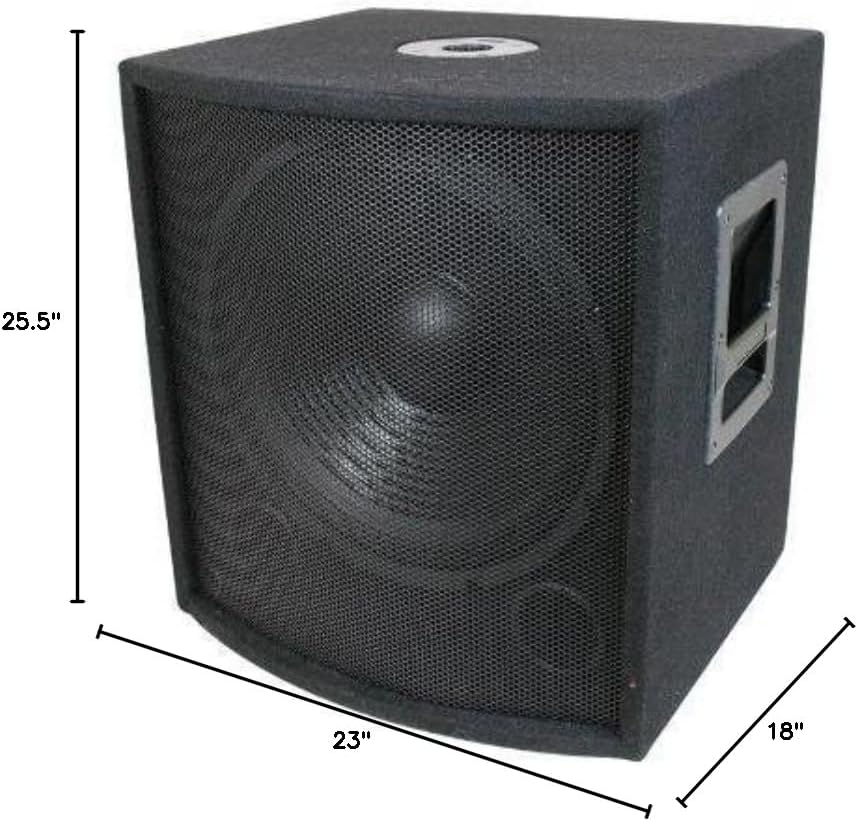
- Recessed handles and Metal Grills: Ensures durability and ease of transport.
- Treated paper cone and treated cloth accordion surround: Enhances speaker longevity and sound quality.
- Frequency Response: 40Hz~3KHz: Delivers a wide range of deep bass frequencies.
- SPL: 91dB: High sound pressure level for impactful audio.

What's in the Box
- 1 x 1/4" input cable
Setup and Connections
Proper connection is crucial for optimal sound quality and to prevent damage to your equipment. This passive subwoofer requires an external amplifier or powered mixer.
Connecting to an Amplifier/Powered Mixer
- Ensure all audio equipment is powered off before making any connections.
- Locate the input panel on the rear of your multicomp PRO subwoofer. It features SpeakON and 1/4" parallel input/output connections.
- Connect the output of your amplifier or powered mixer to one of the input connections on the subwoofer using a high-quality speaker cable (e.g., SpeakON to SpeakON, or 1/4" to 1/4").
- If connecting multiple passive speakers or subwoofers, you can use the parallel output connections to daisy-chain them. Be mindful of impedance matching to avoid overloading your amplifier. This subwoofer has an 8 Ohm impedance.
- Once all connections are secure, power on your amplifier/mixer first, then the subwoofer.
Video Guide: Setting Up Passive Subwoofers
Operating Instructions
- After successful setup, gradually increase the volume on your amplifier/mixer to a desired listening level.
- Monitor the sound for any distortion. If distortion occurs, reduce the volume immediately to prevent speaker damage.
- Adjust the equalizer settings on your amplifier/mixer to fine-tune the bass response according to your preference and room acoustics.
Maintenance
- Cleaning: Use a soft, dry cloth to clean the exterior of the subwoofer. Avoid using harsh chemicals or abrasive cleaners.
- Placement: Place the subwoofer on a stable, flat surface. Avoid placing it in direct sunlight, near heat sources, or in areas with excessive moisture.
- Storage: If storing the subwoofer for an extended period, ensure it is in a dry, temperature-controlled environment.
Troubleshooting
- No Sound: Check all cable connections to ensure they are secure. Verify that the amplifier/mixer is powered on and functioning correctly.
- Distorted Sound: Reduce the volume level on your amplifier/mixer. Check for damaged cables or faulty connections. Ensure the amplifier's output power matches the subwoofer's handling capabilities.
- Unusual Odor: Some new products may emit a faint odor initially. If a strong or persistent foul odor is present, ensure adequate ventilation in the area. If the odor persists or is accompanied by other issues, discontinue use and contact customer support.
Specifications
| Specification | Value |
|---|---|
| Speaker Type | Subwoofer |
| Speaker Maximum Output Power | 700 Watts |
| RMS Power | 350 Watts |
| Impedance | 8 Ohms |
| Frequency Response | 40Hz~3KHz |
| SPL | 91dB |
| Subwoofer Diameter | 18 Inches |
| Material | Metal (Grille), MDF (Cabinet) |
| Product Dimensions | 18"D x 23"W x 25.5"H |
| Connectivity Technology | Wired (SpeakON, 1/4" input) |
| Recommended Uses | DJ medium and large music venues, Professional Audio Applications |
Warranty Information
This multicomp PRO subwoofer comes with a one-year limited warranty. Please retain your proof of purchase for any warranty claims.
Customer Support
For technical assistance, troubleshooting, or warranty inquiries, please contact multicomp PRO customer support. Refer to the product packaging or the official multicomp PRO website for contact details.