
1. Introduction
This manual provides comprehensive instructions for the installation, operation, and maintenance of your FTes RFKits Keyless Entry Door Lock Kit. This system offers secure and convenient access control using an RFID keypad, Tuya app, cards, and passwords. Please read this manual thoroughly before installation and use to ensure proper function and safety.
2. Safety Information
- Ensure all power is disconnected before performing any installation or maintenance.
- Installation should be performed by qualified personnel if you are unfamiliar with electrical wiring.
- Use only the specified DC 12V power supply.
- Do not expose the power supply unit to moisture or extreme temperatures.
- Keep RFID cards and keyfobs away from strong magnetic fields to prevent data corruption.
- Regularly check all connections for security and proper function.
3. Package Contents
Verify that all components are present in your package:
- Keyless Entry RFID Keypad
- 180KG / 350LB Magnetic Lock
- DC 12V 3A Power Supply Control Unit
- Door Exit Push Button
- Doorbell
- RFID Keyfobs (5 ID keyfobs + 5 IC keyfobs for management)
- Mounting Hardware (screws, anchors)
- User Manual (this document)

Figure 3.1: Door Exit Button and Doorbell dimensions. The exit button is 86x86mm and made of hard plastic. The doorbell is 66x85x25mm, made of ABS plastic, and operates on 12V DC.
4. Product Features
- Dual Frequency Support: Operates on both 125KHz and 13.56MHz frequencies.
- High User Capacity: Supports up to 10,000 users.
- Multiple Access Modes: Tuya APP, RFID card, password, or a combination of RFID card + password.
- Easy Management: Management cards can be configured for simplified programming.
- Durable Construction: High-quality touch keypad with IP68 waterproof rating for outdoor installation.
- Enhanced Visibility: Features a backlit keypad and work indicator for convenient use in low-light conditions.
- Powerful Magnetic Lock: 180KG (350LB) electromagnetic lock with anti-residual magnetism design.
- Fail-Safe Operation: Lock is engaged when powered on and unlocks when power is off.
- Versatile Application: Suitable for wooden, metal, and glass doors.

Figure 4.1: The keypad supports dual frequencies (125KHz + 13.56MHz) and allows easy programming of management cards using 'ADD' and 'Delete' keyfobs.

Figure 4.2: The keypad features an IP68 waterproof rating, making it suitable for outdoor installation and operation in various weather conditions, including rain.

Figure 4.3: The keypad includes a work indicator light and backlit number keys for improved visibility and ease of use, especially in dark environments.
5. Setup and Installation
Follow these steps for proper installation of your keyless entry system:
5.1 Wiring Diagram
Refer to the wiring diagram below for connecting all components. Ensure correct polarity and secure connections for all wires.
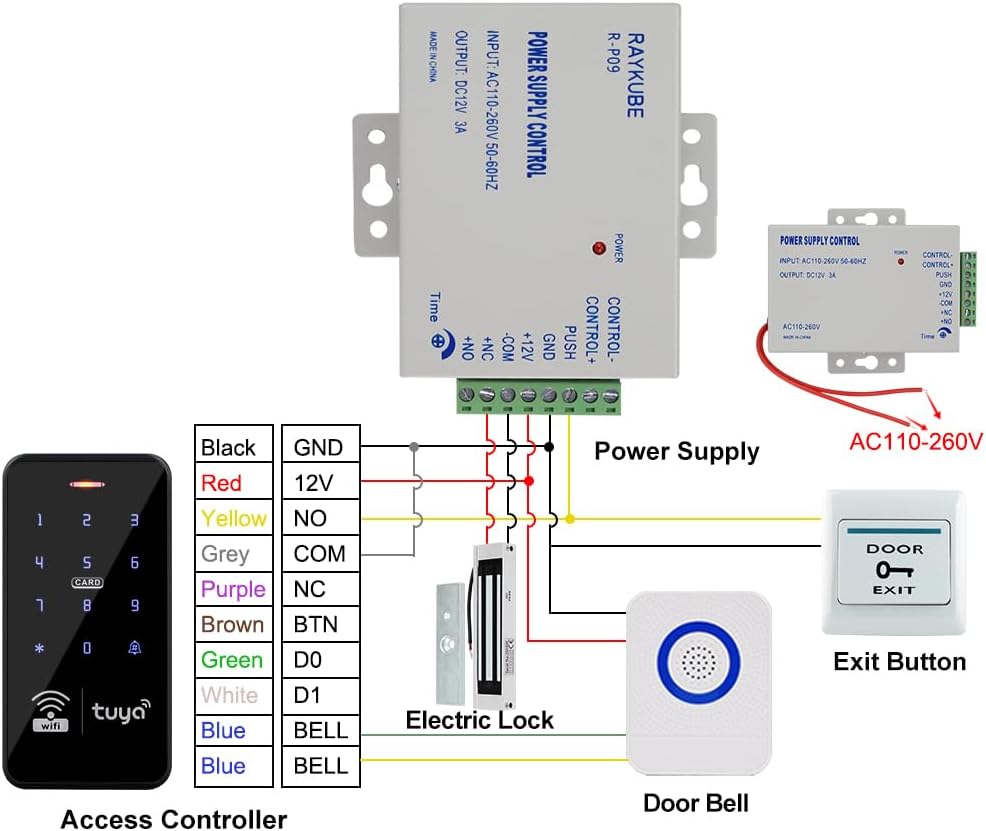
Figure 5.1: Wiring diagram illustrating connections between the access controller, power supply, electric lock, exit button, and doorbell. The power supply accepts AC110-260V input and provides DC12V 3A output.
5.2 Power Supply Control Unit
The power supply control unit converts AC power to DC 12V for the system. It features adjustable time settings for lock release.
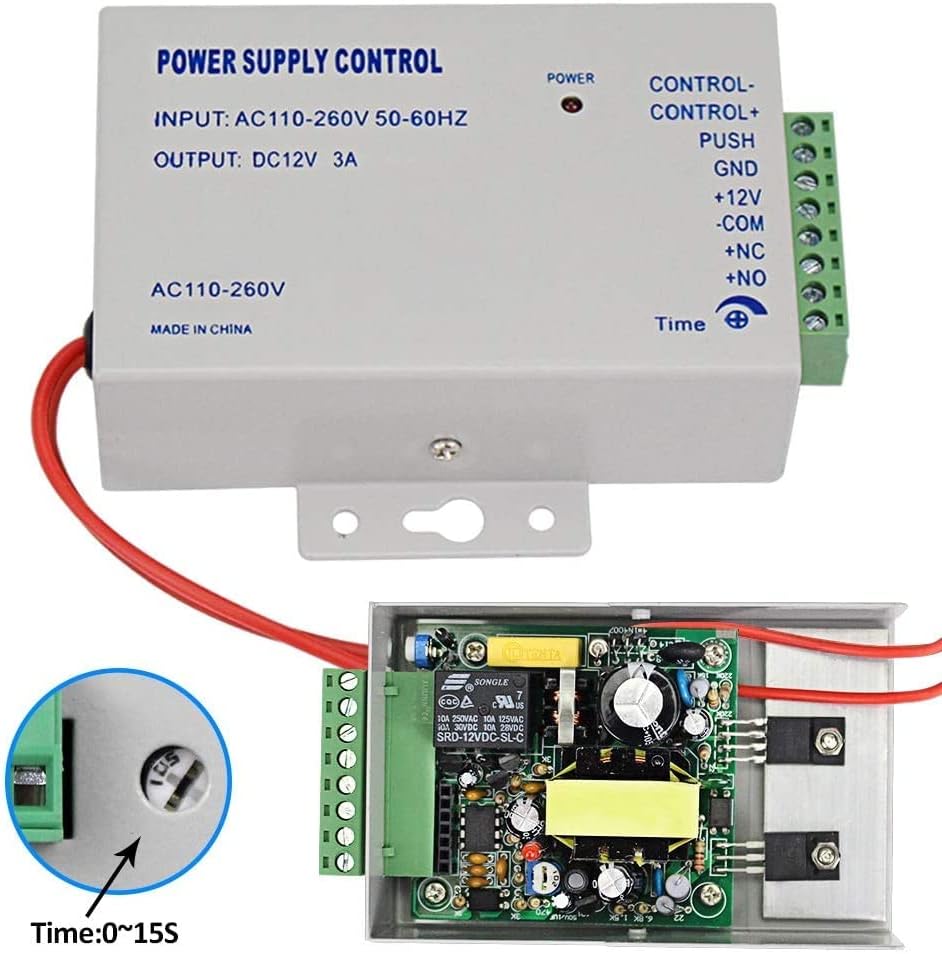
Figure 5.2: The power supply control unit (Input: AC110-260V 50-60Hz, Output: DC12V 3A) includes terminals for control, push button, ground, and lock connections. A timer adjustment knob allows setting the lock release duration from 0 to 15 seconds.
5.3 Keypad Mounting
Mount the keypad at a convenient height near the door. Ensure the mounting surface is stable. Use appropriate screws and anchors for secure installation.
6. Operating Instructions
The system supports multiple methods for unlocking the door:
6.1 Access Methods Overview

Figure 6.1: The system offers various access methods including control via the Tuya APP, temporary passwords, RFID keyfobs, numerical passwords, and a combined RFID keyfob and password entry.
6.2 Tuya APP Control
The system integrates with the Tuya Smart application for remote control and management. Download the Tuya Smart app from your smartphone's app store.
- Pairing: Follow the in-app instructions to pair your keypad with the Tuya app via Wi-Fi.
- Remote Unlocking: Use the app interface to remotely unlock the door.
- User Management: Add or delete users, assign RFID cards, and set passwords directly from the app.
- Temporary Passwords: Generate and share temporary access codes for guests or service personnel.
- Access Logs: View a history of door access events.

Figure 6.2: Screenshots of the Tuya APP demonstrate features such as remote unlocking, generating temporary access codes, managing members (administrators and ordinary users), and adding new RFID cards or passwords.
6.3 RFID Card Access
Present a programmed RFID card or keyfob to the card reader area on the keypad to unlock the door.
6.4 Password Entry
Enter your programmed numerical password on the keypad, then press the '#' key (or equivalent confirmation key) to unlock.
6.5 RFID Card + Password Entry
For enhanced security, present your RFID card first, then enter your numerical password on the keypad.
6.6 Exit Button
From the inside, press the exit button to momentarily unlock the door for egress.
6.7 Doorbell Function
Visitors can press the doorbell button on the keypad to activate the indoor doorbell chime.
7. Maintenance
- Cleaning: Wipe the keypad surface with a soft, damp cloth. Avoid abrasive cleaners or solvents.
- Inspection: Periodically check wiring connections for any signs of wear or damage.
- Software Updates: Ensure your Tuya app is updated to the latest version for optimal performance and security features.
- Password Security: Change passwords regularly and avoid sharing them.
- Magnetic Lock: Ensure the magnetic lock and armature plate are clean and free of debris for proper engagement.
8. Troubleshooting
| Problem | Possible Cause | Solution |
|---|---|---|
| Keypad not responding | No power; Loose connection; Keypad malfunction | Check power supply and wiring. Ensure all connections are secure. If problem persists, contact support. |
| Door not unlocking | Incorrect code/card; Lock malfunction; Power issue | Verify code/card. Check power supply to the lock. Inspect lock for obstructions. |
| Tuya APP not connecting | No Wi-Fi; Incorrect pairing; App issue | Ensure Wi-Fi is active and strong. Re-pair the device in the app. Update or reinstall the Tuya app. |
| Doorbell not ringing | Loose wiring; Faulty doorbell unit | Check doorbell wiring connections. Test the doorbell unit. |
9. Specifications
- Model Number: S20Ty-SP
- Brand: FTes RFKits
- Product Dimensions (L x W x H): 22.3 x 17 x 5.8 cm
- Weight: 1.75 Kilograms
- Power Type: Electric Cable
- Voltage: 12 Volts DC
- Power Supply Output: DC 12V, 3A
- Keypad Frequencies: 125KHz and 13.56MHz (Dual Frequency)
- User Capacity: Up to 10,000 users
- Waterproof Rating: IP68 (Keypad)
- Magnetic Lock Holding Force: 180KG / 350LB
- Control Method: Application (Tuya APP), RFID Card, Password
- Compatible Devices: Smartphone (for app control)
- Connectivity Technology: Wired and Wireless (Wi-Fi for app)
- Included Components: Keypad, Magnetic Lock, Power Supply, Exit Button, Doorbell
10. Warranty and Support
FTes RFKits is committed to providing reliable products and excellent customer service.
- Quality Guarantee: This product comes with a 2-Year Quality Guarantee.
- Return Policy: A 30-Day Free Return Policy is available.
- Customer Service: 24/7 customer support is available for any inquiries or assistance.
- After-Sale Support: For after-sale service, please contact us at Service@acyitoo.com.