
Devanti SB-D-60-SS
Devanti 60L Sensor Rubbish Bin Instruction Manual
Model: SB-D-60-SS
1. Introduction
Thank you for purchasing the Devanti 60L Sensor Rubbish Bin. This automatic trash bin is designed for convenience and hygiene in your kitchen or home. It features a motion sensor for touchless operation, a large capacity, and a soft-close lid to minimize noise and contain odours. Please read this manual thoroughly before use to ensure proper operation and maintenance.
2. Safety Information
- Do not immerse the lid assembly in water or any other liquid.
- Clean the exterior with a damp cloth only.
- Ensure the battery compartment is dry before inserting batteries.
- Use only the specified battery type (4 x AA batteries). Do not mix old and new batteries or different types of batteries.
- Keep the sensor area clear of obstructions to ensure proper function.
- This appliance is for indoor use only.
- Keep out of reach of children and pets.
3. Package Contents
Please check the package for the following items:
- Devanti 60L Sensor Rubbish Bin (Body)
- Sensor Lid Assembly
- Liner Holder Ring
- Instruction Manual
4. Setup
4.1 Battery Installation
- Locate the battery compartment on the underside of the lid assembly.
- Open the battery compartment cover.
- Insert 4 x AA batteries, ensuring the correct polarity (+/-) as indicated inside the compartment.
- Close the battery compartment cover securely.
- Flip the power switch (usually located near the battery compartment) to the 'ON' position.
4.2 Attaching the Lid and Liner Holder
- Place the liner holder ring inside the top rim of the bin body. This ring helps secure the trash bag.
- Drape a trash bag over the liner holder ring, ensuring the edges are tucked neatly.
- Carefully place the sensor lid assembly onto the top of the bin body, aligning it properly.
4.3 Placement
Position the bin in a suitable location, ensuring there is enough clearance for the lid to open fully without obstruction. Consider the dimensions for optimal placement.
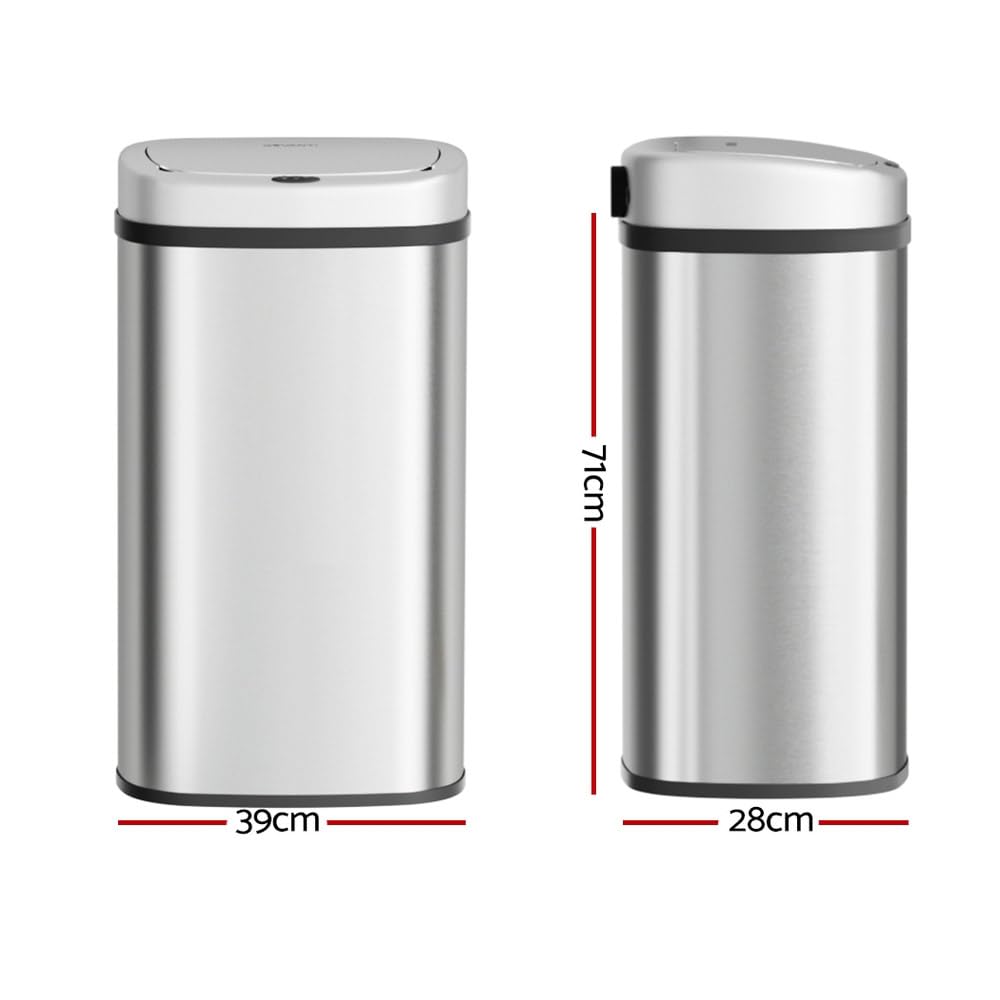
Image: The Devanti 60L Sensor Rubbish Bin shown with its approximate dimensions: 71cm in height, 39cm in width, and 28cm in depth, illustrating its compact design for various spaces.

Image: The Devanti 60L Sensor Rubbish Bin positioned in a contemporary kitchen, demonstrating its sleek silver design blending seamlessly with kitchen cabinetry and decor.
5. Operating Instructions
5.1 Motion Sensor Operation
The bin features an infrared motion sensor for touchless operation. Simply wave your hand or an object within 20cm above the sensor area on the lid. The lid will automatically open and remain open for a few seconds before closing softly. This provides a hygienic way to dispose of waste.

Image: A hand hovering over the sensor area on the bin lid, illustrating the touchless activation of the sensor technology for opening the lid.
5.2 Manual Operation
For situations where continuous opening is desired or if the sensor is temporarily disabled, the bin can be operated manually. Press the 'OPEN' button on the lid to open it. Press the 'CLOSE' button to close it. The lid will also close automatically after a period if left open in manual mode.

Image: A finger pressing the manual mode button located on the bin lid, demonstrating how to operate the bin without using the motion sensor.
5.3 Soft Open and Close Feature
The lid is designed with a soft open and close mechanism, ensuring quiet operation and preventing sudden slams. This feature also contributes to the lid's ability to fully close and contain odours.
6. Maintenance
6.1 Cleaning
To clean the bin, wipe the exterior metal body with a soft, damp cloth. For stubborn marks, a mild, non-abrasive cleaner can be used. The fingerprint-resistant finish helps maintain its sleek appearance. Do not use harsh chemicals or abrasive cleaning tools. The lid assembly should only be wiped clean; do not submerge it in water.
6.2 Battery Replacement
When the lid operation becomes slow or inconsistent, it is time to replace the batteries. Follow the battery installation steps in Section 4.1. Always replace all four AA batteries at the same time with new ones to ensure optimal performance.
6.3 Liner Replacement
To replace the trash bag, remove the lid assembly. Lift the liner holder ring, remove the full trash bag, and dispose of it. Place a new trash bag over the liner holder ring, tucking the edges, and then re-seat the liner holder and lid assembly.
7. Troubleshooting
If you encounter any issues with your Devanti Sensor Rubbish Bin, please refer to the following table for common problems and solutions:
| Problem | Possible Cause | Solution |
|---|---|---|
| Lid does not open/close automatically. | Low batteries; Sensor obstructed; Power switch off. | Replace all 4 AA batteries; Clean sensor area; Ensure power switch is ON. |
| Lid opens unexpectedly. | Sensor activated by passing objects/people. | Relocate bin to an area with less foot traffic or objects near the sensor. |
| Odour escaping from bin. | Trash bag not properly sealed; Bin needs emptying/cleaning; Lid not fully closed. | Ensure trash bag is properly secured by the liner holder; Empty and clean bin regularly; Check for obstructions preventing lid from closing fully. |
| Lid operation is slow or weak. | Low battery power. | Replace all 4 AA batteries with new ones. |
8. Specifications
| Feature | Detail |
|---|---|
| Model | SB-D-60-SS |
| Capacity | 60 Litres |
| Material | Metal (Body), Plastic (Lid, Liner Holder) |
| Colour | Silver |
| Opening Mechanism | Motion-Sensor, Manual Button |
| Power Supply | 4 x AA Batteries (not included) |
| Approximate Dimensions (H x W x D) | 71cm x 39cm x 28cm |
9. Warranty and Support
This product comes with a standard manufacturer's warranty. For specific warranty terms and conditions, please refer to the documentation provided at the time of purchase or contact your retailer. If you require technical support or have questions not covered in this manual, please contact Devanti customer service through your point of purchase or the official Devanti website.
Ask a question about this manual
Ask about setup, troubleshooting, compatibility, parts, safety, or missing instructions. Manuals+ will review the question and use this page’s manual context to help answer it.