1. Introduction
Thank you for choosing the Silonn Countertop Ice Maker. This appliance is designed to provide you with fresh, bullet-shaped ice quickly and conveniently, perfect for home, kitchen, parties, or RV use. With its compact design and efficient operation, you can enjoy ice whenever you need it without the hassle of traditional ice trays or bagged ice.
Key features of your Silonn Ice Maker include:
- Fast Ice Making: Produces 9 bullet ice cubes in as little as 6 minutes, with a capacity of up to 26 lbs of ice in 24 hours.
- Smart & Simple Operation: Features indicators for 'ice full' and 'add water', along with easy one-touch controls.
- Two Ice Cube Sizes: Choose between small and large bullet ice to suit your beverage needs.
- Compact & Portable: Lightweight design with a flip-up handle for easy transport.
- Durable & Quiet: Constructed from food-grade PP material and operates at a low noise level of approximately 45 dB.
- Self-Cleaning Function: Simplifies maintenance and ensures fresh-tasting ice.

The Silonn Countertop Ice Maker, showcasing its sleek design and compact footprint.
2. Important Safety Instructions
Please read all instructions carefully before using your ice maker and retain them for future reference. Failure to follow these instructions may result in electric shock, fire, or serious injury.
- Electrical Safety: Ensure the power outlet matches the voltage requirements (120 Volts). Do not operate with a damaged cord or plug. Do not immerse the appliance, cord, or plug in water or other liquids.
- Placement: Place the ice maker on a stable, level surface away from direct sunlight, heat sources, and corrosive gases. Allow at least 6 inches of clearance around the unit for proper ventilation.
- Water Quality: Use only potable (drinkable) water. Do not fill with milk, juice, or other beverages, as this can damage the unit and void the warranty.
- Children and Pets: Keep the appliance out of reach of children and pets. Supervise children if they are near the appliance.
- Maintenance: Always unplug the ice maker before cleaning or performing any maintenance. Do not attempt to repair or disassemble the unit yourself. Contact qualified service personnel for repairs.
- Ventilation: Do not block any ventilation openings. Ensure proper airflow to prevent overheating.
3. Product Overview
3.1 Components
Familiarize yourself with the main parts of your Silonn Ice Maker:
- Control Panel: Located on the top, with indicator lights and control buttons.
- Ice Basket: Removable basket for collecting produced ice.
- Water Reservoir: Internal tank for water supply.
- Ice Scoop: Included for convenient ice retrieval.
- Drain Plug: Located at the bottom for draining water.
- Transparent Lid: Allows you to view the ice making process.
- Handle: Integrated flip-up handle for portability.

The intuitive control panel of the Silonn Ice Maker.
3.2 Features
The Silonn Ice Maker is designed with user convenience and efficiency in mind:
- Rapid Ice Production: Experience ice in minutes.

Visual representation of the rapid ice production capability.
- Dual Ice Cube Sizes: Adapt to your needs with two bullet ice sizes.

Choose between small and large ice cubes.
- Quiet Operation: Designed to minimize noise, operating at less than 45 dB.

Enjoy ice production without significant noise disruption.
- Smart Sensors: Infrared sensors detect when the ice basket is full or when water needs refilling.

Infrared sensor for automatic detection of ice level and water needs.
- Premium Materials: Constructed with food-grade PP material for the interior, thick insulation, and high-quality ABS exterior.
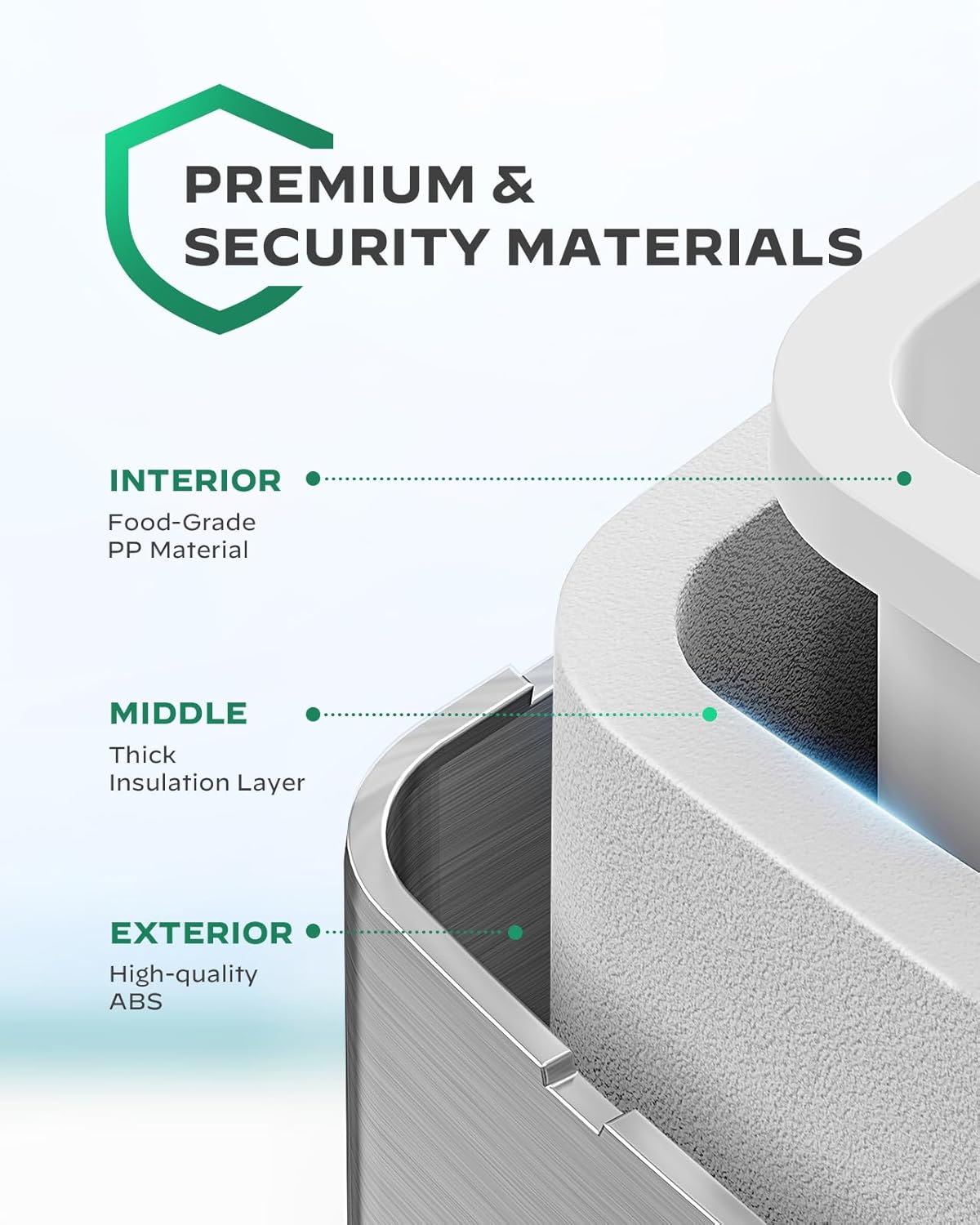
Cross-section view highlighting the quality materials used in construction.
4. Setup
- Unpack: Carefully remove the ice maker from its packaging. Remove all packing materials, tape, and any protective film.
- Initial Cleaning: Before first use, clean the interior of the ice maker. Wipe the water reservoir and ice basket with a soft cloth dampened with warm water and a mild detergent. Rinse thoroughly and dry.
- Placement: Place the ice maker on a firm, level surface. Ensure there is at least 6 inches (15 cm) of space around the unit for proper ventilation. Avoid placing it near heat sources or in direct sunlight.
- Power Connection: Plug the power cord into a grounded electrical outlet. Ensure the outlet meets the specified voltage (120V).
- First Use Cycle: For the first use, it is recommended to run a few ice-making cycles and discard the first batch of ice to ensure cleanliness and optimal performance.
5. Operating Instructions
- Add Water: Open the lid and fill the water reservoir with potable water up to the MAX fill line. Do not overfill.
- Power On: Press the On/Off button on the control panel to turn on the ice maker.
- Select Ice Size: Press the SELECT button to choose your desired ice cube size:
- Small (S): Indicator light will illuminate.
- Large (L): Indicator light will illuminate.
- Ice Production: The ice maker will begin the ice-making cycle. The fan will start, and you may hear the compressor working.
- Ice Full Indicator: When the ice basket is full, the ICE FULL indicator light will illuminate, and the ice production will pause. Remove ice from the basket to resume production.
- Add Water Indicator: If the water level in the reservoir is too low, the ADD WATER indicator light will illuminate. Add more water to resume operation.
- Harvesting Ice: Use the provided ice scoop to remove ice from the basket. For best results, transfer ice to a freezer for storage, as the ice maker is not a freezer and ice will melt over time.
- Power Off: To turn off the ice maker, press the On/Off button again.
6. Maintenance and Cleaning
Regular cleaning and maintenance will ensure the longevity and optimal performance of your Silonn Ice Maker.
6.1 Self-Cleaning Function
The self-cleaning function helps maintain the internal cleanliness of the unit:
- Ensure the ice basket is removed.
- Fill the water reservoir with clean water up to the MAX line.
- Hold the SELECT button for 3-5 seconds until the self-cleaning indicator light illuminates.
- Press the On/Off button to start the 5-minute self-cleaning process.
- Once the cycle is complete, drain the water from the ice maker by removing the drain plug at the bottom of the unit. Ensure all water is drained into a sink or suitable container.
- Replace the drain plug securely.

Internal view demonstrating the self-cleaning water circulation.
6.2 Regular Cleaning
- Exterior: Wipe the exterior with a soft, damp cloth. Do not use harsh chemicals or abrasive cleaners.
- Interior: Periodically clean the water reservoir and ice basket with a solution of water and mild vinegar (1:10 ratio) to prevent mineral buildup. Rinse thoroughly with clean water afterwards.
- Air Vents: Keep the air vents on the side and back of the unit clear of dust and debris to ensure proper cooling.
- Storage: If storing the ice maker for an extended period, drain all water, clean the unit thoroughly, and allow it to air dry completely before storing in a cool, dry place.
7. Troubleshooting
Before contacting customer support, please refer to the following table for common issues and their solutions.
| Problem | Possible Cause | Solution |
|---|---|---|
| Ice maker not turning on. | No power, loose plug, power outage. | Check power cord connection. Ensure outlet has power. Try a different outlet. |
| "ADD WATER" indicator is on. | Water reservoir is empty or low. | Add potable water to the reservoir up to the MAX line. |
| "ICE FULL" indicator is on. | Ice basket is full. | Remove ice from the basket. |
| Ice production is slow or ice cubes are small/misshapen. | High ambient temperature, insufficient water, dirty condenser. | Ensure unit is in a cool environment. Add more water. Clean the condenser vents. Run self-cleaning cycle. |
| Unusual noise during operation. | Unit not level, internal component issue. | Ensure the ice maker is on a stable, level surface. If noise persists, contact customer support. |
| Ice has an odd taste or smell. | Stale water, dirty interior, new unit smell. | Drain and refill with fresh water. Perform a thorough cleaning, including the self-cleaning cycle. For new units, this may dissipate after a few cycles. |
8. Specifications
| Specification | Value |
|---|---|
| Brand | Silonn |
| Model Name | ice maker |
| Model Number | SLIM25T |
| Product Dimensions | 11.93"D x 11.1"W x 9.8"H |
| Item Weight | 16.02 pounds |
| Capacity | 26 Pounds (ice production per 24 hours) |
| Wattage | 160 watts |
| Voltage | 120 Volts |
| Refrigerant | R600a |
| Material | Stainless Steel |
| Color | Silver |
| Installation Type | Countertop |
| Included Components | Ice maker |

Compact dimensions of the Silonn Ice Maker. Note: Image states 13 lbs, product spec states 16.02 lbs. Refer to specifications table for accurate weight.
9. Warranty and Support
For information regarding warranty coverage, please refer to the warranty card included with your product or contact Silonn customer support directly. Protection plans are also available for extended coverage.
For further assistance, troubleshooting not covered in this manual, or to inquire about parts and service, please visit the official Silonn website or contact their customer service department. You can also refer to the official User Manual PDF for additional details:


