1. Safety Information
Please read this manual carefully before installation and use. Keep this manual for future reference.
- Ensure the wall structure can safely support the weight of the mount and the monitor.
- Use a stud finder to locate wood studs for secure mounting. Avoid drilling into electrical wires or pipes.
- Do not exceed the maximum weight capacity of 17.6 lbs (8 kg).
- Ensure all screws are tightened securely, but do not overtighten.
- Keep children and pets away during installation.
- Handle the gas spring arm with care as it is under tension. Follow instructions for tension adjustment.
2. Package Contents
Verify all parts are present before beginning installation. If any parts are missing or damaged, contact customer support.
- Monitor Wall Mount Arm Assembly
- VESA Mounting Plate
- Wall Plate
- Hardware Kit (various screws, washers, anchors for different wall types)
- Allen Key / Hex Wrench for adjustments
- Instruction Manual
3. Specifications
| Feature | Detail |
|---|---|
| Brand | suptek |
| Model | WM01A |
| Screen Size Compatibility | 17 to 32 inches |
| VESA Compatibility | 75x75mm, 100x100mm |
| Weight Capacity | 4.4 - 17.6 lbs (2 - 8 kg) |
| Tilt Angle | ±80° |
| Swivel Angle | ±90° |
| Rotation | 360° |
| Max Extension | 20.39 inches |
| Height Adjustment | 310mm |
| Material | Alloy Steel |
| Compatible Wall Types | Concrete Wall, Brick Wall, Wood Studs |
4. Setup Instructions
4.1. Mounting the VESA Plate to Your Monitor
- Carefully place your monitor face down on a soft, clean surface.
- Identify the VESA mounting holes on the back of your monitor. These are typically in a square pattern (75x75mm or 100x100mm).
- Select the appropriate screws (M4 or M5) and washers from the hardware kit that fit your monitor's VESA holes. Ensure screws are not too long to avoid damaging internal components.
- Attach the VESA mounting plate to the back of your monitor using the selected screws and washers. Tighten securely.

Image: VESA plate securely attached to the back of a monitor, showing the screw points.
Video: Demonstrates the installation process of the Suptek Gas Spring Single Monitor Wall Mount, including attaching the VESA plate to the monitor.
4.2. Mounting the Arm to the Wall
- Determine the desired mounting location on your wall. Use a stud finder to locate a wood stud for optimal support. For concrete or brick walls, use appropriate anchors (provided in the hardware kit).
- Hold the wall plate against the wall at the desired height and mark the drill holes.
- Drill pilot holes according to the recommended drill bit size for your wall type.
- Secure the wall plate to the wall using the lag bolts and washers. Ensure it is firmly attached and level.

Image: Illustration of compatible wall types for mounting: concrete, brick, and wood studs.
Video: Demonstrates the installation process of the Suptek Gas Spring Single Monitor Wall Mount, including securing the wall plate.
4.3. Attaching the Monitor to the Arm
- Carefully lift the monitor (with the VESA plate attached) and align it with the arm's mounting head.
- Slide the VESA plate onto the arm's mounting head until it clicks into place or is securely seated.
- Install any safety screws or locking mechanisms as indicated in the manual to prevent accidental detachment.
Video: Shows the process of attaching a monitor to the wall mount arm.
4.4. Tension Adjustment
The gas spring tension needs to be adjusted according to your monitor's weight to ensure smooth and stable movement.
- Use the provided Allen key to adjust the tension screw located on the arm.
- Turn clockwise for lighter monitors (to increase tension).
- Turn counter-clockwise for heavier monitors (to decrease tension).
- Adjust until the monitor stays in position when moved and can be adjusted with minimal effort.

Image: Visual guide for adjusting the gas spring tension: clockwise for lighter monitors, counter-clockwise for heavier monitors.
5. Operating Instructions
The suptek WM01A monitor arm offers full motion adjustability for optimal viewing comfort.
- Tilt: Adjust the monitor screen up or down by ±80° to reduce glare and find your preferred viewing angle.
- Swivel: Rotate the monitor left or right by ±90° to share your screen with others or change your viewing position.
- Rotation: Rotate the monitor 360° to switch between landscape and portrait orientations.
- Extension/Retraction: Extend the arm up to 20.39 inches or retract it to save space, folding to 3.15 inches from the wall.
- Height Adjustment: The gas spring allows for smooth vertical height adjustments of up to 310mm.

Image: Visual representation of the monitor arm's full motion capabilities, including 360° rotation, tilt, and swivel.
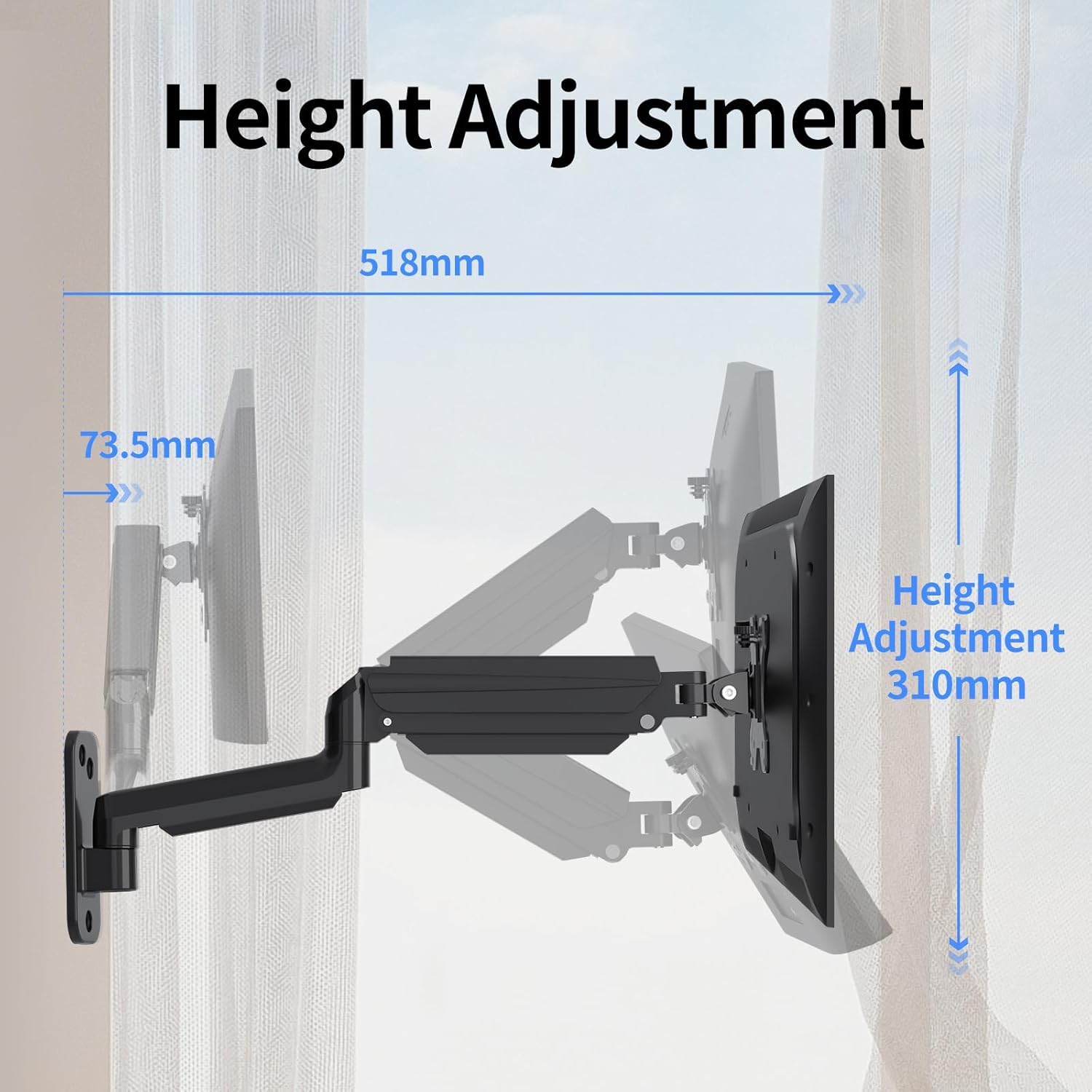
Image: Illustration detailing the height adjustment range of 310mm and the maximum extension of the arm.
Video: Demonstrates the various movements and adjustments possible with the Suptek Wall Monitor Mount (WM01A).
6. Cable Management
The integrated cable management system helps keep your workspace tidy and organized.
- Route your monitor's power and video cables through the clips or channels provided along the arm.
- Ensure cables have enough slack to allow for full range of motion without tension.
- Secure cables to prevent them from snagging or interfering with arm movement.

Image: Close-up of the monitor arm demonstrating how cables are neatly managed through the integrated system.
7. Maintenance
- Regularly check all screws and connections to ensure they remain tight.
- Clean the mount with a soft, damp cloth. Avoid abrasive cleaners.
- Do not lubricate the gas spring mechanism unless specifically instructed by the manufacturer.
8. Troubleshooting
- Monitor sags or does not hold position: The gas spring tension may be too low for your monitor's weight. Increase tension by turning the adjustment screw clockwise with the provided Allen key.
- Monitor is difficult to move or too stiff: The gas spring tension may be too high. Decrease tension by turning the adjustment screw counter-clockwise.
- Mount feels unstable: Recheck all wall mounting screws and VESA plate screws to ensure they are securely tightened. Confirm the wall type is appropriate for the installation method used.
9. Warranty & Support
For warranty information or technical support, please refer to the manufacturer's official website or contact their customer service directly. Keep your purchase receipt for warranty claims.
Manufacturer: suptek
Contact: Visit the suptek Store on Amazon


