
Introduction
Thank you for choosing the Kratos 68K-774 Commercial Two Door Reach-in Freezer. This manual provides essential information for the safe and efficient operation, installation, and maintenance of your new commercial freezer. Please read this manual thoroughly before installation and operation, and retain it for future reference.
Safety Information
Always follow basic safety precautions when using this appliance to reduce the risk of fire, electrical shock, or injury. This unit uses a flammable refrigerant. Ensure proper ventilation and disposal in accordance with local regulations.
- Do not store explosive substances such as aerosol cans with a flammable propellant in this appliance.
- Keep ventilation openings in the appliance enclosure or in the built-in structure clear of obstruction.
- Do not use mechanical devices or other means to accelerate the defrosting process, other than those recommended by the manufacturer.
- Do not damage the refrigerant circuit.
- Do not use electrical appliances inside the food storage compartments of the appliance, unless they are of the type recommended by the manufacturer.
- This appliance is intended for commercial use only.

Image: A close-up of the safety warning label on the freezer, indicating caution regarding fire risk and flammable refrigerant.
Setup and Installation
Unpacking
Carefully remove all packaging materials. Inspect the freezer for any shipping damage. Report any damage immediately to the carrier and your supplier. Do not discard packaging until the unit has been tested and is operating correctly.
Placement
Place the freezer on a flat, stable surface. Ensure adequate clearance around the unit for proper ventilation. Avoid direct sunlight or proximity to heat-generating equipment. The bottom-mount compressor design is optimized for cooler floor-level air intake.
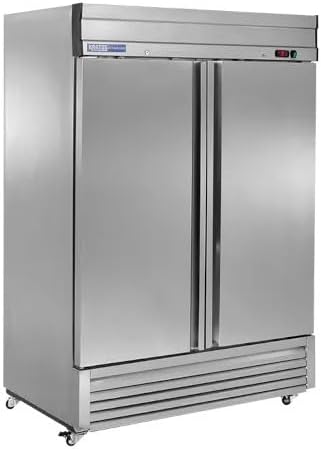

Image: Side and front views of the Kratos 68K-774 Commercial Reach-In Freezer, showing its stainless steel exterior and casters for mobility.
Power Connection
Connect the freezer to a dedicated 120V electrical outlet. Do not use extension cords. Ensure the electrical supply matches the requirements listed on the product's rating label.
Initial Startup
After connecting power, allow the unit to run for at least 2-4 hours empty to reach the desired temperature before loading with product. The digital temperature control will display the internal temperature.
Operating Instructions
Temperature Control
The freezer features a digital temperature control for precise temperature monitoring and adjustment. The factory preset temperature range is -10°F to +10°F. Refer to the separate digital controller manual for detailed programming instructions.
Loading the Freezer
The freezer comes with six adjustable heavy-duty, corrosion-resistant shelves. These shelves can accommodate full-size sheet pans. Distribute products evenly to allow for proper air circulation within the 42.9 cubic foot capacity.
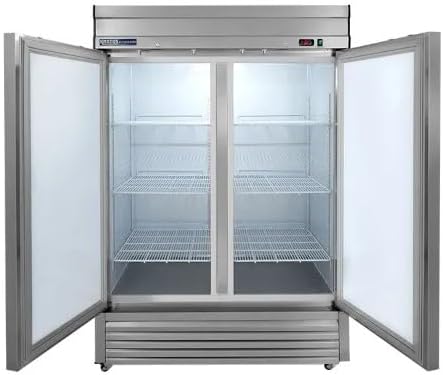

Image: The interior of the freezer showing the adjustable shelves and a close-up of a shelf bracket.
Self-Closing Doors and Alerts
The unit is equipped with self-closing solid doors to minimize temperature fluctuations. If a door is left open for more than three minutes, an audible alert will sound to notify users.
Maintenance
Cleaning
Regular cleaning of the interior and exterior surfaces is recommended. Use a mild detergent and warm water. Avoid abrasive cleaners or scouring pads that could damage the stainless steel finish. Ensure the unit is unplugged before cleaning.
Automatic Defrost
This freezer features an automatic defrost system, which helps maintain optimal operating conditions and reduces ice buildup. No manual defrosting is typically required under normal operating conditions.
Condensate Evaporator
The integrated condensate evaporator eliminates the need for a floor drain connection, simplifying installation and maintenance.
Caster Maintenance
The 3-inch casters allow for easy movement of the unit for cleaning or relocation. Periodically check casters for debris and ensure they roll freely.
Troubleshooting
Before contacting service, please review the following common issues and solutions:
| Problem | Possible Cause | Solution |
|---|---|---|
| Freezer not cooling | Power supply issue, thermostat set too high, condenser coil dirty, excessive door openings. | Check power connection and circuit breaker. Adjust thermostat setting. Clean condenser coils (refer to professional service). Ensure doors are closed properly. |
| Excessive noise | Unit not level, fan obstruction, loose components. | Ensure unit is level. Check for obstructions around fan blades. Contact qualified service technician if noise persists. |
| Door not closing properly | Obstruction, damaged gasket, unit not level. | Remove any obstructions. Inspect and clean door gaskets. Ensure unit is level. |
| Water on floor | Drain line clogged, condensate pan overflow. | Check and clear drain line. Ensure condensate evaporator is functioning correctly. |
If the problem persists after attempting these solutions, please contact a qualified service technician.
Specifications
| Feature | Detail |
|---|---|
| Model | 68K-774 |
| Brand | Kratos |
| Capacity | 42.9 Cubic Feet |
| Dimensions (D x W x H) | 33.37" x 54.12" x 80" |
| Temperature Range | -10°F to +10°F |
| Doors | Two, Self-Closing Solid Doors |
| Shelves | 6 Adjustable, Heavy-Duty, Corrosion-Resistant |
| Compressor Location | Bottom Mount |
| Defrost Type | Automatic |
| Casters | 3" Standard |
| Electrical | 120V |
| Exterior Material | Stainless Steel |
| Interior Material | Aluminum |
Warranty and Support
For warranty information or technical support, please contact Kratos customer service or your authorized dealer. Keep your purchase receipt and model number readily available for faster service.
Note: Any unauthorized modifications or repairs to the unit may void the warranty.


