
1. Introduction
This manual provides essential information for the safe and effective use of your Generic KH106 3-in-1 Carbon Monoxide Detector. This device is designed to monitor carbon monoxide (CO) levels, temperature, and humidity, providing crucial environmental data and alerting you to potential CO hazards. Please read these instructions carefully before installation and operation, and retain them for future reference.
2. Product Overview
The Generic KH106 is a versatile safety device integrating three key monitoring functions into one compact unit. It features an advanced electrochemical sensor for accurate CO detection and a clear color LCD display for real-time readings.
Key Features:
- 3-in-1 Monitoring: Detects Carbon Monoxide (CO), displays ambient temperature, and relative humidity.
- Advanced Sensor: Utilizes an imported electrochemical sensor for high reliability and responsiveness.
- Clear Color LCD Display: Provides easy-to-read real-time values for CO concentration, temperature (1-176°F), and humidity (0-99%).
- Audible & Visual Alarm: Features a voice and light alarm that activates when CO concentration reaches dangerous levels (>150ppm).
- Easy Installation: Simple plug-and-play design requires no complex wiring.
- Self-Test Function: Includes a dedicated button for periodic testing of the alarm system.

Figure 2.1: The 3-in-1 display of the Carbon Monoxide Detector, showing Carbon Monoxide (CO), Humidity, and Temperature readings.
3. Setup and Installation
The Generic KH106 Carbon Monoxide Detector is designed for quick and easy setup. No special tools or wiring are required.
Installation Steps:
- Unpack the Device: Carefully remove the detector from its packaging.
- Remove Protective Film: Before use, peel off the protective film from the LCD screen.
- Plug In: Insert the detector directly into a standard AC power outlet (220 Volts AC). Ensure it is securely plugged in.
- Initialization: Upon plugging in, the device will undergo a brief calibration process. The display will show a countdown for CO levels, typically starting around 60 PPM and decreasing to 0 PPM as it stabilizes. This process usually takes about one minute.
- Ready for Use: Once the CO reading stabilizes at 0 PPM and the power indicator light is green, the detector is ready to monitor your environment.
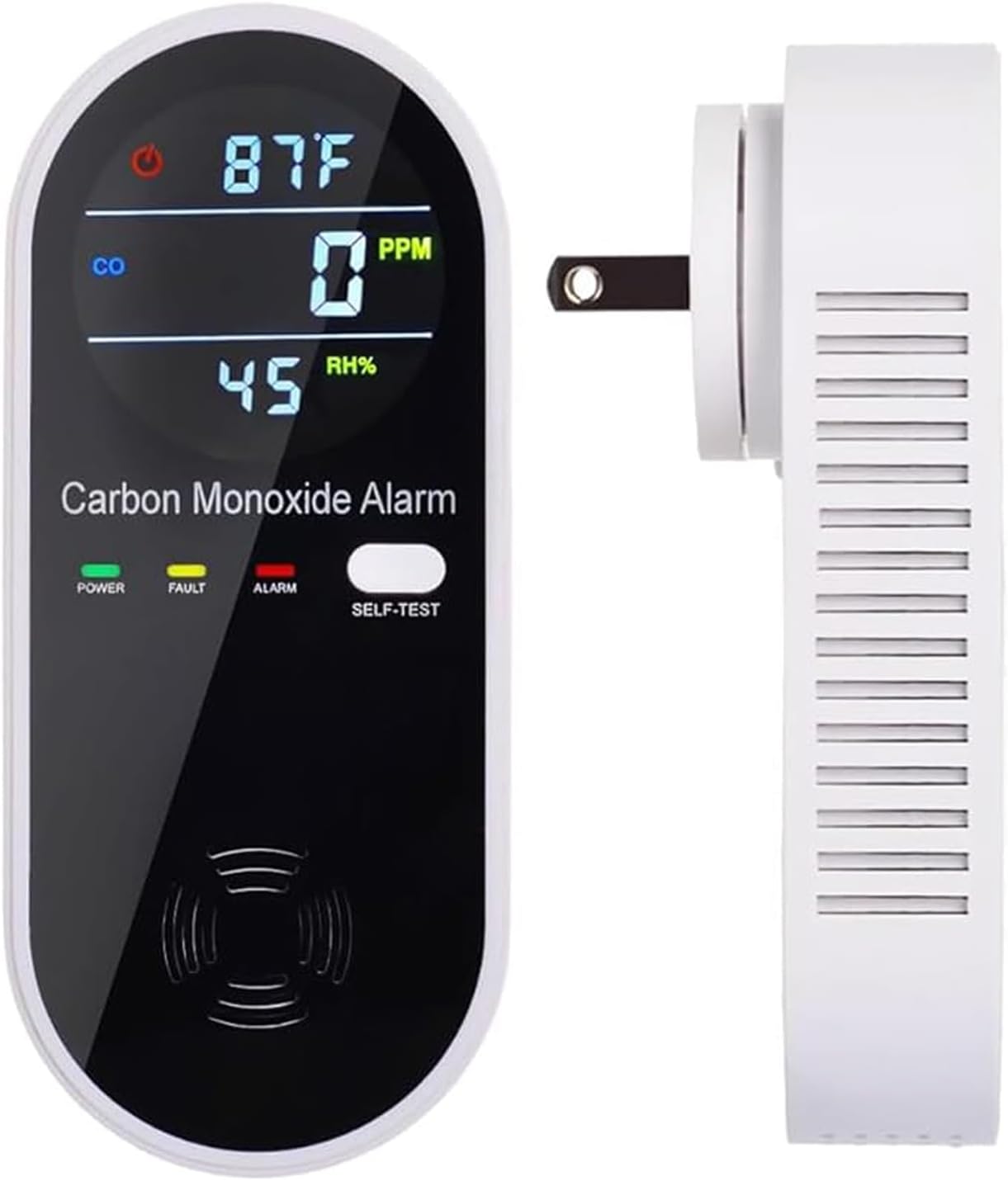
Figure 3.1: The Carbon Monoxide Detector plugged into a standard wall outlet, ready for operation.
4. Operating Instructions
The detector operates continuously once plugged in, providing real-time environmental data.
Display Information:
- Temperature: Displayed in Fahrenheit (°F) at the top of the screen.
- Carbon Monoxide (CO): Displayed in Parts Per Million (PPM) in the middle of the screen. A reading of 0 PPM indicates no detectable CO.
- Relative Humidity (RH%): Displayed at the bottom of the screen.
Indicator Lights:
Three LED indicator lights are located below the display:
- POWER (Green): Indicates the device is powered on and functioning normally.
- FAULT (Yellow): Indicates a malfunction or error with the device. Refer to troubleshooting.
- ALARM (Red): Illuminates and flashes when CO levels exceed the alarm threshold, accompanied by an audible alert.
Self-Test Function:
To ensure the alarm is working correctly, press the 'SELF-TEST' button. The device will emit a loud alarm sound and flash the indicator lights. This confirms the alarm's functionality.

Figure 4.1: Detailed view of the detector's components, including the display, self-test button, and sensor locations.
5. Safety Information
Carbon monoxide is a colorless, odorless, and tasteless gas that can be fatal. This detector is a vital tool for early warning but is not a substitute for proper maintenance of fuel-burning appliances.
Alarm Threshold:
The voice and light alarm will activate when the CO gas concentration reaches or exceeds 150 PPM.
Recommended Placement:
Install the detector in areas where CO may accumulate or where people spend significant time. This includes kitchens, bathrooms, living rooms, bedrooms, RVs, parking lots, and near any fuel-burning appliances. Avoid placing it directly above heat sources or in areas with high humidity that could trigger false alarms.

Figure 5.1: The Carbon Monoxide Detector installed in a home, providing continuous monitoring.
6. Maintenance
To ensure optimal performance and longevity of your detector:
- Regular Testing: Perform a self-test weekly by pressing the 'SELF-TEST' button to confirm the alarm is functioning.
- Cleaning: Gently wipe the exterior of the detector with a soft, damp cloth. Do not use harsh chemicals or abrasive cleaners. Ensure the air inlet is free from dust and debris.
- Avoid Obstruction: Ensure nothing blocks the air inlet or the display screen.
7. Troubleshooting
If the alarm sounds or the 'FAULT' indicator lights up:
- Alarm Sounds (CO Detected): Immediately move to fresh air outdoors or open all doors and windows to ventilate the area. Call emergency services if symptoms of CO poisoning are present. Do not re-enter the premises until the CO level returns to 0 PPM and the cause of the CO leak has been identified and corrected.
- 'FAULT' Light On: Unplug the device, wait 30 seconds, and plug it back in. If the 'FAULT' light persists, the device may be malfunctioning and should be replaced.
- No Display/No Power: Ensure the device is securely plugged into a working power outlet. Check the circuit breaker. If the issue persists, the device may require replacement.
8. Specifications
| Feature | Detail |
|---|---|
| Brand | Generic |
| Model Number | KH106 |
| Power Source | AC Plug-in (220 Volts) |
| Sensor Type | Electrochemical |
| CO Detection Range | 0-999 ppm (±5ppm) |
| Temperature Display Range | 1-176°F (±2°F) |
| Humidity Display Range | 0-99% (±5%) |
| Alarm Level | >150 ppm CO |
| Alarm Type | Voice and Light |
| Material | ABS |
| Product Dimensions | 4.69 x 2.05 x 1.93 inches |
| Item Weight | 3.2 ounces |
9. Warranty and Support
The manufacturer offers unconditional returns and exchanges within 90 days of purchase. For any questions or support needs, please contact the manufacturer via email. They are committed to assisting you with any issues you may encounter.