
GODOX MF-R76S
Contents
GODOX MF-R76S Macro Ring Flash User Manual
Model: MF-R76S
For Sony Cameras
1. Introduction
The GODOX MF-R76S Macro Ring Flash is a dedicated lighting solution designed for macro photography. It features TTL and Manual modes, a twin-tube design for versatile lighting control, and 2.4G wireless capabilities. This manual provides detailed instructions for setting up, operating, and maintaining your MF-R76S flash.

Image: The GODOX MF-R76S Macro Ring Flash is suitable for various close-up applications including plants, food, insects, jewelry, portraits, and oral cavity photography.
2. Package Contents
Before use, please verify that all items listed below are included in your package:
- GODOX MF-R76S Macro Ring Flash Unit x1
- Lithium Battery (7.2V/2600mAh) x1
- USB Charger x1
- Type-C USB Charging Cable x1
- Adapter Rings (49mm, 52mm, 55mm, 58mm, 62mm, 67mm, 72mm, 77mm) x8

Image: A visual representation of all components included in the GODOX MF-R76S Macro Ring Flash package.
3. Setup
3.1 Charging the Battery
Insert the included lithium battery into the USB charger. Connect the charger to a power source using the Type-C USB charging cable. The charging indicator will show the charging status. Ensure the battery is fully charged before first use for optimal performance.
3.2 Attaching the Flash to Your Camera
- Select the appropriate adapter ring for your camera lens's filter thread diameter. The MF-R76S includes rings for 49mm, 52mm, 55mm, 58mm, 62mm, 67mm, 72mm, and 77mm.
- Screw the selected adapter ring onto the front filter thread of your lens.
- Slide the ring flash unit onto the adapter ring until it clicks securely into place.
- Mount the controller unit onto your camera's hot shoe. Ensure it is firmly seated and locked to establish electrical contact.

Image: The controller unit mounted on a camera hot shoe, with various adapter rings displayed for universal lens compatibility.
4. Operating Instructions
4.1 Power On/Off
Press and hold the power button on the controller unit to turn the flash on or off. The LCD screen will illuminate upon power-on.
4.2 Mode Selection (TTL/M)
Press the MODE button to switch between TTL (Through-The-Lens) automatic flash mode and M (Manual) flash mode.
- TTL Mode: The flash output is automatically adjusted by the camera's metering system for optimal exposure. This mode is ideal for quick and convenient shooting.
- Manual Mode: Allows you to manually set the flash output power from 1/1 to 1/128 in 1/3 stop increments. This provides precise control over lighting.

Image: The LCD screen of the MF-R76S controller unit, showing TTL mode with exposure compensation settings.
4.3 Adjusting Flash Output and Ratio
The MF-R76S features a twin-tube design, allowing independent control of the left (A) and right (B) flash tubes. This enables creative lighting effects by adjusting the power ratio between the two tubes.
- In Manual mode, use the dial to adjust the overall flash power.
- Press the RATIO button to adjust the power ratio between flash tube A and flash tube B. You can set them to fire simultaneously at the same power, or adjust them independently to create contrast.

Image: Demonstrates versatile lighting controls, showing how to adjust the power ratio between the two flash tubes (Flash A and Flash B) for different lighting effects.
4.4 2.4G Wireless Control
The MF-R76S integrates a 2.4G wireless system, allowing it to function as a master or slave unit within the Godox 2.4G wireless ecosystem. This enables complex multi-flash setups for advanced lighting scenarios.
- Refer to the detailed instructions in the full manual for setting up master/slave modes and channel/group configurations.

Image: The MF-R76S controller unit wirelessly communicating with other Godox flash units, illustrating its 2.4G wireless system capabilities.
5. Maintenance
- Keep the flash unit and controller clean using a soft, dry cloth. Avoid using solvents or abrasive cleaners.
- Store the unit in a cool, dry place away from direct sunlight and extreme temperatures.
- When not in use for extended periods, remove the battery to prevent leakage.
- Handle the flash tubes with care to avoid damage.
6. Troubleshooting
| Problem | Possible Cause | Solution |
|---|---|---|
| Flash does not fire. | Battery is low or depleted. Flash is not securely mounted. Incorrect camera settings. | Recharge or replace battery. Ensure controller is fully seated in hot shoe and ring flash is clicked into place. Check camera's flash settings and ensure it's in a compatible mode (e.g., P, Av, Tv, M). |
| Flash output is inconsistent. | Dirty contacts on hot shoe. Interference in wireless mode. | Clean hot shoe contacts with a clean, dry cloth. Change wireless channel or move closer to other Godox 2.4G units. |
| LCD screen is blank. | Unit is off or battery is dead. | Press power button to turn on. Recharge battery. |
7. Specifications
| Feature | Detail |
|---|---|
| Model | MF-R76S |
| Flash Modes | TTL, Manual (M) |
| Power Output | 1/1 to 1/128 (in 1/3 stop increments) |
| Recycle Time | 0.1-1.5 seconds |
| Full Power Flashes | Approx. 660 |
| Battery | 7.2V/2600mAh Lithium Battery |
| Color Temperature | 5900K ± 200K |
| Wireless Control | 2.4G Wireless System |
| Adapter Ring Diameters | 49mm, 52mm, 55mm, 58mm, 62mm, 67mm, 72mm, 77mm |
| Product Dimensions | 5.12 x 5.12 x 1.97 inches (13 x 13 x 5 cm) |
| Item Weight | 2.31 pounds (1.05 kg) |
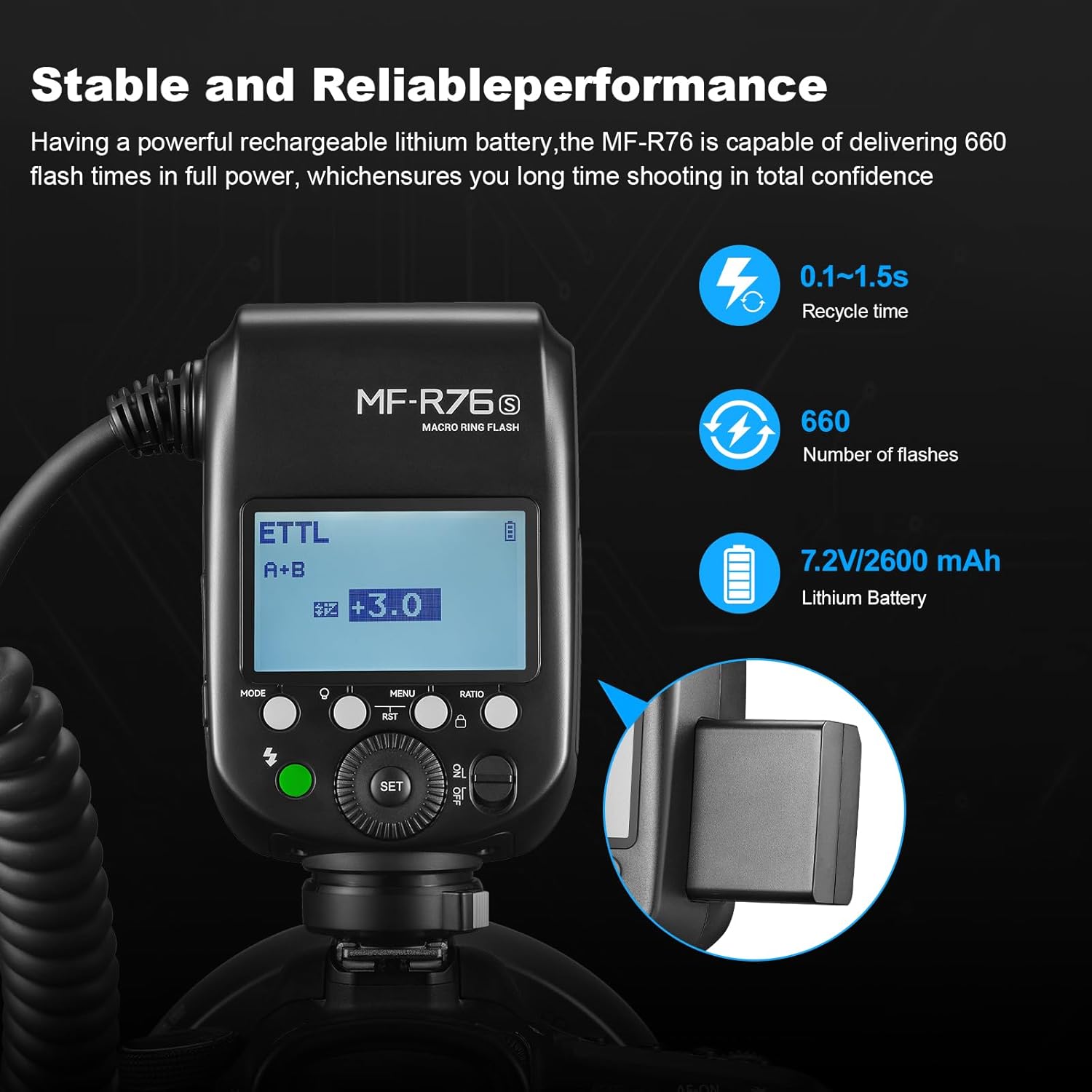
Image: The MF-R76S controller unit's display showing key performance indicators like recycle time, number of flashes, and battery capacity.
8. Warranty and Support
GODOX provides a limited warranty for this product. Please refer to the warranty card included in your package for specific terms and conditions. For technical support, service, or warranty claims, please contact your authorized GODOX dealer or visit the official GODOX website.
For more information, visit the GODOX Store on Amazon.
Ask a question about this manual
Ask about setup, troubleshooting, compatibility, parts, safety, or missing instructions. Manuals+ will review the question and use this page’s manual context to help answer it.