Introduction
The Otufan AI Translator Earbuds are advanced 3-in-1 devices designed to facilitate seamless communication across language barriers, provide high-definition audio for music, and enable clear phone calls. These earbuds support real-time, two-way translation for up to 144 languages, making them ideal for business, travel, and educational purposes. Their ergonomic design ensures comfort for extended wear, and the accompanying mobile application offers various translation modes and features.
Setup Guide
1. Charging the Earbuds
Before first use, ensure the earbuds and charging case are fully charged. Connect the provided Type-C cable to the charging case and a compatible USB power source. A full charge typically takes approximately 90 minutes for the charging compartment.

Image: The Otufan AI Translator Earbuds in their white charging case, accompanied by a USB-C charging cable. The case displays a digital battery indicator.

Image: An illustration detailing the battery life: 3 hours for headphones alone, 12 hours with the charging compartment, and 90 minutes for a full charge via Type-C connector.
2. Downloading the Companion App
The Otufan AI Translator Earbuds require a dedicated mobile application for full functionality, especially for translation features. Scan the QR code provided in the product packaging or search for the 'Translation Earphones' app on your device's app store (compatible with iOS and Android).

Image: A graphic showing icons for Apple App Store and Android Play Store, indicating where to download the companion application for the earbuds.
3. Pairing with Your Device
- Ensure Bluetooth is enabled on your smartphone or tablet.
- Open the charging case. The earbuds will automatically enter pairing mode.
- On your device, search for Bluetooth devices and select 'Otufan Earbuds' (or similar name) from the list.
- Once connected, open the 'Translation Earphones' app. The app will guide you through activating the device.
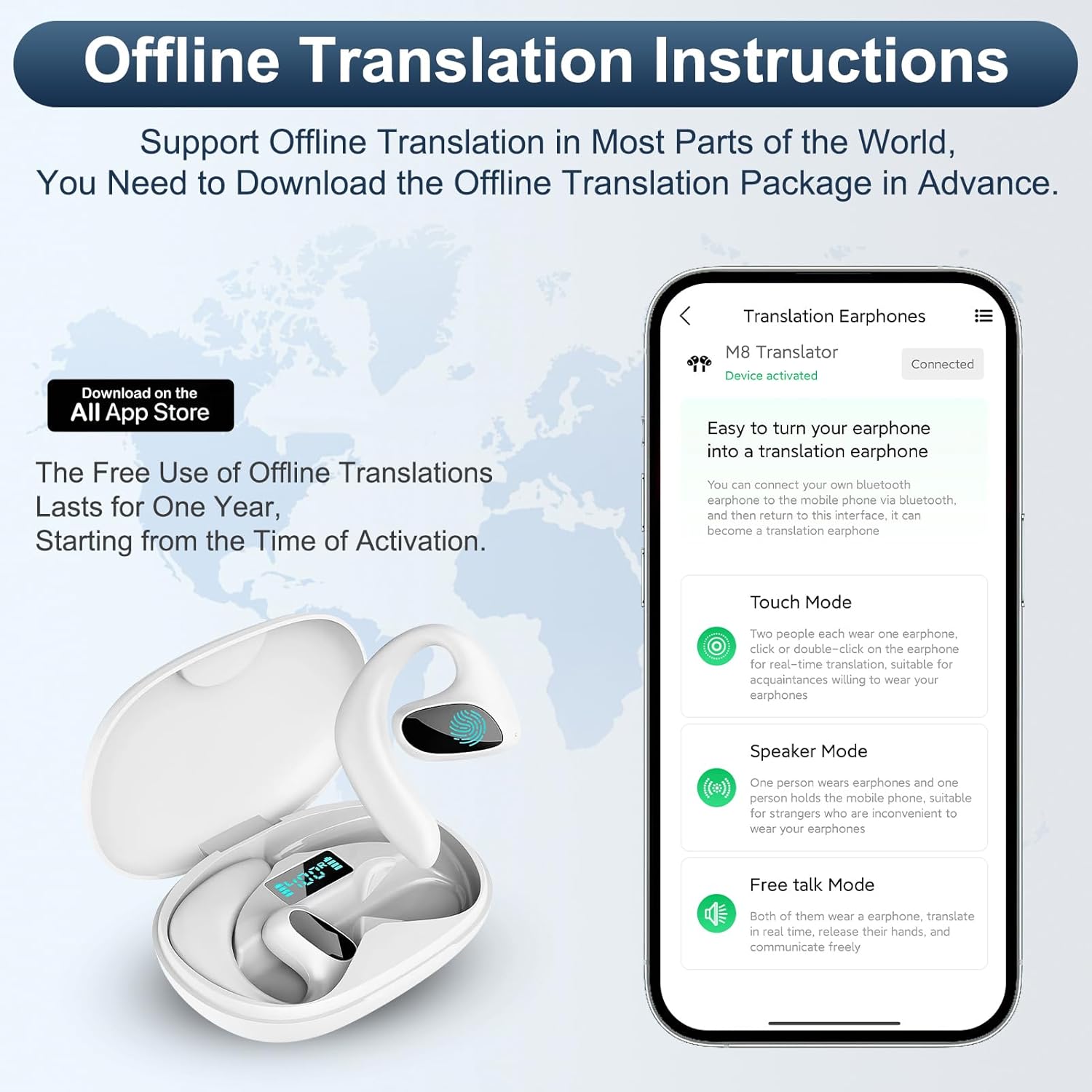
Image: A screenshot of the 'Translation Earphones' app interface, showing options for offline translation and various translation modes.
Operating Instructions
Translation Modes
The earbuds offer several translation modes via the companion app to suit different communication scenarios:
- Touch Mode: Two people each wear one earbud. Click or double-click the earbud for real-time translation, suitable for conversations where both parties wear an earbud.
- Speaker Mode: One person wears an earbud, and the other person speaks into the mobile phone. This mode is suitable for situations where only one person needs to hear the translation through the earbud.
- Free Talk Mode: Both individuals can speak freely, and the app will translate and display the conversation in real-time. This mode allows for more natural, continuous dialogue.

Image: An illustration showing the three main communication modes: Simple Links with Multiple Modes, Simultaneous Translation, Touch Control, and Offline Translation (Free for One Year).

Image: Two men shaking hands, illustrating the bidirectional simultaneous translation capability of the earbuds, providing low latency for seamless communication.
Online vs. Offline Translation
Online translation is available for free and supports 144 languages. Offline translation and features like video, voice, and call translation may require in-app purchases. Offline packages are available for download within the app, with free use for one year from activation.

Image: A screenshot of the app's new UI interface, categorizing features into 'Free Features' (Touch Mode, Speaker Mode, Free Talk Mode) and 'Charge Function' (Offline Mode, Audio/Video & Call Translation).

Image: A hand holding a smartphone displaying a real-time translation conversation, highlighting the speed and accuracy of AI models in translation.
Music Playback and Phone Calls
In addition to translation, the earbuds function as standard Bluetooth headphones, delivering HD sound quality for music and clear audio for phone calls. Simply connect them to your device via Bluetooth and use your preferred media player or calling application.

Image: A graphic illustrating the earbuds' capability to translate 144 languages with 97% accuracy, and offering 2 modes (Online/Offline, with offline free for one year).

Image: An illustration highlighting the noise reduction and high accuracy features, with dual microphones enhancing sound quality and support from leading translation engines.
Maintenance
Cleaning
Regularly clean your earbuds and charging case to maintain optimal performance and hygiene. Use a soft, dry, lint-free cloth to wipe down the surfaces. For stubborn dirt, slightly dampen the cloth with water. Avoid using abrasive materials, solvents, or harsh chemicals.
Storage
When not in use, store the earbuds in their charging case to protect them from dust, dirt, and physical damage. Store the case in a cool, dry place away from direct sunlight and extreme temperatures.
Battery Care
To prolong battery life, avoid fully discharging the earbuds frequently. Charge them regularly, even if not in constant use. Do not expose the battery to extreme heat or cold.
Troubleshooting
| Problem | Possible Cause | Solution |
|---|---|---|
| Earbuds not pairing. | Bluetooth off, earbuds not in pairing mode, device too far. | Ensure Bluetooth is on, open case to activate pairing, keep device within 10m. Restart earbuds/device. |
| Translation delay or inaccuracy. | Poor internet connection (for online), app not updated, background noise. | Ensure stable internet. Update app. Reduce background noise. Speak clearly. |
| No sound or low volume. | Volume too low, earbuds not properly seated, connection issue. | Adjust device volume. Ensure earbuds are correctly worn. Reconnect Bluetooth. |
| Earbuds uncomfortable or fall out. | Improper fit for ear shape. | Adjust the ear-hanging structure for a secure and comfortable fit. Experiment with different angles. |
| App setup is complicated. | Unfamiliarity with app interface. | Refer to the in-app tutorials or online support resources for step-by-step guidance. |
Specifications
| Feature | Detail |
|---|---|
| Model Number | Otufane894k2md06 |
| Translation Languages | 144 (Online), Offline packages available via in-app purchase |
| Translation Accuracy | 98% High-Precision |
| Battery Life (Single Headset) | Up to 5 hours |
| Communication Range | 10 meters |
| Charging Time (Case) | Approx. 90 minutes (Type-C Connector) |
| Functions | Translation, Music Playback, Phone Calls |
| Design | Ergonomic Ear-hanging Structure |
| Weight | 5.3 ounces |
| Country of Origin | China |
Warranty and Support
The Otufan AI Translator Earbuds are manufactured by Otufan. For any product-related inquiries, technical support, or warranty claims, please refer to the contact information provided in your product packaging or visit the official Otufan website. The product includes the Languages Translator Earbuds as listed in the box contents.