
allimity QYSY-SMT2219DTS-QYSY
ALLIMITY Replacement Remote Control User Manual
Model: QYSY-SMT2219DTS-QYSY
1. Introduction
This user manual provides comprehensive instructions for the ALLIMITY Replacement Remote Control. This remote is designed to be a direct replacement for various Telesystem Smart-Tech TV models, offering full functionality without the need for complex programming.
2. Product Overview
The ALLIMITY replacement remote control is engineered to replicate all functions of your original remote. Its ergonomic design ensures comfortable handling and ease of use.

Figure 2.1: Angled front view of the ALLIMITY Replacement Remote Control, showcasing its button layout and ergonomic shape.
2.1 Compatible Models
This remote control is compatible with a wide range of Telesystem Smart-Tech models, including but not limited to:
- SMT2219DTS
- SMT24N30HC1LB1
- SMT32Z1TS
- 2419DTS EXCLUSIV
- LE-1919
- LE-2019DTCS
- LE-2219
- LE-2219DTS
- LE-2419D
- LE-2822
- LE-3222
- LE-32D11TS
- LE32D7
- LE-32Z1
- LE-3918
- LE-3919F
- LE-4018
- LE4219H
- LE-4318
- LE-4318TS
- LE-5018
- LE-6519
- PALCO20-LED07E
- PALCO24-LED07E
3. Setup
Setting up your new ALLIMITY remote control is straightforward and requires no programming. Simply install the batteries, and it will be ready for immediate use.
3.1 Battery Installation
- Locate the battery compartment on the back of the remote control.
- Slide the battery compartment cover downwards or in the direction indicated by an arrow to open it.
- Insert two new AAA alkaline batteries, ensuring the positive (+) and negative (-) terminals align correctly with the markings inside the compartment.
- Slide the battery compartment cover back into place until it clicks securely.

Figure 3.1: Back view of the remote control, highlighting the battery compartment for easy access during battery installation.
Note: Always use new alkaline batteries for optimal performance. Do not mix old and new batteries, or different types of batteries.
4. Operating Instructions
This section details the functions of the buttons on your ALLIMITY replacement remote control.
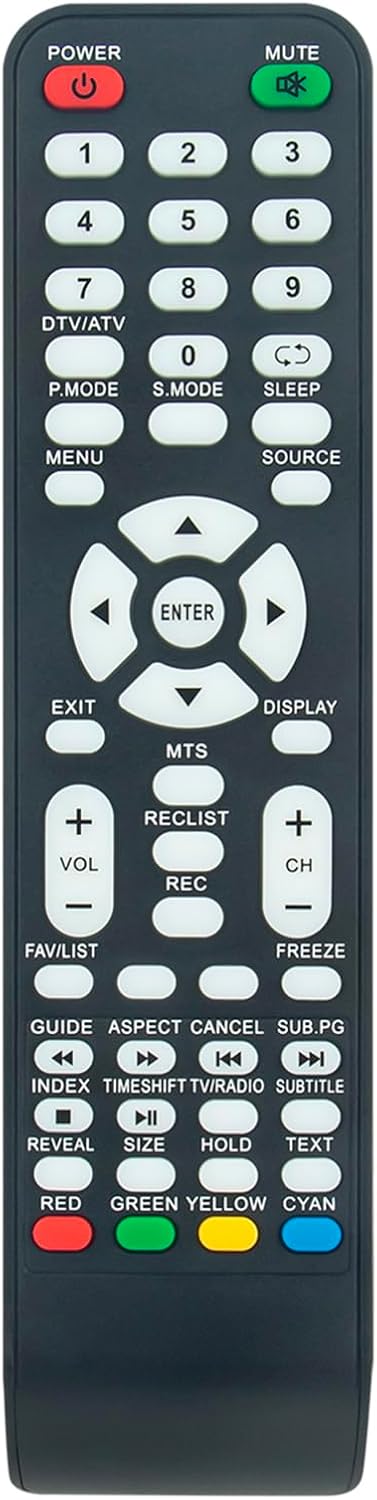
Figure 4.1: Straight-on front view of the remote control, showing the complete button layout.
4.1 Button Functions
| Button | Function |
|---|---|
| POWER | Turns the TV on or off. |
| MUTE | Mutes or unmutes the TV sound. |
| 0-9 | Direct channel selection. |
| DTV/ATV | Switches between Digital TV and Analog TV modes. |
| P.MODE | Cycles through picture modes (e.g., Standard, Dynamic, Movie). |
| S.MODE | Cycles through sound modes (e.g., Standard, Music, Movie). |
| SLEEP | Sets the sleep timer for automatic TV shutdown. |
| SOURCE | Selects the input source (e.g., HDMI, AV, USB). |
| MENU | Opens the main menu for TV settings. |
| ENTER | Confirms selections within menus. |
| Navigation Arrows (Up, Down, Left, Right) | Navigates through menu options and channels. |
| EXIT | Exits the current menu or function. |
| DISPLAY | Displays current channel information or TV status. |
| VOL +/- | Adjusts the volume level. |
| CH +/- | Changes the channel up or down. |
| MTS | Multi-channel Television Sound (audio language/mode selection). |
| RECLIST | Accesses the recording list (if supported by TV). |
| REC | Starts recording (if supported by TV). |
| FREEZE | Freezes the current image on screen. |
| FAV/LIST | Accesses favorite channels or channel list. |
| GUIDE | Opens the Electronic Program Guide (EPG). |
| ASPECT | Changes the screen aspect ratio. |
| CANCEL | Cancels current operation or menu. |
| SUB.PG | Accesses sub-pages in Teletext. |
| INDEX | Accesses Teletext index page. |
| TIMESHIFT | Activates or deactivates Time Shift function. |
| TV/RADIO | Switches between TV and Radio modes. |
| SUBTITLE | Turns subtitles on or off. |
| REVEAL | Reveals hidden text in Teletext. |
| SIZE | Changes Teletext display size. |
| HOLD | Holds the current Teletext page. |
| TEXT | Opens or closes Teletext. |
| Colored Buttons (RED, GREEN, YELLOW, CYAN) | Context-sensitive functions, often used in menus or Teletext. |
5. Maintenance
Proper maintenance ensures the longevity and optimal performance of your remote control.
- Cleaning: Use a soft, dry cloth to wipe the surface of the remote control. For stubborn dirt, slightly dampen the cloth with water. Avoid using harsh chemicals or abrasive cleaners.
- Battery Replacement: Replace batteries when the remote's response becomes sluggish or it stops functioning. Always replace both batteries at the same time.
- Storage: Store the remote control in a cool, dry place away from direct sunlight and extreme temperatures.
- Avoid Drops: Protect the remote from physical impact, as drops can damage internal components.
6. Troubleshooting
If you encounter issues with your remote control, refer to the following common troubleshooting steps:
| Problem | Solution |
|---|---|
| Remote is not responding. |
|
| Some buttons are not working. |
|
| Remote works intermittently. |
|
7. Specifications
| Feature | Detail |
|---|---|
| Brand | ALLIMITY |
| Model Number | QYSY-SMT2219DTS-QYSY |
| Product Dimensions | 4 x 12 x 0.3 cm |
| Weight | 70 grams |
| Connectivity Technology | Infrared |
| Controller Type | Button Control |
| Maximum Range | 10 meters |
| Battery Description | Alkaline |
| Special Feature | Ergonomic |
| Country of Origin | China |
8. Warranty and Support
Specific warranty information for this ALLIMITY replacement remote control is not provided in the product details. For any support inquiries or warranty claims, please refer to the seller or manufacturer's contact information provided at the point of purchase.
Related documentsQYSY-SMT2219DTS-QYSY

Ask a question about this manual
Ask about setup, troubleshooting, compatibility, parts, safety, or missing instructions. Manuals+ will review the question and use this page’s manual context to help answer it.