
Introduction
This manual provides instructions for the assembly, operation, and maintenance of your Fenge Dual Monitor Stand. Designed to enhance your workspace ergonomics and organization, this 42.5-inch wood desk shelf offers a stable platform for two monitors, integrated storage, and cable management solutions.
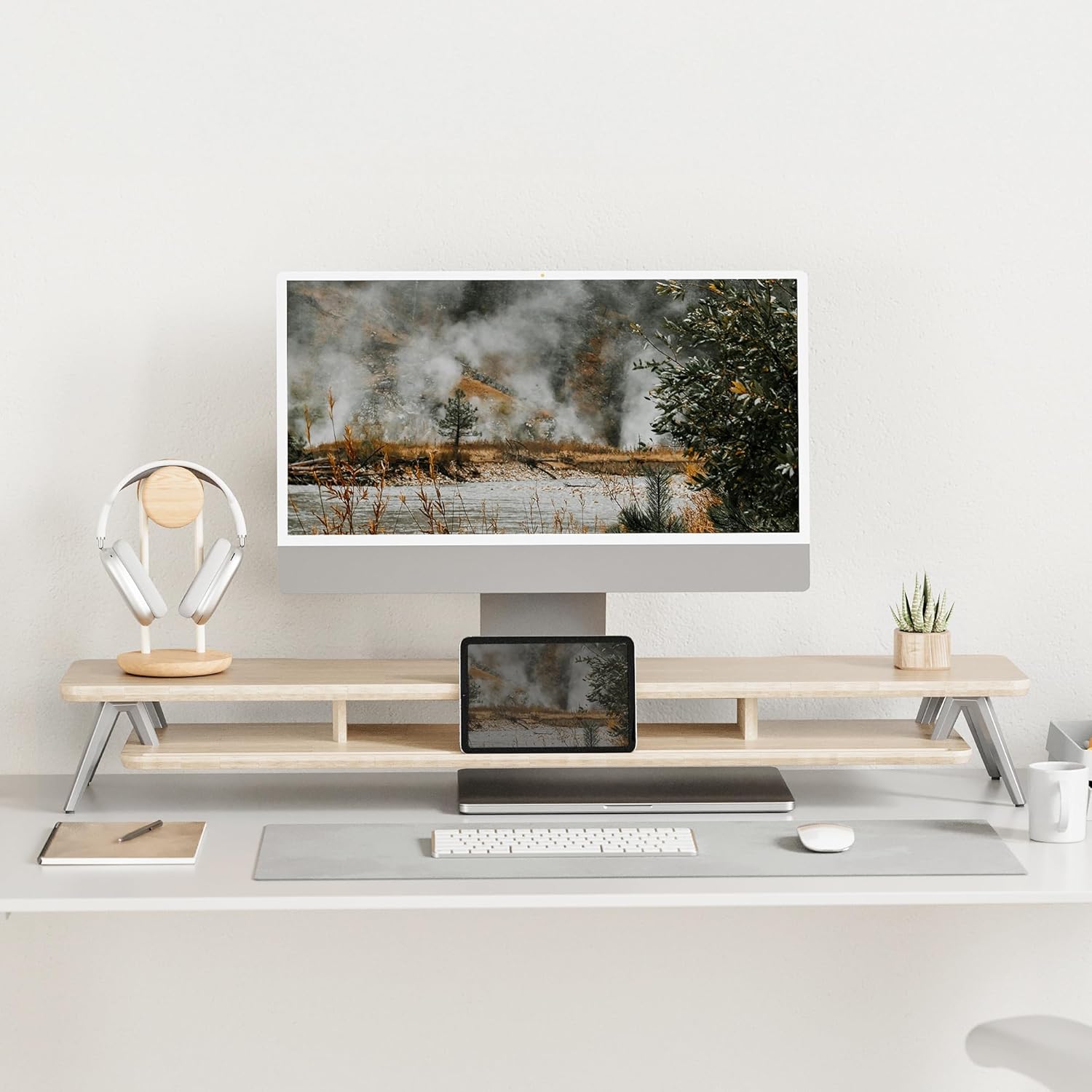
Image: The Fenge Dual Monitor Stand in an oak finish, supporting a single monitor and providing organized storage for desk accessories.
Safety Information
Please read and understand all safety instructions before assembly and use. Failure to follow these instructions may result in product damage or personal injury.
- Ensure all components are present and undamaged before assembly.
- Do not exceed the maximum load capacity of 99 lbs (45 kg).
- Assemble on a clean, flat, and stable surface to prevent scratches or damage.
- Keep small parts away from children to avoid choking hazards.
- Periodically check all connections to ensure they remain tight and secure.
Package Contents
Verify that all the following components are included in your package:
- Thickened MDF Panel (0.7 inch thickness) - Top Shelf
- Lower Shelf Panel with device holder slot and compartments
- Solid Aluminum Footing (4 pieces)
- Rubber Pads (4 pieces)
- Assembly Hardware (screws, dowels, Allen wrench)
- Instruction Manual
Setup and Assembly
Assembly of the Fenge Dual Monitor Stand is straightforward and typically takes 5-8 minutes. Follow these steps:
- Unpack Components: Carefully remove all parts from the packaging and lay them out on a soft, clean surface to prevent scratches. Verify all components are present using the package contents list.
- Attach Aluminum Feet to Lower Shelf: Secure the four solid aluminum footings to the designated points on the underside of the lower shelf using the provided screws and Allen wrench. Ensure they are tightened securely.
- Insert Dowels and Connect Shelves: Insert the wooden dowels into the pre-drilled holes on the top surface of the lower shelf. Align the top shelf with the dowels and the screw holes on the aluminum feet.
- Secure Top Shelf: Fasten the top shelf to the aluminum feet using the remaining screws. Tighten all screws firmly but do not overtighten.
- Apply Rubber Pads: Attach the rubber pads to the bottom of the aluminum feet to prevent scratching your desk surface and ensure stability.

Image: An illustration detailing the assembly process and key features like the M-type stable structure, integrated phone/tablet slot, and cable management trough.
Assembly Video Guide
Video: A demonstration of the Fenge monitor stand assembly and its design features.
Video: Customer feedback video showcasing the assembly process of the monitor stand.
Operating and Usage
The Fenge Dual Monitor Stand is designed to optimize your desk space and improve ergonomic posture. Here’s how to best utilize its features:
- Monitor Placement: Place up to two monitors on the top shelf. The 42.5-inch width accommodates most dual monitor setups.
- Ergonomic Height: The 5.7-inch height raises your monitors to an optimal viewing level, helping to reduce neck and shoulder strain during long work sessions.
- Storage Organization: Utilize the lower shelf's universal device holder slot and three high-capacity compartments to store office accessories, notebooks, tablets, or even a laptop.
- Cable Management: Route your cables through the integrated cable management slots to keep your workspace tidy and free from clutter.

Image: A visual comparison demonstrating the enhanced desktop organization achieved with the Fenge Dual Monitor Stand.
Usage Demonstration Videos
Video: A short video showcasing the Fenge monitor stand in various use cases and its organizational benefits.
Video: A video highlighting the Fenge monitor stand as a quality home office solution.
Video: A detailed video demonstrating the Fenge Dual Monitor Stand's features and how it integrates into a workspace.
Maintenance
To ensure the longevity and appearance of your Fenge Dual Monitor Stand, follow these simple maintenance guidelines:
- Cleaning: The MDF panel surface is waterproof and resistant to scratches and fingerprints. Clean regularly with a dry or lightly damp soft cloth. Avoid abrasive cleaners or harsh chemicals.
- Inspection: Periodically check all screws and connections to ensure they remain tight. Retighten if necessary.
- Avoid Overloading: Do not place items heavier than the specified load capacity (99 lbs / 45 kg) on the stand.
Troubleshooting
If you encounter any issues with your Fenge Dual Monitor Stand, consider the following common solutions:
- Wobbling/Instability: Ensure all screws are securely tightened. Check that the stand is placed on a flat, even surface. Verify the rubber pads are correctly installed on the feet.
- Scratches on Desk: Confirm that the rubber pads are properly attached to the bottom of the aluminum feet.
- Missing Parts: If any parts were missing upon arrival, refer to the Warranty & Support section for assistance.
Specifications
| Brand | Fenge |
| Model | 42.5 Inch Dual Monitor Stand |
| Color | Oak |
| Material | Engineered Wood (MDF), Aluminum |
| Item Dimensions (L x W x H) | 42.5 x 9.3 x 5.7 inches (1080 x 235 x 145 mm) |
| Item Weight | 8.35 Kilograms |
| Load Capacity | 99 Pounds (45 kg) |
| Number of Levels | 2 |
| Assembly Required | Yes |

Image: Technical drawing illustrating the precise dimensions and weight capacity of the monitor stand.
Warranty and Support
Fenge is committed to providing high-quality products and customer satisfaction. If you experience any quality issues, transport damage, or have questions regarding your Fenge Dual Monitor Stand, please contact our customer support for assistance.
We offer an unconditional return and refund service for quality and transport damage problems. Our support team is available to resolve any inquiries promptly.
For further assistance, please refer to the contact information provided with your purchase or visit the official Fenge website.
