Introduction
Thank you for purchasing the Panasonic TX-55MZ1500E 55-inch 4K OLED TV. This television combines advanced OLED display technology with smart features and high-performance processing to deliver an exceptional viewing and gaming experience. This manual provides essential information for setting up, operating, and maintaining your new television. Please read it thoroughly before use and retain it for future reference.

Image 1: Front view of the Panasonic TX-55MZ1500E 55-inch 4K OLED TV, showcasing its display quality with a night city scene.
Important Safety Information
To ensure safe operation and prevent damage, please observe the following safety precautions:
- Power Supply: Connect the TV only to an AC power source as indicated on the rating label.
- Ventilation: Do not block ventilation openings. Ensure adequate space around the TV for proper airflow.
- Water and Moisture: Do not expose the TV to rain or moisture. Do not place objects filled with liquids, such as vases, on the TV.
- Cleaning: Unplug the TV before cleaning. Use a soft, dry cloth. Avoid liquid cleaners or aerosol sprays.
- Placement: Place the TV on a stable, level surface. Avoid placing it in direct sunlight or near heat sources.
- Children: Supervise children to prevent them from climbing on the TV or stand.
- Servicing: Do not attempt to service this product yourself. Refer all servicing to qualified service personnel.
Package Contents
Before proceeding with the setup, please verify that all items listed below are included in your package:
- Panasonic TX-55MZ1500E 55-inch 4K OLED TV
- Remote Control (requires 1 AA battery, not always included)
- Power Cord
- TV Stand (if applicable, assembly required)
- Quick Start Guide
- Safety Information Leaflet
Note: The remote control requires one AA battery. Ensure you have this battery available for initial setup.
Setup Guide
1. Unpacking and Placement
- Carefully remove the TV from its packaging. It is recommended to have two people for this process due to the size and weight.
- Place the TV on a flat, stable surface or prepare for wall mounting (wall mount sold separately).
- Ensure there is adequate space around the TV for ventilation (at least 10 cm on all sides).
2. Stand Installation (if applicable)
If you are using the included TV stand, follow these steps:
- Place the TV screen-down on a soft, clean cloth to prevent scratches.
- Attach the stand base to the TV using the provided screws, ensuring it is securely fastened. Refer to the Quick Start Guide for specific screw locations and types.
- Carefully lift the TV with the stand and place it in your desired viewing location.
3. Connecting Devices
The TX-55MZ1500E offers various connectivity options. Refer to the side view image for port locations.

Image 2: Side profile of the Panasonic TX-55MZ1500E, highlighting the slim design and accessible input ports.
- HDMI: Connect your Blu-ray player, game console, or set-top box to the HDMI ports. This model supports HDMI 2.1 for high-refresh-rate gaming and advanced features.
- USB: Connect USB storage devices for media playback or software updates. The TV has 1 USB port.
- Antenna/Cable: Connect your antenna or cable TV feed for broadcast channels.
- Ethernet (LAN): For a stable wired internet connection.
- Optical Digital Audio Out: For connecting to an external sound system.
4. Power Connection and Initial Setup
- Connect the power cord to the TV and then to a wall outlet.
- Insert the AA battery into the remote control.
- Press the Power button on the remote control to turn on the TV.
- Follow the on-screen instructions to complete the initial setup, which typically includes:
- Language selection
- Country/Region selection
- Network connection (Wi-Fi or wired Ethernet)
- Channel scanning (for antenna/cable)
- Time zone settings
Operating Your TV
Basic Functions
- Power On/Off: Press the Power button on the remote control.
- Volume Control: Use the Volume Up/Down buttons.
- Channel Selection: Use the Channel Up/Down buttons or enter channel numbers directly.
- Input Selection: Press the Input button to switch between connected devices (HDMI 1, HDMI 2, etc.).
- Menu Navigation: Use the arrow keys and OK button to navigate on-screen menus.
Smart TV Features (Smart TV OS)
Your Panasonic TX-55MZ1500E runs on a Smart TV OS, providing access to a wide range of online content and applications.
- Accessing Apps: From the home screen, select your desired application, such as Netflix or YouTube.
- Internet Browsing: Use the built-in web browser to access websites.
- Wireless Streaming: Utilize features like Mirroring, Swipe & Share, and DLNA to stream content from compatible devices.
Picture and Sound Settings
The TV features the HCX Pro AI processor for advanced image processing and supports various HDR formats.
- Picture Modes: Select from various preset picture modes (e.g., Standard, Cinema, Game, Custom) to optimize viewing for different content.
- HDR Support: The TV supports HDR10+, HDR10, HLG, and Dolby Vision, automatically adjusting for optimal contrast and color with compatible content.
- Sound Modes: Adjust audio settings for different content types (e.g., Standard, Music, Speech).
Gaming Features
Designed for a high-level gaming experience, this TV includes:
- Low Input Lag: Minimizes delay between controller input and on-screen action.
- HDMI 2.1: Supports advanced gaming features like Variable Refresh Rate (VRR) and Auto Low Latency Mode (ALLM) on compatible devices.
- Game Control Board: Access specific gaming settings and information quickly.
Maintenance and Care
Proper care will extend the life of your television.
- Screen Cleaning: Gently wipe the screen with a soft, dry microfiber cloth. For stubborn marks, slightly dampen the cloth with water or a specialized screen cleaner (apply to cloth, not directly to screen). Do not use alcohol, benzene, or abrasive cleaners.
- Cabinet Cleaning: Wipe the TV cabinet with a soft, dry cloth.
- Dusting: Regularly dust the ventilation openings to prevent overheating.
- Power Off: Always unplug the TV from the power outlet before cleaning.
Troubleshooting
If you encounter issues with your TV, refer to the following common problems and solutions:
| Problem | Possible Cause / Solution |
|---|---|
| No power |
|
| No picture, but sound is present |
|
| No sound, but picture is present |
|
| Cannot connect to Wi-Fi |
|
| Remote control not working |
|
Specifications
Key technical specifications for the Panasonic TX-55MZ1500E:
| Feature | Detail |
|---|---|
| Model Name | TX-55MZ1500E |
| Brand | Panasonic |
| Screen Size | 55 inches (139 cm) |
| Display Technology | OLED |
| Resolution | 4K Ultra HD (3840 x 2160) |
| Refresh Rate | 100 Hz |
| Processor | HCX Pro AI |
| HDR Support | HDR10+, HDR10, HLG, Dolby Vision |
| Operating System | Smart TV OS |
| Internet Services | Netflix, YouTube, and more |
| Connectivity | HDMI (HDMI 2.1 compatible), Wi-Fi, USB (1 port) |
| Aspect Ratio | 16:9 |
| Included Components | Remote Control |
| Power Consumption (SDR) | 84 kWh/1000h |
| Power Consumption (HDR) | 120 kWh/1000h |
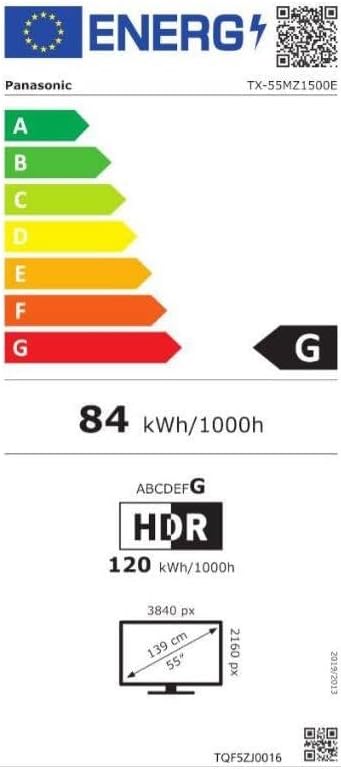
Image 3: Energy efficiency label for the Panasonic TX-55MZ1500E, detailing power consumption and display resolution.
Warranty and Support
Panasonic products are manufactured to high-quality standards. For information regarding your product's warranty, please refer to the warranty card included in your package or visit the official Panasonic website for your region.
For technical support, troubleshooting assistance beyond this manual, or service inquiries, please contact Panasonic customer support. Contact details can typically be found on the Panasonic website or in your product documentation.


