Introduction
This manual provides detailed instructions for the safe and effective use of your GOPLANT GP-V06 1500 Lumens Weapon Laser Light Combo. Please read this manual thoroughly before operation and retain it for future reference.
Safety Information
- Laser Radiation: Avoid direct eye exposure to the laser beam. Laser radiation can cause permanent eye damage.
- Weapon Safety: Always follow all applicable firearm safety rules. Ensure the weapon is unloaded and pointed in a safe direction before attaching, detaching, or adjusting the light/laser combo.
- Heat: The flashlight head may become hot during prolonged use. Avoid touching it directly after extended operation.
- Water Resistance: The device is IPX7 waterproof, meaning it can withstand immersion in water up to 1 meter for 30 minutes. However, it is not designed for prolonged underwater use.
- Children: Keep this product out of reach of children.
Package Contents
- 1 x GOPLANT GP-V06 Pistol Light
- 1 x User Manual
- 1 x Hex Key
- 1 x One-way Screwdriver
- 1 x USB-C Charging Cable
Product Overview
The GOPLANT GP-V06 is a versatile weapon-mounted light and laser combo designed for tactical applications. It features a high-brightness LED flashlight and a green laser for enhanced targeting. The unit is rechargeable via USB-C and constructed from durable aluminum alloy.
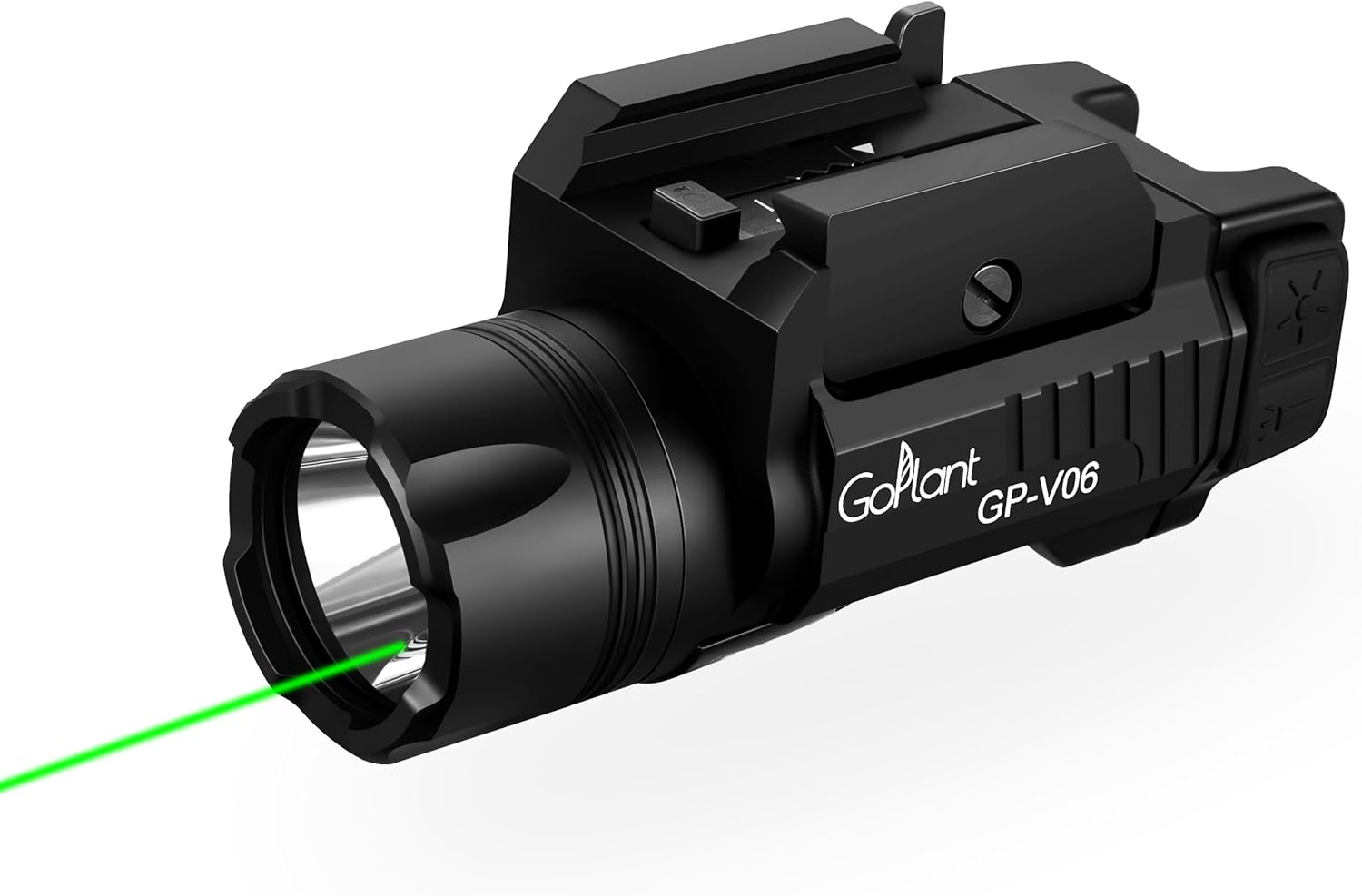
Image: The GOPLANT GP-V06 unit, showcasing its compact design and integrated light and laser components.

Image: Visual representation of the GP-V06 highlighting its 1500 Max Lumens output and 160 minutes Max Runtime.
Setup
Mounting the Device
The GP-V06 features a quick-release Picatinny rail design for easy attachment and detachment. Ensure your pistol's rail space is at least 2.45 inches (63mm) for optimal fit.
- Adjust Bayonet Size: If necessary, remove the buckle and adjust the bayonet size to fit your rail.
- Slide onto Rail: Press the left side lever and slide the clamp teeth onto your weapon's rail.
- Secure in Place: Release the lever to lock the device onto the rail. Use the provided one-way screwdriver to adjust the screw for desired tightness.
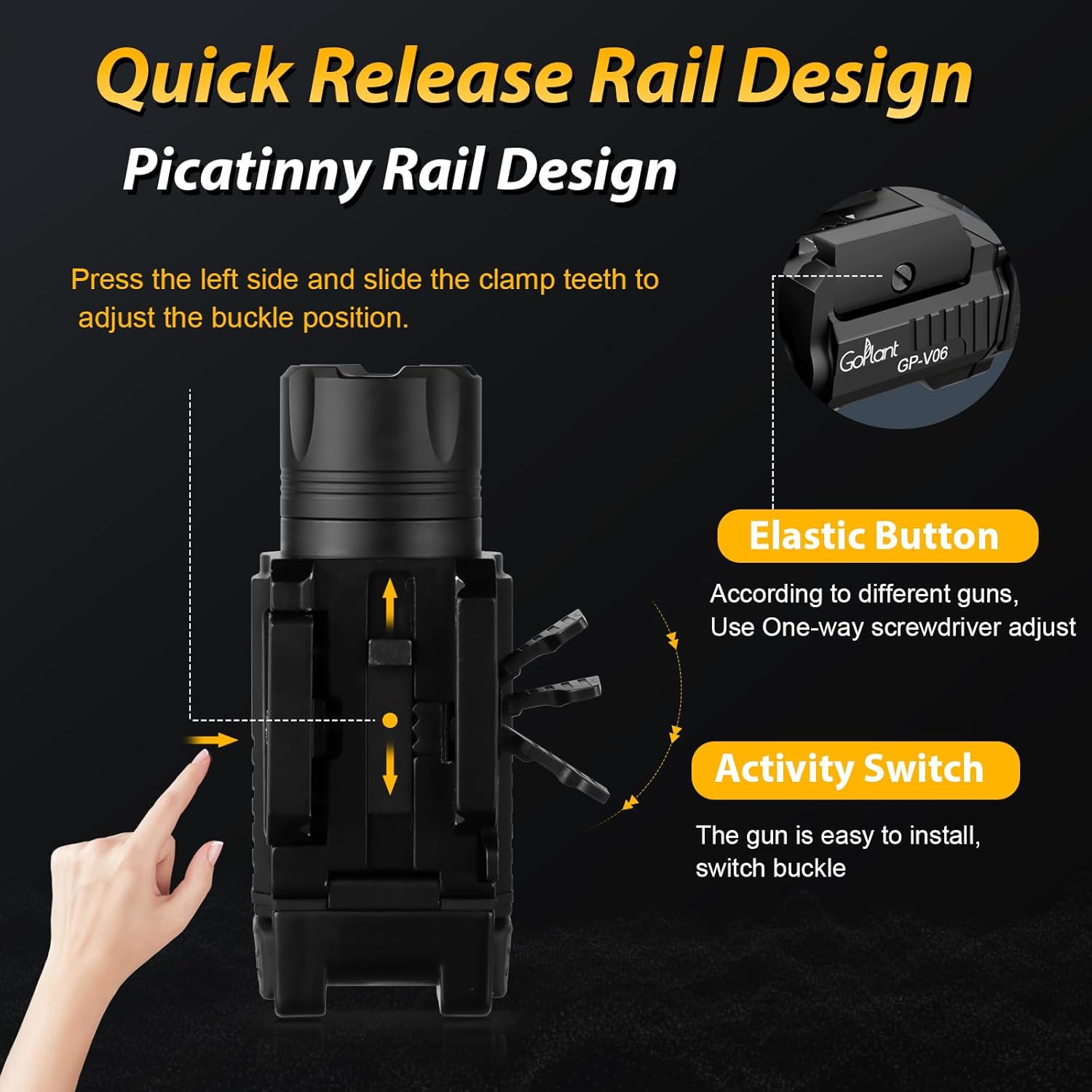
Image: Diagram illustrating the quick-release rail design, showing the lever and adjustable clamp teeth for secure mounting.

Image: A visual guide demonstrating the compatibility of the GP-V06 with various pistol types, emphasizing the required rail length.
Charging the Device
The GP-V06 features a built-in 1400mAh rechargeable battery and charges via a Type-C port.
- Locate the Type-C charging port on the device, typically covered by a rubber flap.
- Open the rubber flap and insert the provided USB-C charging cable.
- Connect the other end of the cable to a standard USB power source (e.g., wall adapter, computer USB port).
- The charging indicator light will show the charging status. A full charge takes approximately 45 minutes.

Image: Close-up of the Type-C charging port, indicating the 1400mAh battery capacity and 45-minute charging time.
Operating Instructions
The GP-V06 features ambidextrous switches for easy operation by both left-handed and right-handed users.
Light Modes (White LED)
The white LED flashlight offers three modes: Strong Light, Low Light, and Strobe.
- Strong Light: Short press either side switch once.
- Strobe: Press either side switch twice continuously.
- Low Light: Press either side switch three times continuously.

Image: Illustration of the three light modes: Green Laser Only, Flashlight + Laser, and Flashlight Only.
Laser Operation (Green Laser)
The green laser can be activated independently or in conjunction with the flashlight.
- Activate Laser: Use the dedicated laser switch (if separate) or cycle through modes via the main switches until the green laser is active.
- Laser Adjustment: Use the provided hex key to adjust the laser's windage (left/right) and elevation (up/down) for precise targeting.

Image: Diagram showing the adjustment points for the laser's windage and elevation using a hex key.
Maintenance
- Cleaning: Use a soft, damp cloth to clean the device. Do not use abrasive cleaners or solvents.
- Lens Care: Keep the flashlight lens and laser aperture clean for optimal performance. Use a lens cleaning cloth if necessary.
- Charging: Recharge the device regularly to maintain battery health, especially if stored for extended periods.
- Storage: Store the device in a cool, dry place away from direct sunlight and extreme temperatures.
Troubleshooting
| Problem | Possible Cause | Solution |
|---|---|---|
| Light/Laser does not turn on | Low battery; Device is off | Charge the device; Ensure switches are pressed correctly |
| Light/Laser is dim | Low battery; Dirty lens/aperture | Charge the device; Clean lens/aperture |
| Device is loose on rail | Mounting screw not tightened; Incorrect rail adjustment | Tighten the mounting screw with the provided screwdriver; Adjust the clamp teeth for a snug fit |
| Laser is not accurate | Laser not zeroed | Adjust laser windage and elevation using the hex key |
Specifications
- Model: GP-V06
- Light Output: 1500 Lumens (White LED)
- Laser Type: Green Laser
- Runtime: Up to 160 minutes
- Battery: 1400mAh Lithium-Ion (Built-in)
- Charging: Type-C USB
- Material: Aluminum Alloy
- Water Resistance: IPX7 (1 meter for 30 minutes)
- Drop Resistance: 1 meter
- Dimensions: 3.3"D x 1.54"W x 1.43"H (8.4cm x 3.9cm x 3.6cm)
- Weight: 3.52 ounces (100g)

Image: Detailed product dimensions of the GP-V06 unit.

Image: Highlighting the IPX7 waterproof rating and durable aluminum alloy construction of the device.
Warranty and Support
For warranty information or technical support, please refer to the contact details provided with your purchase or visit the official GOPLANT website. Keep your purchase receipt as proof of purchase.