
1. Introduction
This manual provides essential information for the safe and efficient use of your Kenmore 24-inch Built-in Dishwasher, Model 2214599. This appliance is designed to deliver thorough cleaning with advanced features such as the SmartWash Cycle, UltraWash system, SmartDry Plus technology, and a Leak Detect System. Please read this manual carefully before operating your dishwasher.

Figure 1.1: Front view of the Kenmore 24-inch Built-in Dishwasher (Black).
Key Features:
- SmartWash Cycle: Automatically adjusts wash settings based on soil level.
- UltraWash System: Two spray arms provide comprehensive cleaning from multiple angles.
- SmartDry Plus: Utilizes hot water for condensation drying, with an Extra Dry option for difficult items.
- 3-Stage UltraWash Filter: Captures and removes food particles for consistently clean dishes.
- Leak Detect System: Monitors water flow and drains the tub if a leak is detected.
- MoreSpace Adjustable Rack: Provides flexibility for loading various dish sizes, accommodating up to 14 place settings.
- Energy Star Certified: Designed for energy and water efficiency.
2. Safety Information
Please observe the following safety precautions to reduce the risk of fire, electric shock, or injury.
- Read all instructions before using the dishwasher.
- This appliance must be properly grounded. Connect to a properly rated, protected, and sized power supply circuit.
- Do not operate the dishwasher if it has a damaged power cord or plug, or if it is not working properly.
- Keep children away from the dishwasher, especially when it is operating.
- Use only detergents and rinse agents recommended for automatic dishwashers.
- Load sharp items so they are not likely to damage the door seal or tub.
- Do not tamper with controls.
- Do not sit, stand, or place heavy objects on the door or racks of the dishwasher.
3. Setup and Installation
Proper installation is crucial for the performance and safety of your dishwasher. It is recommended that installation be performed by a qualified technician.
Installation Requirements:
- Location: The dishwasher is designed for built-in installation under a standard countertop.
- Electrical: Requires a 115 Volt, 60 Hz, AC only, 15-amp or 20-amp fused electrical supply.
- Water Supply: Hot water supply line with a minimum pressure of 20 psi (138 kPa) and a maximum of 120 psi (827 kPa).
- Drain: Proper drain hose connection to a sink drain or garbage disposal.

Figure 3.1: Tools and parts for installation. This includes hot water supply line, metallic strain, compression hose, cabinet grommet, power cord kit, hose clamp, steam protection foil, mounting brackets, screws, long legs, side trim, handle, setscrew, and hex key.
Initial Use:
- After installation, ensure all connections are secure and there are no leaks.
- Add rinse aid to the dispenser.
- Run a short cycle without dishes to flush the system and check for proper operation.
4. Operating Instructions
Your Kenmore dishwasher offers various cycles and options to ensure optimal cleaning for different types of loads.
Loading the Dishwasher:
Proper loading improves cleaning performance and drying efficiency.
- Lower Rack: Place larger items like plates, bowls, and pots. Ensure items do not block the spray arms.
- Upper Rack: Ideal for glasses, cups, and smaller bowls. The MoreSpace Adjustable Upper Rack can be raised or lowered to accommodate taller items or delicate stemware.
- Cutlery Basket: Place forks and spoons with handles up, and knives with handles down for safety.

Figure 4.1: Dishwasher interior with adjustable upper rack and control panel. The image highlights the flexibility of the MoreSpace Adjustable Upper Rack, the Time Remaining Display, and easy-to-use push-button controls.
Control Panel:
The control panel is located on the top edge of the dishwasher door and features touch controls for cycle and option selection.
Wash Cycles:
Select the appropriate cycle based on the soil level and type of dishes.

Figure 4.2: Dishwasher interior showcasing the range of cycles and options available. This includes 6 wash cycles (Normal, Smart Wash, Pots & Pans, Delicate, Express, Quick Rinse) and 6 options (Half Load, Sani Rinse, High Temp, Extra Rinse, Extra Dry, Delay).
- Normal: For regular loads with average soil.
- SmartWash: Automatically detects soil level and adjusts wash settings.
- Pots & Pans: For heavily soiled cookware and bakeware.
- Delicate: Gentle wash for fragile items and fine china.
- Express: Cleans a full load in approximately 50 minutes.
- Quick Rinse: Rinses dishes to prevent odors and dried-on food before a full wash.
Wash Options:
Customize your wash cycle with these additional options.
- Delay Start: Delays the start of the cycle by 1 to 24 hours.
- Half Load: For smaller loads, washing only items in one rack.
- Extra Dry: Extends drying time and boosts heat for plastics and hard-to-dry items.
- Sani Rinse: Uses high-temperature water to sanitize dishes and glassware.
- High Temp: Boosts water temperature for enhanced cleaning and grease removal.
- Extra Rinse: Adds an additional rinse for thorough cleaning, especially for heavily soiled items.
Starting a Wash Cycle:
- Load dishes according to guidelines.
- Add detergent to the dispenser and close it.
- Ensure rinse aid dispenser is filled.
- Select your desired wash cycle.
- Select any desired wash options.
- Press the Start button to begin the cycle.
5. Maintenance
Regular maintenance ensures optimal performance and longevity of your dishwasher.
Cleaning the 3-Stage UltraWash Filter:
The filter should be cleaned monthly to prevent food particles from redepositing on dishes.
- Turn off the dishwasher power.
- Locate the filter assembly at the bottom of the dishwasher tub.
- Twist and lift the filter to remove it.
- Rinse the filter under running water to remove any trapped food particles. Use a soft brush if necessary.
- Reinsert the filter and twist to lock it into place.
General Care:
- Exterior: Wipe the exterior with a soft, damp cloth. For stainless steel finishes, use a stainless steel cleaner.
- Interior: Periodically clean the interior with a dishwasher cleaner or a mixture of vinegar and baking soda to remove mineral buildup and odors.
- Door Seal: Wipe the door seal regularly to remove food debris and prevent mold growth.
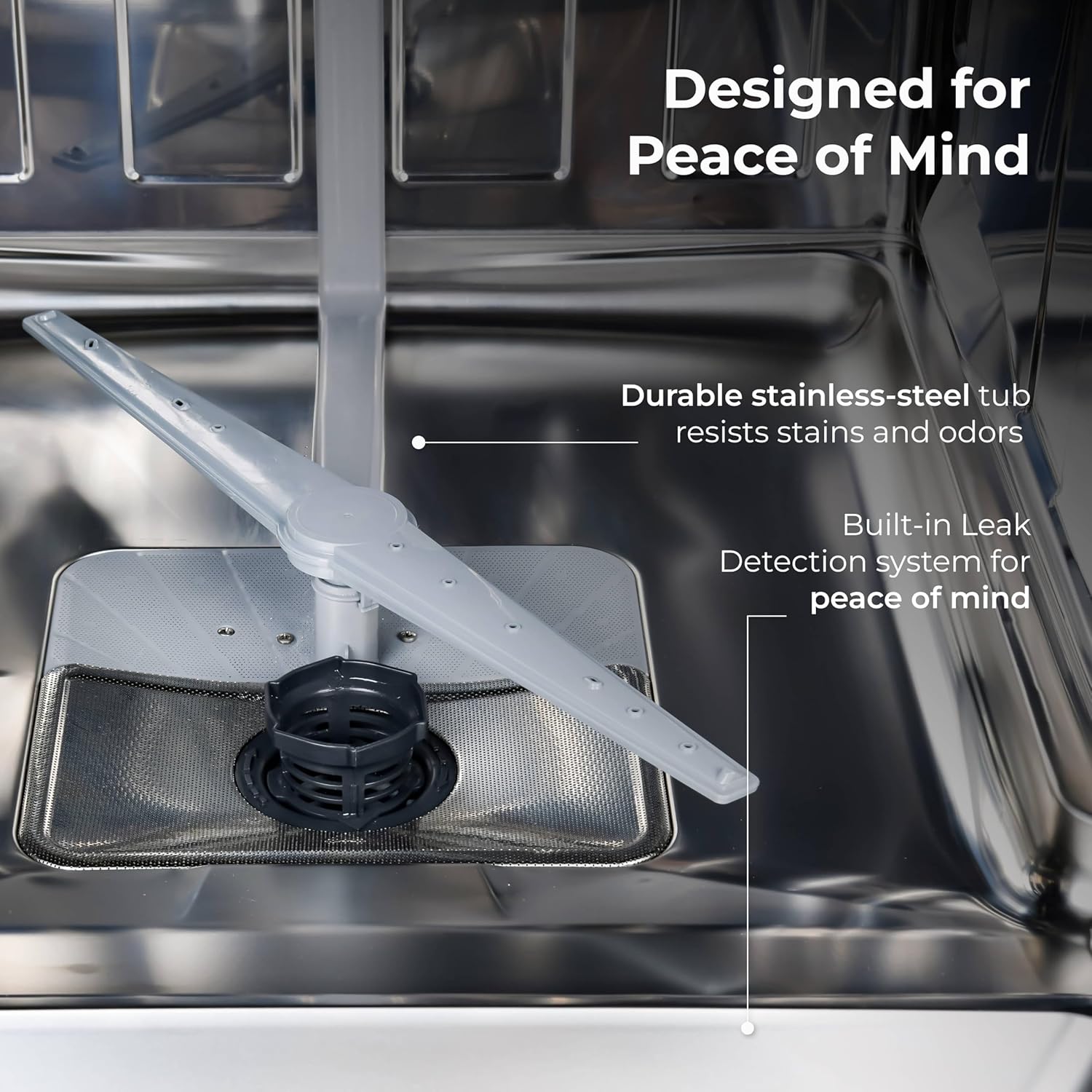
Figure 5.1: Dishwasher interior with durable stainless-steel tub and built-in Leak Detection system. The stainless steel tub resists stains and odors, contributing to the appliance's longevity.
6. Troubleshooting
Before calling for service, review these common issues and their solutions.
| Problem | Possible Cause | Solution |
|---|---|---|
| Dishwasher does not start | Power supply issue, door not closed properly, cycle not selected. | Check power, ensure door is latched, select a cycle and press Start. |
| Dishes are not clean | Improper loading, clogged filter, insufficient detergent, spray arms blocked. | Reload dishes, clean filter, use correct detergent amount, ensure spray arms rotate freely. |
| Dishes are not drying | No rinse aid, Extra Dry option not selected, improper loading. | Refill rinse aid, select Extra Dry, ensure proper spacing for air circulation. |
| Water leaks from dishwasher | Door seal damaged, improper installation, hose connection loose. | Check door seal, verify hose connections, contact service if Leak Detect System activates repeatedly. |
| Unusual noise during operation | Items interfering with spray arms, foreign object in pump, normal operating sounds. | Ensure dishes do not block spray arms, check for foreign objects, some sounds are normal (e.g., water circulation). |
7. Specifications
Detailed technical specifications for the Kenmore 24-inch Built-in Dishwasher, Model 2214599.

Figure 7.1: Dishwasher dimensions. Height: 33 7/8", Length: 23 9/16", Depth: 24 3/5".
| Specification | Value |
|---|---|
| Brand | Kenmore |
| Model Number | 2214599 |
| Installation Type | Built-In |
| Product Dimensions (D x W x H) | 24.61" x 23.55" x 33.88" |
| Item Weight | 90.4 pounds |
| Capacity | 14 Place Settings |
| Inner Material | Stainless Steel |
| Noise Level | 51 dB |
| Voltage | 115 Volts |
| Annual Energy Consumption | 239 Kilowatt Hours Per Year |
| Certification | Energy Star |
| Controls Type | Touch |
| Included Components | Cutlery Basket |
8. Warranty and Support
Warranty Information:
This Kenmore dishwasher may be eligible for extended protection plans. For specific warranty details, please refer to the documentation provided with your purchase or contact Kenmore customer service.
A 3-Year Protection Plan may be available for purchase separately to cover repairs and parts beyond the standard manufacturer's warranty.
Customer Support:
For technical assistance, service scheduling, or to order replacement parts, please contact Kenmore customer support. You can find contact information on the Kenmore website or in your product registration materials.
Online resources and FAQs may also be available on the official Kenmore website: Visit the Kenmore Store


