1. Introduction
The GFTVRCE Chameleon Ultra is a versatile and portable RFID tool designed for emulation, cloning, and analysis of various RFID tags and cards. Built with an NRF52840 hardware foundation, it offers advanced functionalities for professionals and enthusiasts in RFID technology. This device allows users to create copies of RFID tags, emulate different RFID systems for testing, and identify potential vulnerabilities in RFID-based access control systems.
2. Package Contents
Upon unboxing your Chameleon Ultra, please verify that all components are present:
- Chameleon Ultra Device
- USB Charging Cable
- Blank RFID Cards (various types)
- Blue Key Fobs (various types)
Video demonstrating the unboxing and package contents of the Chameleon Ultra device.
3. Setup
To begin using your Chameleon Ultra, follow these initial setup steps:
- Charge the Device: Connect the Chameleon Ultra to a power source using the provided USB cable. The device will indicate charging status via its LED indicators.
- Install the Companion App: Download and install the official Chameleon Ultra companion application on your smartphone. This app is essential for controlling the device and managing RFID data.
- Connect via Bluetooth: Power on the Chameleon Ultra. Open the companion app and follow the on-screen instructions to connect your device via Bluetooth. Ensure Bluetooth is enabled on your smartphone.
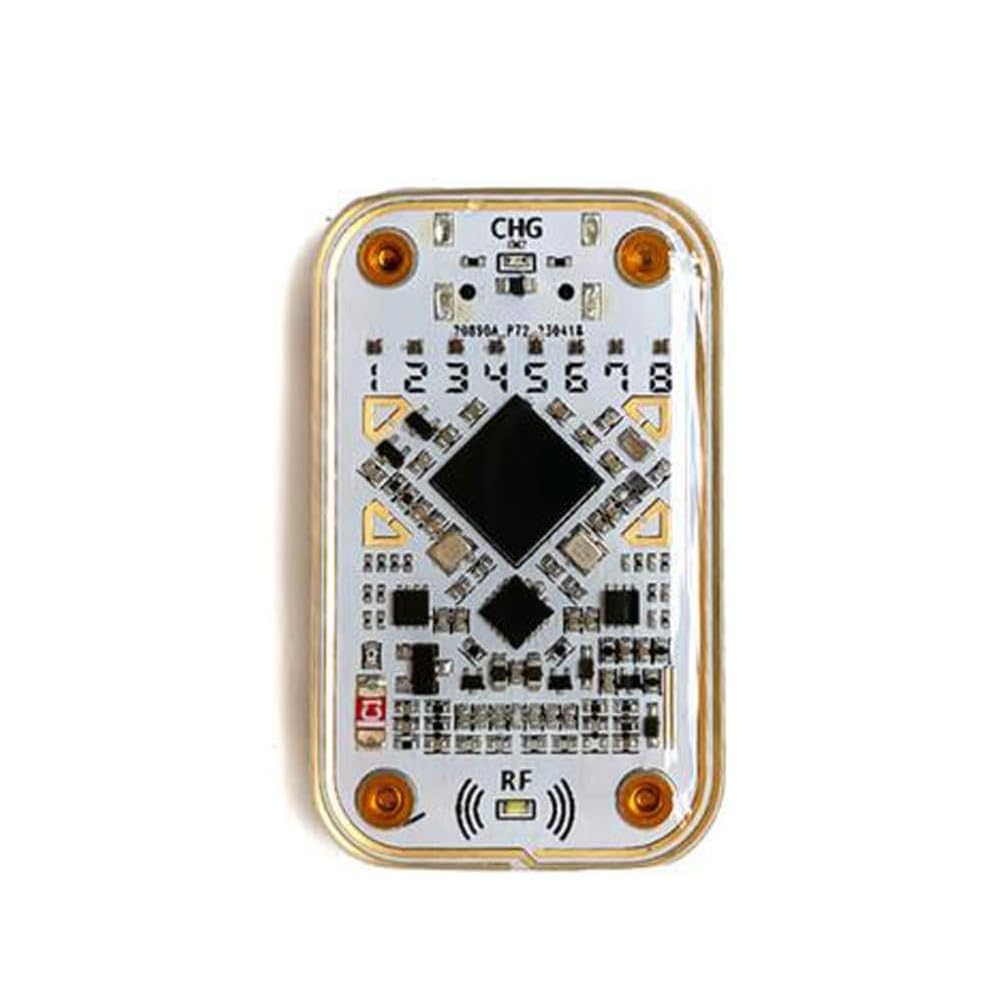
The Chameleon Ultra device, powered on and ready for operation.
4. Operating Instructions
4.1. Emulation
The Chameleon Ultra can emulate various RFID tags and systems. This feature is useful for testing RFID readers and systems without needing the physical tag.
- Program the Chameleon Ultra with specific data and commands using the companion app.
- Place the Chameleon Ultra near an RFID reader to emulate the desired tag.
4.2. Cloning
Cloning allows you to create duplicates of existing RFID tags. This is beneficial for replacing lost tags or creating multiple copies.
- Place the original RFID tag on the Chameleon Ultra to read its data.
- Save the read data within the companion app.
- Place a blank, compatible RFID tag on the Chameleon Ultra.
- Use the app to write the saved data to the blank tag, creating a clone.
4.3. Testing
The device can be used to test and validate RFID reader and system behavior under various conditions.
- Emulate tags with weak signals or different frequencies to assess system robustness.
- Identify potential vulnerabilities or weaknesses in RFID systems.
4.4. Reading and Writing ID Cards
The Chameleon Ultra simplifies the process of reading and writing data to ID cards and key fobs.
- Connect Device: Ensure your Chameleon Ultra is connected to the companion app on your phone.
- Read ID Card: Place the ID card or key fob on the back of the Chameleon Ultra device. In the app, navigate to the 'Read Card' section and tap 'Read' for either HF or LF tag info. The device will read the card's data.
- Save Data: After reading, save the card's data within the app, assigning a name for easy identification.
- Prepare for Writing: Take a blank ID card or key fob that is compatible with the data you wish to write.
- Write Data: In the app, go to the 'Write Card' section. Select the previously saved data. Place the blank card on the back of the Chameleon Ultra and tap 'Write data'.
- Verify: After writing, you can re-read the newly written card to confirm the data was transferred successfully.
Video demonstrating the process of reading, saving, and writing ID card data using the Chameleon Ultra and its companion app.
5. Specifications
| Feature | Description |
|---|---|
| Brand | GFTVRCE |
| Model | Chameleon Ultra |
| Color | White |
| Material | Plastic |
| Included Components | NFC device, USB cable, blank cards/fobs |
| Display Type | LCD |
6. Supported Functions
6.1. Low Frequency Attack Functions
The Chameleon Ultra supports various low-frequency attack types for analysis and testing.
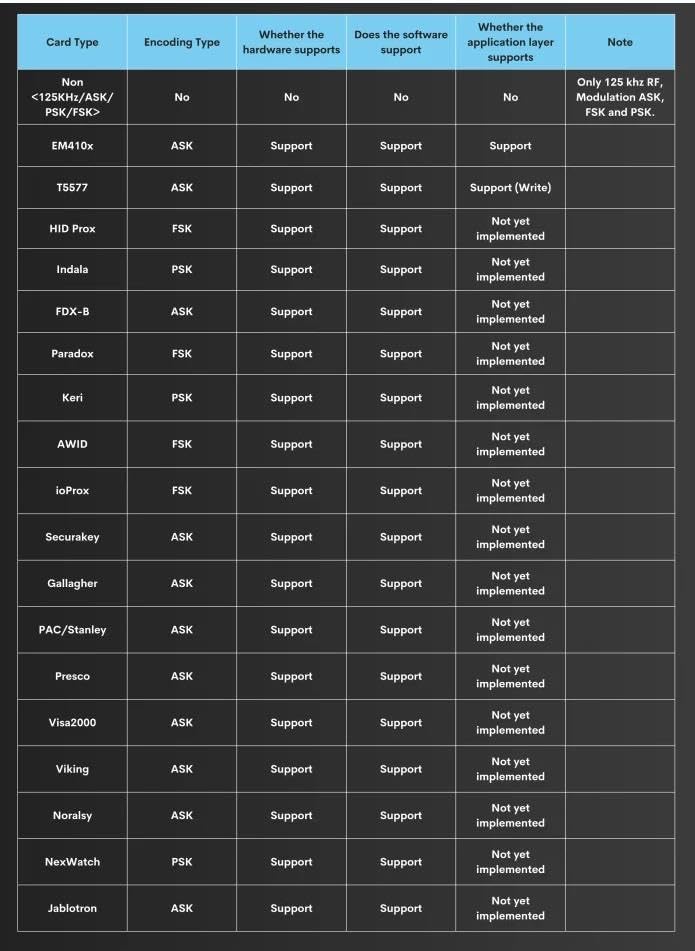
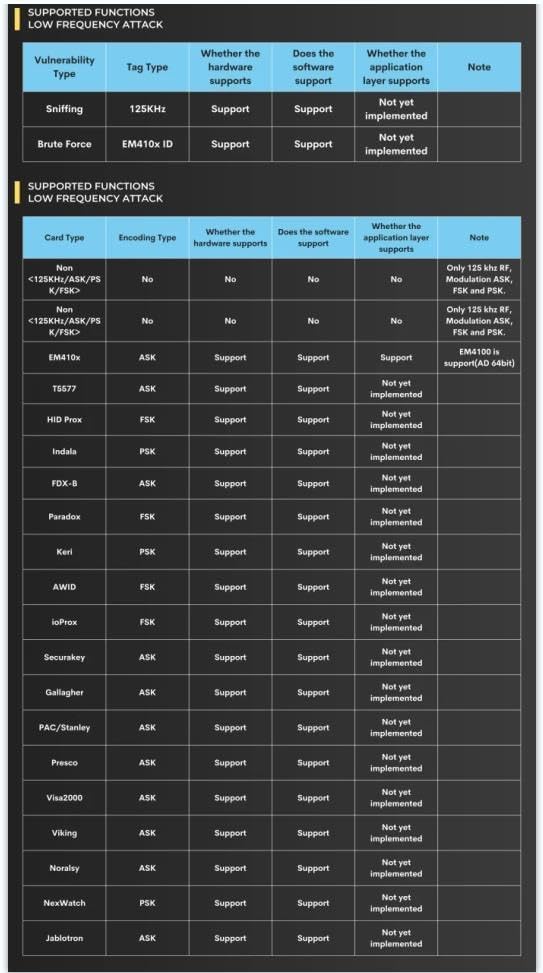
Detailed tables outlining the Chameleon Ultra's capabilities for low-frequency RFID attack and analysis, including supported card types and encoding methods.
6.2. High Frequency Reader Functions
The device is capable of reading various high-frequency card types.

Table showing the high-frequency RFID card types supported by the Chameleon Ultra for reading, including MIFARE Classic, Ultralight, DESFire, and NTAG.
6.3. High Frequency Attack Functions
The Chameleon Ultra also supports various high-frequency attack types for security testing.
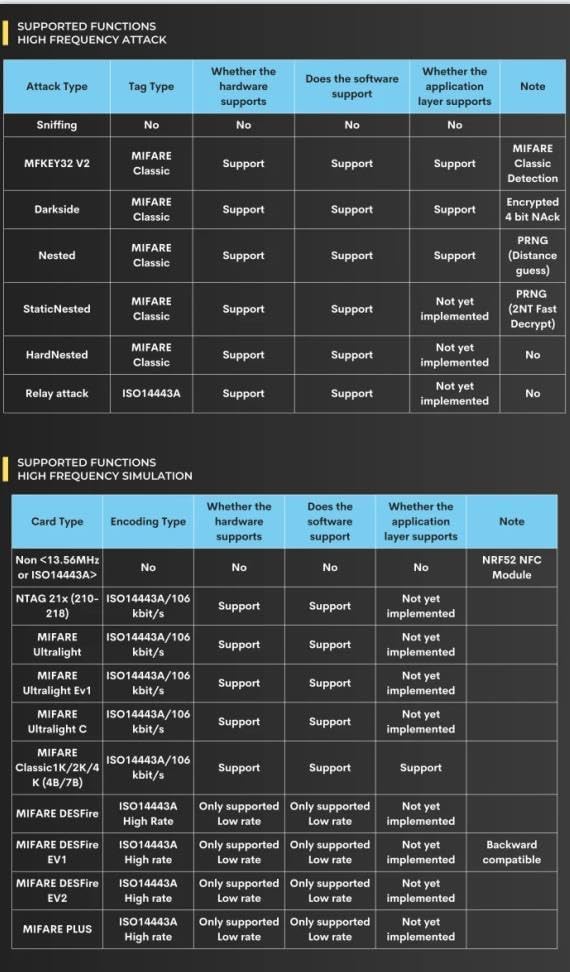
Table illustrating the high-frequency RFID attack functions supported by the Chameleon Ultra, such as sniffing, MFKEY32 V2, Darkside, Nested, StaticNested, HardNested, and Relay attack.
6.4. Product Comparison Chart
A comparison of the Chameleon Ultra's features and performance against similar RFID products.

Comparison of Chameleon Ultra's features and performance metrics against other RFID tools.
7. Maintenance
Proper maintenance ensures the longevity and optimal performance of your Chameleon Ultra device:
- Cleaning: Use a soft, dry cloth to clean the device. Avoid using harsh chemicals or abrasive materials.
- Storage: Store the device in a cool, dry place away from direct sunlight and extreme temperatures.
- Battery Care: For optimal battery life, avoid fully discharging the device frequently. Charge it regularly, even if not in constant use.
- Software Updates: Regularly check for and install firmware updates for the Chameleon Ultra and updates for the companion app to ensure you have the latest features and security enhancements.
8. Troubleshooting
If you encounter issues with your Chameleon Ultra, try the following troubleshooting steps:
- Device Not Connecting: Ensure Bluetooth is enabled on your phone and the Chameleon Ultra is powered on. Try restarting both the device and the app.
- Reading/Writing Errors: Ensure the RFID tag or card is correctly positioned on the device. Verify that the tag type is supported by the Chameleon Ultra. Some magic cards may require specific settings or may not be writable.
- App Issues: Clear the app's cache or reinstall the app if it's behaving unexpectedly.
- No Power: Check the USB cable and power source. Ensure the device is fully charged.
If problems persist, please refer to the support section for further assistance.
9. Warranty and Support
The GFTVRCE Chameleon Ultra comes with a standard manufacturer's warranty. Please retain your proof of purchase for warranty claims.
For technical support, warranty inquiries, or further assistance, please contact GFTVRCE customer service through the retailer where the product was purchased or visit the official GFTVRCE support website.


