
1. Introduction
Thank you for choosing the Pritech PBP-307 Digital Bathroom Scale. This scale features a large, eco-friendly bamboo platform, a clear LCD display, and high-precision sensors for accurate weight measurement. Designed for ease of use, it includes automatic on/off functionality and indicators for temperature and battery status. Please read this manual carefully before use to ensure proper operation and maintenance.
2. Safety Information
- Do not use this scale on wet or slippery surfaces. Ensure the platform is dry before stepping on it.
- Do not jump on the scale or use it for purposes other than weighing.
- Keep the scale away from extreme temperatures, direct sunlight, and high humidity.
- Avoid dropping the scale or subjecting it to strong impacts, as this may damage the sensors.
- Do not attempt to disassemble or repair the scale yourself. Contact customer support if issues arise.
- Keep batteries out of reach of children. Dispose of used batteries responsibly.
3. Package Contents
The package should contain the following items:
- 1 x Pritech PBP-307 Digital Bathroom Scale with Bamboo Platform
- 1 x Warranty Card
4. Product Features
- Eco-friendly Bamboo Platform: Large 280 x 280 mm surface with a durable, slim design.
- High Precision: Equipped with 4 sensors for accurate measurements.
- Wide Measurement Range: Measures from 5 kg (11 lb) up to 180 kg (400 lb) with 100g (0.2 lb) graduation.
- Clear LCD Display: Easy-to-read screen, even in low light conditions.
- Integrated Indicators: Displays ambient temperature and battery status.
- Automatic On/Off: The scale turns on automatically when weight is detected and switches off after a few seconds of inactivity.

Image: Visual representation of key features including LED lighting, auto power-off, battery indicator, resistance, and temperature display.
5. Setup
5.1. Battery Installation
- Locate the battery compartment on the underside of the scale.
- Open the battery compartment cover.
- Insert 2 x AAA batteries, ensuring the correct polarity (+/-) as indicated inside the compartment.
- Close the battery compartment cover securely.
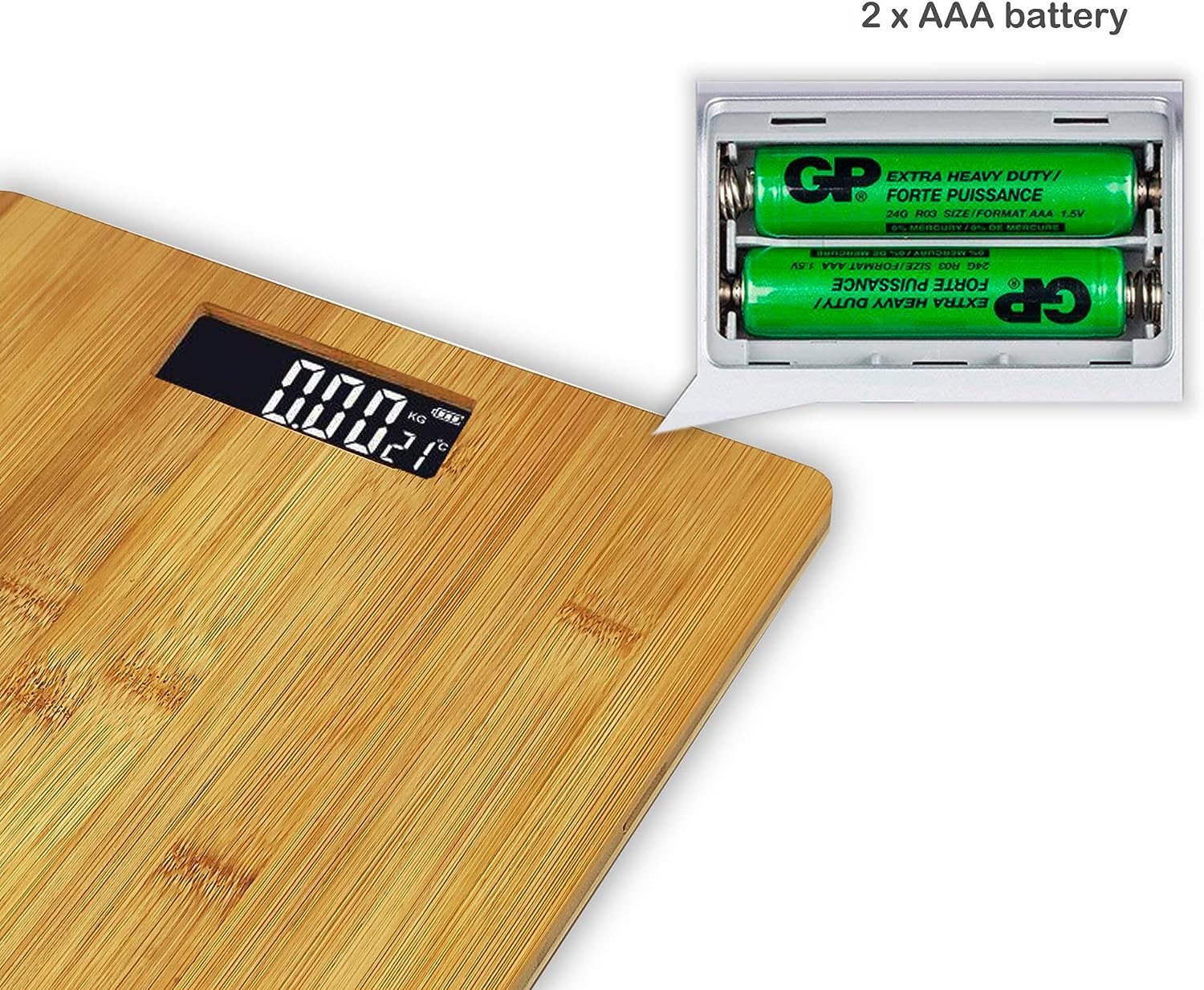
Image: Illustration of the battery compartment and correct insertion of 2 x AAA batteries.
5.2. Initial Placement
Place the scale on a hard, flat, and stable surface. Uneven or soft surfaces (like carpet) can affect accuracy. Ensure there are no obstructions beneath the scale.

Image: Top and side view of the scale, illustrating its compact dimensions suitable for various placements.
6. Operating Instructions
6.1. Taking a Measurement
- Gently step onto the scale with bare feet. The scale will automatically turn on.
- Stand still on the platform, distributing your weight evenly.
- Your weight will be displayed on the LCD screen. The reading will flash a few times before locking.
- Step off the scale. The scale will automatically turn off after a few seconds of inactivity.
6.2. Display Indicators
The LCD display shows:
- Weight: Your current body weight in kilograms (kg) or pounds (lb).
- Temperature: The ambient room temperature in degrees Celsius (°C).
- Battery Indicator: An icon indicating the current battery level. Replace batteries when the 'Lo' indicator appears.
7. Maintenance
7.1. Cleaning
Wipe the scale surface with a soft, damp cloth. Do not use abrasive cleaners or immerse the scale in water. Avoid harsh chemicals that could damage the bamboo finish or electronic components.
7.2. Storage
Store the scale in a cool, dry place. Avoid storing it vertically or placing heavy objects on it, as this may affect its accuracy over time.
7.3. Battery Replacement
When the battery indicator shows 'Lo' or the display becomes dim, replace both AAA batteries with new ones. Refer to section 5.1 for battery installation instructions.
8. Troubleshooting
- No Display / 'Lo' Indicator: Batteries are low or incorrectly installed. Replace batteries or check polarity.
- Inaccurate Readings: Ensure the scale is on a hard, flat surface. Recalibrate by stepping on and off the scale once before taking a measurement. Avoid moving the scale between measurements.
- 'Err' Indicator: This usually indicates an overload (weight exceeds 180 kg) or an unstable measurement. Step off the scale and try again.
- Scale Does Not Turn On: Check battery installation. If batteries are new and correctly installed, contact customer support.
9. Specifications
| Model | PBP-307 |
| Brand | PRITECH |
| Material | Bamboo (Wood) |
| Display Type | LCD |
| Maximum Weight Capacity | 180 kg (400 lb) |
| Graduation | 100g (0.2 lb) |
| Dimensions | 29 x 29 x 3.5 cm |
| Weight | 950 g |
| Power Source | 2 x AAA Batteries |
| Special Function | Automatic Shut-off |
10. Warranty and Support
10.1. Warranty
This Pritech PBP-307 Digital Bathroom Scale comes with a 2-year warranty from the date of purchase. This warranty covers manufacturing defects under normal use. It does not cover damage caused by misuse, accidents, unauthorized repairs, or normal wear and tear. Please retain your proof of purchase for warranty claims.
10.2. Customer Support
If you have any questions, concerns, or require assistance with your Pritech PBP-307 scale, please contact our customer support team. Refer to the warranty card or the official Pritech website for contact details.