
AVATTO AVATTO Thermostat
AVATTO Smart WiFi Thermostat User Manual
Model: AVATTO Thermostat
Brand: AVATTO
Product Overview
The AVATTO Smart WiFi Thermostat is a programmable thermostat designed for efficient home climate control. It offers advanced features such as remote control via mobile applications (Tuya or Smart Life) and voice control compatibility with Amazon Alexa and Google Assistant. This thermostat is suitable for various HVAC systems, including heat pump systems, cooling-only systems, and conventional heating and cooling systems.

Image: The AVATTO Smart WiFi Thermostat, showcasing its sleek design, the digital display, and its accompanying mobile application interface. A separate wiring module is also visible, indicating its modular design.
Key features include a TFT color screen, knob control for temperature adjustment, and compatibility with both horizontal and vertical installations. It requires a 24V AC power supply, typically connected through the C-line.
Installation and Setup
Before installation, ensure the power to your HVAC system is turned off at the circuit breaker. The AVATTO Smart WiFi Thermostat is designed for easy installation, compatible with most 24V HVAC systems.
Compatibility
- Heat Pump Systems: Heat pump and Air handling, Heat pump and Furnace (Gas, Oil, Propane).
- Cooling Only: Air Conditioner.
- Conventional Heating & Cooling Systems: Gas Furnace with AC, Electrical Furnace with AC, Oil Furnace with AC, Boiler.
- Heating Only: Gas Furnace, Electrical Furnace, Oil Furnace, Boiler.
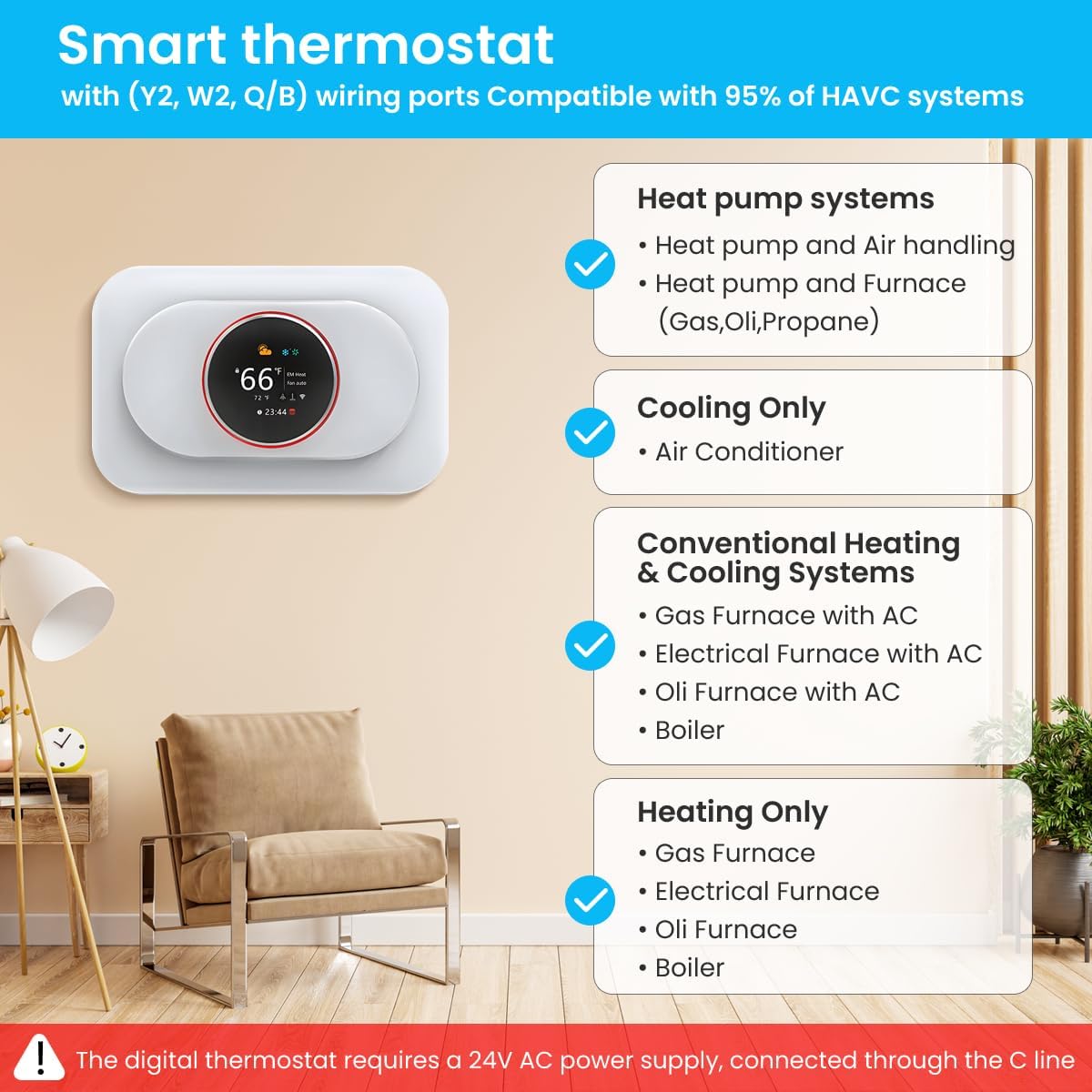
Image: A visual guide illustrating the compatibility of the smart thermostat with different types of HVAC systems, including heat pump, cooling-only, conventional heating and cooling, and heating-only systems. It emphasizes the requirement for a 24V AC power supply via the C-line.
Wiring Instructions
The thermostat requires a 24V AC power supply. If your existing thermostat wiring does not include a C-wire, a power module is provided to ensure proper operation.

Image: This image displays the main thermostat unit, its backplate, and a C-wire adapter, highlighting the components necessary for installation and power supply.

Image: Detailed wiring diagrams are presented, showing how to connect the thermostat for systems that already have a C-wire and for those that require the use of the included power module to provide the necessary 24V AC power.
Terminal Designations
| Terminals | What it means |
|---|---|
| Rh | 24VAC primary for heating |
| Rc | 24VAC primary for cooling |
| C | 24VAC Common Wire |
| W1 | Heat Relay (Stage 1) |
| W2 | Heat Relay (Stage 2) |
| Y1 | Compress Relay (Stage 1) |
| Y2 | Compress Relay (Stage 2) |
| G | Fan Relay |
| O/B | Heat Pump Changeover Valve |
| S | Optional wiring module terminal to combine Y and G, while reserve an extra in-wall wire to power on the thermostat |

Image: An illustration of the thermostat's backplate, clearly labeling each terminal and its corresponding function for wiring purposes.
Physical Installation
The thermostat features a 6.2mm PC+ABS material installation backplate with an 84±14mm interval, suitable for various wire sizes. It supports both horizontal and vertical installation.

Image: This image demonstrates the thermostat's sensitive knob for temperature control and illustrates its adaptability for both horizontal and vertical mounting orientations.

Image: A diagram detailing the dimensions of the thermostat and its backplate, alongside a visual representation of the items included in the box, such as screws, user guide, and optional power module.
Operating Instructions
The AVATTO Smart WiFi Thermostat can be controlled directly via its intuitive display, through the mobile application, or using voice commands.
On-Device Control
The thermostat features a TFT color screen and a sensitive knob for easy temperature adjustments and mode selection. The display provides information such as current state, system mode, fan mode, indoor/outdoor temperature, time, and Wi-Fi status.

Image: A comprehensive breakdown of the thermostat's digital display, explaining the meaning of each icon and indicator, including system mode, fan mode, Wi-Fi, temperature units, clock, child lock, temperature calibration, and brightness settings.
App Remote Control
The thermostat supports remote control via the Tuya Smart or Smart Life applications, available for both iOS and Android devices. This allows you to adjust settings, monitor temperature, and schedule programs from anywhere.

Image: A smartphone screen displaying the Tuya or Smart Life application interface, demonstrating how users can remotely control the thermostat's settings, such as system mode, fan mode, and hold mode.
Voice Control
The AVATTO Smart WiFi Thermostat is compatible with popular voice assistants, including Amazon Alexa and Google Assistant. You can use simple voice commands to adjust the temperature or change modes.
- Example Command: "Alexa, please set the thermostat to 23°C."
- Example Command: "Hey Google, turn on the heat."

Image: This image illustrates the voice control capability of the thermostat, showing it interacting with Amazon Alexa and Google Home devices to adjust temperature settings.
Maintenance
The AVATTO Smart WiFi Thermostat requires minimal maintenance. Follow these guidelines to ensure optimal performance:
- Cleaning: Gently wipe the screen and exterior with a soft, dry cloth. Avoid using abrasive cleaners or solvents, as they may damage the surface.
- Software Updates: Ensure your mobile application is up-to-date to receive the latest features and performance improvements. Firmware updates for the thermostat may be pushed through the app.
- Filter Cleaning Reminder: The thermostat display includes an icon for filter cleaning. Refer to your HVAC system's manual for instructions on how to clean or replace your air filter regularly.
Troubleshooting
If you encounter issues with your AVATTO Smart WiFi Thermostat, consider the following common solutions:
- No Power/Display Off:
- Check the circuit breaker for your HVAC system to ensure power is on.
- Verify that the C-wire is correctly connected and providing 24V AC power. If using the power module, ensure it is properly installed.
- Wi-Fi Disconnection:
- Ensure your Wi-Fi router is working correctly and within range.
- Restart your router and the thermostat.
- Confirm you are connected to a 2.4GHz Wi-Fi network, as the thermostat does not support 5GHz networks.
- Re-pair the thermostat with the Tuya Smart or Smart Life app if necessary.
- Incorrect Temperature Readings:
- Ensure the thermostat is not exposed to direct sunlight, drafts, or heat sources that could affect its temperature sensor.
- Check the temperature calibration setting in the app or on the device.
- HVAC System Not Responding:
- Verify all wiring connections are secure and correct according to the installation guide.
- Ensure the system mode (Heat, Cool, Auto, Off) is correctly selected on the thermostat or app.
- Check your HVAC system's circuit breaker.
For persistent issues, please refer to the official AVATTO support resources or contact customer service.
Specifications
| Feature | Detail |
|---|---|
| Brand | AVATTO |
| Model Number | AVATTO Thermostat |
| Color | White |
| Product Dimensions | 4.98 x 9.91 x 4.06 cm (1.96 x 3.90 x 1.60 inches) |
| Product Weight | 136.08 g (4.8 oz) |
| Power | 240 watts (This value likely refers to max load or system power) |
| Voltage | 24 Volts |
| Material | Plastic |
| Special Features | Works with Alexa, Google Home, Works with Tuya or Smart Life App, Programmable Thermostat |
| Controller Type | Amazon Alexa |
| Connectivity | 2.4GHz WLAN |
Warranty and Support
For information regarding warranty coverage, please refer to the documentation included with your product or visit the official AVATTO website. For technical support, troubleshooting assistance beyond this manual, or to inquire about replacement parts, please contact AVATTO customer service through their official channels.
Always ensure you are using official AVATTO resources for support to guarantee accurate and reliable information.
Related documentsAVATTO Thermostat


Ask a question about this manual
Ask about setup, troubleshooting, compatibility, parts, safety, or missing instructions. Manuals+ will review the question and use this page’s manual context to help answer it.