
1. Introduction
This manual provides essential information for the safe and efficient operation of your Ecoviva WP-RO-200G Reverse Osmosis Water Filter System. Please read these instructions thoroughly before installation and use, and retain them for future reference. This system is designed to provide purified drinking water through a multi-stage filtration process.
2. Safety Information
- Ensure the power supply matches the specifications indicated on the product label.
- Do not immerse the main unit in water or other liquids.
- Keep the appliance away from heat sources and direct sunlight.
- Do not operate the system with damaged cords or plugs.
- Only use original Ecoviva replacement filters.
- This appliance is for household use only.
- Ensure the glass carafe is correctly seated before dispensing water.
- Do not use hot water (above 38°C) in the raw water tank.
3. Package Contents
Verify that all components are present in the package:
- Ecoviva WP-RO-200G Reverse Osmosis Water Filter System (Main Unit)
- Glass Carafe
- Composite Filter Cartridge (CF)
- Reverse Osmosis Filter Cartridge (RO)
- User Manual (English and German)
4. Product Overview
The Ecoviva WP-RO-200G is a compact, countertop reverse osmosis water filter system designed for ease of use and portability. It features a 4-stage filtration process to remove a wide range of impurities from tap water.

Figure 4.1: Ecoviva WP-RO-200G Main Unit with Filters and Carafe.
4.1 Key Features
- 4-Stage Filtration: Utilizes a Composite Filter (CF) and a Reverse Osmosis (RO) membrane (0.0001µm precision) for comprehensive purification.
- Real-time TDS Monitor: Displays Total Dissolved Solids (TDS) levels of both source and purified water.
- Filter Life Reminders: Alerts you when it's time to replace filters.
- Volume Selection: Dispense specific water volumes (0.4L, 0.8L, 1.2L).
- High Efficiency: Achieves a 3:1 pure water to wastewater ratio.
- Portable Design: Compact dimensions (12 x 31 x 31 cm) allow for placement in various locations.
- Durable Glass Carafe: Features a 150% thicker glass pitcher with an integrated stainless steel base, ensuring food-grade quality and preventing secondary contamination.

Figure 4.2: The compact design allows for versatile placement in different environments.
4.2 Filtration Process
The system employs a dual filtration cycle for enhanced water purification:
- Composite Filter (CF): Acts as a pre-filter, removing larger particles, sediment, chlorine, and improving taste and odor.
- Reverse Osmosis (RO) Membrane: The core filtration stage, removing dissolved solids, heavy metals (lead, arsenic), PFOA/SPFOS, fluoride, nitrates, and other microscopic impurities down to 0.0001µm.
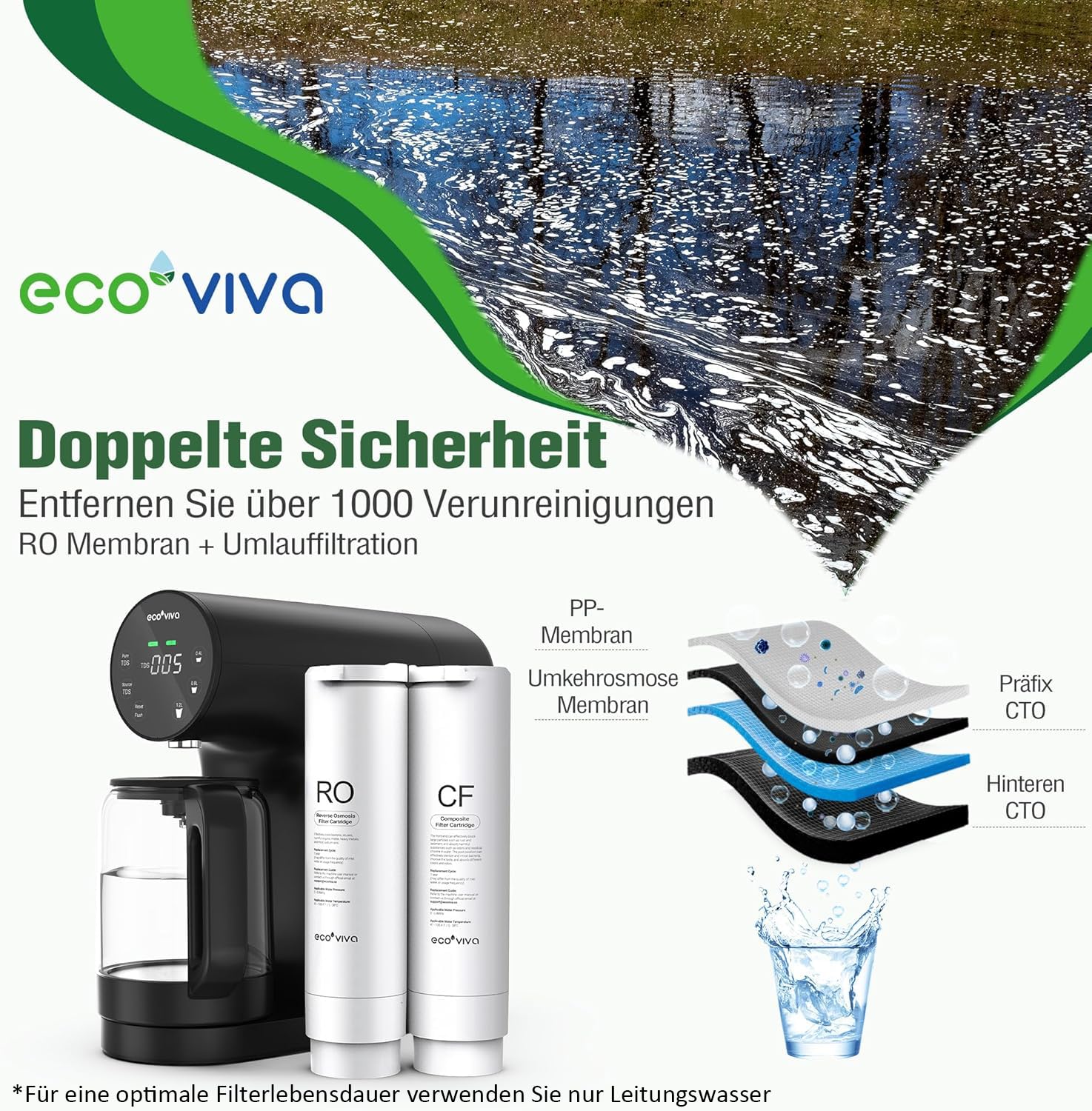
Figure 4.3: Illustration of the 4-stage filtration layers within the system.
4.3 Control Panel
The intuitive control panel provides real-time information and easy operation.

Figure 4.4: Control panel with TDS display, filter indicators, and water volume options.
- Pure TDS / Source TDS: Buttons to switch between displaying the TDS of purified water and raw tap water.
- TDS Display: Digital readout of Total Dissolved Solids in parts per million (ppm).
- Filter Indicators (CF, RO): Lights indicating the status and remaining life of each filter.
- Volume Selection (0.4L, 0.8L, 1.2L): Buttons to select the desired dispensing volume.
- Reset / Flush: Button for resetting filter life after replacement or initiating a system flush.
5. Setup Instructions
The Ecoviva WP-RO-200G is designed for zero installation. Follow these steps for initial setup:
- Unpack: Carefully remove all components from the packaging.
- Place: Position the main unit on a stable, flat surface.
- Install Filters: The Composite Filter (CF) and Reverse Osmosis (RO) Filter Cartridges are typically pre-installed. If not, insert them into their designated slots according to the labels.
- Clean Carafe: Wash the glass carafe thoroughly with mild soap and water before first use.
- Fill Water Tank: Remove the raw water tank from the back of the unit and fill it with tap water. Do not exceed the maximum fill line. Reattach the tank securely.
- Power On: Plug the power cord into a suitable electrical outlet. The system will power on.
- Initial Flush: Before consuming water, perform an initial flush to prepare the filters. Fill the raw water tank, place the empty carafe, and press the 'Flush' button (or follow specific instructions in the detailed manual for initial flushing cycles). This process typically takes about 30 minutes and ensures optimal filter performance. Discard the flushed water.
6. Operating Instructions
Using your Ecoviva WP-RO-200G is straightforward:
- Fill Raw Water Tank: Ensure the raw water tank is filled with tap water.
- Place Carafe: Position the empty glass carafe securely under the dispenser spout.
- Select Volume: Press one of the volume selection buttons (0.4L, 0.8L, 1.2L) to start dispensing purified water. The system will automatically stop when the selected volume is reached.
- Monitor TDS: Press 'Pure TDS' to view the TDS level of the dispensed water. Press 'Source TDS' to view the TDS level of the raw tap water.
- Empty Wastewater: After filtration, the wastewater tank will contain concentrated impurities. It is recommended to empty this tank regularly. The system can reuse the wastewater up to 3 times for subsequent filtration cycles, but for optimal performance, it is best to empty it after each use.

Figure 6.1: The durable glass carafe is designed for purity and ease of use.
7. Maintenance
7.1 Filter Replacement
The system will provide reminders when filters need replacement. Filter lifespan depends on water quality and usage.
- Composite Filter (CF): Typically lasts up to 6-12 months.
- Reverse Osmosis (RO) Filter: Typically lasts up to 12-24 months.
To replace filters:
- Unplug the unit.
- Remove the old filter cartridge by twisting it counter-clockwise.
- Insert the new filter cartridge and twist clockwise until secure.
- Plug in the unit and press the 'Reset' button to reset the filter life indicator for the replaced filter.
- Perform a short flush cycle after replacing filters to ensure proper function.
7.2 Cleaning
- Exterior: Wipe the exterior of the unit with a soft, damp cloth. Do not use abrasive cleaners.
- Water Tanks & Carafe: Regularly clean the raw water tank, wastewater tank, and glass carafe with mild soap and water. Rinse thoroughly.
- Descaling: Descaling may be required every few months depending on source water hardness. Refer to the detailed manual for descaling procedures.
8. Troubleshooting
| Problem | Possible Cause | Solution |
|---|---|---|
| No power | Power cord unplugged, power outage | Check power connection, verify outlet functionality. |
| Low water flow | Clogged filters, low water level in raw tank | Check filter life indicators, replace filters if needed. Refill raw water tank. |
| High TDS in purified water | RO membrane needs replacement, initial use (not flushed) | Replace RO filter. Perform initial flush as per setup instructions. |
| Water leakage | Improperly installed filters or tanks | Ensure filters and water tanks are securely seated and sealed. |
| Unusual noise | Normal pump operation, air in system | Some pump noise is normal. If excessive, ensure tanks are full and filters are correctly installed. |
9. Specifications
| Feature | Specification |
|---|---|
| Model Number | WP-RO-200G-B |
| Dimensions (L x W x H) | 31 cm x 31 cm x 12 cm |
| Weight | 5.9 kilograms |
| Material | Plastic |
| Capacity | 200 Gallons (filtration capacity) |
| Installation Type | Countertop |
| Purification Method | Reverse Osmosis |
| Special Features | Filter change indicator, Portable, TDS reduction, Tankless, Integrated TDS meter |
| Manufacturer | Ecoviva |
| Country of Origin | China |
10. Warranty and Support
Ecoviva is committed to providing quality products and support.
- Warranty: A 1-year warranty is provided. Please scan the QR code in your detailed product manual for effortless registration.
- Technical Support: Lifetime technical support is available for your Ecoviva WP-RO-200G system.
- Certifications: The countertop RO system uses food-grade materials, and certain parts are strictly certified according to European compliance standards. For detailed test reports, refer to the official documentation, such as the STS report available at ecoviva.co/wp-content/uploads/2024/01/STSGZ2312293024E.pdf.

Figure 10.1: Product certifications and access to test reports via QR code.


