
ZYC G-10P-3R
ZYC 3 Inch Gimbal LED Recessed Light Instruction Manual
Model: G-10P-3R
1. Safety Information
Please read and understand all instructions before beginning installation. Failure to follow these instructions may result in electric shock, fire, or other hazards that could cause personal injury or property damage.
- WARNING: Risk of electric shock. Disconnect power at the fuse or circuit breaker before installing or servicing.
- This product must be installed in accordance with the applicable installation code by a person familiar with the construction and operation of the product and the hazards involved.
- Ensure all electrical connections are made correctly and securely.
- Do not alter or modify the fixture.
- Suitable for damp locations.
- IC Rated: Suitable for direct contact with insulation.
It is highly recommended that a licensed electrician install this fixture to meet electrical codes and ensure safety.
2. Package Contents
Verify that all components are present before installation:
- LED Light Body (10 units for 10-pack)
- Junction Box (10 units for 10-pack)
- 1:1 Hole Template
- Specification Sheet (this manual)
3. Specifications
| Brand | ZYC |
| Model Name | ZYCGIM |
| Item Model Number | G-10P-3R |
| Size | 3 Inch |
| Color | Black |
| Material | Aluminum |
| Wattage | 8 Watts |
| Brightness | 850 Lumens |
| Color Temperature (CCT) | 2700K, 3000K, 3500K, 4000K, 5000K Selectable |
| Dimming | 5-100% Smooth Dimming (Triac Dimmer Compatible) |
| Tilt Angle | 30° |
| Beam Angle | 40° |
| Product Dimensions | 3.35"L x 2.52"W x 1.93"H |
| Advised Hole Cut-out Size | 2.76" (70mm) |
| Certifications | ETL Listed, IC Rated |
| Indoor/Outdoor Usage | Indoor (Damp Location Rated) |

Image: Detailed specifications and dimensions of the ZYC 3 Inch Gimbal LED Recessed Light, including power, brightness, beam angle, and advised hole cut-out size of 2.76 inches.
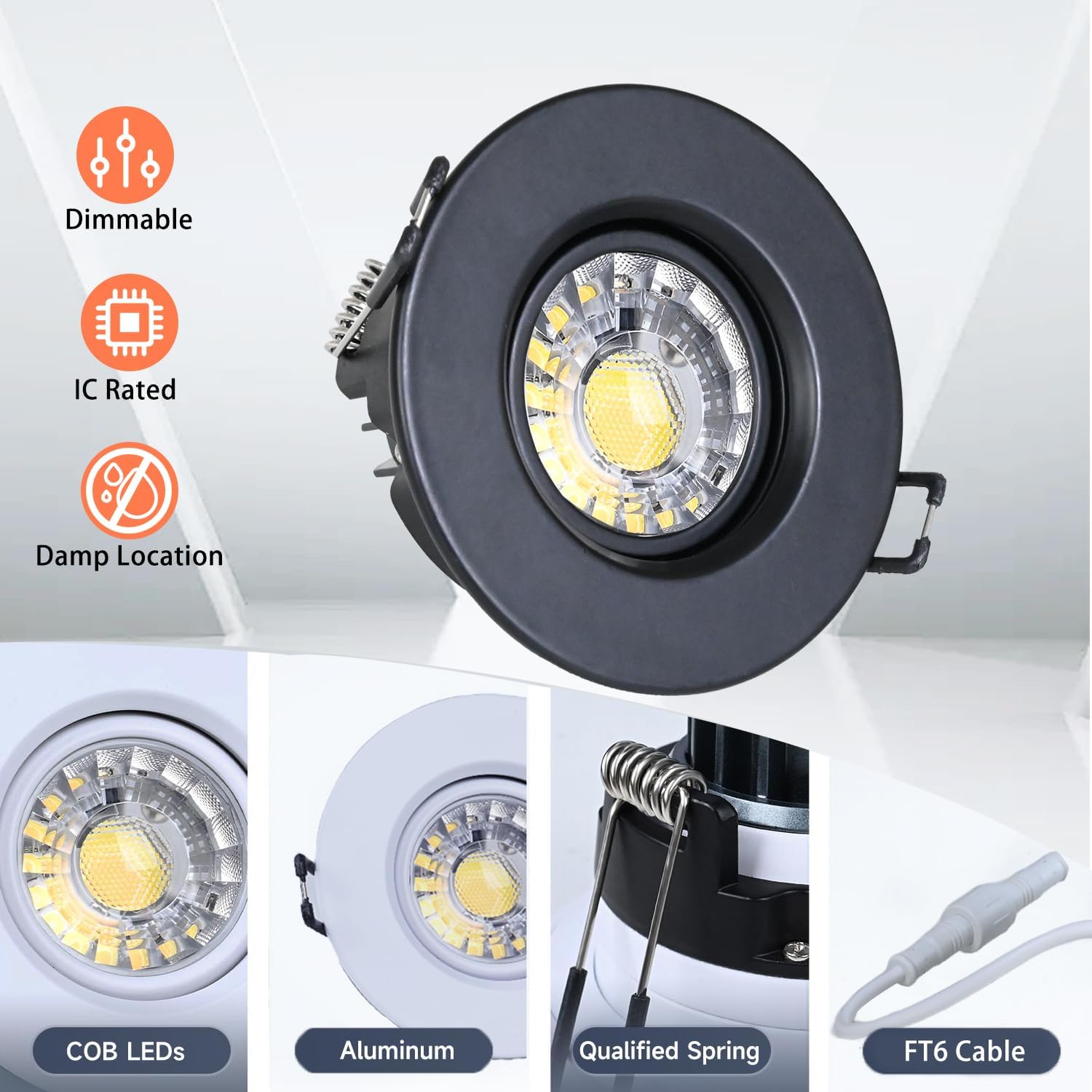
Image: Key features of the ZYC 3 Inch Gimbal LED Recessed Light, highlighting dimmability, IC rating, damp location suitability, COB LEDs, aluminum construction, qualified spring clips, and FT6 cable.
4. Installation Instructions
Follow these steps for proper installation. Ensure power is disconnected at the circuit breaker before starting.
4.1. Visual Installation Guide
Video: A step-by-step guide demonstrating the installation process for the ZYC 3 Inch LED Gimbal Recessed Lighting, including wiring and mounting.
4.2. Step-by-Step Installation
- Cut a Hole in the Ceiling: Use the provided 1:1 hole template to mark and cut a 2.76-inch (70mm) diameter hole in the ceiling.

Image: Step 1 of installation, showing how to cut a 2-3/4 inch hole in the ceiling using a hole saw.
- Connect Supply Wire to Connector: Open the junction box cover. Connect the household electrical supply wires (live, neutral, ground) to the corresponding wires inside the junction box using the provided wire connectors. Ensure connections are secure.
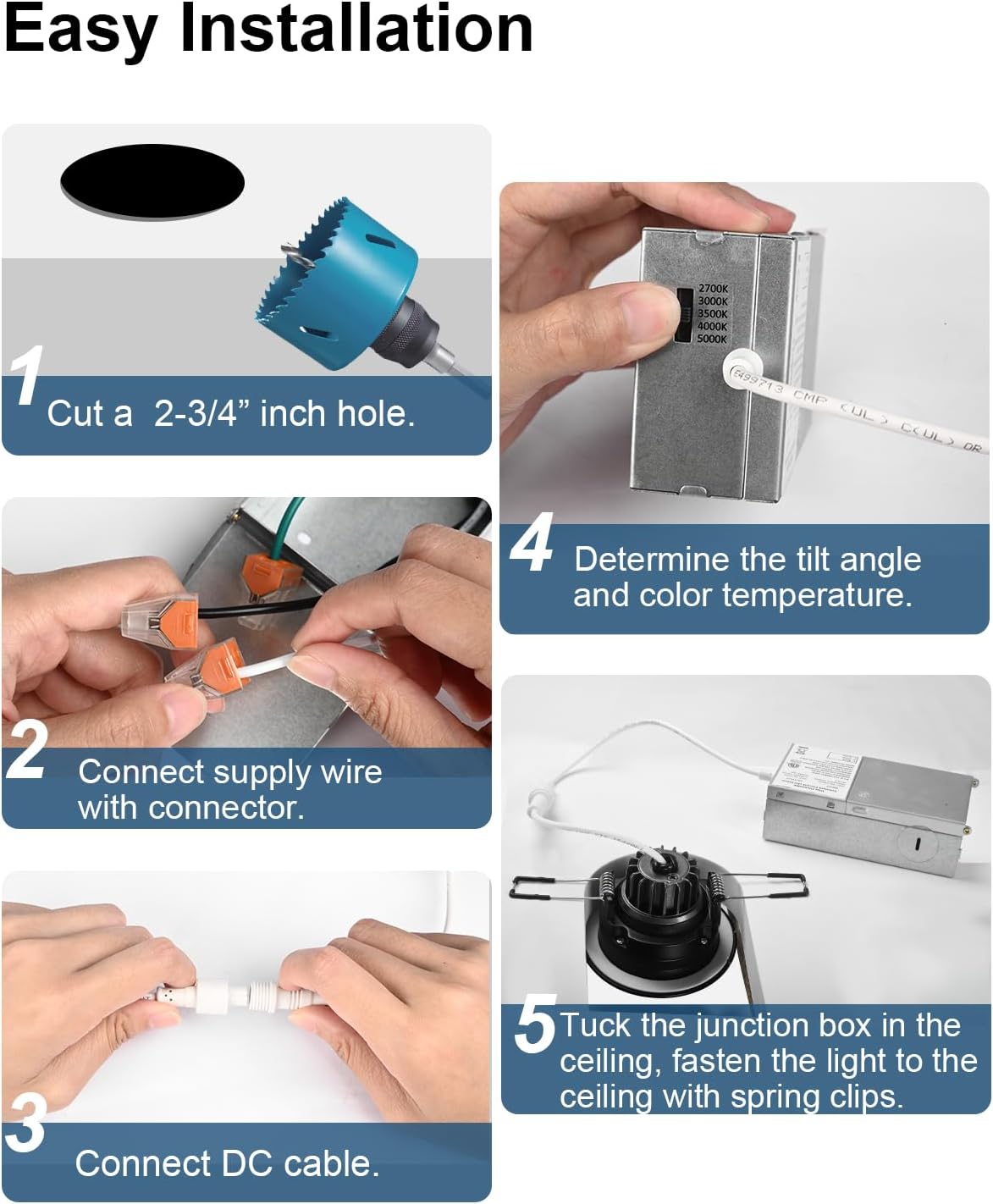
Image: Step 2 of installation, demonstrating how to connect the supply wires to the connector within the junction box.
- Connect DC Cable: Connect the DC cable from the LED light body to the DC cable extending from the junction box. Ensure the connection is firm.
- Determine Tilt Angle and Color Temperature: Before tucking the junction box, adjust the desired tilt angle of the gimbal light and select the preferred color temperature (2700K, 3000K, 3500K, 4000K, or 5000K) using the switch on the junction box.

Image: Illustration of the 5 CCT (Correlated Color Temperature) options available on the ZYC LED Recessed Light, ranging from Soft White (2700K) to Daylight (5000K).
- Tuck Junction Box and Fasten Light: Carefully tuck the junction box into the ceiling hole. Then, push the LED light body into the hole, ensuring the spring clips firmly secure the light to the ceiling.

Image: Step 5 of installation, showing how to tuck the junction box into the ceiling and secure the light fixture using its spring clips.
Once installation is complete, restore power at the circuit breaker.
5. Operating Instructions
5.1. Color Temperature Selection (CCT)
The ZYC Gimbal LED Recessed Light offers 5 selectable color temperatures to suit various environments and preferences:
- 2700K: Soft White
- 3000K: Warm White
- 3500K: Neutral White
- 4000K: Cool White
- 5000K: Daylight
To change the color temperature, locate the switch on the side of the junction box. Adjust the switch to your desired CCT setting. This adjustment should ideally be made before final installation into the ceiling, or by carefully pulling down the fixture if already installed.

Image: Visual representation of the five selectable color temperatures (2700K, 3000K, 3500K, 4000K, 5000K) and their appearance in a room setting.
5.2. Dimming Functionality
This recessed light supports smooth dimming from 5% to 100% when used with a compatible Triac dimmer switch (not included). This allows you to adjust the light output to create the desired ambiance for any occasion.

Image: The ZYC 3 Inch Gimbal LED Recessed Light demonstrating its 5-100% smooth dimming capability in a kitchen setting.
5.3. Adjustable Tilt
The gimbal design allows for a 30° tilt angle, enabling you to direct the light precisely where needed. This feature is ideal for highlighting artwork, architectural features, or specific areas of a room.

Image: Diagram illustrating the adjustable tilt feature of the ZYC Gimbal LED Recessed Light, showing a 30-degree tilt angle to direct light.
6. Maintenance
The ZYC Gimbal LED Recessed Light requires minimal maintenance.
- Cleaning: Ensure power is off before cleaning. Wipe the fixture with a soft, dry, or slightly damp cloth. Do not use harsh chemicals or abrasive cleaners, as these may damage the finish or electrical components.
- LED Longevity: LED lights have a long lifespan and do not require bulb replacement.
7. Troubleshooting
| Problem | Possible Cause | Solution |
|---|---|---|
| Light does not turn on. |
|
|
| Light flickers or dims improperly. |
|
|
| Incorrect color temperature. |
|
|
8. Warranty and Support
This ZYC product comes with a 3-year manufacturer's warranty from the date of purchase, covering defects in materials and workmanship.
For technical support, warranty claims, or any questions regarding your ZYC Gimbal LED Recessed Light, please contact ZYC customer service. Refer to your purchase documentation or the ZYC brand store on Amazon for contact details.

Image: ZYC customer support details, highlighting a 3-year limited manufacturer's support and a 24-hour quick response service.
Related documentsG-10P-3R

Ask a question about this manual
Ask about setup, troubleshooting, compatibility, parts, safety, or missing instructions. Manuals+ will review the question and use this page’s manual context to help answer it.