1. Introduction
This manual provides detailed instructions for the GENGQIANSI RG32A/E Replacement Remote Control. This remote is designed to function as a direct replacement for the original remote controls of specific Noma 4-in-1 Energy Star Window Air Conditioner models. It offers essential functions for controlling your air conditioner, ensuring comfortable operation.

Image 1.1: The GENGQIANSI Replacement Remote Control (left) shown next to an older remote, illustrating the design and compatibility. Ensure your original remote matches the design shown for proper function.
2. Compatibility
This replacement remote control is compatible with the following Noma 4-in-1 Energy Star Window Air Conditioner models:
- Noma 043-5238-4
- Noma 043-5240-6
- Noma 043-5232-6
- Noma 043-5243-0
Important: To ensure full compatibility and proper functionality, please verify that your original remote control is identical in appearance and button layout to the GENGQIANSI RG32A/E remote shown in this manual, particularly the one depicted in the main product image.
3. Setup and Battery Installation
The GENGQIANSI RG32A/E remote control requires two (2) AAA 1.5V batteries (not included). No programming or pairing is needed; simply insert the batteries, and the remote is ready for use.
3.1. Installing Batteries
- Locate the battery compartment cover on the back of the remote control.
- Slide the cover downwards or press the latch to open the compartment.
- Insert two (2) AAA 1.5V batteries, ensuring the positive (+) and negative (-) terminals align correctly with the markings inside the compartment.
- Replace the battery compartment cover by sliding it back into place until it clicks securely.

Image 3.1: Illustration of the battery compartment and correct insertion of AAA batteries. Note the positive and negative terminals.
Note: If the remote does not respond after battery installation, check the battery orientation and ensure the batteries are new and fully charged.
4. Operating the Remote Control
The remote control features an ergonomic design with clearly labeled buttons for intuitive operation of your air conditioner. Point the remote directly at the air conditioner's receiver when pressing buttons.
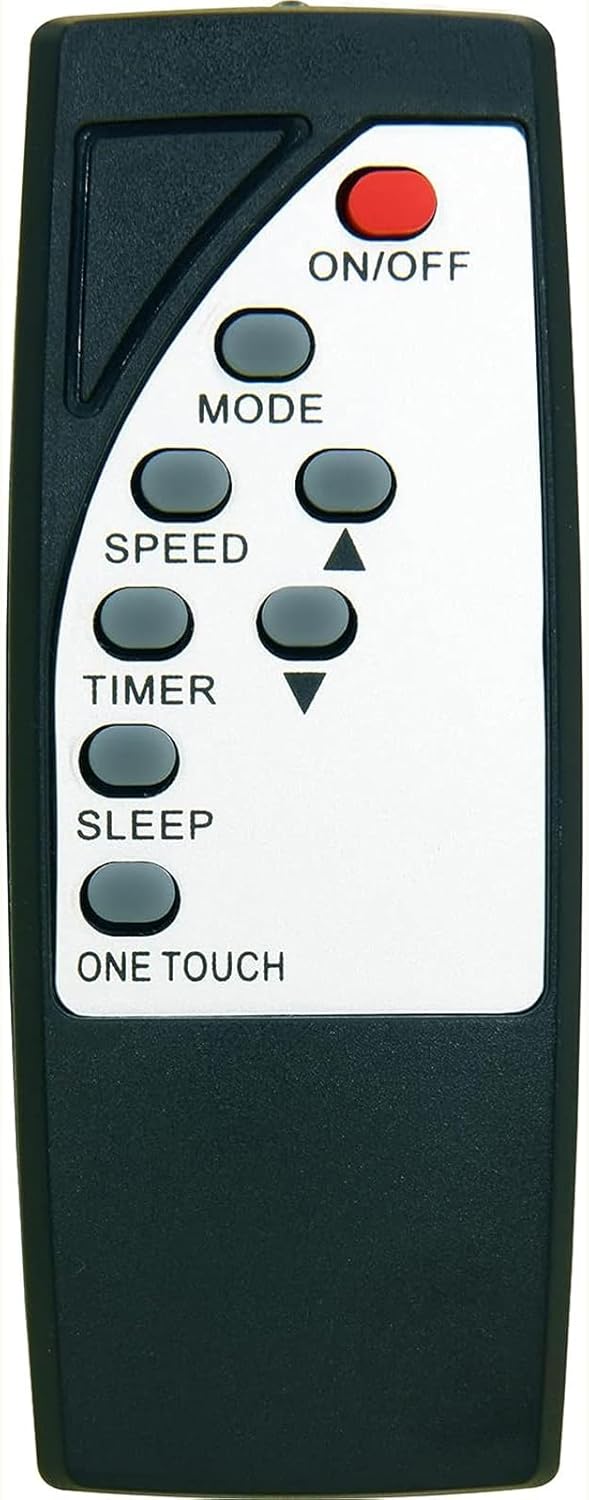
Image 4.1: Front view of the remote control, displaying the layout of all functional buttons.
4.1. Button Functions
| Button | Function |
|---|---|
| ON/OFF | Powers the air conditioner on or off. |
| MODE | Cycles through operating modes (e.g., Cool, Fan, Dry, Auto). |
| SPEED | Adjusts the fan speed (e.g., Low, Medium, High, Auto). |
| TIMER | Sets the timer for automatic on/off operation. |
| SLEEP | Activates or deactivates the sleep mode, which adjusts temperature for comfortable sleep. |
| ONE TOUCH | Activates a pre-set comfort setting or a quick function. Refer to your air conditioner's manual for specific 'One Touch' functionality. |
| ▲ / ▼ (Temperature/Adjustment) | Adjusts temperature settings or navigates menu options. |
5. Maintenance
Proper care and maintenance will extend the life of your remote control.
5.1. Cleaning
- Wipe the remote control with a soft, dry cloth.
- Do not use abrasive cleaners, waxes, or solvents, as these may damage the surface or internal components.
5.2. Storage
- Store the remote control in a cool, dry place away from direct sunlight and extreme temperatures.
- If the remote will not be used for an extended period, remove the batteries to prevent leakage and potential damage.
6. Troubleshooting
If you experience issues with your remote control, please refer to the following common solutions:
| Problem | Possible Cause | Solution |
|---|---|---|
| Remote not responding to air conditioner. | Dead or incorrectly installed batteries. | Replace batteries with new AAA 1.5V batteries, ensuring correct polarity (+/-). |
| Remote not responding to air conditioner. | Obstruction between remote and air conditioner. | Ensure a clear line of sight between the remote's infrared emitter and the air conditioner's receiver. |
| Remote functions are incorrect or limited. | Incompatible remote model. | Verify that your original remote matches the GENGQIANSI RG32A/E remote's appearance and button layout as shown in this manual. This remote is a direct replacement and does not require programming. |
| Buttons feel sticky or unresponsive. | Dirt or debris under buttons. | Clean the remote's surface with a soft, dry cloth. Avoid liquids. |
7. Specifications
| Feature | Detail |
|---|---|
| Model Identifier | RG32A/E (ASIN: B0CFGY3THJ) |
| Brand | GENGQIANSI |
| Connectivity Technology | Infrared (IR) |
| Power Source | 2 x AAA 1.5V Batteries (not included) |
| Max Number of Supported Devices | 1 (Specific Noma Air Conditioner models) |
| Special Feature | Ergonomic Design |
8. Warranty and Support
For any questions, concerns, or support regarding your GENGQIANSI Replacement Remote Control, please contact the seller directly through the platform where you purchased the product. The seller, Remote Control US, can provide assistance with product-specific inquiries and troubleshooting beyond this manual.
Please retain your proof of purchase for any warranty claims or support requests.


