Introduction
This manual provides essential instructions for the safe and effective operation, maintenance, and troubleshooting of your Interstate Batteries JMP0800 Portable Jump Starter and Power Pack. Please read this manual thoroughly before using the device and retain it for future reference.
Important Safety Information
WARNING: This product contains chemicals known to the State of California to cause cancer and birth defects or other reproductive harm. For more information, go to www.P65Warnings.ca.gov.
- Always wear eye protection when working with batteries.
- Ensure the jump starter is fully charged before use.
- Do not attempt to jump start a frozen battery.
- Do not connect the positive (+) and negative (-) clamps together.
- Keep the device away from children.
- Store in a cool, dry place away from direct sunlight and heat.
- Refer to your vehicle's owner's manual for specific jump-starting procedures.
Package Contents
Verify that all items are present in your package:
- Interstate Batteries JMP0800 Jump Starter Power Bank
- Smart Clamp Jump Cables
- AC Power Adapter
- USB-C Charging Cable
- 3-in-1 Charging Cables (for various electronic devices)
- Compact Carrying Case
- User Manual (this document)

Image: The Interstate Batteries JMP0800 jump starter unit, smart clamp cables, and a USB charging cable. The jump starter is green and black, with USB ports and a flashlight on one end.

Image: The Interstate Batteries JMP0800 jump starter, smart clamps, USB cable, and a black compact carrying case, alongside the product packaging.
Product Overview
The Interstate Batteries JMP0800 is a versatile portable device designed to jump start 12V vehicles and charge various electronic devices. It features an 8,000 mAh Li-polymer battery, 700A peak current, dual USB outputs, a USB-C quick charge input, and a multi-mode LED flashlight.
Component Identification:
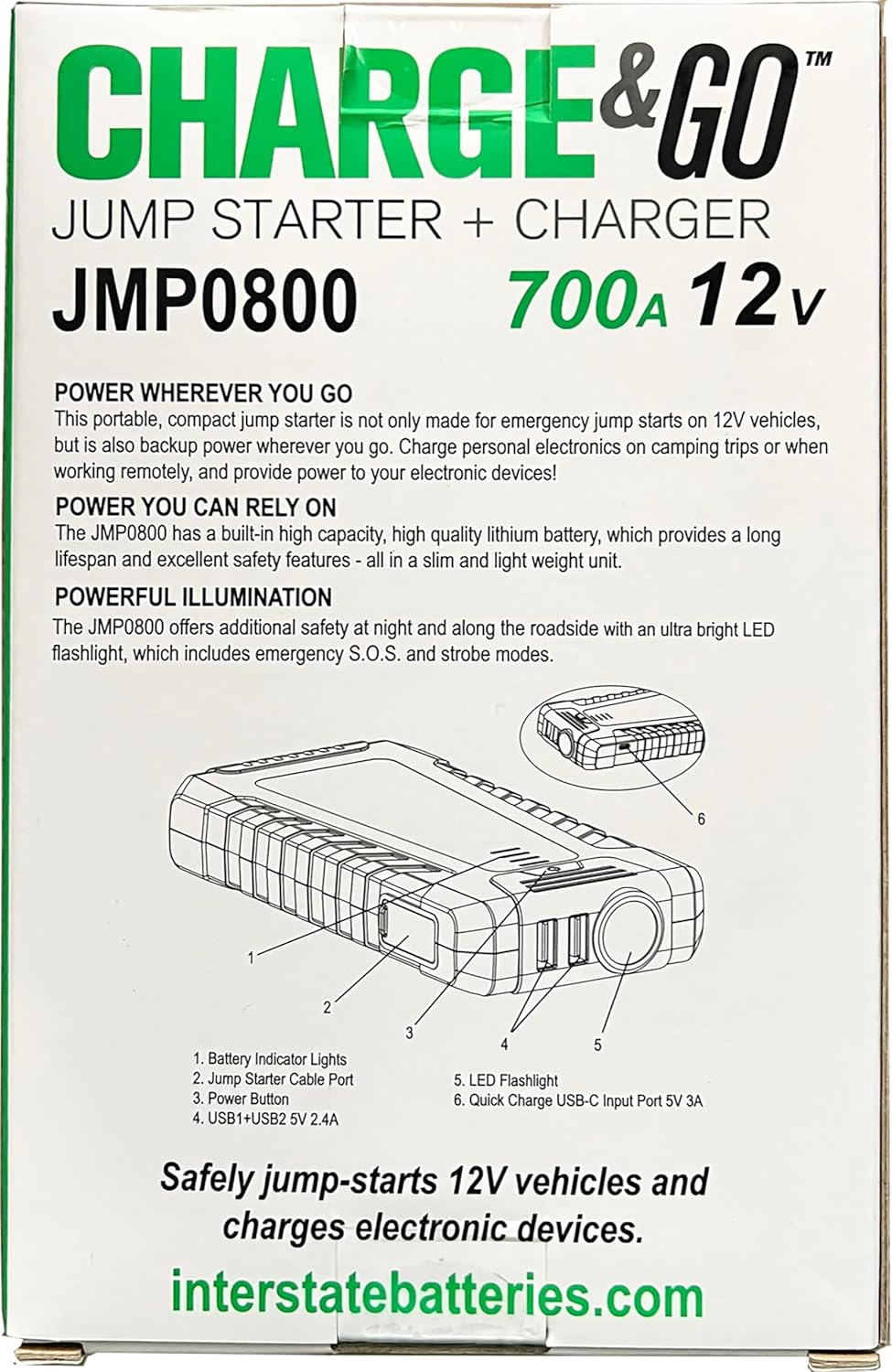
Image: A diagram showing the various components of the JMP0800 jump starter, including battery indicator lights, jump starter cable port, power button, USB outputs, LED flashlight, and USB-C input port.
- Battery Indicator Lights: Display the current charge level.
- Jump Starter Cable Port: Connects to the smart clamp jump cables.
- Power Button: Activates the device and cycles flashlight modes.
- USB Outputs (OUT: 5V/2.4A): For charging electronic devices.
- LED Flashlight: Provides illumination with steady, SOS, and strobe modes.
- Quick Charge USB-C Input Port (IN: 5V/3A): For charging the jump starter unit.

Image: A close-up view of the Interstate Batteries JMP0800 jump starter showing four blue LED indicator lights illuminated, indicating a full charge.

Image: A close-up view of the end of the Interstate Batteries JMP0800 jump starter, highlighting the two USB output ports and the integrated LED flashlight.
Charging the JMP0800 Unit
Before first use, fully charge the JMP0800 unit. It is recommended to recharge the unit every 3-6 months to maintain optimal battery health, even when not in use.
- Connect the USB-C charging cable to the Quick Charge USB-C Input Port (6) on the JMP0800 unit.
- Connect the other end of the USB-C cable to the provided AC power adapter, then plug the adapter into a standard wall outlet.
- The Battery Indicator Lights (1) will illuminate and flash to indicate charging status. All four lights will be solid when fully charged.
Operating Instructions: Jump Starting a Vehicle
The JMP0800 is designed to jump start 12V vehicles with gasoline engines up to 8.0L and diesel engines up to 8.0L.
Steps for Jump Starting:
- Ensure the JMP0800 unit is sufficiently charged (at least 3 indicator lights).
- Turn off your vehicle's ignition and all accessories (headlights, radio, etc.).
- Connect the smart clamp jump cables to the Jump Starter Cable Port (2) on the JMP0800 unit. Ensure a secure connection.
- Connect the RED positive (+) clamp to the positive (+) terminal of your vehicle's battery.
- Connect the BLACK negative (-) clamp to the negative (-) terminal of your vehicle's battery.
- Observe the indicator lights on the smart clamp unit. A solid green light indicates a correct and safe connection. If a red light or alarm sounds, check connections for polarity reversal or short circuit.
- Once the green light is solid, start your vehicle's engine.
- After the vehicle starts, immediately remove the smart clamp jump cables from the vehicle battery, first the negative (-) clamp, then the positive (+) clamp.
- Disconnect the smart clamp cables from the JMP0800 unit.
Note: If the vehicle does not start after the first attempt, wait at least 30 seconds before trying again. Do not attempt more than three consecutive jump starts.
Operating Instructions: Charging Electronic Devices
The JMP0800 can also function as a portable power bank for your USB-powered devices.
- Connect your electronic device's USB charging cable (or the provided 3-in-1 cable) to one of the USB Output Ports (4) on the JMP0800 unit.
- Connect the other end of the cable to your electronic device.
- The JMP0800 will automatically begin charging your device. The Battery Indicator Lights (1) will show the remaining power level.
Using the LED Flashlight:
- Press and hold the Power Button (3) for 3 seconds to turn on the LED Flashlight (5).
- Press the Power Button (3) briefly to cycle through the modes: Steady Beam → SOS Flashing → Strobe Light → Off.
Maintenance and Storage
- Cleaning: Wipe the unit with a dry, soft cloth. Do not use harsh chemicals or abrasive materials.
- Charging: Recharge the unit every 3-6 months to prevent deep discharge and prolong battery life.
- Storage: Store the JMP0800 in its compact carrying case in a cool, dry place, away from direct sunlight, moisture, and extreme temperatures.
- Battery Disposal: Do not dispose of the battery in household waste. Follow local regulations for proper battery recycling.
Troubleshooting
| Problem | Possible Cause | Solution |
|---|---|---|
| Vehicle does not start. | JMP0800 unit is not charged. Clamps are not connected correctly. Vehicle battery is severely damaged. | Charge the JMP0800 unit. Check clamp connections and polarity. Ensure smart clamp indicator is green. Consult a professional mechanic. |
| Smart clamp indicator is red or beeping. | Reverse polarity connection. Short circuit detected. | Disconnect clamps and reconnect with correct polarity (Red to +, Black to -). Ensure clamps are not touching each other or other metal parts. |
| Electronic device not charging. | JMP0800 unit is low on charge. USB cable is faulty or not connected properly. | Recharge the JMP0800 unit. Check cable connections or try a different USB cable. |
| LED flashlight not working. | JMP0800 unit is low on charge. Power button not pressed correctly. | Recharge the JMP0800 unit. Press and hold the power button for 3 seconds to activate. |
Specifications
| Feature | Detail |
|---|---|
| Model | JMP0800 |
| Brand | Interstate Batteries |
| Peak Output Current | 700 Amps |
| Battery Capacity | 8,000 mAh (8Ah) Li-polymer |
| Vehicle Compatibility | 12V vehicles (up to 8.0L gasoline, 8.0L diesel engines) |
| USB Output | Dual 5V/2.4A |
| USB-C Input | 5V/3A (Quick Charge) |
| Product Dimensions | 4.9"D x 4.1"W x 7.7"H |
| Item Weight | 1.7 pounds |
| UPC | 656489002167 |
Warranty and Support
For warranty information, technical support, or to register your product, please visit the official Interstate Batteries website or contact their customer service.
Official User Manual (PDF): Download PDF Manual
Manufacturer: Interstate Batteries


