
1. Introduction
This manual provides detailed instructions for the setup, operation, and maintenance of your Lenovo ThinkPad X390 Yoga 2-in-1 Laptop Computer. The ThinkPad X390 Yoga is a versatile device featuring a 13.3-inch Full HD touchscreen display, powered by an Intel Core i5-8365U processor, and equipped with 16GB RAM and a 512GB NVMe SSD. It runs on Windows 10 Pro, with a free upgrade path to Windows 11 Pro. This guide will help you maximize your experience with your new device.

Figure 1.1: Lenovo ThinkPad X390 Yoga 2-in-1 Laptop, showcasing its touch display capabilities.
2. What's in the Box
Upon opening the packaging, verify that all the following items are present:
- Lenovo ThinkPad X390 Yoga Laptop
- AC Adapter
- Battery (integrated)
- Documentation (including this user manual)
- Cue Accessories (USB extension cord, HDMI cable, Mouse Pad)

Figure 2.1: Included Cue Accessories, which may vary by package.
3. Product Overview
3.1 Key Features
- Processor: Intel Core i5-8365U with 4 Cores and 8 Threads, up to 4.10 GHz Max Turbo Frequency.
- Display: 13.3" Full HD (1920 x 1080) Touch Display for interactive use.
- Memory & Storage: 16GB RAM and 512GB PCIe NVMe SSD for fast performance and ample storage.
- Operating System: Pre-installed with Windows 10 Pro, eligible for a free upgrade to Windows 11 Pro.
- Graphics: Integrated Intel UHD Graphics.
3.2 Component Identification
Familiarize yourself with the main components of your ThinkPad X390 Yoga:

Figure 3.1: Key components of the ThinkPad X390 Yoga, including the touchscreen, webcam, keyboard, trackpoint, and fingerprint scanner.
- Touch Screen: The 13.3-inch display supports multi-touch gestures.
- HD Webcam with Privacy Shutter: Located at the top center of the display bezel, includes a physical shutter for privacy.
- Backlit Keyboard: Full-sized keyboard with adjustable backlighting for low-light conditions.
- Trackpoint: Red pointing stick located in the center of the keyboard for precise cursor control.
- Fingerprint Scanner: Integrated for secure biometric login.
3.3 Ports and Connectors
The ThinkPad X390 Yoga offers a variety of ports for connectivity:
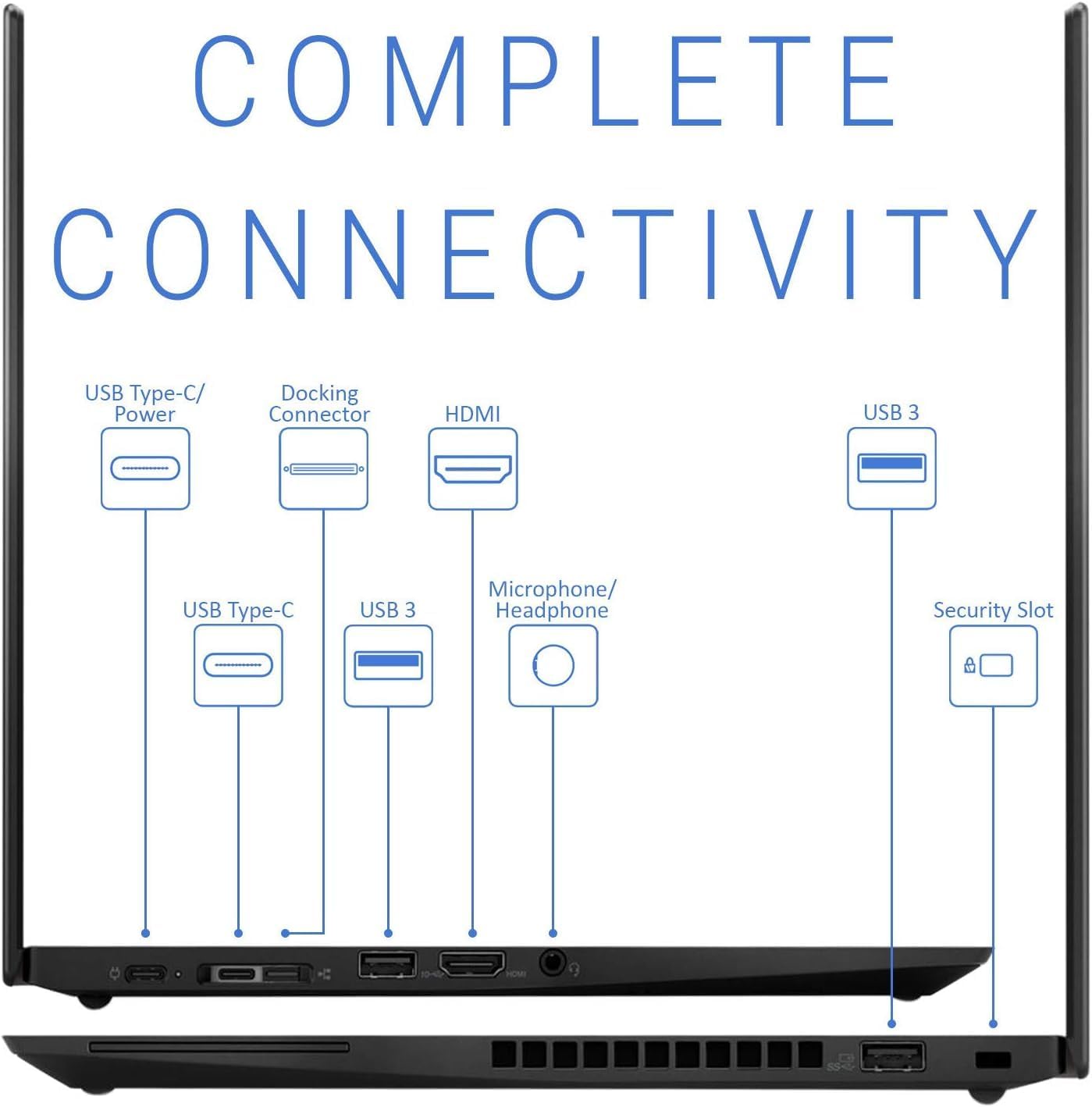
Figure 3.2: Complete connectivity options on the ThinkPad X390 Yoga.
- 2 x USB-C Ports: Used for power delivery, data transfer, and display output.
- 2 x USB-A Ports (USB 3): Standard USB ports for connecting peripherals.
- 1 x HDMI Port: For connecting to external displays or projectors.
- 1 x Microphone/Headphone Jack: Combined audio jack for headsets.
- Docking Connector: For connecting to compatible docking stations.
- Security Slot: For attaching a security cable lock.
4. Setup
4.1 Initial Power On
- Unpack the laptop and all accessories from the box.
- Connect the AC adapter to the laptop's USB-C power port and then to a power outlet.
- Open the laptop lid. The laptop may power on automatically, or you may need to press the power button (typically located on the side or top right of the keyboard deck).
- Follow the on-screen instructions to complete the Windows 10 Pro setup, including language selection, network connection, and user account creation.
4.2 Connecting Peripherals
Connect external devices such as a mouse, external keyboard, or monitor to the appropriate ports as described in Section 3.3.
5. Operating Instructions
5.1 Using the Touchscreen
The 13.3-inch Full HD display supports multi-touch gestures. You can interact with the operating system and applications directly using your fingers. Common gestures include tapping, swiping, pinching to zoom, and rotating.
5.2 Keyboard and Trackpoint Usage
The backlit keyboard provides a comfortable typing experience. The Trackpoint, located between the G, H, and B keys, allows for precise cursor navigation without moving your hands from the keyboard. Use the dedicated Trackpoint buttons below the spacebar for left, right, and middle clicks.
5.3 Windows 10 Pro Features
Your laptop comes with Windows 10 Pro, offering advanced features for productivity and security:
- BitLocker: Encrypt your drives for enhanced data security.
- Remote Desktop: Access your computer remotely from another device.
- Hyper-V: Create and manage virtual machines.
- Windows Hello: Use the fingerprint scanner for fast and secure login.

Figure 5.1: User interacting with the ThinkPad X390 Yoga keyboard.
6. Maintenance
6.1 Cleaning the Laptop
- Screen: Use a soft, lint-free cloth slightly dampened with water or a screen-cleaning solution. Do not spray liquid directly onto the screen.
- Keyboard and Chassis: Use a soft, dry cloth. For stubborn dirt, a slightly damp cloth with mild soap solution can be used, ensuring no liquid enters openings.
- Ports: Use compressed air to clear dust from ports and vents.
6.2 Software Updates
Regularly check for and install Windows updates and Lenovo driver updates to ensure optimal performance and security. You can find Windows updates in Settings > Update & Security > Windows Update. Lenovo drivers can be found on the official Lenovo support website.
7. Troubleshooting
7.1 Common Issues and Solutions
| Problem | Possible Cause | Solution |
|---|---|---|
| Laptop does not power on. | Low battery or power adapter issue. | Ensure AC adapter is securely connected and power outlet is functional. Allow battery to charge for a few minutes before attempting to power on again. |
| Display is blank or flickering. | Display settings, driver issue, or hardware problem. | Try connecting to an external monitor to check if the issue is with the laptop's display. Update graphics drivers. Restart the laptop. |
| Wi-Fi connection issues. | Incorrect Wi-Fi settings, router issue, or driver problem. | Ensure Wi-Fi is enabled. Restart your router and laptop. Update wireless drivers. |
| Slow performance. | Too many applications running, low storage, or outdated drivers. | Close unnecessary applications. Check available storage. Run Windows updates and driver updates. |
For more complex issues, refer to the Lenovo support website or contact customer service.
8. Specifications
Detailed technical specifications for the Lenovo ThinkPad X390 Yoga:
| Feature | Detail |
|---|---|
| Processor | Intel Core i5-8365U (4 Cores, 8 Threads, 1.60GHz Base, up to 4.10 GHz Max Turbo) |
| Graphics | Intel UHD Graphics (Integrated) |
| Operating System | Windows 10 Pro (Free Upgrade to Windows 11 Pro) |
| Display | 13.3" FHD (1920 x 1080) Touchscreen |
| Memory (RAM) | 16GB DDR4 |
| Storage | 512GB NVMe SSD (PCIe x4) |
| Wireless Connectivity | WiFi 5 (802.11a/g/n/ac), Bluetooth |
| Ports | 2 x USB-C, 2 x USB-A, 1 x HDMI, 1 x Microphone/Headphone Jack |
| Dimensions (LxWxH) | 12.3 x 8.6 x 0.7 inches |
| Weight | 4.40 lbs |
| Color | Black |
| Power Source | AC & Battery |
9. Warranty and Support
9.1 Product Warranty
Your Lenovo ThinkPad X390 Yoga is covered by a limited warranty. Please refer to the warranty documentation included in your product packaging for specific terms, conditions, and duration of coverage. Retain your proof of purchase for warranty claims.
9.2 Technical Support
For technical assistance, driver downloads, or further troubleshooting, please visit the official Lenovo Support website. You will typically need your product's serial number, which can be found on a label on the bottom of the laptop or within the system information in Windows.
Lenovo Support Website: https://support.lenovo.com/


