
Introduction
Thank you for choosing the Philco PAS26P Robotic Vacuum Cleaner. This device is designed to provide efficient and convenient cleaning for your home. Please read this manual thoroughly before operating the appliance to ensure safe and optimal performance. Keep this manual for future reference.
Important Safety Instructions
When using an electrical appliance, basic precautions should always be followed, including the following:
- Read all instructions before using the appliance.
- Do not operate the vacuum cleaner in wet conditions or on wet surfaces.
- Do not allow children to operate the vacuum cleaner. Supervise children and pets when the appliance is in use.
- Do not pick up large or sharp objects, liquids, or burning/smoking materials.
- Ensure the charging base is placed against a wall on a level surface, free from obstacles.
- Unplug the appliance from the power outlet before cleaning or performing maintenance.
- Use only the manufacturer's recommended attachments and accessories.
- Do not use the appliance if it is damaged or malfunctioning. Contact customer support.
- This appliance contains a lithium-ion battery. Dispose of batteries according to local regulations.
Package Contents
Verify that all components are present and in good condition:
- Philco PAS26P Robotic Vacuum Cleaner
- Charging Base
- Power Adapter
- Remote Control
- Side Brushes (2 pairs)
- Mop Cloth
- Dustbin with HEPA Filter
- Water Tank (integrated with mop function)
- User Manual (this document)
Product Overview
Familiarize yourself with the main components of your robotic vacuum cleaner.
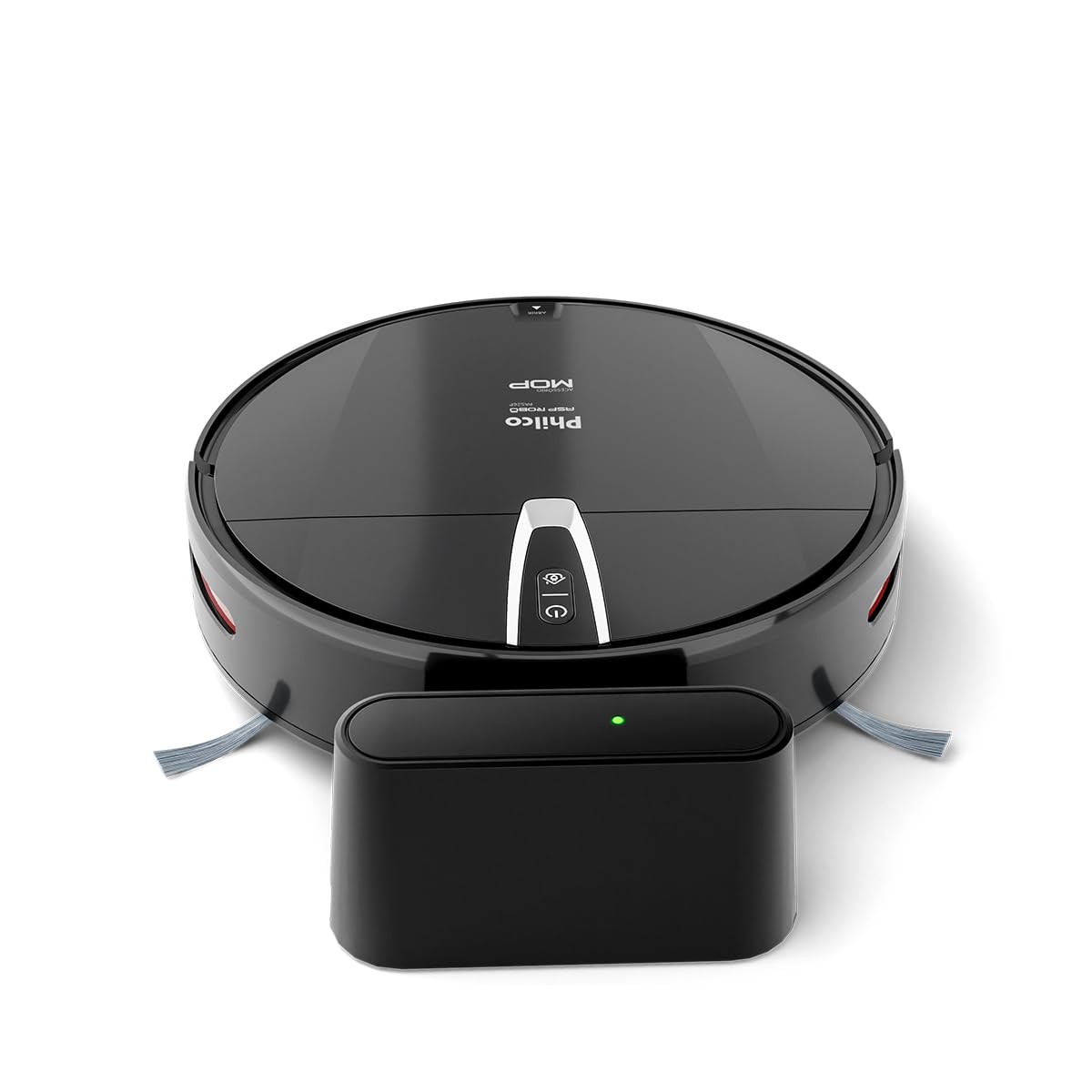
Figure 1: Top view of the Philco PAS26P Robotic Vacuum Cleaner with its charging base. The robot is black and round, featuring control buttons on its top surface and a side brush visible. The charging base is a compact black unit with an indicator light.

Figure 2: The Philco PAS26P Robotic Vacuum Cleaner with its top cover lifted, revealing the dustbin compartment. The dustbin is easily accessible for emptying and filter maintenance.

Figure 3: Bottom view of the Philco PAS26P Robotic Vacuum Cleaner, showing the two side brushes, main wheels, and the attached blue mop cloth for wet cleaning.
Setup
- Unpack the Robot: Carefully remove the robotic vacuum cleaner and all accessories from the packaging.
- Install Side Brushes: Attach the two side brushes to their respective posts on the bottom of the robot. Press firmly until they click into place.
- Place Charging Base: Position the charging base against a wall in an open area, ensuring there are no obstacles within 1 meter (3 feet) to the front and 0.5 meters (1.5 feet) to the sides. Plug the power adapter into the charging base and a wall outlet.
- Initial Charge: Place the robot onto the charging base. Ensure the charging contacts on the robot align with those on the base. The indicator light on the robot will show charging status. For first use, charge the robot for at least 4-6 hours until fully charged.
- Prepare for Mopping (Optional): If using the mop function, fill the water tank with clean water and attach the mop cloth. Insert the water tank assembly into the designated slot on the robot's underside.

Figure 4: The Philco PAS26P Robotic Vacuum Cleaner docked on its charging base. The robot automatically returns to this base when its battery is low or after completing a cleaning cycle.
Operating Instructions
Before Cleaning
- Clear the area of loose cables, small objects, and fragile items.
- For optimal mopping, ensure the water tank is filled and the mop cloth is attached.
- Open doors to rooms you wish to clean and close doors to areas you want the robot to avoid.
Starting a Cleaning Cycle
You can start the robot using the power button on the robot or the remote control.
- On the Robot: Press the power button once to start a cleaning cycle. The robot will begin cleaning in automatic mode.
- Using Remote Control: Use the "Start/Pause" button on the remote control to begin or pause cleaning. The remote control also allows you to select different cleaning modes (e.g., Auto, Spot, Edge) and direct the robot manually.

Figure 5: The Philco PAS26P Robotic Vacuum Cleaner actively cleaning a hard floor surface. Its compact design allows it to navigate under furniture and around obstacles.
Cleaning Modes
- Auto Mode: The robot cleans automatically, adjusting its path based on obstacles and room layout.
- Spot Cleaning: The robot focuses on a specific area, cleaning in a spiral pattern. Useful for concentrated dirt.
- Edge Cleaning: The robot cleans along walls and furniture edges.
Returning to Charging Base
The robot will automatically return to its charging base when the battery is low or when a cleaning cycle is complete. You can also manually send it back using the "Home" button on the remote control.
Maintenance
Regular maintenance ensures optimal performance and extends the lifespan of your robotic vacuum cleaner.
Emptying the Dustbin
- Press the "Open" button on the top cover to access the dustbin.
- Remove the dustbin and empty its contents into a trash can.
- Clean the HEPA filter and primary filter with the provided cleaning brush or by tapping them gently to remove dust. Do not wash the HEPA filter with water.
- Reinsert the filters and dustbin into the robot.
Cleaning Side Brushes
- Periodically remove the side brushes by pulling them upwards.
- Remove any hair or debris tangled around the brushes.
- Reattach the brushes, ensuring they are securely in place.
Cleaning the Mop Cloth and Water Tank
- Remove the mop cloth from the water tank. Wash it by hand or machine and allow it to air dry completely before reattaching.
- Empty any remaining water from the water tank after each use to prevent mildew and odors.
Cleaning Sensors and Charging Contacts
- Wipe the anti-fall sensors (located on the bottom of the robot) and obstacle sensors (on the front bumper) with a clean, dry cloth.
- Clean the charging contacts on both the robot and the charging base with a dry cloth to ensure a good connection.
Troubleshooting
Refer to this section for common issues and their solutions.
| Problem | Possible Cause | Solution |
|---|---|---|
| Robot does not turn on. | Low battery; Power switch off. | Charge the robot; Ensure the main power switch (if present) is ON. |
| Robot does not charge. | Charging contacts dirty; Power adapter not connected. | Clean charging contacts on robot and base; Ensure power adapter is securely plugged in. |
| Robot gets stuck frequently. | Obstacles (cables, rugs); Sensors dirty. | Clear obstacles from the cleaning path; Clean all sensors. |
| Poor cleaning performance. | Dustbin full; Filters clogged; Brushes tangled. | Empty dustbin; Clean/replace filters; Clean side brushes. |
| Mop function not effective. | Water tank empty; Mop cloth dry or dirty. | Refill water tank; Wet and clean mop cloth. |
| Robot does not return to base. | Charging base obstructed; Robot too far from base. | Ensure clear path to base; Manually place robot closer to base. |
Specifications
| Model Number | PAS26P |
| Brand | PHILCO |
| Color | Black |
| Product Dimensions | 8 x 31.6 x 34.9 cm (Height x Diameter) |
| Product Weight | 2.4 kg |
| Dustbin Capacity | 0.61 L |
| Water Tank Capacity | 0.2 L |
| Special Features | Anti-fall sensors, Automatic cleaning, Mop function, HEPA filter |
| Battery Type | Lithium-ion (1 included) |
| Included Components | Robotic Vacuum Cleaner, Charging Base, Remote Control |
| Surface Recommendation | Vinyl and similar hard floor surfaces |
Warranty and Support
For warranty information or technical support, please refer to the warranty card included in your product packaging or visit the official Philco website. Keep your purchase receipt as proof of purchase.
Official Philco Store: Visit the Philco Store on Amazon

