
Introduction
Thank you for choosing the Fenge Dual Monitor Stand with 2 Drawers. This manual provides essential information for the safe and efficient assembly, operation, and maintenance of your new computer riser. Please read these instructions thoroughly before use and retain them for future reference.
Safety Information
- Ensure all components are present and undamaged before assembly. Do not use if any parts are missing or defective.
- Assemble the unit on a soft, clean surface to prevent scratches.
- Do not exceed the maximum load capacity of 99 lbs (45 kg).
- Place the monitor stand on a stable, level surface to prevent tipping.
- Keep small parts away from children.
Package Contents
Verify that all the following components are included in your package:
- Main MDF Board (Top Shelf)
- Lower MDF Board (Middle Shelf)
- Adjustable Height Legs (4 pieces)
- Fabric Drawers (2 pieces)
- Assembly Hardware (screws, dowels, etc.)
- Assembly Tool (screwdriver/Allen wrench)
Assembly Instructions
Follow these steps to assemble your Fenge Dual Monitor Stand:
- Prepare the Boards: Lay the main MDF board (top shelf) and the lower MDF board (middle shelf) on a soft, flat surface.
- Attach Support Pieces: Secure the internal support pieces to the underside of the main MDF board and the top of the lower MDF board using the provided screws and dowels. Ensure they are aligned with the pre-drilled holes.
- Connect the Shelves: Carefully align the main MDF board with the lower MDF board, ensuring the support pieces fit correctly. Secure them together with the appropriate hardware.
- Install Legs: Attach the four adjustable height legs to the underside of the lower MDF board. Tighten the screws securely.
- Insert Drawers: Slide the two fabric drawers into their designated compartments on the lower shelf.
For a visual guide on assembly, please refer to the official assembly video:
Video: Fenge Monitor Stand Assembly Guide (Excludes Drawer Section). This video demonstrates the step-by-step process of assembling the monitor stand components.
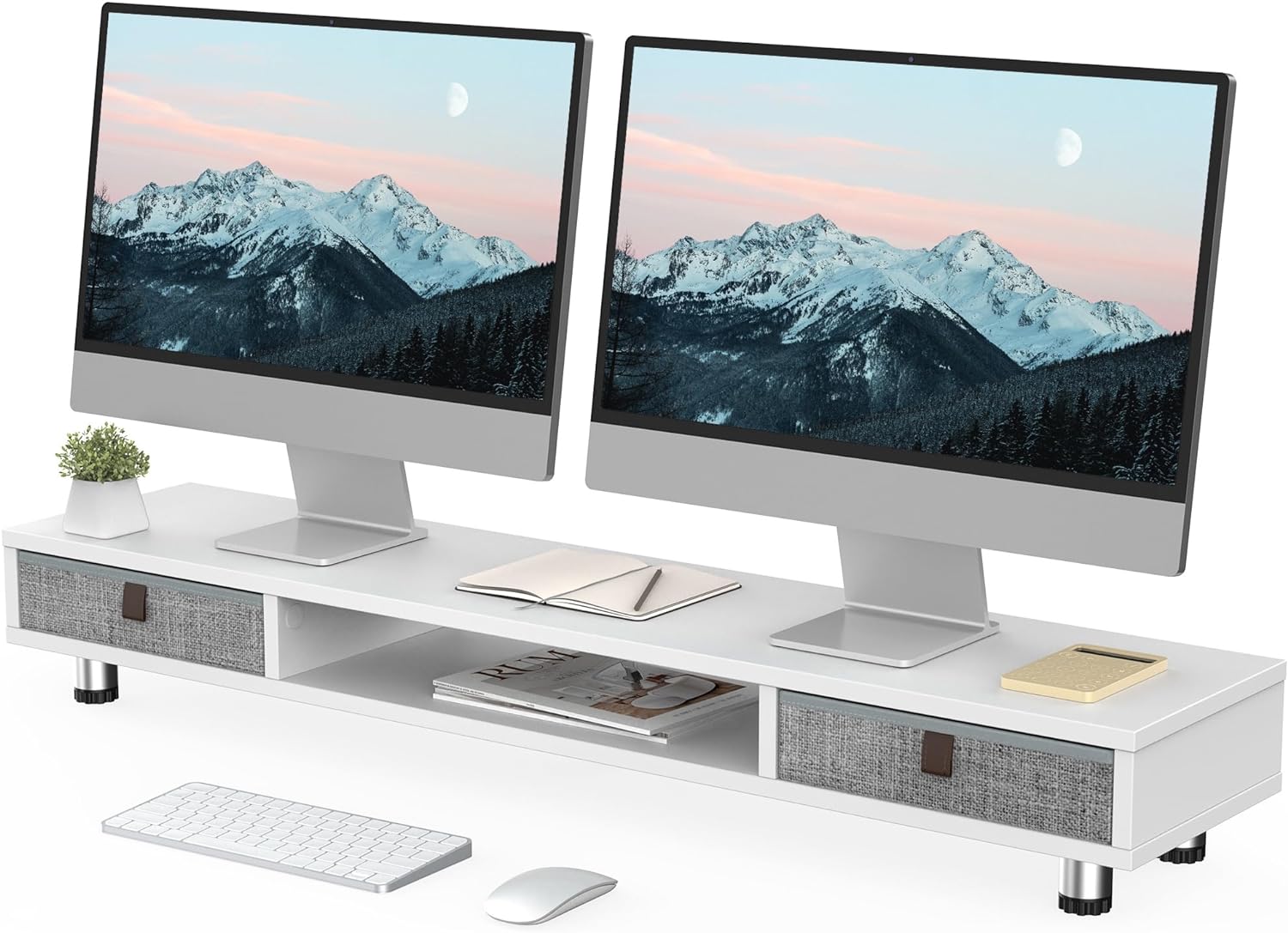
Image: The fully assembled Fenge Dual Monitor Stand in white, showcasing its design with two monitors and integrated storage drawers.
Operating Instructions
The Fenge Dual Monitor Stand is designed to enhance your workspace ergonomics and organization.
- Monitor Placement: Place up to two 32-inch monitors on the top surface of the stand. Ensure the weight is evenly distributed and does not exceed the 99 lbs (45 kg) capacity.
- Adjustable Height: The stand's height can be adjusted from 6.0 inches to 6.6 inches. Rotate the adjustable feet at the bottom of the legs to achieve your desired ergonomic viewing height. This helps alleviate neck strain during long work sessions.
- Integrated Storage: Utilize the two large 10.9-inch slide-out fabric drawers for storing desktop items such as pens, notebooks, and small accessories, keeping your workspace tidy. The middle compartment also offers additional space for laptops, keyboards, or other devices.
- Versatile Use: This stand can also function as a printer stand, laptop riser, or TV stand, adapting to various needs in your home or office.

Image: A close-up illustrating the practical storage provided by the pull-out drawers, ideal for organizing small office supplies.

Image: Visual examples demonstrating the monitor stand's adaptability for use with printers, multiple monitors, or as a television stand.
Video: Fenge Dual Monitor Stand with 2 Drawers Product Overview. This video provides a brief demonstration of the monitor stand's features and functionality.
Maintenance
To ensure the longevity and appearance of your monitor stand:
- Wipe surfaces with a soft, damp cloth. Avoid harsh chemicals or abrasive cleaners.
- Regularly check all screws and connections to ensure they remain tight.
- Keep the stand away from direct sunlight and extreme temperatures to prevent material damage.
Troubleshooting
If you encounter any issues with your monitor stand, refer to the following common solutions:
- Instability/Wobbling: Ensure all screws are tightened. Check that the adjustable feet are evenly extended and making full contact with the desk surface.
- Drawers not sliding smoothly: Verify that the drawers are inserted correctly and that there are no obstructions in the compartments.
- Difficulty with height adjustment: Ensure the adjustable feet are not overtightened and can rotate freely.
Specifications
Detailed product specifications for the Fenge Dual Monitor Stand:
| Feature | Detail |
|---|---|
| Model | B0CFF9BCKB |
| Dimensions (L x W x H) | 42.5 x 9.3 x 6.0~6.6 inches |
| Item Weight | 18.56 pounds (8.44 kg) |
| Load Capacity | 99 Pounds (44.91 kg) |
| Material | MDF (Medium-Density Fiberboard) |
| Color | White |
| Drawers | 2 fabric slide-out drawers (10.9 inches each) |
| Adjustable Height Range | 6.0 inches to 6.6 inches |

Image: A detailed diagram illustrating the physical dimensions and weight capacity of the monitor stand.

Image: Close-up view emphasizing the construction materials and adjustable features of the stand's legs.
Warranty and Support
For warranty information or technical support, please refer to the product packaging or contact Fenge customer service directly. Keep your purchase receipt for any warranty claims.