1. Introduction
Thank you for choosing Topsung M920 Walkie Talkies. These handheld two-way radios are designed for reliable long-range communication, featuring NOAA weather alerts, rechargeable batteries, and user-friendly operation. They are ideal for various activities such as hiking, camping, road trips, or simply staying connected with family and friends.
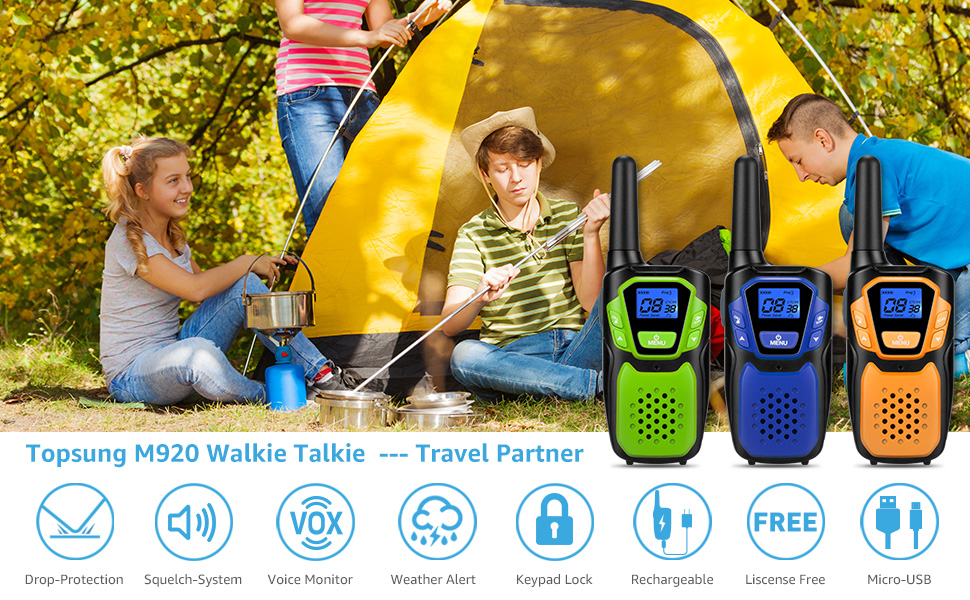
Topsung M920 Walkie Talkies provide reliable communication for outdoor activities.
2. Package Contents
Please verify that all items listed below are included in your package:
- 2 x Two-Way Radio Handheld Units (Blue & Green)
- 6 x 1000mAh AA Ni-MH Rechargeable Batteries
- 1 x USB Charger Adapter
- 1 x USB Charging Cable (splits into two for simultaneous charging)
- 2 x Adjustable Lanyards
- 1 x User Manual

All components included in the Topsung M920 Walkie Talkies package.
3. Product Overview
Familiarize yourself with the various parts and controls of your Topsung M920 Walkie Talkie:

Detailed diagram of the Topsung M920 Walkie Talkie components.
- Antenna: For transmitting and receiving signals.
- Backlit LCD Display: Shows channel, privacy code, battery level, and other indicators.
- PTT Button (Push-to-Talk): Press and hold to transmit your voice.
- Call/Lock Button: Press to send a call tone. Press and hold to lock/unlock the keypad.
- Up Button: Navigates menus and increases values.
- Menu/Power Button: Press to access menu settings. Press and hold to power on/off the radio.
- Speaker: Outputs received audio.
- NOAA/Scan Button: Press to activate NOAA weather scan. Press and hold to activate channel scan.
- Down Button: Navigates menus and decreases values.
- Microphone: Captures your voice for transmission.
- External Speaker/Microphone/Charger Jack: Port for accessories and charging.
4. Setup
4.1 Battery Installation
- Ensure the radio is powered off.
- Locate the battery compartment cover on the back of the radio.
- Push down on the clip and slide the cover downwards to remove it.
- Insert the 3 AA Ni-MH rechargeable batteries into the compartment, observing the correct polarity (+/-) as indicated.
- Replace the battery compartment cover by sliding it upwards until it clicks into place.
Refer to the battery compartment diagram in the Product Overview section for visual guidance.
4.2 Charging the Batteries
For optimal performance, fully charge the batteries before first use. The included USB charger provides overcharge, overvoltage, and short circuit protection.
- Connect the USB charging cable to the External Speaker/Microphone/Charger Jack on the side of the walkie talkie.
- Plug the USB charger adapter into a standard wall outlet.
- The battery icon on the LCD display will indicate charging status.
- A full charge typically takes approximately 3 hours. The radio can then provide standby time of about 63 hours.

Convenient USB charging allows for flexible power sources.
5. Operating Instructions
5.1 Power On/Off
Press and hold the MENU/POWER button for approximately 3 seconds to turn the radio on or off.
5.2 Channel Selection
Your Topsung M920 radio has 22 FRS channels. To communicate with another radio, both radios must be set to the same channel and privacy code.
- Press the MENU/POWER button once. The channel number will flash on the LCD display.
- Use the UP or DOWN buttons to select your desired channel (1-22).
- Press the PTT button to confirm your selection and exit the menu, or press MENU/POWER again to proceed to privacy code settings.
5.3 Privacy Codes (CTCSS/DCS)
The radio supports 38 CTCSS (Continuous Tone-Coded Squelch System) privacy codes and 98 DCS (Digitally Coded Squelch) privacy codes. These codes help filter out unwanted conversations on the same channel.
- After selecting a channel, press the MENU/POWER button again. The privacy code number will flash.
- Use the UP or DOWN buttons to select your desired privacy code (0-38 for CTCSS, 39-136 for DCS). Code '0' means no privacy code is selected.
- Press the PTT button to confirm your selection and exit the menu.
5.4 Push-to-Talk (PTT)
To transmit your voice, press and hold the PTT button. Speak clearly into the microphone. Release the PTT button to listen for a response.
5.5 VOX (Voice Operated Exchange)
VOX allows for hands-free operation. When activated, the radio transmits automatically when it detects your voice.
- Press the MENU/POWER button repeatedly until 'VOX' appears on the display.
- Use the UP or DOWN buttons to select a VOX sensitivity level (1-18, with 1 being most sensitive). 'OFF' disables VOX.
- Press the PTT button to confirm and exit.

VOX feature enables hands-free communication, useful for activities like skiing.
5.6 NOAA Weather Alert
The radio can scan for NOAA weather channels and alert you to severe weather updates.
- Press the NOAA/SCAN button once to activate NOAA Weather Scan. The radio will automatically scan through 25 available weather (WX) band channels and lock onto the strongest signal.
- If a severe weather alert is issued, the radio will sound an alarm.
- Press any button to exit the NOAA Weather Scan mode.
5.7 Keypad Lock
To prevent accidental changes to settings, you can lock the keypad.
- Press and hold the CALL/LOCK button for approximately 3 seconds. A key icon will appear on the display, indicating the keypad is locked. Only the PTT button will function.
- To unlock, press and hold the CALL/LOCK button again for 3 seconds. The key icon will disappear.
5.8 Scanning Function
The scanning function allows you to monitor all channels for activity.
- Press and hold the NOAA/SCAN button for approximately 3 seconds to activate channel scanning. The radio will cycle through all 22 channels.
- When activity is detected on a channel, the scan will pause. It will resume after a few seconds of inactivity.
- Press the PTT button to stop scanning and communicate on the current channel.
6. Range Information
The communication range of your walkie talkie can vary significantly depending on terrain, weather conditions, electromagnetic interference, and obstructions. While the radio is capable of long-range communication, real-world conditions will affect performance.

Typical range expectations in various environments.
- Mountain to Valley: Up to 16 miles (with clear line of sight)
- Open Water: Up to 4 miles
- Neighborhood: Up to 1 mile (due to buildings and obstructions)
For best results, try to maintain a clear line of sight between radios and avoid large obstructions like buildings or dense foliage.
7. Maintenance
- Cleaning: Use a soft, damp cloth to clean the exterior of the radio. Do not use harsh chemicals or abrasive cleaners.
- Storage: If storing the radio for an extended period, remove the batteries to prevent leakage. Store in a cool, dry place.
- Battery Care: Use only the specified rechargeable batteries. Do not mix old and new batteries or different types of batteries.
- Water Exposure: These radios are not waterproof. Avoid exposing them to heavy rain or submersion in water.
8. Troubleshooting
| Problem | Possible Cause | Solution |
|---|---|---|
| Radio does not power on. | Batteries are low or not installed correctly. | Charge the batteries or ensure they are inserted with correct polarity. |
| Cannot communicate with other radios. | Radios are on different channels or privacy codes. Out of range. | Ensure all radios are on the same channel and privacy code. Move closer to the other radio. |
| Poor audio quality or static. | Weak signal, interference, or out of range. | Move to a location with fewer obstructions. Check battery level. |
| Keypad is unresponsive. | Keypad is locked. | Press and hold the CALL/LOCK button for 3 seconds to unlock. |
| Batteries not charging or dying quickly. | Poor contact with battery terminals. | Carefully pry out the battery contacts slightly to ensure a tighter connection. Ensure USB cable is fully inserted. |
9. Specifications
- Model: M920
- Number of Channels: 22 FRS Channels
- Privacy Codes: 38 CTCSS, 98 DCS
- Frequency Range: 462-467 MHz
- Power Source: 3 x 1000mAh AA Ni-MH Rechargeable Batteries per unit (6 included)
- Voltage: 3.6 Volts
- Talking Range Maximum: Up to 2 Miles (typical conditions)
- Special Features: NOAA Weather Alert, Emergency Alarm, VOX, Keypad Lock, Scanning Function
- Item Weight: Approximately 1.08 pounds (for the pair with batteries)
- Dimensions (per unit): Approximately 2.2 x 1.3 x 3.9 inches (excluding antenna)
10. Warranty and Support
Topsung is committed to providing quality products. For any questions, technical support, or warranty inquiries, please refer to the contact information provided with your purchase or visit the official Topsung website. Please retain your proof of purchase for warranty claims.


