
1. Product Overview
The CUBOT Note 21 is a feature-rich smartphone designed for a smooth and intuitive user experience. It operates on Android 13 and boasts a 6.56-inch HD+ display with a 90Hz refresh rate for fluid visuals. Equipped with a powerful Unisoc T606 processor, 6GB of RAM (expandable), and 128GB of internal storage, it handles multitasking and applications efficiently. Capture moments with its 50MP main camera, 2MP macro camera, and 8MP front camera. A large 5200mAh battery ensures extended usage throughout the day.

Image: An overview of the CUBOT Note 21 smartphone, showcasing its design and key features like RAM, ROM, camera, screen, battery, and Android 13.
2. Getting Started
2.1 Package Contents
Verify that your package contains the following items:
- CUBOT Note 21 Smartphone
- Power Adapter
- USB Cable
- SIM Ejector Tool
- Quick Start Guide (this manual)
2.2 Inserting SIM Cards and MicroSD Card
The CUBOT Note 21 supports Dual SIM functionality and a MicroSD card for expanded storage.
- Locate the SIM card tray on the side of the device.
- Insert the SIM ejector tool into the small hole next to the tray and press gently until the tray pops out.
- Place your Nano-SIM cards and/or MicroSD card into the designated slots on the tray. Ensure the gold contacts face downwards.
- Carefully push the tray back into the phone until it clicks into place.

Image: A visual guide showing the CUBOT Note 21's SIM card tray, illustrating how to insert SIM cards and a MicroSD card.
2.3 Charging the Battery
Before first use, fully charge the device battery. Use only the provided power adapter and USB cable.
- Connect the USB cable to the power adapter.
- Plug the power adapter into a wall outlet.
- Connect the USB cable to the charging port on your phone.
- The charging indicator will appear on the screen.

Image: An illustration emphasizing the 5200mAh battery capacity of the CUBOT Note 21.
2.4 Powering On/Off
- To Power On: Press and hold the Power button until the CUBOT logo appears.
- To Power Off: Press and hold the Power button, then select "Power off" from the options on the screen.
3. Operating Your CUBOT Note 21
3.1 Display and Navigation
The CUBOT Note 21 features a 6.56-inch HD+ IPS touchscreen with a 90Hz refresh rate for smooth scrolling and responsive interaction.

Image: The CUBOT Note 21 display showcasing its 6.56-inch size and immersive visual experience with a 90Hz refresh rate.
- Touch Gestures: Tap, swipe, pinch-to-zoom for various functions.
- Notification Panel: Swipe down from the top of the screen to access quick settings and notifications.
- Home Screen: Customize with widgets, app shortcuts, and wallpapers.
3.2 Android 13 Features
Your device runs on Android 13, offering enhanced privacy controls, improved customization options, and a more intuitive user interface.

Image: A visual representation of the Android 13 interface on the CUBOT Note 21, highlighting its modern design and app icons.
- Privacy Dashboard: Manage app permissions and data access.
- Material You: Personalize your phone's theme to match your wallpaper.
- Notification Permissions: Control which apps can send you notifications.
3.3 Camera Usage
The CUBOT Note 21 is equipped with a 50MP main camera, a 2MP macro camera, and an 8MP front camera for capturing photos and videos.
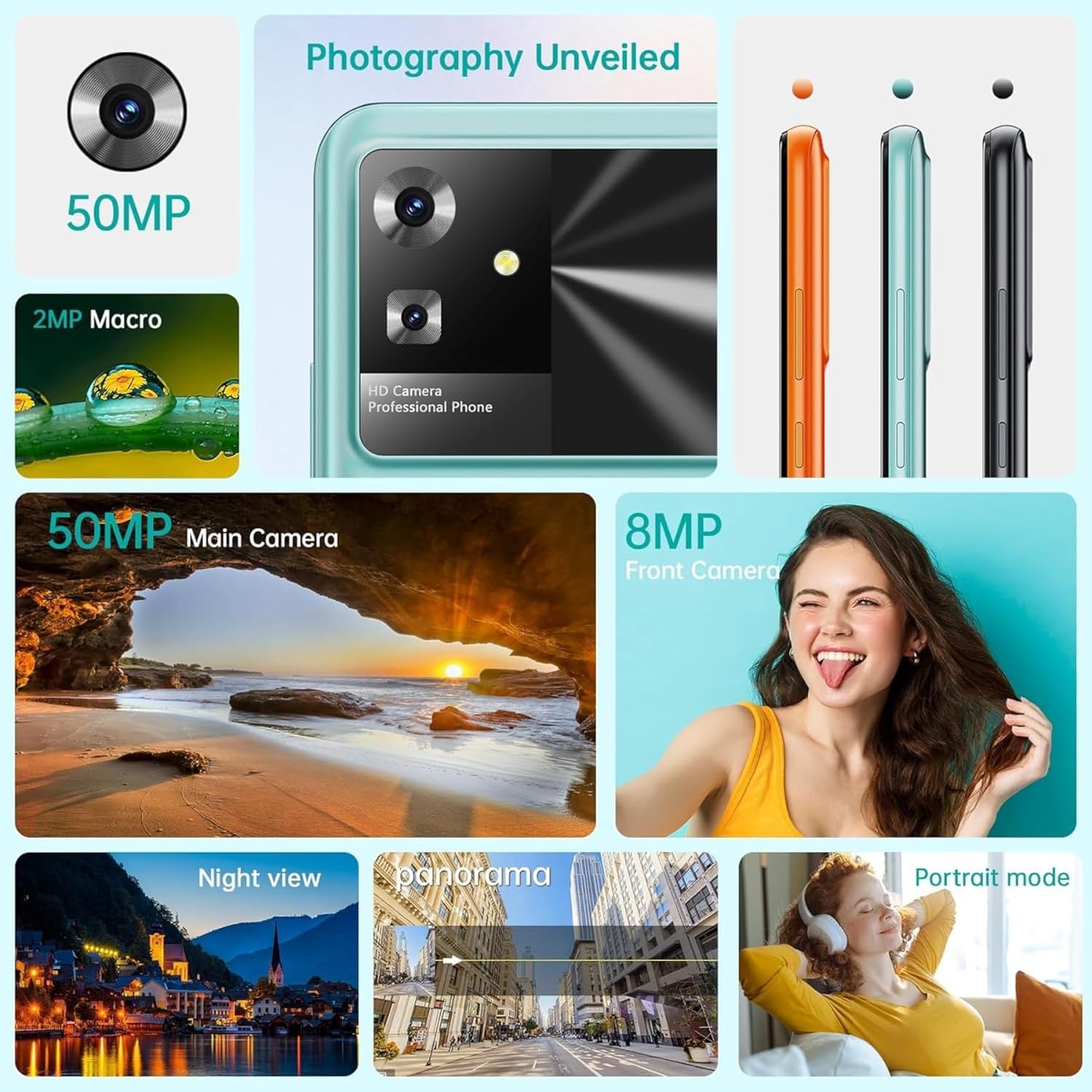
Image: A detailed view of the CUBOT Note 21's camera system, including the 50MP main and 8MP front cameras, along with various shooting modes.
- Open the Camera app.
- Select your desired mode (Photo, Video, Portrait, Macro, etc.).
- Tap the shutter button to take a picture or start/stop recording a video.
- Use the zoom gestures (pinch-to-zoom) or switch between front and rear cameras.
3.4 Storage and Memory
The device comes with 6GB of RAM (expandable) and 128GB of internal storage, with support for up to 1TB TF card expansion.

Image: A diagram illustrating the 6GB RAM (with 6GB expansion) and 128GB ROM of the CUBOT Note 21, highlighting its memory capabilities.
- Internal Storage: 128GB for apps, photos, and files.
- RAM: 6GB for smooth multitasking, with virtual expansion capabilities.
- Expandable Storage: Insert a MicroSD card (up to 1TB) into the SIM tray for additional storage.
4. Maintenance and Care
4.1 Battery Care
To maximize battery life and performance:
- Avoid extreme temperatures.
- Do not let the battery drain completely regularly.
- Use only the original charger and cable.
- Unplug the charger once the battery is full.
4.2 Cleaning Your Device
- Use a soft, lint-free cloth to clean the screen and body.
- Avoid using harsh chemicals or abrasive materials.
- Do not expose the device to excessive moisture.
4.3 Software Updates
Regularly check for and install software updates to ensure optimal performance, security, and access to new features.
- Go to Settings > System > System update to check for available updates.
- Ensure your device has sufficient battery and a stable Wi-Fi connection before starting an update.
5. Troubleshooting
If you encounter issues with your CUBOT Note 21, refer to the following common solutions:
| Problem | Possible Solution |
|---|---|
| Device does not power on | Ensure the battery is charged. Press and hold the Power button for at least 10 seconds to force a restart. |
| Apps are crashing or freezing | Clear the cache of the problematic app (Settings > Apps > [App Name] > Storage > Clear cache). Restart the device. |
| Poor network signal | Check if SIM card is properly inserted. Try restarting the device. Ensure you are in an area with network coverage. |
| Battery drains quickly | Reduce screen brightness, close unused apps, disable Wi-Fi/Bluetooth when not in use. Check battery usage in Settings to identify power-hungry apps. |
| Camera not working | Restart the device. Clear the Camera app's cache and data (Settings > Apps > Camera > Storage). Check app permissions. |
6. Technical Specifications
Detailed specifications for the CUBOT Note 21 smartphone:
| Feature | Specification |
|---|---|
| Model Name | Note 21 |
| Operating System | Android 13.0 |
| Processor | Unisoc T606 Octa-Core, 1.6 GHz |
| RAM | 6 GB (expandable) |
| Internal Storage | 128 GB |
| Expandable Storage | Up to 1 TB via MicroSD (TF card) |
| Display Size | 6.56 Inches |
| Display Type | LCD HD+ IPS Touch Screen |
| Display Resolution | 720x1612 |
| Refresh Rate | 90 Hz |
| Rear Camera | 50 MP Main, 2 MP Macro |
| Front Camera | 8 MP |
| Battery Capacity | 5200 mAh |
| Average Battery Life | 48 Hours |
| Cellular Technology | 4G |
| Connectivity | NFC, USB, Wi-Fi, Bluetooth |
| Special Features | Accelerometer, Camera, Front Camera, Dual SIM, GPS, Touch Screen, Light Sensor, WiFi |
| Dimensions | 16.57 x 7.59 x 1.05 cm |
| Weight | 214 g |
7. Warranty and Support
CUBOT products are designed for reliability and performance. For warranty information and technical support, please refer to the warranty card included in your product packaging or visit the official CUBOT website. Keep your proof of purchase for warranty claims.
- Online Support: Visit the official CUBOT website for FAQs, software downloads, and contact information.
- Customer Service: Contact CUBOT customer service for assistance with product issues or inquiries.


