1. Introduction
The TTXSCAM MT01 Motorcycle DVR is an advanced system designed to enhance your riding experience with integrated navigation, communication, and recording capabilities. It features wireless Apple CarPlay and Android Auto, dual HD 1080P cameras for comprehensive recording, a Tire Pressure Monitoring System (TPMS) for safety, GPS tracking, G-Sensor for incident detection, and voice control for hands-free operation. This manual provides detailed instructions for setting up, operating, and maintaining your device.

Figure 1: TTXSCAM MT01 Motorcycle DVR with Apple CarPlay interface.
2. What's in the Box
Please verify that all components listed below are included in your package:
- 5-inch IPS Touch Screen Display Unit
- Dual HD 1080P Front and Rear Cameras
- 2x Tire Sensors for TPMS
- 64G TF Card
- Waterproof Power Cable
- Bracket + Spacer (6 pcs)
- Sticker (2 pcs) + Screw (4 pcs)
- 3m Cable (2 pcs)
- Binding Strap (6 pcs)
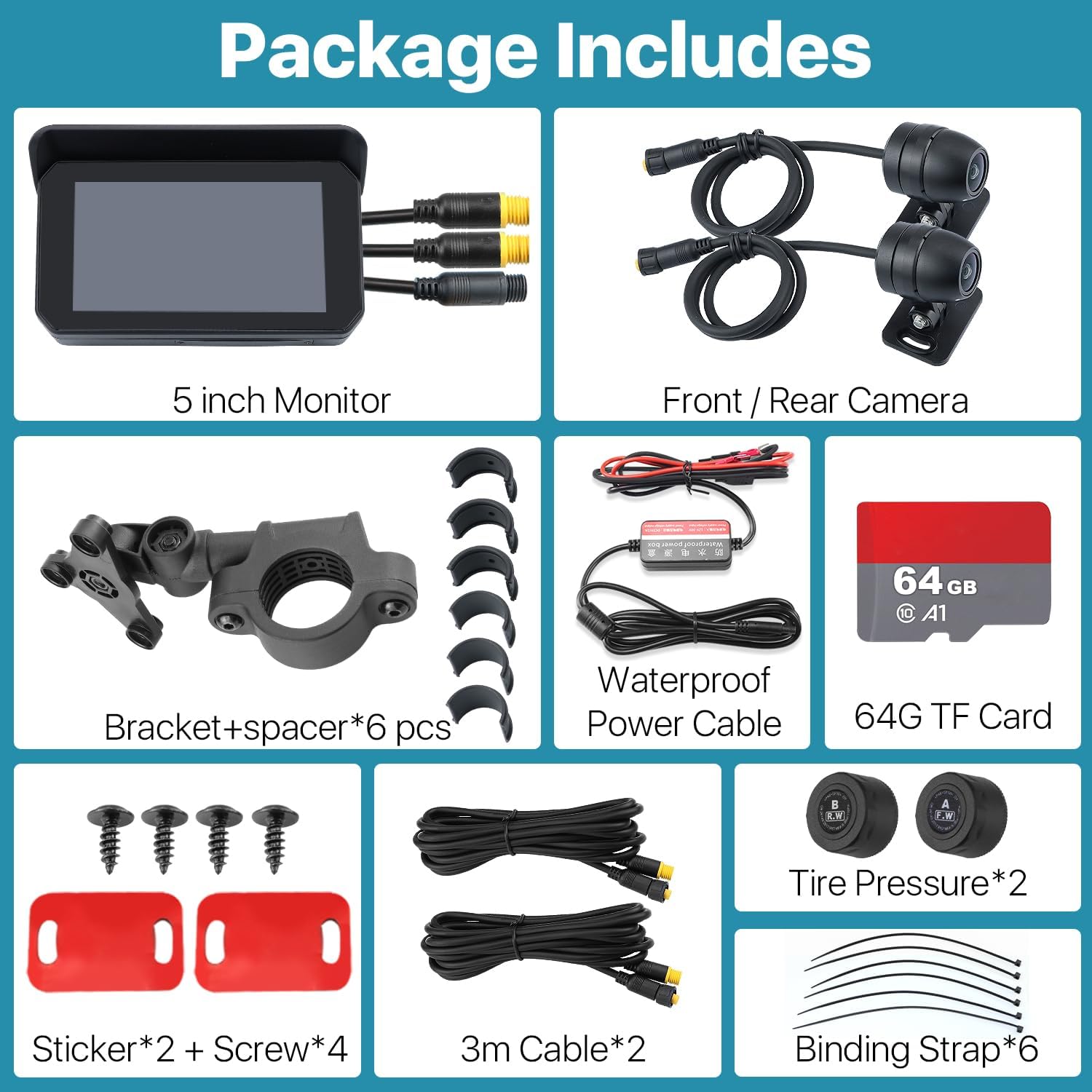
Figure 2: All included components in the TTXSCAM MT01 package.
3. Specifications
| Feature | Description |
|---|---|
| Model Number | TTXSCAM-MT01 |
| Display Size | 5 Inches IPS Touch Screen |
| Video Capture Resolution | Dual HD 1080P (Front and Rear) |
| Connectivity | Wireless, Bluetooth, Wi-Fi, USB |
| Special Features | Wireless CarPlay & Android Auto, TPMS Support, Waterproof (IP65), G-Sensor, Loop Recording, GPS Track Playback, Voice Control (Siri/Google Voice) |
| Mounting Type | Tripod Bracket Holder (Adjustable) |
| Product Dimensions | 5.71 x 3.43 x 1.46 inches |
| Item Weight | 2.23 pounds |
| Country of Origin | China |
4. Setup Guide
4.1. Mounting the Device
The TTXSCAM MT01 comes with an adjustable bracket holder for universal compatibility with motorcycles. Securely attach the bracket to your motorcycle's handlebars using the provided screws and spacers. Ensure the display unit is firmly attached to the bracket and positioned for optimal viewing without obstructing your ride.

Figure 3: Monitor dimensions and bracket mounting details.
Video 1: This video demonstrates the mounting process of the TTXSCAM MT01 motorcycle DVR, showing how to attach it to the handlebars and adjust its position for optimal use.
4.2. TF Card Insertion
The device requires a TF (microSD) card for recording footage. A 64GB TF card is included. To insert the TF card, locate the card slot on the side of the unit. Carefully open the protective cover, insert the TF card with the gold contacts facing down until it clicks into place, and then close the cover securely to maintain waterproofing.
Video 2: This video illustrates the correct procedure for inserting the TF card into the TTXSCAM MT01 device, ensuring proper placement and sealing for waterproof integrity.
5. Operating Instructions
5.1. Basic Navigation
The 5-inch IPS touch screen allows for intuitive navigation. You can swipe between screens and tap icons to access various functions. The unit also features four side buttons for quick control: Record, Switching (camera view), Home, and Power.
5.2. Wireless CarPlay and Android Auto Connection
To connect your smartphone for wireless CarPlay or Android Auto:
- On your smartphone, open Bluetooth settings.
- Search for and pair with the device named 'MT65B-xxxxxxx'.
- Once paired, enable wireless CarPlay or Android Auto via Wi-Fi.
- Ensure the device microphone is OFF: Navigate to Settings >>> System >>> Device MIC >>> OFF.
- Access 'Bluetooth Emit' to search and connect with your Bluetooth helmet for audio output.

Figure 4: Wireless CarPlay and Android Auto interfaces.
Video 3: This video provides a step-by-step guide on how to connect your smartphone to the TTXSCAM MT01 for CarPlay functionality.
5.3. Dual Camera Operation (DVR)
The device records continuously from both front and rear 1080P cameras. Footage is saved to the inserted TF card. The G-Sensor automatically locks footage during sudden impacts or collisions, preventing it from being overwritten. Loop recording ensures that older, unlocked files are overwritten when the storage is full.

Figure 5: Key functions including Loop Recording and G-Sensor.
5.4. TPMS Monitoring
The included Tire Pressure Monitoring System (TPMS) sensors provide real-time tire pressure and temperature data directly on the display. Install the sensors on your tire valves as per the instructions provided with the TPMS kit. Monitor the display for any alerts regarding abnormal tire conditions to ensure riding safety.

Figure 6: Integrated Tire Pressure Monitoring System (TPMS).
5.5. Intelligent Voice Control
Utilize Siri or Google Voice for hands-free control of various functions, including making calls, playing music, and getting GPS guidance. Activate voice control by saying the wake-up phrase (e.g., "Hey Siri" or "Hey Google") followed by your command.

Figure 7: Voice control functionality with Siri and Google Voice.
5.6. Bluetooth Helmet Integration
After pairing your phone with the MT01, ensure your Bluetooth helmet is also connected to the device via the 'Bluetooth Emit' setting. This allows audio from CarPlay/Android Auto, calls, and navigation prompts to be routed directly to your helmet speakers.

Figure 8: Bluetooth helmet connectivity.
6. Maintenance
To ensure the longevity and optimal performance of your TTXSCAM MT01, follow these maintenance guidelines:
- Cleaning: Use a soft, damp cloth to clean the display and exterior. Avoid abrasive cleaners or solvents that could damage the screen or casing.
- Waterproofing: The device is IP65 waterproof. Ensure all port covers and the TF card slot cover are securely closed before exposure to water or moisture.
- Storage: When not in use for extended periods, store the device in a cool, dry place away from direct sunlight and extreme temperatures.
- Cable Management: Periodically check all cables and connections for wear or damage. Ensure they are securely fastened and not exposed to excessive strain.
7. Troubleshooting
If you encounter issues with your TTXSCAM MT01, refer to the following common problems and solutions:
- Device Not Powering On:
- Check all power connections to ensure they are secure.
- Verify the motorcycle's power source is active.
- Inspect the power cable for any visible damage.
- CarPlay/Android Auto Not Connecting:
- Ensure Bluetooth is enabled on both the device and your smartphone.
- Confirm that the correct 'MT65B-xxxxxxx' device is selected in your phone's Bluetooth settings.
- Restart both the MT01 and your smartphone.
- Check Wi-Fi connectivity, as CarPlay/Android Auto uses Wi-Fi for data transmission after initial Bluetooth pairing.
- Cameras Not Recording or Displaying:
- Ensure the TF card is properly inserted and not full.
- Format the TF card through the device settings if recording issues persist (this will erase all data).
- Check camera cable connections to the main unit.
- TPMS Not Displaying Readings:
- Ensure the TPMS sensors are correctly installed on the tire valves.
- Verify that the sensors are paired with the device (refer to TPMS specific instructions if provided separately).
- Check for any physical damage to the sensors.
8. Warranty and Support
The TTXSCAM MT01 Motorcycle DVR comes with a comprehensive warranty:
- 3 Months Money Back Guarantee: For any dissatisfaction within the first three months.
- 3 Years New Replacement: For manufacturing defects or malfunctions within three years of purchase.
- Lifelong Service: Ongoing technical support and assistance for the lifetime of the product.
For technical support, warranty claims, or any other inquiries, please contact TTXSCAM customer service through the platform where you purchased the product or visit the official TTXSCAM website for contact information.


