1. Introduction and Overview
The La Crosse Technology Wireless Professional Color Weather Station (Model 328-1415) provides comprehensive weather monitoring capabilities. This system offers real-time data including indoor and outdoor temperature, humidity, barometric pressure trends, wind speed and direction, and precise rainfall data.
Key features include:
- Professional-Grade Monitoring: Atomic time and date, wind speed and direction up to 111mph, rainfall data, indoor/outdoor temperature and humidity, and daily high/low records.
- Advanced Cyclone Sensor: The innovative TX145WSDR Cyclone sensor delivers accurate wind measurements, displaying direction via a compass rose or degrees. It tracks detailed wind history and supports customizable alerts.
- Comprehensive Rainfall Tracking: The integrated rain gauge provides accumulated rainfall data in various views (hourly, daily, weekly, monthly, yearly) with personalized alerts.
- User-Friendly Display: A high-contrast colored LCD screen offers easy readability with 6 dynamic color forecast icons, tendency indicators, and seasonal backgrounds. Barometric pressure readings and collected rain measurements are clearly displayed.
- Versatile Power and Range: The base unit uses a 5.0V AC adapter with CR2032 battery backup. The TX145WSDR sensor features a solar panel for extended battery life, while the TX141TH-BV4 sensor requires 2 AA batteries (not included). A 330-foot wireless transmission range ensures consistent data collection.
2. Package Contents
The La Crosse Technology 328-1415 Weather Station package typically includes the following components:
- Color Display Unit (Base Station)
- TX145WSDR Cyclone Sensor (Outdoor Multi-Sensor)
- TX141TH-BV4 Sensor (Outdoor Temperature/Humidity Sensor)
- 5.0V AC Power Adapter for Display Unit
- CR2032 Battery (pre-installed in Display Unit for backup)
- Mounting hardware (screws, anchors)
- Instruction Manual

Figure 2.1: Overview of the La Crosse Technology 328-1415 Wireless Professional Color Weather Station components, including the display unit, outdoor multi-sensor, and remote temperature/humidity sensor.
3. Setup
Follow these steps to set up your weather station for optimal performance:
- Power the Display Unit: Plug the 5.0V AC adapter into the display unit and a power outlet. The CR2032 battery is pre-installed for backup.
- Install Batteries in TX141TH-BV4 Sensor: Open the battery compartment of the TX141TH-BV4 sensor and insert 2 AA batteries (not included), observing correct polarity.
- Install Batteries in TX145WSDR Cyclone Sensor: The Cyclone sensor is primarily solar-powered, but it also requires batteries for backup and low-light conditions. Open the battery compartment and insert the specified batteries (typically 3 AA, not included), observing correct polarity.
- Sensor Placement: Position the TX145WSDR Cyclone sensor outdoors in an open area, away from obstructions, to ensure accurate wind and rain measurements. The TX141TH-BV4 sensor should also be placed outdoors in a shaded, well-ventilated location. Ensure both sensors are within the 330-foot wireless transmission range of the display unit.
- Synchronization: The display unit should automatically connect to the sensors. If connection is not established, refer to the troubleshooting section.

Figure 3.1: Rear view of the display unit, showing the battery compartment and power adapter input.
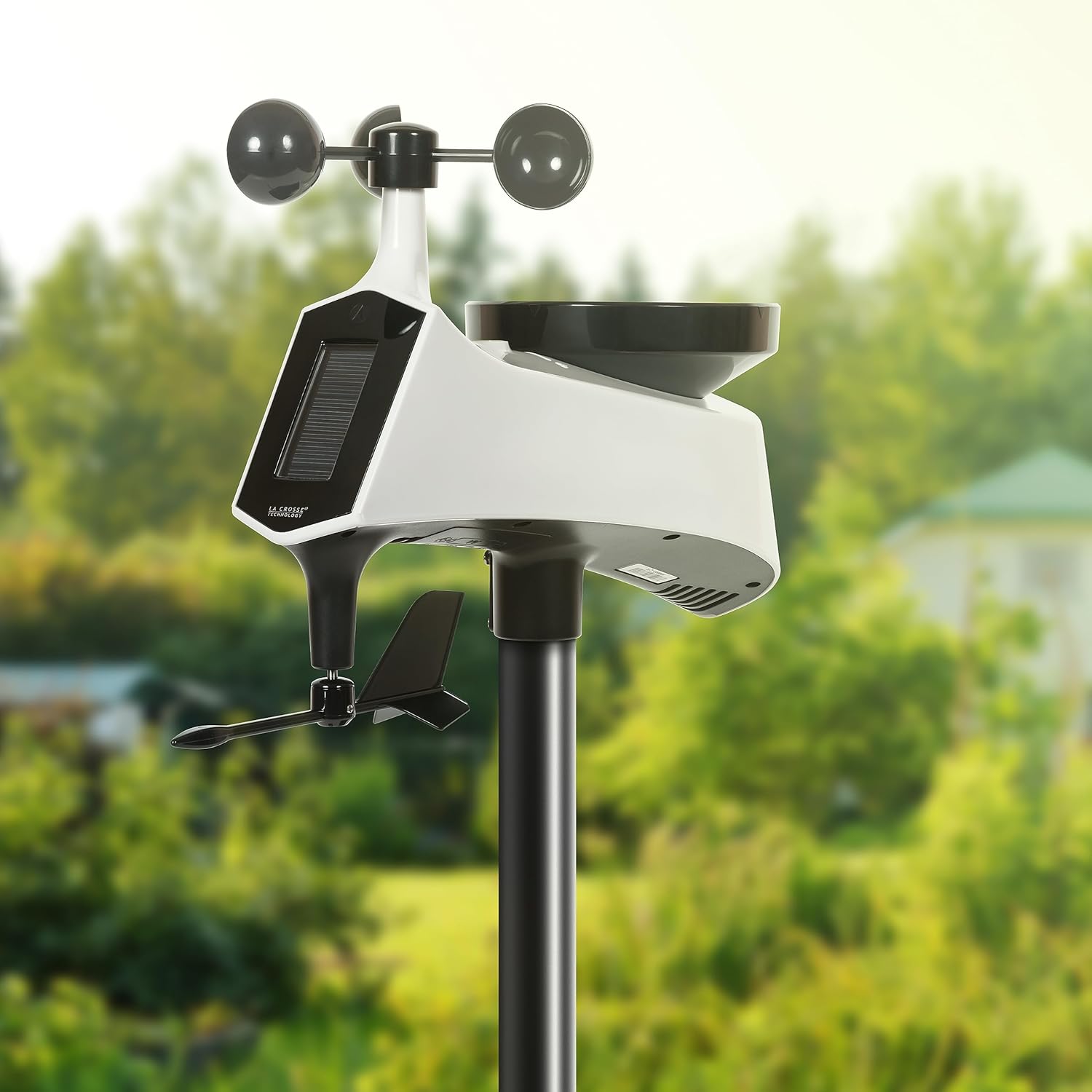
Figure 3.2: The outdoor multi-sensor (TX145WSDR Cyclone) installed in an open area for optimal weather data collection.
4. Operating
The display unit provides a clear and comprehensive overview of your local weather conditions. Familiarize yourself with the various sections and buttons:
- Display Layout: The high-contrast color LCD screen is divided into sections for outdoor temperature/humidity, indoor temperature/humidity, wind speed/direction, rainfall, barometric pressure, and a dynamic weather forecast.
- Weather Forecast: Six dynamic color icons indicate the weather forecast with tendency indicators and seasonal backgrounds. The forecast is based on changes in barometric pressure.
- Temperature & Humidity: View current indoor and outdoor temperature and humidity readings, along with daily high/low records.
- Wind Data: The TX145WSDR Cyclone sensor measures wind speed up to 111mph and displays wind direction using a compass rose or degrees. Historical wind records (1 hour, 24 hours, 7 days, month, year) are available.
- Rainfall: The rain gauge provides accumulated rainfall data in multiple views, from the past hour up to the last year.
- Barometric Pressure: Displays current barometric pressure in InHg or hPa with trend indicators.
- Atomic Time & Date: The station automatically synchronizes with the atomic time signal for accurate timekeeping.
- Customizable Alerts: Set personalized alerts for specific wind speed, rainfall, temperature, and humidity thresholds.
- Adjustable Backlight: The display's backlight can be adjusted for optimal viewing day or night.

Figure 4.1: Close-up view of the color display, highlighting various data points and forecast icons.
5. Maintenance
Proper maintenance ensures the longevity and accuracy of your weather station:
- Sensor Cleaning: Periodically clean the outdoor sensors (TX145WSDR Cyclone and TX141TH-BV4) to remove dirt, dust, leaves, insects, or other debris that may obstruct readings. Ensure the rain gauge funnel is clear.
- Battery Replacement: Replace batteries in the outdoor sensors as needed. The TX141TH-BV4 sensor requires 2 AA batteries. The TX145WSDR Cyclone sensor uses a solar panel but also requires batteries for backup. The display unit uses a CR2032 battery for backup.
- Storage: If storing the product for an extended period, remove all batteries from the sensors and display unit.
6. Troubleshooting
If you encounter issues with your weather station, refer to these common solutions:
- No Sensor Data: If the display unit is not receiving data from the outdoor sensors, check the following:
- Ensure batteries are correctly installed and not depleted in both sensors.
- Verify that the ABC switch settings on both sensors and the display unit match (A, B, or C).
- Relocate sensors closer to the display unit to improve signal strength, ensuring they are within the 330-foot range and away from major electronic interference.
- Press the 'TEMP' button on the display unit to initiate a manual search for the outdoor sensor.
- Inaccurate Readings: Ensure sensors are placed in optimal locations (e.g., open area for wind/rain, shaded area for temperature/humidity). Calibrate the rain gauge if necessary according to the full instruction manual.
- Low Battery Indicator: A low battery icon on the display indicates that batteries in a specific sensor or the display unit need replacement.
7. Specifications
| Brand | La Crosse Technology |
| Model Number | 328-1415 |
| Product Dimensions | 8.23 x 3.27 x 5.83 inches |
| Item Weight | 12.8 ounces |
| Material | Acrylonitrile Butadiene Styrene (ABS), Plastic |
| Color | Black |
| Display Type | LCD |
| Power Source | Corded Electric (Display Unit), Solar/Battery (TX145WSDR), Battery (TX141TH-BV4) |
| Batteries Required | Yes (CR2032 for display backup, AA for sensors) |
| Temperature Accuracy | 1 °C |
| Upper Temperature Rating | 140 Degrees Fahrenheit |
| Connectivity Technology | Wireless (for sensors), Wi-Fi (as per specifications, though primarily for sensor communication) |
| Special Features | Adjustable Brightness, Customizable Alert, Large Display, Weather Resistant |
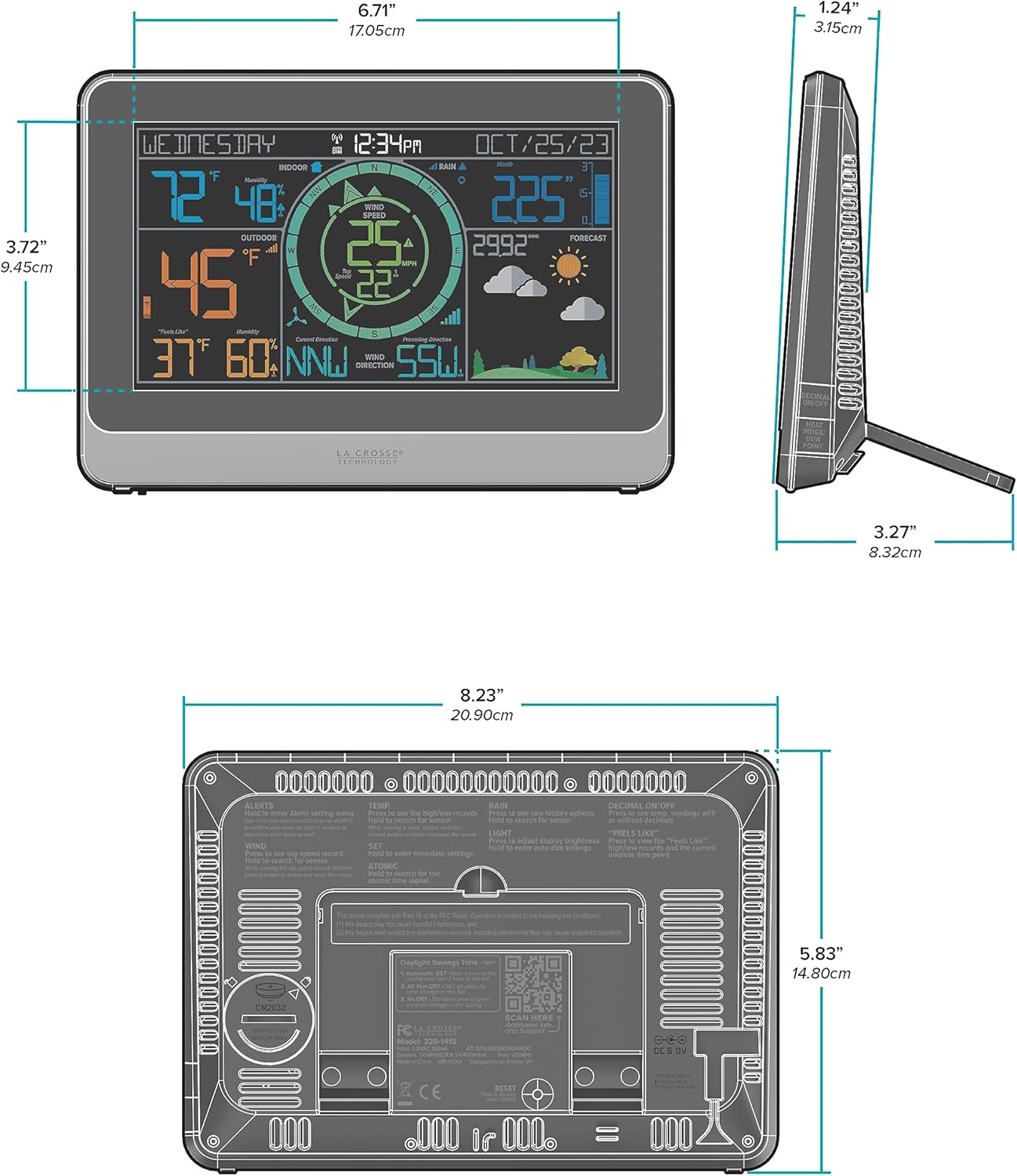
Figure 7.1: Detailed dimensions of the display unit and rear panel layout.
8. Warranty and Support
Warranty: La Crosse Technology, Ltd. provides a 1-year limited time warranty from the date of purchase. This warranty covers manufacturing defects in materials and workmanship. For full warranty details, visit: www.lacrossetechnology.com/patents.
Customer Support: For additional support or inquiries, please contact the friendly customer support team based in La Crosse, Wisconsin.
- Phone: 1-608-782-1610
- Online: lacrossetechnology.com/support
- Hours: Monday-Friday, 8am-6pm CST


