1. Introduction
The Niiyen V311B is a versatile 12V car battery tester designed for comprehensive battery diagnostics. It supports testing in both startup and charging modes, providing accurate readings of battery voltage, rated value, measured value, internal resistance, lifespan (SOH), and remaining capacity. This manual provides detailed instructions for setting up, operating, and maintaining your V311B battery tester.

Figure 1: Niiyen V311B Car Battery Tester. The device features a compact blue and black body with a clear display, connected to red and black alligator clips for battery connection.
2. Package Contents
Please verify that all items are present in the package:
- 1 x V311B Car Battery Tester
- 1 x User Manual
3. Specifications
| Feature | Description |
|---|---|
| Model | V311B |
| Main Control Chip | APM32F103VCT6 |
| Appearance Color | Blue |
| Interface Type | A pair of reverse black and red clips |
| Shell Material | ABS |
| Display | 2.8 inch TFT color screen, resolution: 240 x 320 |
| External Power | 12V |
| Working Voltage | 9-18V |
| Measurement Type | Ordinary battery, AGM flat plate, AGM winding, GEL, EFB |
| Measurement Standards | CCA, JIS, GB, SAE, MCA, CA, DIN, IEC, EN, BCI |
| Measuring Range (CCA, BCI, CA, MCA, EN, SAE) | 100-2000A |
| Measuring Range (JIS) | 26A17-24SH52 |
| Measuring Range (DIN, IEC) | 100-1400A |
| Measuring Range (GB) | 10-250Ah |
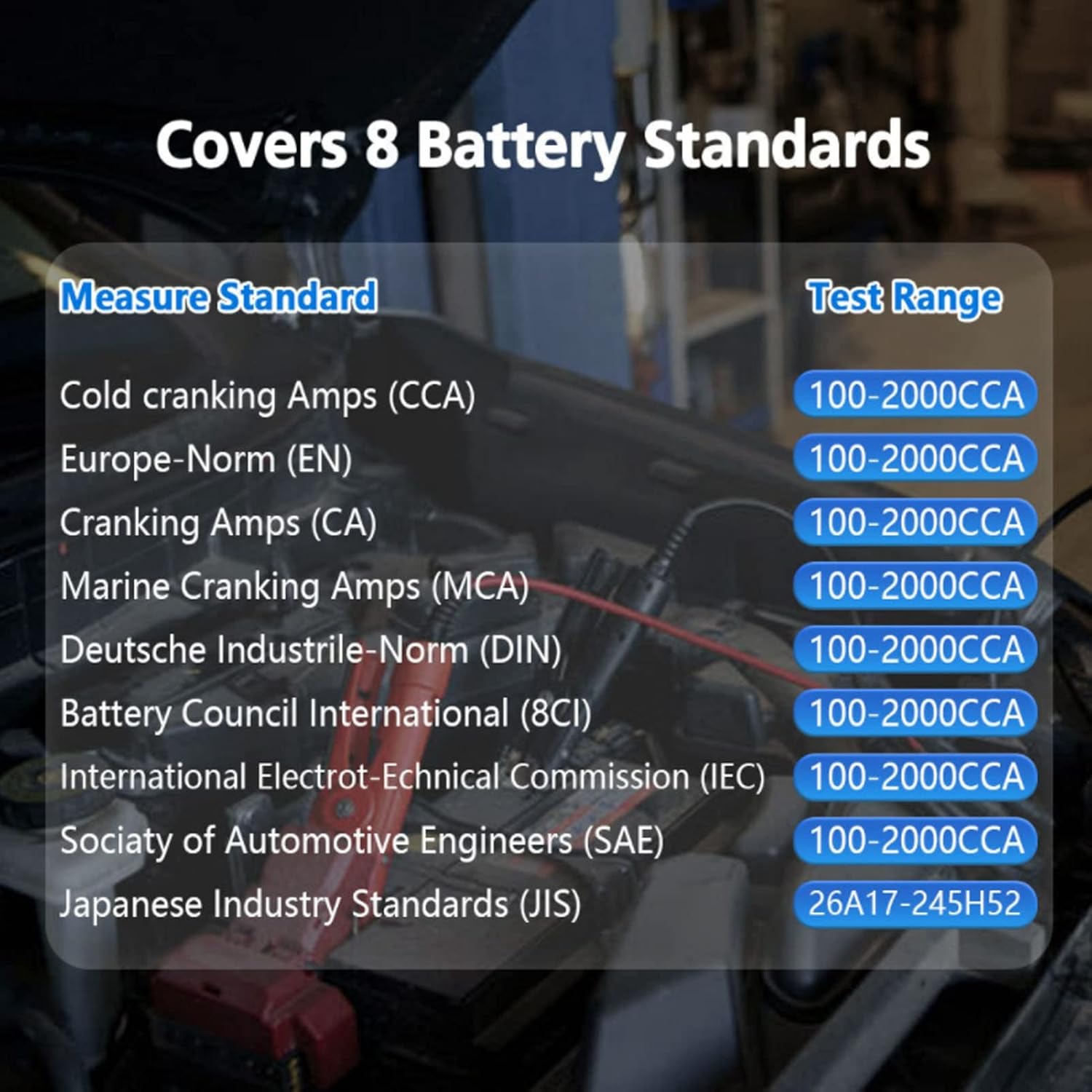
Figure 2: The V311B supports a wide range of battery measurement standards, including CCA, EN, CA, MCA, DIN, BCI, IEC, SAE, and JIS, with corresponding test ranges.
Interpretation of Measurement Standards:
- CCA: The most commonly used value of cold start current, specified by SAE&BCI. This is the most common rating for starting batteries at 0°F (-18°C).
- BCI: International Battery Council Standard.
- CA: 0 ℃ effective starting current rating.
- MCA: Marine battery standard, the effective starting current rating at 0℃.
- JIS: Japanese Industrial Standard, displayed as a combination of numbers and letters on the battery (e.g., 55D23, 80D26).
- DIN: Standard of the German Automotive Industry Council.
- IEC: International Electrotechnical Commission standard.
- EN: European Automobile Industry Association Standard.
- SAE: American Society of Engineers standard.
- GB: China National Standard.
4. Setup
To begin using your V311B Car Battery Tester, follow these steps:
- Ensure the vehicle's ignition is off and all accessories are turned off.
- Locate the vehicle's 12V battery.
- Connect the red alligator clip to the positive (+) terminal of the battery.
- Connect the black alligator clip to the negative (-) terminal of the battery.
- The tester will power on automatically once connected correctly.

Figure 3: Proper connection of the V311B tester to a 12V car battery using the red and black alligator clips.
5. Operating Instructions
The V311B features a user-friendly interface with navigation buttons (Up, Down, Left, Right, OK, ESC) to navigate through menus and select options.
5.1. Main Menu Navigation
Upon powering on, the main menu will appear. Use the arrow buttons to navigate and the OK button to select an option. The ESC button is used to go back to the previous screen or exit a function.

Figure 4: The V311B's intuitive interface displays icons for quick access to functions such as Fast Test, Standard Test, Charging Test, Starting Test, Waveform Analysis, and Printing.
5.2. Battery Test Modes
The V311B offers several testing modes to assess battery performance:
- Quick Test: Provides a rapid assessment of the battery's health.
- Standard Test: Conducts a more thorough analysis, requiring input of battery specifications.
- Starting Test: Measures the battery's cranking performance during engine start-up.
- Charging Test: Evaluates the vehicle's charging system performance.
- Waveform Analysis: Displays real-time voltage waveforms for detailed diagnostics.
5.3. Interpreting Test Results
After a test is completed, the V311B will display the results on its screen. Key parameters include:
- Volt: Current battery voltage.
- Rated: The rated Cold Cranking Amps (CCA) or other standard value of the battery.
- Measured: The actual measured CCA or equivalent value.
- Resistance: Internal resistance of the battery. Lower values indicate better health.
- Life (SOH): State of Health, indicating the battery's overall condition as a percentage.
- State of Charge: The current charge level of the battery as a percentage.

Figure 5: The tester's screen provides detailed battery information including voltage, rated CCA, measured CCA, resistance, lifespan (SOH), and state of charge. It also supports multiple languages for user convenience.
5.4. Printing Data
The V311B supports printing of test results. Connect the tester to a computer via USB, and then connect the computer to a printer. Follow the on-screen instructions on the tester to initiate the printing process.

Figure 6: The V311B tester can be connected via USB to a computer for data management and to a printer for hard copy reports of test results.
5.5. Wide Application
The V311B battery tester is compatible with various 12V battery types, including regular lead-acid batteries, AGM flat plate, AGM winding, GEL, and EFB batteries. It is suitable for use with a wide range of vehicles.

Figure 7: The V311B battery tester is designed for versatile use, compatible with 12V batteries found in a wide array of vehicles including cars, SUVs, pickup trucks, boats, and motorcycles.
6. Maintenance
- Cleaning: Wipe the device with a soft, dry cloth. Do not use abrasive cleaners or solvents.
- Storage: Store the tester in a cool, dry place away from direct sunlight and extreme temperatures.
- Cable Care: Ensure the test cables are not kinked or damaged. Inspect the alligator clips for corrosion or wear before each use.
7. Troubleshooting
| Problem | Possible Cause | Solution |
|---|---|---|
| Tester does not power on. | Incorrect connection to battery terminals; battery voltage too low. | Ensure red clip is on positive (+) and black clip on negative (-). Verify battery voltage is within 9-18V operating range. |
| Inaccurate readings. | Poor connection; dirty battery terminals; incorrect battery type selected. | Clean battery terminals. Ensure clips are securely attached. Verify the correct battery type (e.g., AGM, GEL) is selected in the tester's settings. |
| Cannot print results. | USB connection issue; printer not configured correctly. | Ensure USB cable is securely connected to both tester and computer. Verify printer drivers are installed and the printer is online. |
8. Warranty and Support
Niiyen products are manufactured to high-quality standards. For information regarding warranty coverage, technical support, or service, please refer to the warranty card included with your product or contact Niiyen customer service through the official website or your point of purchase. Please retain your purchase receipt for warranty claims.