1. Introduction
The YIHUA 982 Precision Soldering Station is designed for intricate micro soldering tasks, offering precise temperature control and rapid heating. This manual provides essential information for the safe and effective operation, maintenance, and troubleshooting of your device.

Figure 1: YIHUA 982 Precision Soldering Station and included accessories.
2. Setup
2.1 Unboxing and Component Identification
Carefully unpack all components. The package should include the YIHUA 982 main unit, 616A iron handpiece, elevated cable guide, solder wire dispenser, and three C245 soldering tips (I / SI / 3.2K).
2.2 Attaching Accessories
- Solder Wire Dispenser: Attach the solder wire dispenser to the side of the main unit using the provided screws. This allows for convenient storage and dispensing of solder wire.
- Cable Guide: Secure the elevated cable guide to the main unit. This guide helps manage the soldering iron cable, preventing tangles and improving maneuverability.
- Cleaning Sponge: Place the cleaning sponge in its designated slot. Dampen the sponge with water before use for effective tip cleaning.
- Soldering Handpiece Connection: Connect the 616A iron handpiece cable to the appropriate port on the rear of the main unit. Ensure the connection is secure.

Figure 2: Attaching the solder wire dispenser.

Figure 3: Attaching the elevated cable guide.
2.3 Tip Installation
The soldering iron handpiece uses cartridge-type precision soldering tips (C245 compatible). Proper insertion is crucial for function and to avoid error codes.
- To install a tip, gently push it into the handpiece until it is fully seated.
- An 'S-E' error code indicates that the tip is not fully inserted. Re-insert the tip completely and restart the unit if this occurs.

Figure 4: Correct tip installation (bottom) versus incorrect (top).
2.4 Power Connection
Connect the power cord to the main unit and then to a 110-240V AC power outlet. The unit is designed for US-standard power plugs.
2.5 Installation Video
Video 1: YIHUA 982 Soldering Station Installation Guide. This video demonstrates the assembly and initial setup of the soldering station, including accessory attachment and tip installation.
3. Operating Instructions
3.1 Power On/Off
Locate the power switch on the rear of the main unit to turn the station on or off.
3.2 LCD Display Overview
The digital LCD provides real-time information, including actual temperature, set temperature, power meter, preset channel, handpiece status, and buzzer feedback indicator. The power meter allows you to monitor the soldering iron's operational status.
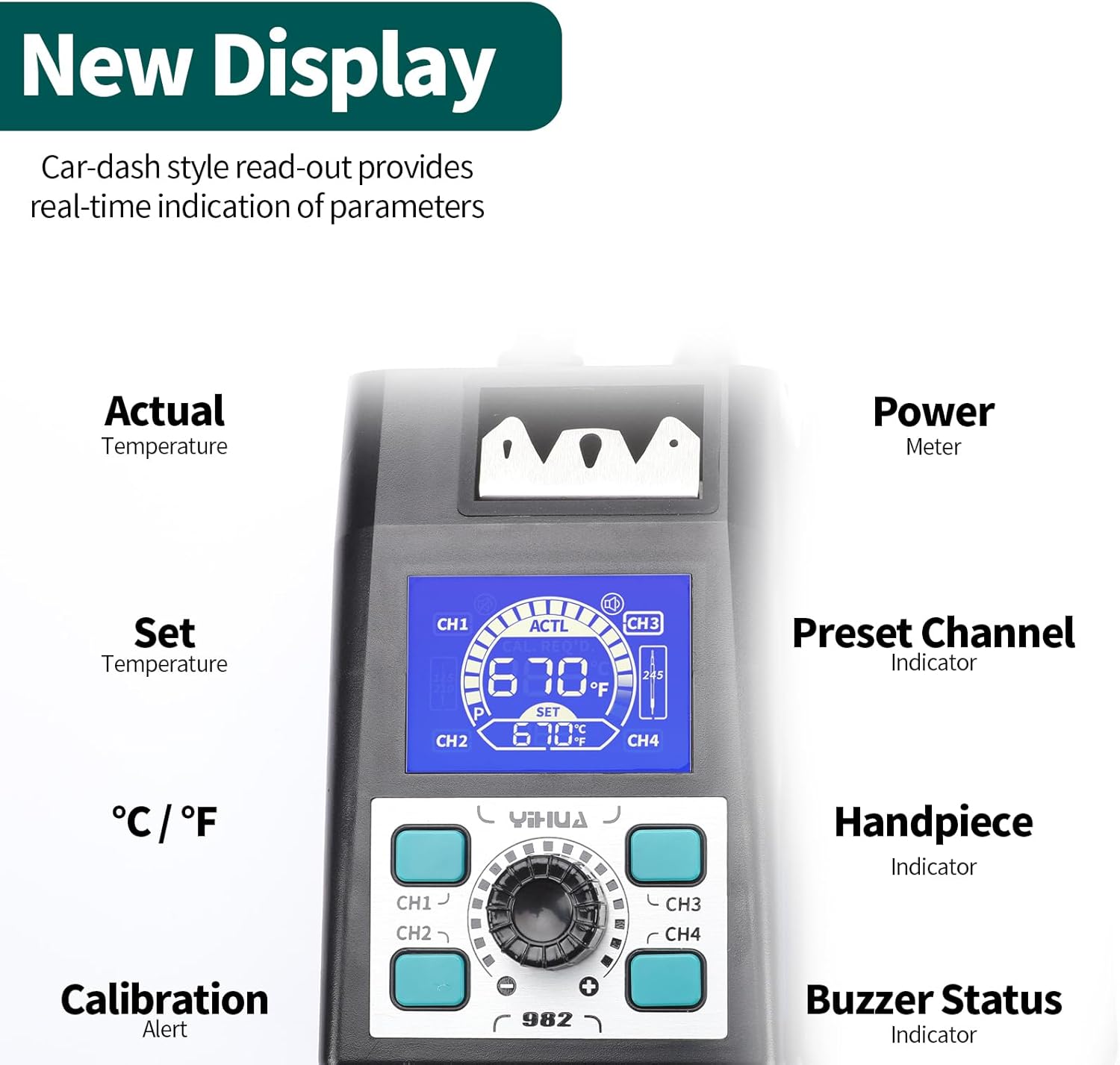
Figure 5: Detailed view of the LCD display showing operational parameters.
3.3 Temperature Adjustment and Preset Channels
Adjust the soldering temperature using the rotary knob. The station features a PID temperature stabilization function to maintain a steady tip temperature. You can set the temperature from 194°F (90°C) to 842°F (450°C).
- Utilize the 4 preset channels (CH1-CH4) for quick access to frequently used temperatures. These can be customized to your preferred settings.
- The unit supports digital temperature calibration for accuracy.

Figure 6: Control panel for temperature and channel selection.
3.4 Rapid Heating and Temperature Recovery
Thanks to the cartridge-type tip design, the soldering iron tip can reach soldering temperature from room temperature within 2 seconds. The PID control ensures rapid temperature recovery during use, maintaining consistent performance.
3.5 Sleep Mode and Auto-Shutdown
The station includes a sleep mode, which cools the iron to a default temperature (e.g., 200°C) when placed in the holder, preserving tip life. An auto-shutdown feature activates after 30 minutes of non-use for safety and energy saving.
3.6 Celsius/Fahrenheit Conversion
Easily switch between Celsius and Fahrenheit temperature displays as per your preference.
3.7 Product Overview Video
Video 2: YIHUA 982 Precision Soldering Station Product Features. This video highlights the key operational features of the soldering station, including temperature adjustment, display functions, and safety features.
4. Maintenance
4.1 Tip Cleaning
Regularly clean the soldering tip to ensure optimal performance and longevity. Use the integrated cleaning kit, which includes brass wool and a cleaning sponge. Always dampen the sponge before use.

Figure 7: Cleaning accessories and tip change groove.
4.2 Tip Storage and Change
The station features a built-in metallic rack for easy cartridge tip changes and storage. The V-shape cartridge-swap groove allows for safe and convenient tip replacement without direct contact with hot tips.
4.3 General Care
Keep the soldering station clean and free from dust and debris. Ensure proper ventilation around the unit during operation.
5. Troubleshooting
| Problem | Possible Cause | Solution |
|---|---|---|
| 'S-E' Error Code on Display | Soldering tip not fully inserted into the handpiece. | Ensure the tip is fully inserted into the handpiece. Restart the unit. Refer to Figure 4 for correct insertion. |
| Iron not heating or inconsistent temperature | Loose connection, incorrect temperature setting, or worn-out tip. | Check handpiece connection. Verify temperature settings. Replace the soldering tip if worn. |
| Unit does not power on | Power cord not connected, power switch off, or power outage. | Ensure power cord is securely connected. Turn on the power switch. Check power supply. |
6. Specifications
- Model: 982 (C245-Compatible)
- Temperature Range: 194°F - 842°F (90°C - 450°C)
- Temperature Stability: PID controlled
- Wattage: 120 watts
- Voltage: 110 Volts (US-standard power plug)
- Display Type: LCD
- Item Weight: 2.46 pounds
- Product Dimensions: 5.79 x 5.63 x 4.17 inches
- Included Components: 1×616A Iron Handpiece, 1×Elevated Cable Guide, 1×Solder Wire Dispenser, 1×YIHUA 982 Main Unit, 3×C245 Soldering Tip (I / SI / 3.2K)
- Special Note: This product is specifically designed for extremely precise micro soldering. The tip-end diameter is 0.02mm and does not support general or heavy-duty soldering applications.

Figure 8: Illustration of C245 compatible handpiece for precision work.

Figure 9: Tip size reference for C245 compatible soldering tips.
7. Warranty and Support
The YIHUA 982 Precision Soldering Station comes with a 12-month US-exclusive manufacturer technical coverage. For any technical assistance or support, please contact YIHUA's professional assistance team available 24/7 on Amazon.


