
1. Introduction
Thank you for choosing the Ledlenser HF4R Signature Headlamp. This ultra-slim, lightweight, and versatile headlamp is designed for outdoor enthusiasts, sports activities, and demanding DIY tasks. It features up to 600 lumens of brightness, a separate spot and floodlight, RGB front light, IP68 waterproof rating, and a convenient magnetic charging system.

The Ledlenser HF4R Signature headlamp, showcasing its compact design and integrated headband.
2. Safety Instructions
- Eye Safety: Do not look directly into the light beam or shine it into the eyes of others. High-intensity light can cause temporary vision impairment.
- Battery Safety: The headlamp contains an integrated rechargeable Lithium-ion battery. Do not attempt to replace it yourself. Do not expose the battery to extreme temperatures, fire, or water.
- Water Exposure: While the headlamp is IP68 rated for continuous immersion in water, ensure the magnetic charging port is clean and dry before charging to prevent damage.
- Children: Keep out of reach of children.
3. Package Contents
Verify that all items are present in your package:
- Ledlenser HF4R Signature Headlamp
- USB-C Charging Cable
- Integrated Rechargeable Battery (pre-installed)
4. Setup
4.1. Charging the Battery
The HF4R Signature headlamp features a magnetic charging system for convenience. Before first use, fully charge the battery.
- Connect the magnetic end of the supplied USB-C charging cable to the charging port on the headlamp. The magnetic connector will snap into place.
- Connect the USB-C end of the cable to a suitable USB power source (e.g., wall adapter, computer USB port).
- The integrated battery status indicator lights will show the charging progress. Once all lights are solid, the battery is fully charged.
- Disconnect the charging cable once charging is complete.

The Ledlenser HF4R Signature headlamp connected to its magnetic charging cable, illustrating the charging port and battery status indicator lights.
4.2. Adjusting the Headband
The headlamp comes with an individually adjustable, slim headband for a comfortable and secure fit.
- Place the headlamp on your head.
- Use the adjustable buckles on the headband to tighten or loosen it until it fits snugly without being too tight.
- The headlamp unit can be tilted up or down to direct the light beam as needed.
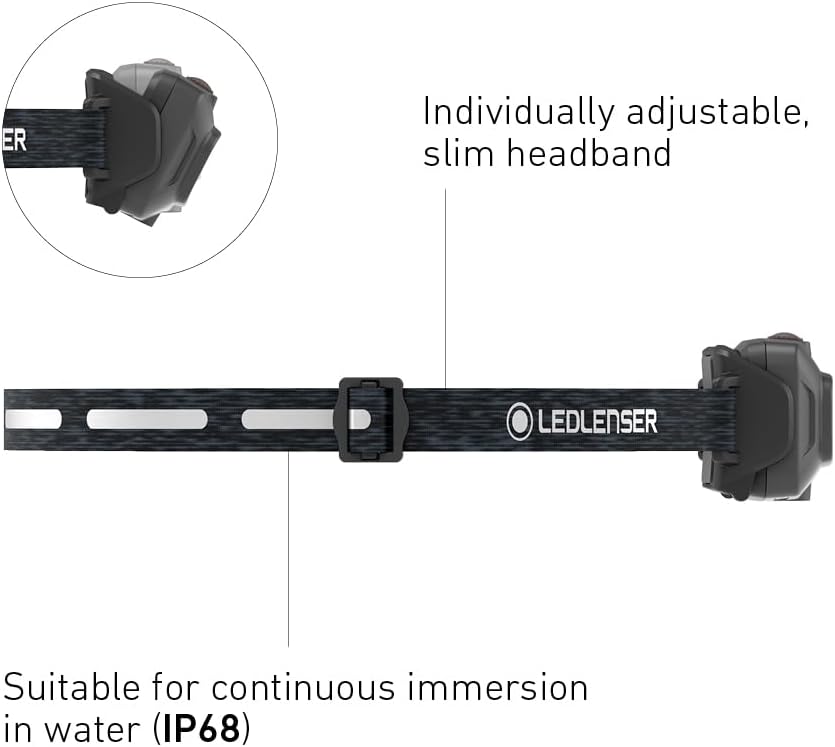
Detail of the adjustable headband mechanism on the Ledlenser HF4R Signature headlamp, showing how to achieve a secure and comfortable fit.
5. Operating Instructions
The HF4R Signature headlamp features intuitive controls for various lighting modes.
5.1. Power On/Off and Brightness Levels
The headlamp has a single button for operation.
- To Turn On: Press the power button once. The headlamp will turn on in its last used white light mode.
- To Cycle Brightness: While the headlamp is on, press the power button repeatedly to cycle through the three white light brightness levels (e.g., Low > Medium > High).
- To Turn Off: Press and hold the power button for approximately 2 seconds.

Front view of the Ledlenser HF4R Signature headlamp, highlighting its dual light sources for both spot and flood illumination, and indicating the RGB light capability.
5.2. RGB Light Function
The HF4R Signature includes red, green, and blue front lights for specialized applications.
- To Activate RGB: From the OFF state, press and hold the power button for approximately 3 seconds until the RGB light activates.
- To Cycle RGB Colors: While the RGB light is on, press the power button repeatedly to cycle through Red > Green > Blue.
- To Return to White Light: Press and hold the power button again for approximately 3 seconds, or turn the headlamp off and on normally.
5.3. Spot and Floodlight
The headlamp features separate light sources for a focused spot beam and a wide flood beam, providing optimal illumination for both close-range and long-distance viewing. These modes are typically integrated into the brightness cycling sequence or can be activated by specific button presses depending on the exact firmware version. Refer to the quick start guide included with your product for precise activation sequences.
6. Maintenance
6.1. Cleaning
- Wipe the headlamp body with a soft, damp cloth.
- Do not use abrasive cleaners or harsh chemicals, as these can damage the finish or seals.
- Clean the magnetic charging contacts periodically to ensure proper connection.
6.2. Battery Care
- Charge the battery regularly, even if the headlamp is not in frequent use, to maintain battery health.
- Avoid completely discharging the battery, as this can reduce its lifespan.
- For long-term storage, charge the battery to approximately 50-70% capacity.
6.3. Storage
- Store the headlamp in a cool, dry place, away from direct sunlight and extreme temperatures.
- Ensure the headlamp is turned off to prevent accidental activation and battery drain.
7. Troubleshooting
- Headlamp not turning on: Ensure the battery is charged. Connect to the charger and check the battery indicator.
- Light is dim or flickering: The battery level is likely low. Recharge the headlamp fully.
- Charging not working: Check that the magnetic cable is properly connected and the USB power source is active. Clean the magnetic contacts on both the cable and the headlamp.
- Water ingress (unlikely with IP68): If water somehow enters the device, immediately turn it off and allow it to dry completely before attempting to use or charge it again. Contact customer support if issues persist.
8. Specifications
| Feature | Specification |
|---|---|
| Brand | Ledlenser |
| Model | HF4R Signature (LL502795) |
| Dimensions (L x W x H) | 4.2 x 4.2 x 4.2 cm |
| Weight | 72 grams |
| Battery Type | 1 Lithium-ion (integrated) |
| Luminous Flux (Max) | 600 lumens |
| Power | 4 Watt-hours |
| IP Rating | IP68 (Dustproof, protected against continuous immersion in water) |
| Material | Anodized Aluminum |
| Special Features | Portable, Lightweight, Rechargeable, RGB Light, Adjustable, Multiple Light Types |
| Components Included | USB-C charging cable, integrated rechargeable battery |
9. Warranty and Support
Your Ledlenser HF4R Signature Headlamp is covered by a manufacturer's warranty. For detailed warranty information, product registration, or technical support, please visit the official Ledlenser website or contact their customer service directly. Keep your proof of purchase for warranty claims.
10. Environmental Protection and Disposal
Do not dispose of the device or its battery with household waste. This product contains an integrated rechargeable Lithium-ion battery that must be recycled responsibly. Please follow local regulations for the separate collection of electronic products and batteries. Proper disposal helps prevent potential negative consequences for the environment and human health.


