1. Safety Information
Always follow the assembly instructions carefully. Do not force any parts during assembly. Keep the chair on a stable, flat surface. Do not exceed the maximum weight capacity of 300 pounds. Keep the chair away from heat sources and sharp objects. Do not leave the chair unattended while in the reclined position. Always test the chair's stability before use.
2. Product Overview
The Newtral MagicH002 Ergonomic High-Back Office Chair is designed to provide optimal comfort and support for extended periods of sitting. Key features include:
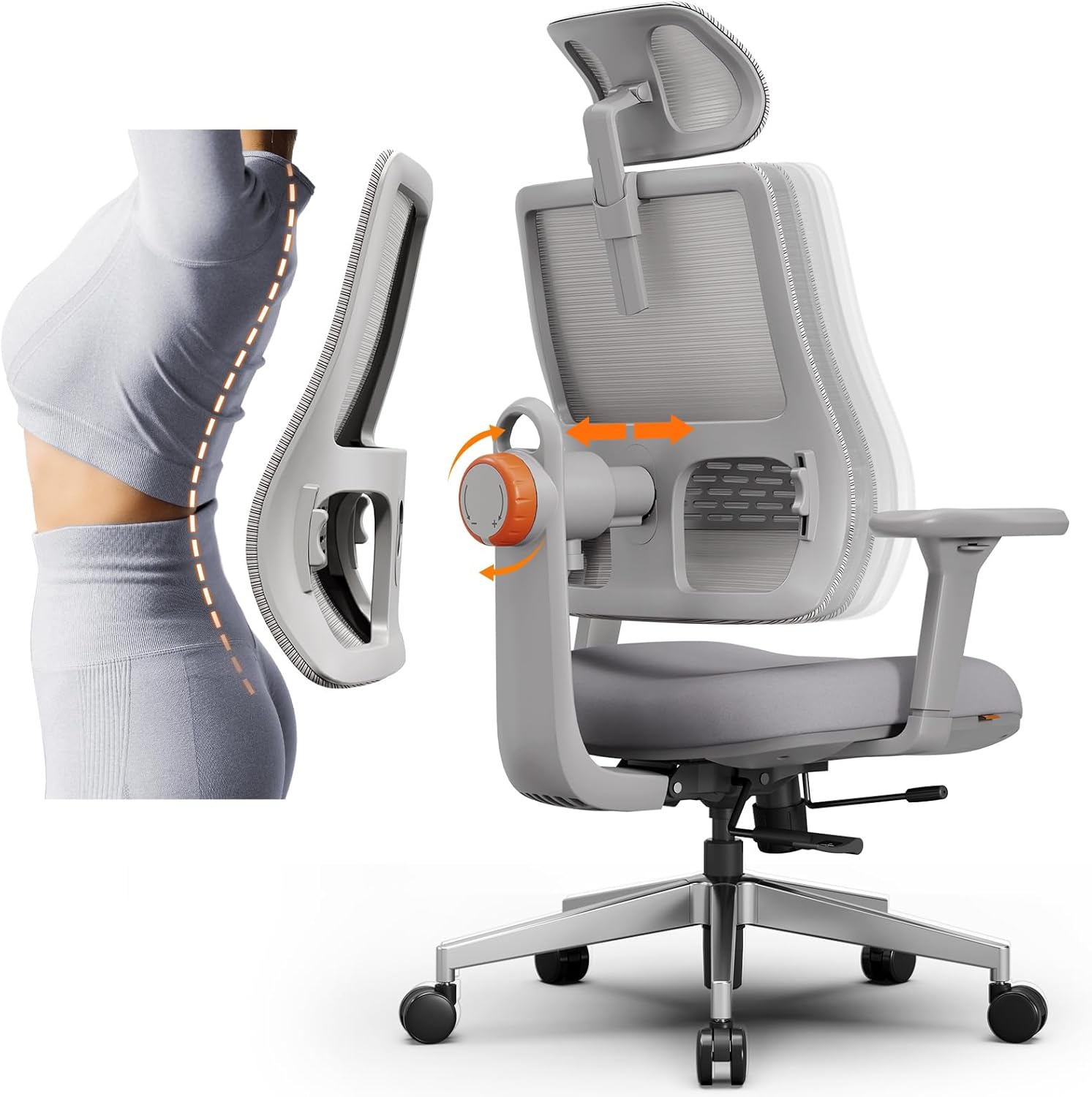
- Unique Adaptive Lumbar Support: Utilizes innovative automatic lumbar tracking technology to follow your spine's movement, providing continuous support and helping to relieve back pain.
- Multifunctional Adjustment: Offers extensive customization including three backrest height options, 96° to 136° recline with locking capability, adjustable headrest angle and height, seat depth adjustment, and 4D adjustable armrests.
- Certified Quality Materials: Features a high-quality KGS Class 4 gas lift (BIFMA/SGS certified), Korea Filo breathable back mesh for air circulation, and a 7cm high-density sponge cushion with waterproof and flame-retardant fabric for durability and safety.
3. Assembly Instructions
The Newtral MagicH002 chair comes with clear instructions and tools for easy assembly, typically taking about 40 minutes. An electronic manual is also available in the 'Product guides and documents' section of the product details page.
Assembly Video Guide
Video 3.1: Detailed guide on how to install your Newtral Ergonomic Office Chair.
Key Assembly Steps:
- Unboxing and Accessory Check: Verify all components are present against the accessories list.
- Assemble the Five-Star Base: Attach the five feet to the central hub of the base.
- Mount Wheels: Insert the five wheels into the designated slots on the assembled five-star base.
- Insert Air Pressure Rod: Place the air pressure rod into the center of the five-star base.
- Attach Chassis to Seat: Position the chassis mechanism onto the underside of the seat cushion and secure it with the provided screws (H: M6x25mm, 4PCS). Ensure all screws are tightened.
- Install Armrests: Attach the armrests to the seat using the specified screws (I: M6x30mm, 6PCS).
- Install Back Bracket: Secure the back bracket to the rear of the chassis using the appropriate screws (J: M8x16mm, 3PCS).
- Attach Backrest: Align the backrest with the back bracket, selecting one of the three height gear options based on your preference (under 165cm, 166-178cm, above 179cm). Tighten the screws to secure.
- Install Headrest: Insert the headrest into the top of the backrest.
4. Operating Instructions (Adjustments)
The Newtral MagicH002 chair offers multiple adjustment points to customize your seating experience for optimal comfort and ergonomic support.
Adjustment Video Guide
Video 4.1: Comprehensive guide on adjusting the Newtral MagicH002 chair's various features.
Specific Adjustments:
- Headrest Adjustment: The headrest can be adjusted for height and angle (30° rotation) to support your neck and head.
- Armrest Adjustment: The 3D armrests can be moved up/down, forward/backward, and rotated inward/outward to find your ideal arm support position.
- Seat Height Adjustment: Use the lever located under the seat to raise or lower the chair to your desired height.
- Seat Depth Adjustment: The seat can be moved forward or backward to accommodate different leg lengths and provide proper thigh support.
- Recline/Tilt Adjustment: The backrest can be tilted and locked at various angles from 96° (formal work) to 136° (relax). Use the recline lock/unlock lever and tension adjustment knob to control the recline resistance.
- Lumbar Support Adjustment: The innovative auto-following lumbar support automatically adjusts to your spine. Its strength can be further customized by rotating the orange knob on the backrest. The lumbar support height can also be adjusted manually.
5. Maintenance
To ensure the longevity and optimal performance of your Newtral MagicH002 chair, follow these simple maintenance guidelines:
- Cleaning: Wipe clean with a damp cloth. Avoid harsh chemicals or abrasive cleaners.
- Regular Checks: Periodically check all screws and bolts to ensure they are tight. Re-tighten if necessary.
- Avoid Overloading: Do not exceed the maximum weight recommendation of 300 pounds.
- Protect from Elements: Keep the chair away from direct sunlight, extreme temperatures, and excessive moisture to prevent material degradation.
6. Troubleshooting
If you encounter any issues with your Newtral MagicH002 chair, please refer to the following common troubleshooting tips:
- Chair Squeaks: Check and tighten all assembly bolts. Applying a small amount of silicone lubricant to moving parts may help.
- Gas Lift Not Functioning: Ensure the height adjustment lever is fully engaged or disengaged. If the issue persists, the gas lift may need replacement (refer to warranty).
- Backrest Not Reclining/Locking: Verify the recline lock lever is in the correct position. Adjust the recline tension knob to ensure it's not too tight or too loose.
- Wobbly Chair: Re-check all connections and ensure all screws are securely tightened. Ensure the chair is on a flat, even surface.
- Lumbar Support Issues: Ensure the lumbar adjustment knob is correctly engaged and rotated to your desired tension. Check if the lumbar support height is set appropriately.
For further assistance, please contact Newtral customer support.
7. Specifications
| Feature | Detail |
|---|---|
| Brand | Newtral |
| Model Number | MagicH002 |
| Color | Grey |
| Product Dimensions | 21.26"D x 20.08"W x 16.54"H |
| Item Weight | 52 pounds |
| Maximum Weight Recommendation | 300 Pounds |
| Material | Nylon, Foam, Aluminum, Alloy Steel, Polyurethane, Fiber, Mesh, Acrylonitrile Butadiene Styrene |
| Back Style | Breathable Back Mesh |
| Reclining Position Count | 3 (96°, 116°, 126°) |
| Special Features | Auto-Following Lumbar, Adjustable Height, Arm Rest, Ergonomic, Back Tilt |

Quality Certifications
- USPTO (Appl.NO : 17/451,820)
- BIFMA Certification
- EN1335 Certification
- TUV Certification
- Fiti Certification
- EU Certification

8. Warranty and Support
Newtral stands behind its products with comprehensive warranty and support services:
- Warranty: The chair comes with a 3-year warranty that includes free part replacements if needed. After the initial 3 years, a 7-year limited warranty is provided, offering free replacement parts with payment for shipping.
- Customer Support: Newtral provides 7x24 hours after-sale service to assist with any problems or inquiries.
For support, please refer to the contact information provided with your purchase or on the official Newtral website.