
1. Introduction
Thank you for choosing the VECELO TV Stand Model TV06-GRY-180. This manual provides essential information for the safe assembly, operation, and maintenance of your new entertainment center. Please read these instructions thoroughly before beginning assembly or use to ensure proper functionality and longevity of the product.
2. Safety Information
Adhering to these safety guidelines is crucial for preventing injury and damage to the product.
- Always read and understand all instructions before assembly and use.
- Ensure all parts are firmly connected during and after assembly. Loose connections can lead to instability.
- Do not exceed the product's maximum weight capacity of 110 pounds (50 kg). Overloading can cause structural failure.
- Place the TV stand on a flat, stable, and level surface to prevent tipping.
- Keep small parts and packaging materials away from children to avoid choking hazards.
- Do not allow children to climb on or play with the TV stand.
- When moving the TV stand, ensure it is empty and lift it carefully to avoid damage or injury.
- For electrical components (LED lights, power outlets), ensure proper connection to a grounded power source. Do not overload the power outlets.
3. Package Contents
Before assembly, verify that all components listed below are present in your package. If any parts are missing or damaged, please contact VECELO customer support.
- 1x VECELO TV Stand (disassembled components)
- 1x Instruction Manual
- 1x Assembly Kit (including hardware and tools)
4. Assembly Instructions
Assembly of the VECELO TV Stand requires careful attention to detail. Follow the step-by-step instructions provided in the included assembly kit. It is recommended to assemble the unit with two people.
- Unpack all components and lay them out on a clean, soft surface to prevent scratches.
- Identify each part using the labels in the assembly kit.
- Follow the numbered steps in the assembly kit, ensuring all screws and fasteners are tightened securely. Do not overtighten.
- Install the tempered glass shelves as indicated in the instructions.
- Attach the LED lighting strips and connect the power outlet module according to the diagrams.
- Once assembled, gently move the TV stand to its desired location.
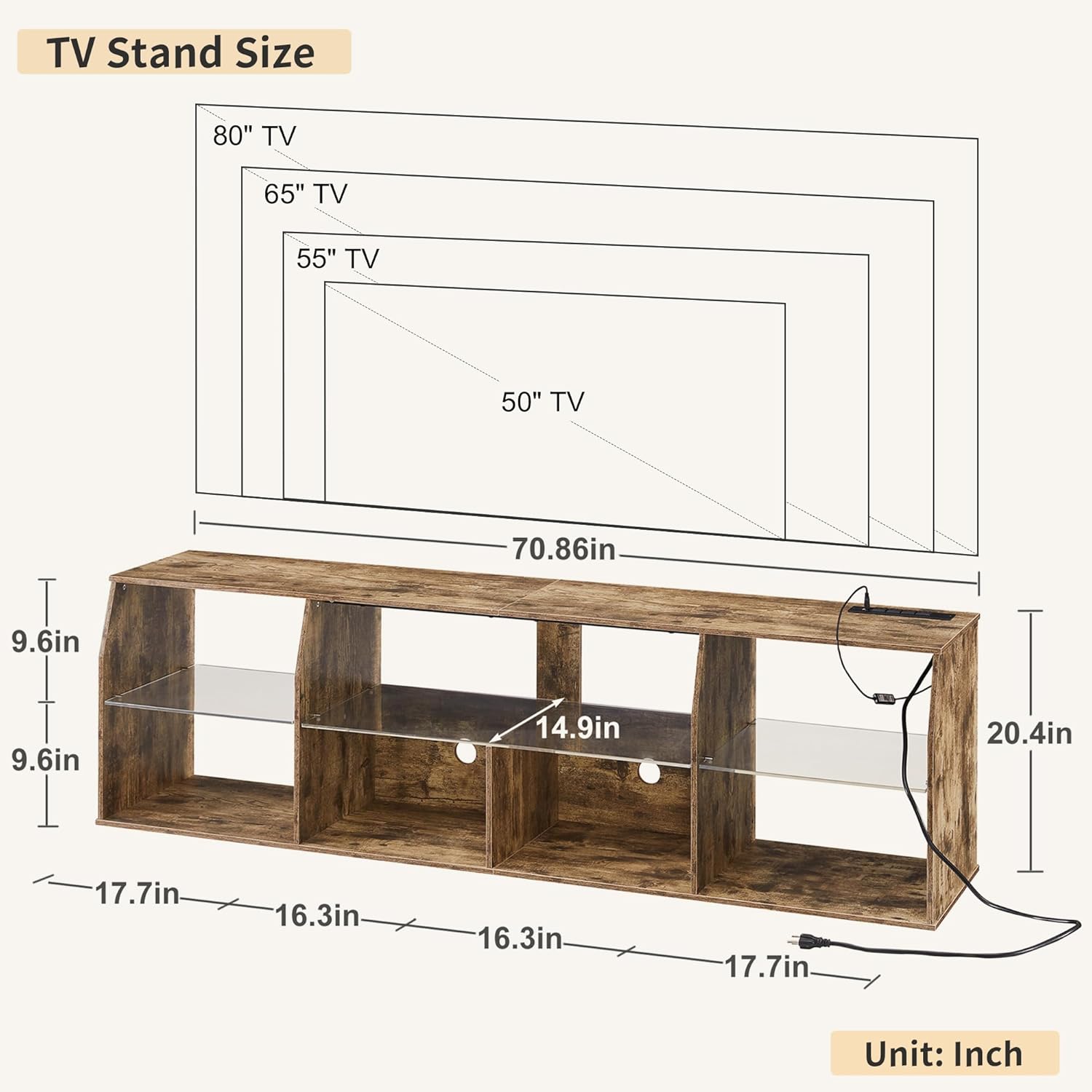
Image: The VECELO TV Stand, demonstrating its overall appearance and potential use in a living room environment.

Image: Detail of the tempered glass shelf and integrated cable management hole for organizing wires.

Image: Integrated power outlet module with AC and USB charging ports.
5. Operating Instructions
5.1. LED Lighting System
The VECELO TV Stand features an integrated LED lighting system with multiple color and mode options to enhance your entertainment experience.
- Modes: The LED system offers 23 dynamic RGB light modes and 4 general lighting modes.
- Control: The lights can be controlled via a remote control, a dedicated mobile application (APP), or a stripe wire control switch. Refer to the specific instructions for pairing the remote or app.
- Features: Adjustable brightness, timing function, over 60,000 color options, dynamic modes, mic mode (reacts to sound), and music mode.

Image: Demonstration of the RGB LED lighting system with various color options and control methods.
5.2. Power Outlets and USB Ports
The TV stand includes a built-in power strip for convenient access to power for your devices.
- AC Outlets: Three (3) 120V/12A AC outlets are provided for standard electronics.
- USB Ports: One (1) USB-A port and one (1) USB Type-C port, both providing 5V/2A output for charging mobile devices.
- Power Cord: The integrated power cord is 6.6 feet long.
- Usage: Connect your television, gaming consoles, media players, and other devices directly to the stand for organized power access. Avoid overloading the outlets.
6. Maintenance
Regular maintenance will help preserve the appearance and functionality of your VECELO TV Stand.
- Cleaning: Wipe the matte polished tabletop and other surfaces with a soft, damp cloth. Avoid abrasive cleaners or harsh chemicals that could damage the finish.
- Dusting: Regularly dust the unit to prevent accumulation, especially in the open compartments.
- Connections: Periodically check all assembly connections to ensure they remain tight. Retighten if necessary.
- Electrical Components: Ensure the power cord and LED light connections are free from damage. If any damage is observed, discontinue use and contact support.
7. Troubleshooting
If you encounter issues with your VECELO TV Stand, refer to the following common problems and solutions:
- LED Lights Not Working:
- Check if the power cord is securely plugged into a working wall outlet.
- Ensure the LED strip connections are properly seated.
- Verify the remote control battery is functional and correctly inserted.
- Try controlling the lights with the app or stripe wire control to isolate the issue.
- Power Outlets Not Functioning:
- Confirm the TV stand's main power cord is plugged into a live electrical outlet.
- Check if the connected device is working properly by plugging it directly into a wall outlet.
- Ensure the total power draw of connected devices does not exceed the outlet's capacity (12A).
- Stand Appears Unstable:
- Verify that the TV stand is placed on a completely flat and level surface.
- Recheck all assembly screws and fasteners to ensure they are tight.
- Ensure the weight distribution of items on the stand is balanced.
If these steps do not resolve the issue, please contact VECELO customer support for further assistance.
8. Specifications
| Brand | VECELO |
| Model Name | TV06-GRY-180 |
| Color | Light Brown |
| Material | Engineered Wood (MDF, Acrylic Board) |
| Product Dimensions (D x W x H) | 14.9" x 70.86" x 20.4" (37.8 cm x 180 cm x 51.8 cm) |
| Item Weight | 50.71 lbs (23 kg) |
| Weight Limit | 110 lbs (50 kg) |
| TV Size Compatibility | Up to 80 inches |
| Number of Compartments | 7 Open Storage Compartments |
| Special Feature | Illuminated (LED with 23 Dynamic RGB Modes) |
| Power Outlets | 3 AC (120V/12A) |
| USB Ports | 1 USB-A, 1 USB Type-C (5V/2A) |
| Power Cord Length | 6.6 feet |
| Assembly Required | Yes |
| UPC | 810144970226 |

Image: Dimensional diagram of the TV stand, illustrating its size and TV compatibility.
9. Warranty and Support
VECELO is committed to providing quality products and customer satisfaction. While specific warranty details are not provided in this manual, please retain your proof of purchase for any warranty claims.
For any questions, missing parts, assembly assistance, or troubleshooting not covered in this manual, please contact VECELO customer support. You can find more information and contact details by visiting the official VECELO store:


