
1. Introduction
Thank you for choosing the BRPOM BM600 Car Jump Starter. This powerful and portable device is designed to jump start vehicles with up to 12.0L diesel or all gas engines, providing 8000 amps of peak current. It also functions as a portable power bank and an LED flashlight. Please read this manual thoroughly before use to ensure safe and effective operation.
2. Safety Information
WARNING: Read and understand all safety information before using this product. Failure to follow these safety instructions may result in electrical shock, explosion, fire, which may result in serious injury, death, or property damage.
- Do not operate the jump starter if it is damaged.
- Do not jump start a frozen battery.
- Ensure proper polarity connection (red clamp to positive, black clamp to negative). Reverse polarity can cause damage.
- Do not allow the red and black clamps to touch each other.
- Keep out of reach of children.
- Use in a well-ventilated area.
- Do not expose the product to water, rain, or snow.
- Do not disassemble the unit. Refer servicing to qualified personnel.
- Do not store the jump starter in temperatures exceeding 60°C (140°F).
3. Package Contents
- BRPOM BM600 Car Jump Starter Unit
- Smart Jumper Clamps
- USB-C Charging Cable
- User Manual
- Storage Case
4. Product Features and Components
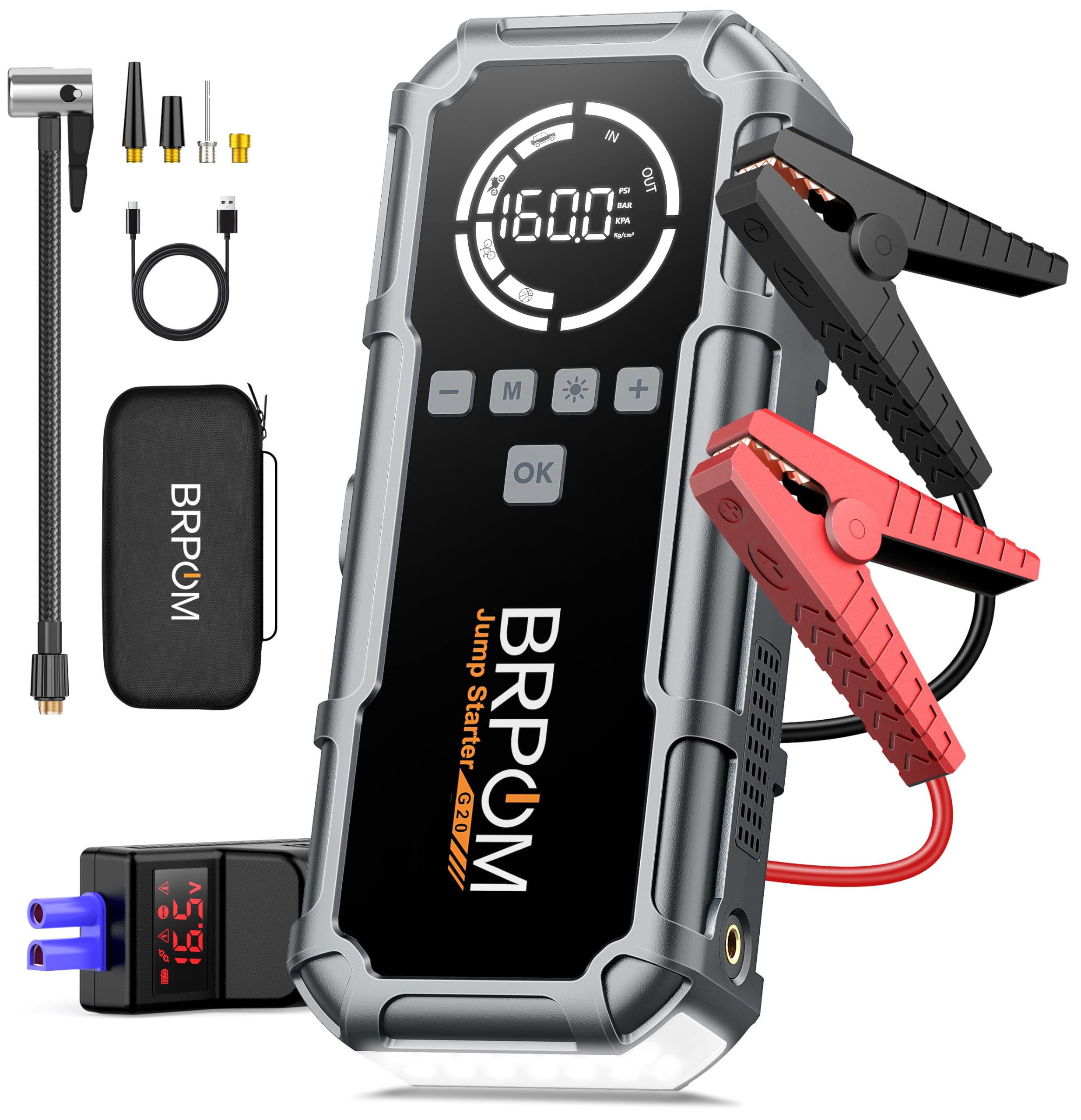
Image: The BRPOM BM600 Car Jump Starter connected to smart clamps, ready for use. The device features an integrated LED light, a digital display, and control buttons. The smart clamps are shown with a voltage reading of 16.5V. The image highlights the device's capability of 8000A peak current for all gas and 12.0L diesel engines.
Key Features:
- 8000A Peak Current: Capable of jump starting large engines.
- High Capacity Battery: 26800mAh internal battery.
- Multi-functional: Jump starter, power bank, LED flashlight.
- Smart Clamps: Provides protection against reverse polarity, over-current, short-circuit, over-charge, and over-temperature.
- Digital Display: Shows battery level and operational status.
Component Overview:
- Jump Start Port: Connects to the smart jumper clamps.
- USB Output Ports: For charging mobile devices.
- USB-C Input Port: For recharging the jump starter.
- LED Flashlight: Provides illumination with multiple modes.
- Power Button/Display: Activates the unit and shows status.
- Control Buttons (M, OK, +, -): For navigating menus and adjusting settings.
5. Charging the Jump Starter
Before first use, fully charge the BRPOM BM600. It is recommended to recharge the unit every 3-6 months to maintain battery health, even if not in use.
- Connect the provided USB-C charging cable to the USB-C input port on the jump starter.
- Connect the other end of the USB-C cable to a USB wall adapter (not included) or a car charger.
- The digital display will show the charging status. The unit is fully charged when the display indicates 100%.
6. Operating Instructions: Jump Starting a Vehicle
Ensure the jump starter is at least 50% charged before attempting to jump start a vehicle.
- Connect Smart Clamps: Insert the blue plug of the smart jumper clamps into the jump start port on the BRPOM BM600. Ensure a firm connection.
- Connect to Car Battery: Attach the red (+) clamp to the positive terminal of the vehicle's battery and the black (-) clamp to the negative terminal.
- Check Indicator: Observe the indicator light on the smart clamps. A solid green light indicates a correct connection and that the unit is ready to jump start. If a red light or no light appears, check connections and battery voltage.
- Start Vehicle: Once the green light is solid, start your vehicle's engine. If the engine does not start immediately, wait 30 seconds before trying again. Do not attempt more than 3 consecutive jump starts.
- Remove Clamps: Once the vehicle starts, immediately remove the smart clamps from the car battery, then disconnect the clamps from the jump starter.
7. Using as a Power Bank
The BRPOM BM600 can charge various USB-powered devices such as smartphones, tablets, and cameras.
- Connect your device's USB charging cable to one of the USB output ports on the jump starter.
- The jump starter will automatically begin charging your device. The digital display will show the remaining battery level.
- Disconnect your device once charging is complete.
8. Using the LED Flashlight
The integrated LED flashlight has multiple modes for different situations.
- Press and hold the flashlight button (often marked with a sun icon or similar) to turn on the steady light mode.
- Press the button again to cycle through modes: steady light > strobe light > SOS signal > off.
9. Maintenance and Storage
- Clean the unit with a dry, soft cloth. Do not use harsh chemicals or abrasive materials.
- Store the jump starter in its protective case in a cool, dry place away from direct sunlight.
- Recharge the unit every 3-6 months to prolong battery life, even if not in use.
- Keep the jump start port and USB ports free from dust and debris.
10. Troubleshooting
| Problem | Possible Cause | Solution |
|---|---|---|
| Vehicle does not start | Low jump starter battery; incorrect clamp connection; severely discharged vehicle battery. | Ensure jump starter is fully charged. Check clamp connections for proper polarity and secure contact. Wait a few minutes before trying again, or consult a mechanic if the vehicle battery is severely damaged. |
| Smart clamp indicator shows red or no light | Incorrect connection; short circuit; reverse polarity. | Disconnect clamps and reconnect carefully, ensuring red to positive and black to negative. Check for any short circuits. |
| Jump starter not charging | Faulty charging cable or adapter; damaged charging port. | Try a different USB-C cable and wall adapter. If the issue persists, contact customer support. |
11. Specifications
- Model: BM600
- Peak Amperage: 8000 Amps
- Battery Capacity: 26800mAh (Lithium Polymer)
- Voltage: 12 Volts
- Engine Compatibility: Up to 12.0L Diesel / All Gas Engines
- Product Dimensions: 10.16 x 25.4 x 7.62 cm
- Item Weight: 839 g
- Operating Temperature: -20℃ to 60℃
12. Warranty and Support
BRPOM products are designed and manufactured to the highest quality standards. This product comes with a standard manufacturer's warranty. For specific warranty details, technical support, or customer service inquiries, please refer to the warranty card included in your package or visit the official BRPOM website. Please have your model number (BM600) and purchase information ready when contacting support.


