
1. Introduction
This manual provides detailed instructions for the assembly, operation, and maintenance of your VECELO LED TV Stand, Model KHD-TV06-GRY-140. Please read this manual thoroughly before assembly and use to ensure proper function and safety. Keep this manual for future reference.
2. Safety Information
- Do not exceed the product's weight capacity. Refer to the specifications section for details.
- Ensure all parts are firmly connected during assembly and before use. Loose connections can lead to instability.
- Keep small parts and packaging materials away from children to prevent choking hazards.
- Place the TV stand on a flat, stable surface to prevent tipping.
- Avoid exposing the product to direct sunlight or extreme temperatures to prevent material damage.
- Do not stand or climb on the TV stand.
- When moving the TV stand, ensure it is empty and lift it carefully to avoid injury or damage.
3. Included Components
Verify that all components listed below are present before beginning assembly. If any parts are missing or damaged, please contact customer support.
- 1x VECELO LED TV Stand (Main Unit)
- 1x Assembly Kit (includes hardware and tools)
- 1x Instruction Manual (this document)
- LED Light Strip with Controller
- Integrated Power Outlets and USB Ports
4. Setup and Assembly
Follow these steps carefully for proper assembly. It is recommended to have two people for assembly.
4.1 Unpacking and Preparation
- Open the packaging and carefully remove all components.
- Lay out all parts on a clean, soft surface (e.g., a blanket or carpet) to prevent scratches.
- Identify each part by comparing it with the parts list in the assembly kit.
4.2 Assembly Steps
While specific step-by-step diagrams are provided in the included assembly kit, the general process involves:
- Assemble the Main Frame: Connect the side panels to the base and top panels using the provided hardware. Ensure all screws are tightened securely.
- Install Shelves: Insert the acrylic shelves into their designated slots. Ensure they are level and stable.
- Attach Back Panels (if applicable): Secure any back panels to the frame.
- Integrate Power Unit: Carefully place the power outlet strip into its designated slot on the top surface. Ensure the power cord is routed correctly.
- Install LED Lights: Adhere the LED light strip to the interior edges of the shelves or designated areas. Connect the light strip to its controller and power source.
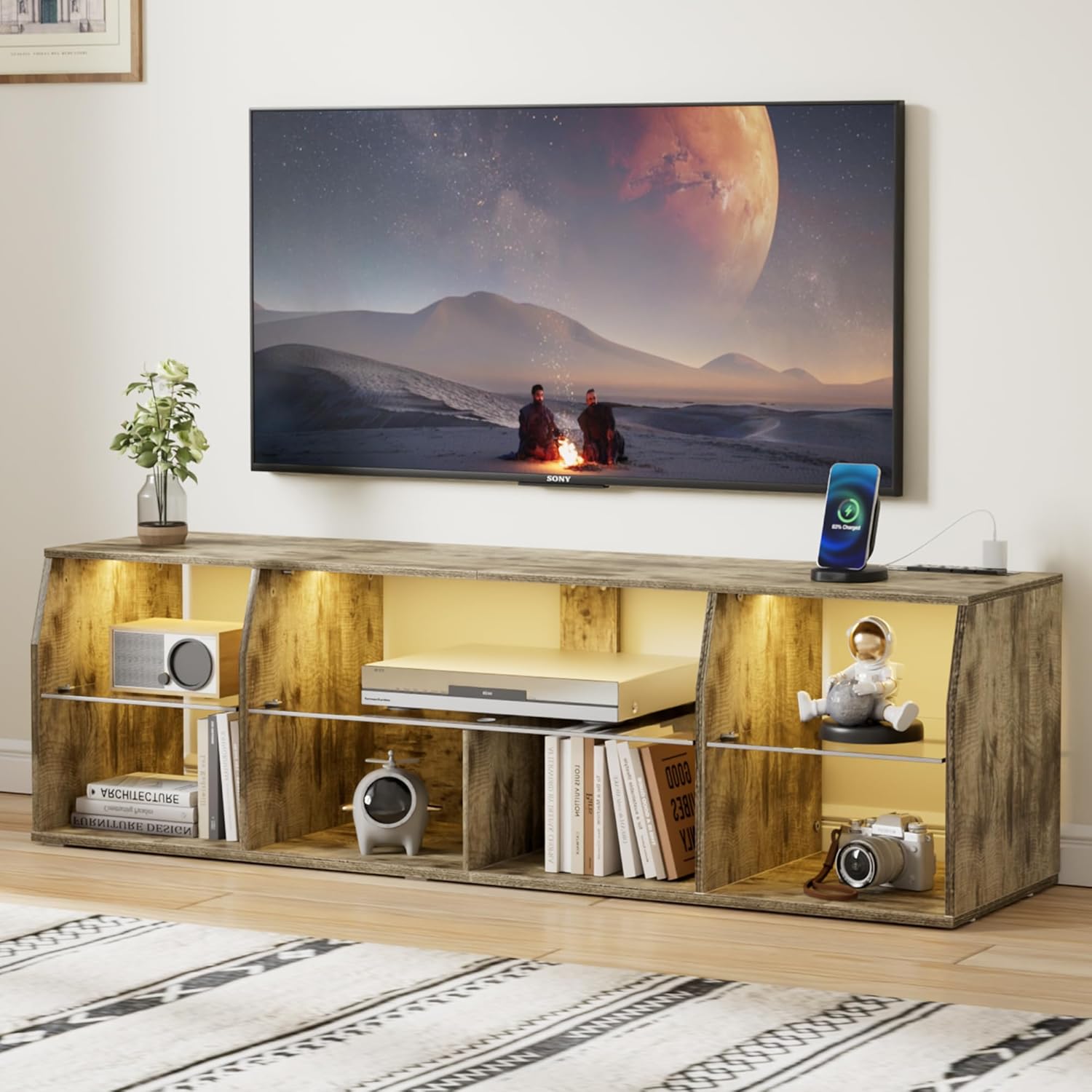
Image: Fully assembled VECELO LED TV Stand, showcasing its design and functionality with a television and various media devices.

Image: Product dimensions diagram, indicating the overall size of the TV stand and suitable TV sizes (32", 43", 55").
5. Operating Instructions
5.1 LED Lighting System
The VECELO LED TV Stand features an integrated LED lighting system with multiple colors and modes.
- Power On/Off: Use the button on the inline controller or the remote control to turn the LED lights on or off.
- Color Selection: Cycle through various colors using the remote control or dedicated buttons on the controller. The system offers over 60,000 colors.
- Mode Selection: Choose from 4 dynamic modes (e.g., flash, strobe, fade, smooth) to create different ambient effects.
- Brightness Adjustment: Adjust the intensity of the lights using the brightness controls on the remote or controller.
- Timing Function: Set a timer for the lights to automatically turn off.
- Music/Mic Mode: Some models may feature modes that react to sound or music. Refer to the specific LED controller instructions for details.

Image: The TV stand with its LED lights activated, showing the remote control and various light modes available.
5.2 Integrated Charging Station
The TV stand is equipped with a charging station for your electronic devices.
- Power Outlets: The unit includes 4 standard 120V/12A AC outlets. Plug in your TV, gaming consoles, DVD players, or other appliances.
- USB Ports: Two USB ports (5V/2A, including one Type-C) are available for charging smartphones, tablets, and other USB-powered devices.
- Cable Management: Utilize the cable holes on the back of the stand to route wires neatly and prevent tangling.

Image: Detail of the charging station, highlighting the AC outlets and USB ports for convenient device charging.
6. Maintenance
- Cleaning: Wipe the surfaces with a damp cloth. Avoid using harsh chemicals or abrasive cleaners, which can damage the finish.
- Dusting: Regularly dust the stand to prevent buildup, especially on the LED lights and power outlets.
- Inspections: Periodically check all connections and hardware to ensure they remain tight. Retighten if necessary.
- Spills: Immediately wipe up any spills to prevent water damage or staining.
7. Troubleshooting
- LED Lights Not Working:
- Check if the power adapter is securely plugged into a working outlet.
- Ensure the LED strip is properly connected to the controller.
- Verify that the remote control has working batteries and is pointed directly at the receiver.
- Power Outlets/USB Ports Not Functioning:
- Confirm the main power cord for the TV stand's charging station is plugged into a live wall outlet.
- Test the wall outlet with another device to ensure it is working.
- Avoid overloading the outlets; distribute devices across different power sources if necessary.
- Stand Wobbles:
- Ensure the TV stand is placed on a level surface.
- Check and tighten all assembly screws.
If you encounter issues not covered here, please contact VECELO customer support for assistance.
8. Specifications
| Feature | Detail |
|---|---|
| Brand | VECELO |
| Model Number | KHD-TV06-GRY-140 |
| Color | Light Brown |
| Material | MDF, Acrylic Board |
| Product Dimensions (L x W x H) | 55.1 x 14.9 x 20.4 inches (140 x 37.8 x 51.8 cm) |
| Item Weight | 41.9 pounds (19 kg) |
| Compatible TV Size | Up to 55 inches |
| Storage Shelves | 7 Open Compartments |
| Power Outlets | 4 x 120V/12A AC Outlets |
| USB Ports | 2 (1x USB-A, 1x USB Type-C), 5V/2A |
| LED Lights | RGB, 23 light effects, 4 modes, over 60,000 colors, brightness adjustable, timing function |
| Care Instructions | Wipe with Damp Cloth |
| UPC | 810144970202 |
9. Warranty and Support
VECELO is committed to providing quality products. For any questions, missing parts, or issues during assembly or use, please contact VECELO customer service. While specific warranty details are not provided in this manual, please refer to your purchase documentation or the VECELO official website for warranty information.
Contact Information: Please refer to the contact details provided with your purchase or visit the official VECELO website for support.
You can also visit the VECELO Store on Amazon for more information.
