
Introduction
This manual provides comprehensive instructions for the Gvyugke CT780 Wireless Gaming Headset. Please read this manual carefully before using the product to ensure proper operation and to maximize your gaming experience. This headset offers versatile connectivity options including 2.4GHz wireless, Bluetooth 5.3, and a 3.5mm wired connection, compatible with various platforms such as PS5, PS4, PC, and Nintendo Switch.
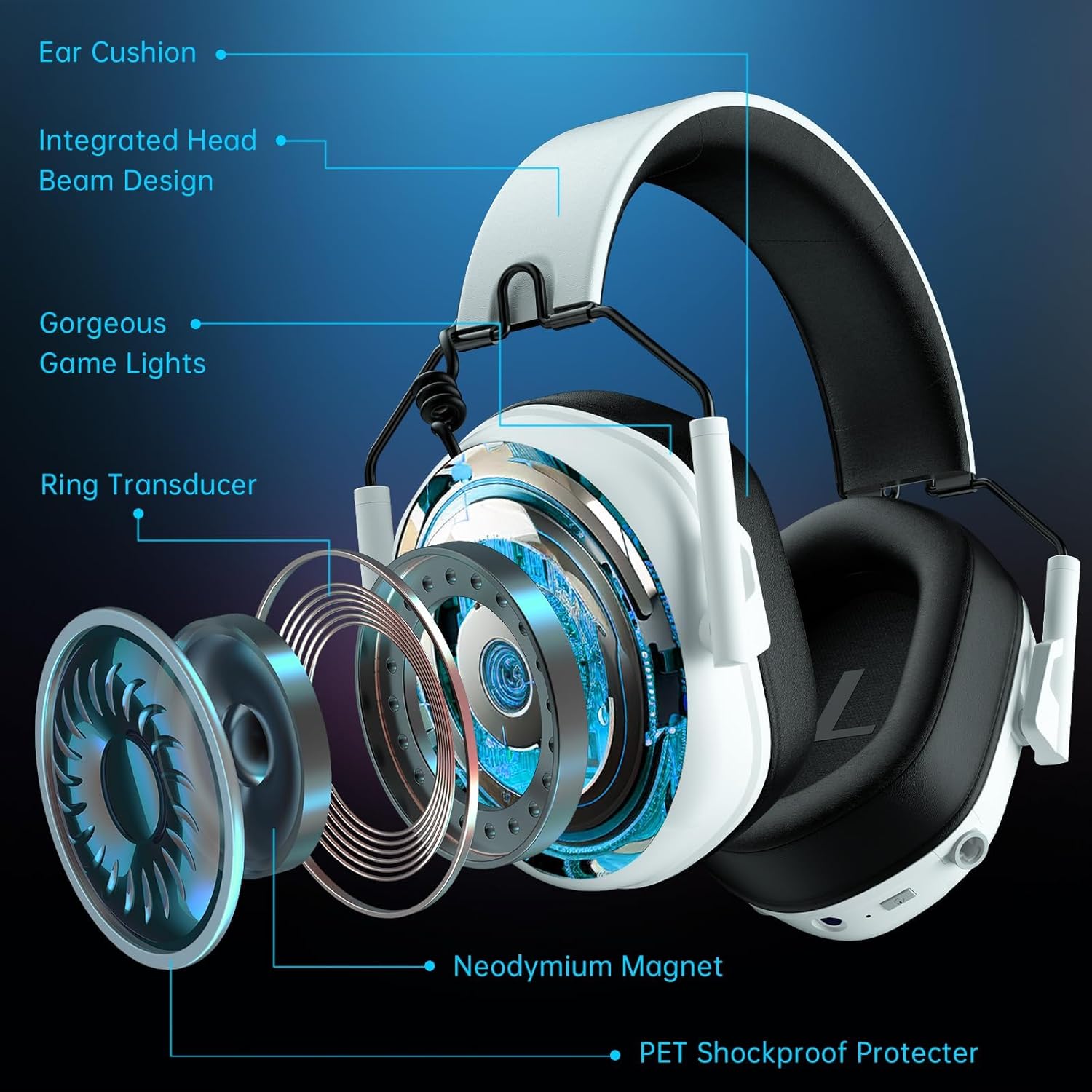
Image: The Gvyugke CT780 Wireless Gaming Headset, showcasing its light yellow design and over-ear form factor.
Package Contents
Verify that all items are present in the package:
- Gvyugke CT780 Wireless Gaming Headset
- 2.4GHz USB Wireless Dongle
- Detachable Noise-Canceling Microphone
- USB Charging Cable
- 3.5mm Audio Cable
- User Manual (this document)
Product Overview
Familiarize yourself with the components and controls of your Gvyugke CT780 headset.
Key Features:
- 50mm Audio Drivers: Designed for immersive 7.1 surround sound.
- Integrated Head Beam Design: Provides structural integrity and comfort.
- Comfortable Ear Cushions: Protein leather ear pads with memory foam for extended wear.
- Adjustable Slider: Allows for a customized fit for various head sizes.
- Detachable Microphone: Omni-directional with noise-canceling capabilities for clear communication.
- LED Lighting: Futuristic blue lighting effects along the edges of the earcups.

Image: Exploded view of the headset's internal components, highlighting the 50mm drivers and comfort features.

Image: The detachable microphone, emphasizing its flexibility and noise-canceling feature.

Image: Details on the headset's ergonomic design, highlighting breathable memory foam, soft protective elements, and adjustable sliders for comfort.
Setup
The Gvyugke CT780 headset offers multiple connection methods. Choose the one that suits your device.

Image: A compatibility chart detailing the various devices supported by each connection type (2.4GHz, Wired, Bluetooth).
1. 2.4GHz Wireless Connection (for PC, PS5, PS4, Nintendo Switch)
- Insert the 2.4GHz USB wireless dongle into an available USB port on your PC, PS5, PS4, or Nintendo Switch dock.
- Power on the headset by pressing and holding the Power button until the LED indicator lights up.
- The headset and dongle should automatically pair. The LED indicator on the headset will show a solid light when connected.
- On your device, ensure the audio output is set to the "Gvyugke CT780" or similar headset option.
Note: For Nintendo Switch, the microphone may not be supported in 2.4GHz mode. For Xbox Series, 2.4GHz wireless is not supported.

Image: The headset connected to a PS5 console via the 2.4GHz USB dongle, demonstrating the wireless setup.
2. Bluetooth Connection (for Phones, Tablets, Bluetooth-enabled Mobile Devices)
- Ensure the headset is powered on.
- Press and hold the Bluetooth pairing button (refer to product diagram for exact location) until the LED indicator flashes rapidly, indicating pairing mode.
- On your mobile device, go to Bluetooth settings and search for "Gvyugke CT780" or similar.
- Select the headset to pair. The LED indicator will show a solid light when connected.
Note: Bluetooth mode is not supported for Xbox All Series.

Image: A user enjoying the headset, highlighting its Bluetooth 5.3 capabilities for mobile and PC use.
3. Wired Connection (for Xbox, 3.5mm Audio Devices)
- Connect one end of the 3.5mm audio cable to the headset's 3.5mm jack.
- Connect the other end of the 3.5mm audio cable to your device's 3.5mm audio jack (e.g., Xbox controller, PC audio port).
Note: For older Xbox controllers, a headset adapter (not included) may be required.
Operating Instructions
Power On/Off
- Power On: Press and hold the Power button for approximately 3 seconds until the LED indicator lights up.
- Power Off: Press and hold the Power button for approximately 3 seconds until the LED indicator turns off.
Volume Control
- Use the volume roller/buttons located on the earcup to adjust the audio output level.
Microphone Usage
- Attach Microphone: Insert the detachable microphone into the designated port on the headset.
- Mute/Unmute: Use the microphone mute button (refer to product diagram) to toggle the microphone on or off.
- Positioning: Adjust the flexible microphone boom for optimal voice pickup.
LED Lighting Control
The headset features integrated LED lighting. The lighting can be controlled via a dedicated button (refer to product diagram).
- Press the LED button to cycle through different lighting modes or to turn the lights off.

Image: The headset showcasing its customizable RGB lighting effects.
Charging
The headset is equipped with a 1200mAh battery, offering up to 70 hours of playtime (without LED lighting) or 15-20 hours with lighting enabled.
- Connect the USB charging cable to the headset's charging port and to a USB power source (e.g., computer, wall adapter).
- The LED indicator will show charging status (e.g., red for charging, off or blue for fully charged).
- A full charge takes approximately 2.5 to 3 hours.
- A quick charge feature provides approximately 2 hours of use after just 5 minutes of charging.
- A voice alert will notify you when the battery level is below 3%.

Image: Battery life and charging details, including usage times with and without LED lighting.
Maintenance
Proper maintenance ensures the longevity and performance of your headset.
- Cleaning: Use a soft, dry cloth to clean the headset. Do not use harsh chemicals or abrasive materials.
- Storage: Store the headset in a cool, dry place away from direct sunlight and extreme temperatures. The foldable design allows for easy storage.
- Avoid Moisture: Do not expose the headset to water or excessive moisture.
- Cable Care: Handle cables gently to prevent damage.
Troubleshooting
If you encounter issues with your headset, refer to the following common solutions:
| Problem | Solution |
|---|---|
| No sound from headset |
|
| Microphone not working |
|
| Headset not connecting wirelessly |
|
| Short battery life |
|
Specifications
Detailed technical specifications for the Gvyugke CT780 Wireless Gaming Headset.
| Feature | Detail |
|---|---|
| Brand | Gvyugke |
| Model Name | CT780 |
| Model Number | Captain 5 |
| Color | Light Yellow |
| Ear Placement | Over Ear |
| Connectivity Technology | Wired, Wireless (2.4GHz, Bluetooth 5.3) |
| Wireless Technology | 2.4GHz, Bluetooth 5.3 |
| Bluetooth Range | 33 Feet (10 meters) |
| 2.4GHz Wireless Range | Up to 49 Feet (15 meters) |
| Audio Latency (2.4GHz) | Less than 20 Milliseconds |
| Audio Latency (Bluetooth) | Less than 120 Milliseconds |
| Audio Driver Size | 50 Millimeters |
| Impedance | 32 Ohms |
| Frequency Response | 20 Hz - 20 KHz |
| Microphone | Omni-directional, Noise-Canceling, Detachable |
| Battery Capacity | 1200mAh |
| Battery Life (Gaming) | Up to 70 hours (lights off), 15-20 hours (lights on) |
| Charging Time | Approx. 2.5 - 3 hours |
| Quick Charge | 5 minutes charge for 2 hours use |
| Material | ABS Plastic, Metal, Leather |
| Compatible Devices | PS5, PS4, PC, Nintendo Switch, Mac, USB-compatible devices, Xbox Series (wired) |
Warranty and Support
Gvyugke products are manufactured with quality and reliability in mind. For specific warranty information, please refer to the warranty card included with your purchase or visit the official Gvyugke website. If you require technical assistance or have questions not covered in this manual, please contact Gvyugke customer support through their official channels.
Please retain your proof of purchase for any warranty claims.
