
BOXPUT BPR1S
BOXPUT BPR1S BT Remote Instruction Manual
Universal Replacement Remote with Air Mouse, Voice Control, and IR Learning
Product Overview
The BOXPUT BPR1S is a versatile Bluetooth remote control designed for a wide range of Android-based devices, including Android TV Boxes, TV Sticks, and Set-Top Boxes. It features a 6-axis gyroscope for precise air mouse functionality, voice control capabilities for compatible systems, and full-button IR learning for universal compatibility with various devices. Its ergonomic and lightweight design ensures comfortable use.


Compatibility
The BPR1S remote control is designed for broad compatibility with Android devices. However, certain devices are not supported. Please review the compatibility information below.

Compatible Devices:
- Almost all Android devices in the market.
- ATV Android Device
- Android TV Box
- Personal Computer (firmware upgrade may be required)
- Set Top Box
- TV Stick
Incompatible Devices:
- Amazon Fire Stick
- DVB Box
- ROKU Box
- MAG Box
- Apple Box
- Some LG and Samsung TVs
If you are unsure about compatibility with your specific media player, it is recommended to contact the manufacturer before purchase.
Setup
Battery Installation
The BPR1S remote requires 2 AAA batteries for operation. Open the battery compartment on the back of the remote and insert the batteries, ensuring correct polarity (+/-).
Bluetooth Connection
To pair the BPR1S remote with a new device via Bluetooth, follow these steps:
- Press and hold the "OK" button and the "Back" button simultaneously until the indicator light on the remote begins to flash.
- Keep the remote control within 1 meter (approximately 3 feet) of the device you wish to pair for faster pairing.
- On your device, open the Bluetooth settings and search for available devices.
- Select "BOXPUT | BPR1S" from the list of found devices to complete the pairing process.

Operating Instructions
Air Mouse Function (6-axis Gyro)
The BPR1S features a 6-axis gyroscope sensor, enabling precise air mouse control. To activate the air mouse, press the dedicated mouse button (often indicated by a cursor icon). Once activated, simply hold the remote and move your wrist to control the cursor on your screen. Press the mouse button again to deactivate the air mouse and return to standard navigation.

Voice Control
The BPR1S supports voice input for compatible devices. This allows you to use voice commands to search, navigate, or interact with your device's voice assistant.
- Compatibility: Voice function primarily supports ATV Google certified devices (e.g., TCL smart TVs, Shield TV boxes, HAKO mini, Google TV). Other AOSP Android devices can be controlled, but voice functionality may not be available.
- Usage: The voice search function typically works within the built-in voice input search box or specific applications, and may not function across all applications.
IR Learning (Full Keys)
The BPR1S remote supports full-button IR learning, allowing it to learn infrared codes from other remote controls. This feature is compatible with all AOSP devices and some ATV devices/Smart TVs.
- Enter IR Learning Mode: To initiate IR learning, you must first disconnect the Bluetooth connection of the BPR1S remote.
- Learning Process:
- In IR mode, all buttons on the BPR1S can learn IR signals. Note that the mouse function is not available in IR mode.
- If buttons have completed IR learning, only the power button will send the IR signal in priority when the remote is in Bluetooth mode.
- The Power, Mute, and Volume keys can learn IR codes from Samsung TVs and Android devices. Other keys support learning from Android devices only.

Maintenance
- Cleaning: Use a soft, dry cloth to clean the remote control. Avoid using abrasive cleaners or solvents.
- Battery Care: If the remote will not be used for an extended period, remove the batteries to prevent leakage and potential damage.
- Storage: Store the remote in a cool, dry place away from direct sunlight and extreme temperatures.
- Button Material: The buttons are made of silicone, providing a smooth and sensitive touch while offering resistance to dust.

Troubleshooting
| Problem | Possible Cause / Solution |
|---|---|
| Remote not responding / Not pairing via Bluetooth. |
|
| Voice control not working. |
|
| IR learning not working. |
|
| Air mouse cursor is erratic or not precise. |
|
Specifications
| Feature | Detail |
|---|---|
| Model Number | BPR1S |
| Connectivity | Bluetooth (BT connection), Infrared (IR Learning) |
| Special Features | Air Mouse (6-axis Gyroscope), Voice Search, Full-button IR Learning, Ergonomic, Lightweight |
| Compatible Devices | ATV Android Device, Android TV Box, Personal Computer, Set Top Box, TV Stick |
| Power Source | 2 x AAA Batteries (required) |
| Product Dimensions | 6.47 x 1.6 x 0.78 inches (164.3 x 40.6 x 19.8 mm) |
| Item Weight | 1.44 ounces (40.8 grams) |
| Color | Black |
| Max Supported Devices | 1 (at a time via Bluetooth) |

Warranty and Support
BOXPUT is committed to providing support for its products. If you encounter any questions or issues with your BPR1S remote control, please contact BOXPUT customer service for assistance. The manufacturer aims to provide quick and effective solutions.
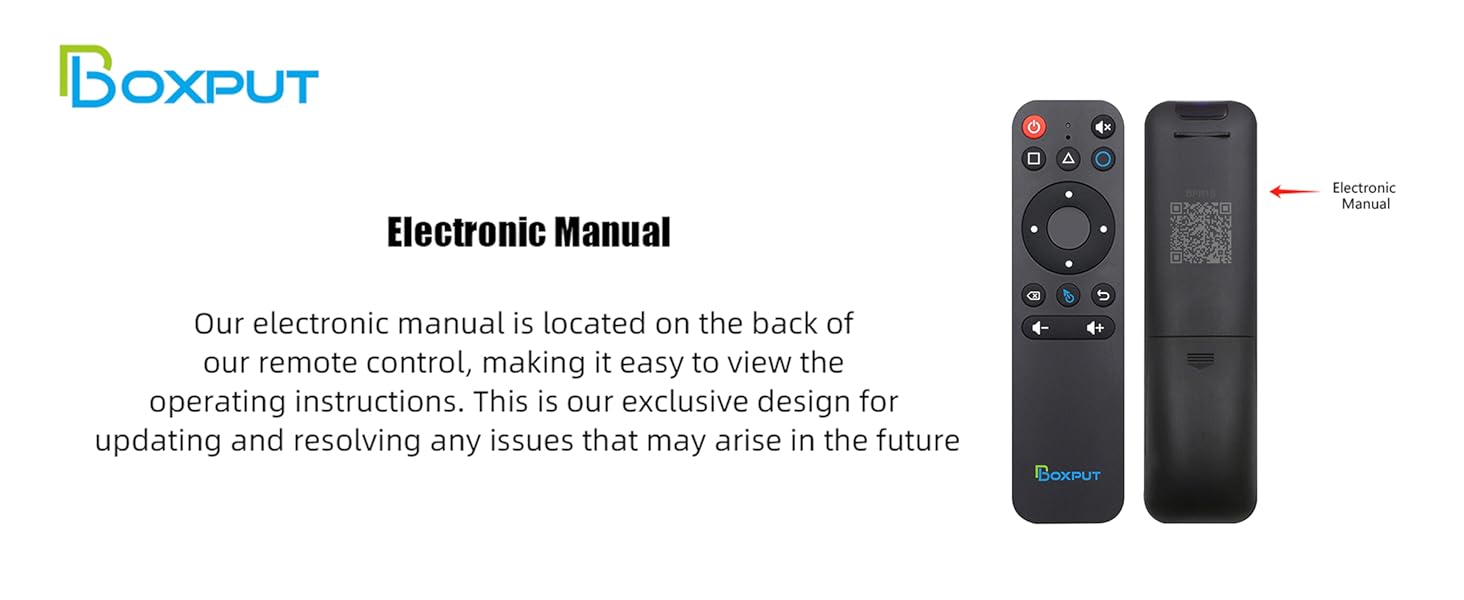
An electronic manual is conveniently located on the back of the remote control (via QR code) for easy access to operating instructions and future updates or troubleshooting guidance.
Related Documents - BPR1S
 |
BOXPUT BPR1S Plus 2.4G RF Remote - Product Overview and Safety Information Official product overview for the BOXPUT BPR1S Plus 2.4G RF remote, detailing its features, manufacturer, European representative, and essential safety warnings. Includes SKU 10500023. |
 |
BOXPUT Q5 PLUS Android TV Box - 4K HD, Android 11, Amlogic S905W2, 2GB/16GB The BOXPUT Q5 PLUS Android TV Box offers Android 11.0, 4K HD streaming, and powerful performance with an Amlogic S905W2 Quad-Core processor, 2GB RAM, and 16GB ROM. Features dual-band WiFi, Bluetooth 5.2, and Ethernet connectivity. Includes manufacturer and distributor details. |