
1. Introduction
This manual provides instructions for the GP RECYKO GP B441 USB Charger and the accompanying D451 Docking Station, designed for charging AA and AAA NiMH rechargeable batteries. This compact charging unit offers intelligent safety features and techniques to ensure efficient and safe battery charging.
Package Contents
Verify that all items are present in your package:
- 1 x GP B441 USB Charger
- 4 x GP ReCyko AA 2100mAh NiMH Rechargeable Batteries
- 1 x D451 Docking Station
- 1 x USB Charging Cable
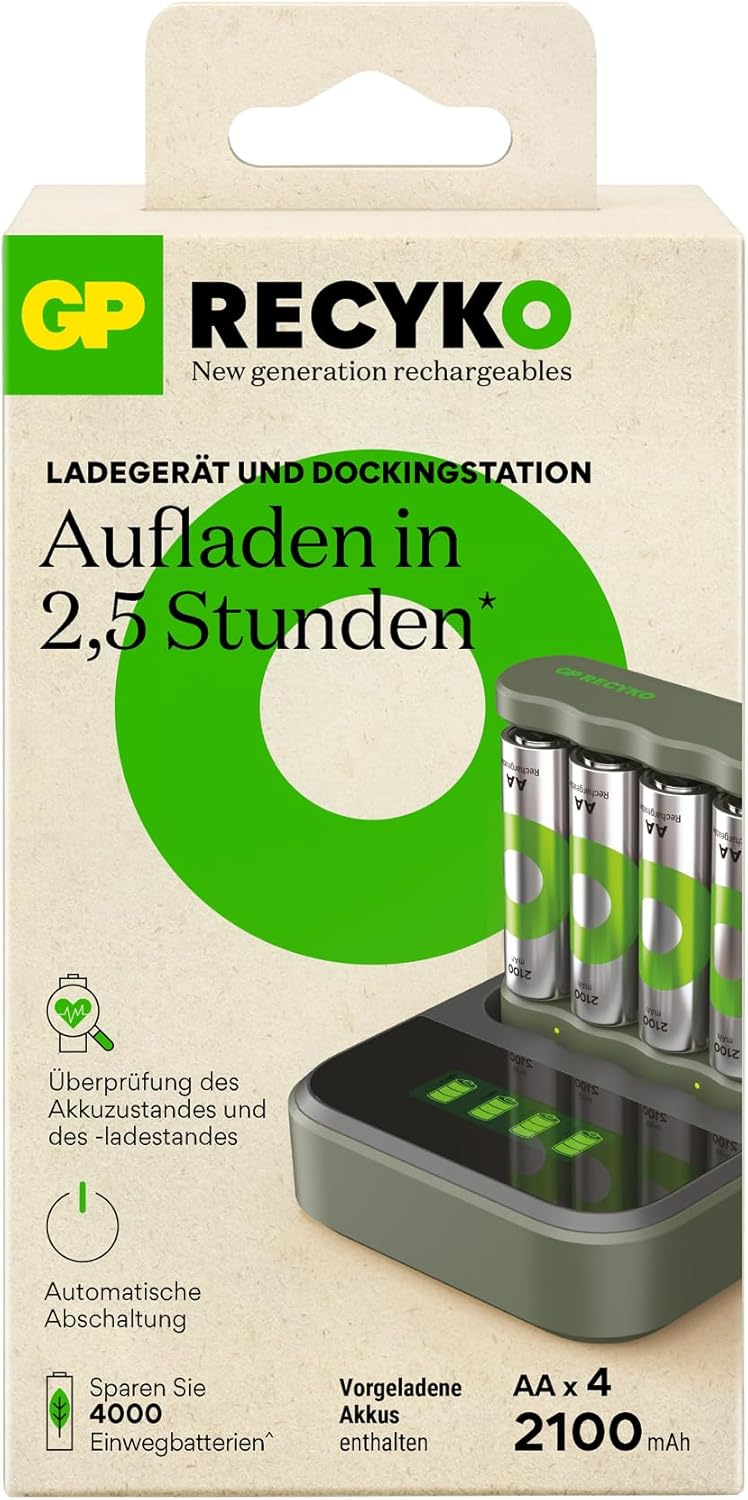
Figure 1: Package Contents - GP B441 USB Charger, 4 AA batteries, Docking Station, and USB Cable.

Figure 2: GP B441 USB Charger with Docking Station and Batteries.
2. Setup
Connecting the Charger
- Connect the provided USB charging cable to the GP B441 USB Charger.
- Plug the other end of the USB cable into a compatible USB power source (e.g., computer USB port, USB wall adapter, or power bank) with a minimum output of DC 5V/1A.
- The charger can be used independently or placed into the D451 Docking Station for enhanced charging and display features.
Inserting Batteries
The GP B441 charger supports charging up to four AA or AAA NiMH rechargeable batteries simultaneously.
- Ensure the batteries are NiMH rechargeable type. Do not attempt to charge disposable batteries.
- Insert the batteries into the charging slots, observing the correct polarity (+ and -) as indicated on the charger.

Figure 3: Charger compatible with AA and AAA batteries.
3. Operating Instructions
Charging Process
Once batteries are correctly inserted and the charger is connected to a power source, the charging process will begin automatically.
- The device charges 4 x AA 2100 mAh batteries in approximately 3 hours via a USB port.
- Charging time for 2100mAh AA batteries is approximately 180 minutes (with input min. DC 5.0V 1.0A min., 2 batteries).
- Charging time for 850mAh AAA batteries is approximately 180 minutes (with input min. DC 5.0V 1.0A min., 2 batteries).

Figure 4: Fast charging capability of the GP B441 charger.
LED Indicators
The LED display provides visual feedback on the charging status and battery condition:
- Green LED on for 0.5 seconds after USB power connection: Indicates the charger has received power.
- Green LED flashes slowly: Batteries are currently charging.
- Green LED illuminated (solid): Batteries are fully charged.
- Green LED flashes fast: Indicates defective batteries or disposable batteries have been inserted.

Figure 5: LED Charge Status Display.
Battery Status Check Function
The charger includes a function to quickly check the battery status. This allows you to determine if your batteries are sufficiently charged or require recharging, helping to avoid unexpected situations with empty batteries and unnecessary charging.
4. Safety Features
The GP B441 charger incorporates multiple safety mechanisms to protect both the batteries and the user:
- Automatic Shut Off Timer: Prevents overcharging. The timer is 5 hours when using 1 channel or 10 hours when using 2 channels.
- Full Charge Detection (-DV): Automatically detects when batteries are fully charged and stops the charging process.
- Temperature Interruption: Monitors battery temperature during charging and stops if overheating is detected.
- Primary Battery Protection: Prevents charging of non-rechargeable (disposable) batteries.
- Reverse Polarity Protection: Protects against damage if batteries are inserted incorrectly.
- These features collectively prevent overcharging, over-voltage, short circuits, and help extend battery life.

Figure 6: Automatic shut-off feature for fully charged batteries.
5. Maintenance
To ensure optimal performance and longevity of your GP RECYKO charger and batteries, follow these maintenance guidelines:
- Keep the charger and docking station clean and dry. Use a soft, dry cloth to wipe surfaces.
- Avoid exposing the unit to extreme temperatures, direct sunlight, or high humidity.
- Store the charger and batteries in a cool, dry place when not in use.
- Do not attempt to disassemble or modify the charger or docking station.
6. Troubleshooting
If you encounter issues with your charger, refer to the following common troubleshooting steps:
- Batteries not charging / LED flashes fast:
- Ensure batteries are correctly inserted with the correct polarity.
- Verify that the batteries are NiMH rechargeable type. The fast flashing green LED indicates that defective or disposable batteries have been inserted.
- Check the USB cable connection and ensure the power source is providing sufficient power (DC 5V/1A minimum).
- Try charging fewer batteries at a time to see if the issue persists.
- Charger not powering on:
- Ensure the USB cable is securely connected to both the charger and the power source.
- Try a different USB cable or power source to rule out a faulty component.
If problems persist, contact customer support for further assistance.
7. Specifications
GP B441 USB Charger
| Feature | Specification |
|---|---|
| Model | B441 |
| Dimensions (L x W x H) | 68 x 75 x 21.3 mm |
| Weight | Approx. 38 g |
| Number of Slots/Channels | 4 slots / 2 channels |
| USB Input Power | DC 5V / 1A |
| Output Voltage/Charging Current (1-2 AA) | DC 2.8V / 770mA |
| Output Voltage/Charging Current (3-4 AA) | DC 2.8V / 300mA |
| Output Voltage/Charging Current (1-4 AAA) | DC 2.8V / 400mA |
| Charging Time (2x 2100mAh AA) | Approx. 180 minutes (input min. DC 5.0V 1.0A) |
| Charging Time (2x 850mAh AAA) | Approx. 180 minutes (input min. DC 5.0V 1.0A) |
| Safety Features | Timer Protection, -DV Full Charge Detection, Temperature Interruption, Primary Battery Protection, Reverse Polarity Protection |
| LED Indicators | Power On, Charging, Fully Charged, Defective/Disposable Battery |
GP D451 Docking Station
| Feature | Specification |
|---|---|
| Model | D451 |
| Dimensions (L x W x H) | 82 x 82 x 27 mm |
| Weight | Approx. 71 g |
| Compatible Chargers | GP B441, M452, P461 4-Slot USB Chargers |
| USB Input Power | DC 5V / 1A |
| Output Voltage/Charging Current | DC 5V / 1A |
| Charging Time Improvement (B441 with Dock) | ~150/300 min for 1-2/3-4 AA 2100mAh batteries ~150/200 min for 1-2/3-4 AAA 850mAh batteries |
| Display | Built-in LCD display for individual battery charging status |
8. Warranty and Support
Information regarding product warranty and customer support details is not available in the provided product data. Please refer to the product packaging or the manufacturer's official website for warranty terms and contact information for support.


