
Dreo DR-HAF004S, PolyFan 513S
Dreo Smart Fans User Manual
Models: DR-HAF004S (Air Circulator) & PolyFan 513S (Pedestal Fan)
Brand: Dreo
Product Overview
This manual provides detailed instructions for the Dreo Smart Fans, including the DR-HAF004S Air Circulator and the PolyFan 513S Pedestal Fan. These smart fans offer advanced features such as Wi-Fi connectivity, remote control, and voice control compatibility with Alexa and Google Assistant, designed to provide optimal air circulation and comfort in your home.

Image: Overview of both Dreo Smart Fans, their respective remote controls, and smartphone application interfaces, demonstrating their smart capabilities.
Setup and Assembly
Before operating your Dreo Smart Fan, please follow these steps for proper setup and assembly.
1. Unpacking
- Carefully remove all components from the packaging.
- Verify that all listed parts are present: fan unit(s), remote control(s), power adapter(s), and user manual.
2. Assembly (PolyFan 513S Pedestal Fan)
The PolyFan 513S requires minimal assembly. Ensure the base is securely attached to the main fan body. Refer to the diagrams below for guidance.

Image: The Dreo PolyFan 513S Pedestal Fan, showcasing its design, remote control, and smartphone app connectivity for smart operation.
The DR-HAF004S Air Circulator typically comes pre-assembled and ready for use.
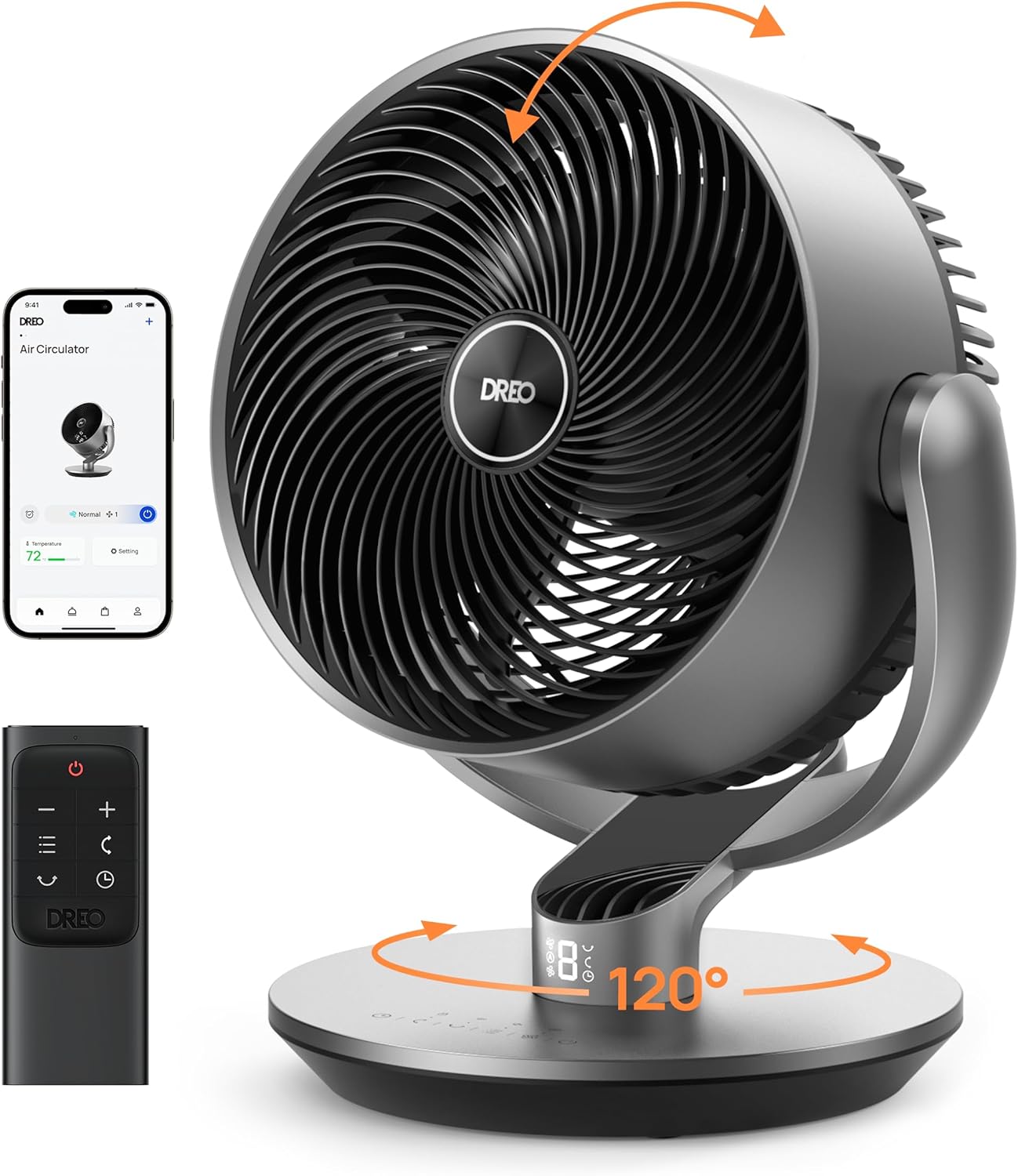
Image: The Dreo DR-HAF004S Air Circulator, highlighting its compact design, included remote control, and smartphone app for smart functionality.
3. Power Connection
- Place the fan on a stable, flat surface.
- Plug the power cord into a standard electrical outlet.
4. Wi-Fi and App Setup
To utilize smart features, download the Dreo app from your smartphone's app store and follow the in-app instructions to connect your fan to your Wi-Fi network. This enables remote control and voice assistant integration.
Operating Instructions
Your Dreo Smart Fans can be operated via the control panel on the unit, the included remote control, or the Dreo smartphone app.
Control Panel and Remote Control
Both fans feature intuitive controls for power, speed, mode, oscillation, and timer functions.
- Power Button: Turns the fan On or Off.
- Speed Adjustment: Increases or decreases fan speed.
- Mode Selection: Cycles through available modes (e.g., Normal, Natural, Sleep, Auto).
- Oscillation: Activates or deactivates horizontal and vertical oscillation.
- Timer: Sets a countdown timer for automatic shut-off.
Modes and Speeds
The DR-HAF004S Air Circulator offers 9 speeds and 6 modes for versatile airflow control.

Image: The Dreo DR-HAF004S Air Circulator, illustrating its capability to operate across 9 different speeds and 6 distinct modes for customized airflow.
The PolyFan 513S Pedestal Fan offers 8 speeds and 6 modes.
Oscillation
- DR-HAF004S: Provides 120° horizontal and 90° vertical oscillation for wide area coverage.
- PolyFan 513S: Offers 120° horizontal and 105° vertical oscillation. This model also resets its oscillation position when turned off.

Image: The Dreo DR-HAF004S Air Circulator positioned in a living room, illustrating its effective air circulation and compatibility with voice control commands like "Alexa, set air circulator to speed one."

Image: The Dreo PolyFan 513S Pedestal Fan in a room, visually representing its capability to project air up to 100 feet and deliver 882 CFM of air volume, powered by Turbosilent™ X technology.
Smart Control (Wi-Fi & Voice)
Once connected to Wi-Fi via the Dreo app, you can control your fan from anywhere using your smartphone. Both models are compatible with Amazon Alexa and Google Assistant for convenient voice control.
Maintenance
Regular cleaning ensures optimal performance and extends the lifespan of your Dreo Smart Fan.
Cleaning
- Disconnect Power: Always unplug the fan from the power outlet before cleaning.
- Exterior Cleaning: Wipe the exterior surfaces with a soft, damp cloth. Do not use abrasive cleaners or solvents.
- Grille and Blade Cleaning: Use a vacuum cleaner with a brush attachment or a soft, dry cloth to remove dust from the grilles and fan blades. For deeper cleaning, some grilles may be removable (refer to specific model instructions if applicable).
- Drying: Ensure all parts are completely dry before plugging the fan back in.
Storage
When not in use for extended periods, store the fan in a cool, dry place, away from direct sunlight and extreme temperatures. Cover the fan to protect it from dust.
Troubleshooting
If you encounter issues with your Dreo Smart Fan, refer to the following common problems and solutions.
| Problem | Possible Cause | Solution |
|---|---|---|
| Fan does not turn on. | No power supply; Power cord not securely plugged in; Outlet malfunction. | Ensure the fan is plugged into a working outlet. Check the power cord connection. Try a different outlet. |
| Remote control not working. | Batteries are dead or incorrectly inserted; Obstruction between remote and fan; Remote out of range. | Replace batteries with new ones, ensuring correct polarity. Remove any obstructions. Operate the remote within the specified range. |
| Wi-Fi connection fails. | Incorrect Wi-Fi password; Fan too far from router; Router issues; App issues. | Double-check Wi-Fi password. Move fan closer to router. Restart your router. Reinstall the Dreo app. Ensure your Wi-Fi is 2.4GHz. |
| Fan makes unusual noise. | Dust accumulation on blades; Loose parts; Fan not on a stable surface. | Clean the fan blades and grilles. Check for any loose components. Place the fan on a firm, level surface. |
If the problem persists after trying these solutions, please contact Dreo customer support.
Specifications
| Feature | DR-HAF004S (Air Circulator) | PolyFan 513S (Pedestal Fan) |
|---|---|---|
| Brand | Dreo | |
| Color | Silver | |
| Control Method | Remote, Voice (Alexa/Google), Wi-Fi App | |
| Room Type | Bedroom, Living Room, Office | |
| Special Feature | Oscillating | |
| Recommended Use | Air Circulation | |
| Indoor/Outdoor Usage | Indoor | |
| Blade Material | Plastic | |
| Airflow (CFM) | 1082 CFM | 882 CFM |
| Air Reach | Up to 110 ft | Up to 100 ft |
| Noise Level | As low as 25dB | |
| Speeds | 9 Speeds | 8 Speeds |
| Modes | 6 Modes | |
| Horizontal Oscillation | 120° | 120° |
| Vertical Oscillation | 90° | 105° |
| Timer | 12H Timer | (Not specified, assume similar or check product page if needed, but for now, only list what's explicitly mentioned for 513S) |
| Included Components | Remote Control | |
Warranty and Support
Dreo products are designed for reliability and performance. For warranty information or technical support, please refer to the official Dreo website or contact their customer service directly.
Dreo Official Website: www.dreo.com
Please have your product model number (DR-HAF004S or PolyFan 513S) and purchase information ready when contacting support.
Related documentsDR-HAF004S, PolyFan 513S


Ask a question about this manual
Ask about setup, troubleshooting, compatibility, parts, safety, or missing instructions. Manuals+ will review the question and use this page’s manual context to help answer it.