
Product Overview
This document provides instructions for the installation and maintenance of the qrcamule Rocker Switch, designed as a replacement part for the Mr. Coffee 12-Cup SK13/SK-13 Coffee Maker.
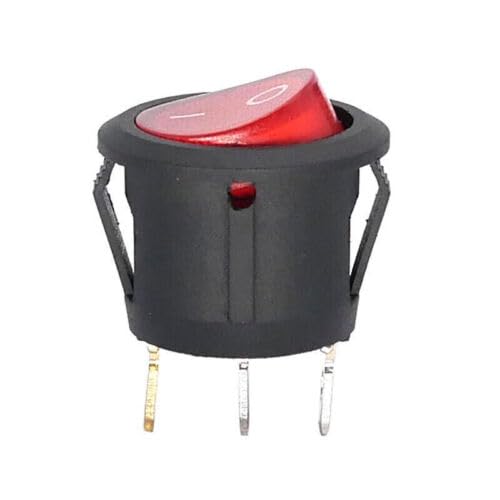
Figure 1: Front view of the qrcamule Rocker Switch. This image shows the red rocker switch in its housing, with the 'on' position indicated by a line.
Specifications
| Specification | Detail |
|---|---|
| Brand | qrcamule |
| Compatible Model | Mr. Coffee 12-Cup SK13/SK-13 Coffee Maker |
| Operation Mode | Manual |
| Contact Type | Normally Open |
| Connector Type | Crimp |
| Terminal | Screw |
| Circuit Type | 1-way |
| Actuator Type | Rocker |
| Number of Positions | 1 |
| Control Method | Touch |
| Connectivity Protocol | X-10 |
Setup and Installation
This rocker switch is intended as a replacement part. Installation should only be performed by individuals with appropriate technical knowledge and experience in appliance repair. Always ensure the appliance is unplugged from the power source before beginning any installation or repair work.
- Safety First: Disconnect the Mr. Coffee 12-Cup SK13/SK-13 Coffee Maker from the main power supply. Ensure there is no residual power before proceeding.
- Access the Old Switch: Carefully open the coffee maker's casing to gain access to the existing rocker switch. Refer to your coffee maker's specific service manual for instructions on how to safely open its enclosure.
- Note Wiring: Before removing the old switch, take a clear photograph or make a diagram of the wiring connections to ensure correct re-installation. Note which wires connect to which terminals.
- Remove Old Switch: Disconnect the wires from the old switch. Carefully unclip or unscrew the old switch from its mounting position.
- Install New Switch: Insert the new qrcamule Rocker Switch into the mounting hole. Ensure it clicks securely into place.
- Connect Wiring: Reconnect the wires to the new switch's terminals according to the diagram or photograph taken in step 3. Ensure all connections are secure and properly crimped if necessary.
- Secure Casing: Carefully reassemble the coffee maker's casing, ensuring all screws and clips are properly secured.
- Test Functionality: Plug the coffee maker back into the power supply. Test the new rocker switch to ensure it functions correctly, turning the coffee maker on and off as expected.
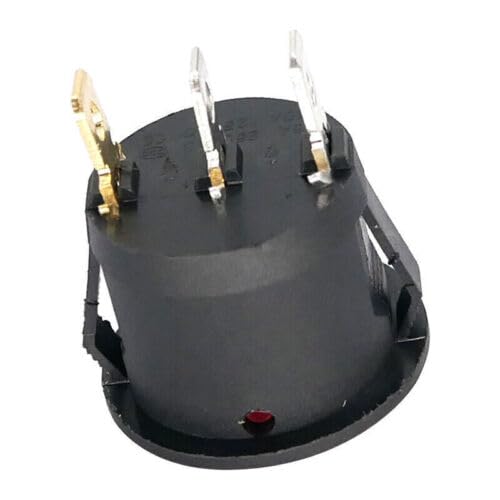
Figure 2: Rear view of the qrcamule Rocker Switch, displaying the three screw terminals for electrical connections.
Operating Instructions
Once installed, the qrcamule Rocker Switch operates identically to the original switch on your Mr. Coffee 12-Cup SK13/SK-13 Coffee Maker.
- Power On: Press the rocker switch to the 'on' position (typically indicated by a line or 'I' symbol) to supply power to the coffee maker.
- Power Off: Press the rocker switch to the 'off' position (typically indicated by a circle or 'O' symbol) to cut power to the coffee maker.
- Always refer to your Mr. Coffee 12-Cup SK13/SK-13 Coffee Maker's user manual for complete operating instructions for the appliance itself.
Maintenance
The qrcamule Rocker Switch is a sealed component and requires no routine maintenance. If the switch becomes unresponsive or exhibits intermittent operation, it may require replacement.
- Cleaning: If the exterior of the switch becomes dirty, wipe it gently with a dry, soft cloth. Do not use abrasive cleaners or immerse the switch in liquids.
- Inspection: Periodically inspect the switch for any visible damage or loose connections. If any issues are found, disconnect power and address them immediately.
Troubleshooting
If you experience issues after installing the qrcamule Rocker Switch, consider the following troubleshooting steps:
- Switch Does Not Turn On/Off:
- Ensure the coffee maker is properly plugged into a working electrical outlet.
- Verify that all wiring connections to the switch are secure and correctly matched according to the original configuration.
- Check for any loose wires or damaged insulation within the coffee maker's casing.
- If the switch still does not function, the switch itself may be faulty and require replacement.
- Intermittent Operation:
- This often indicates a loose connection. Disconnect power and re-check all wiring terminals for tightness.
- Internal wear of the switch can also cause intermittent operation, necessitating replacement.
- Sparking or Burning Smell:
- Immediately unplug the coffee maker from the power source.
- Do not attempt to use the appliance. This indicates a serious electrical fault. Seek professional repair or replace the appliance.
Disclaimer: Attempting repairs on electrical appliances carries inherent risks. If you are unsure about any step, consult a qualified technician.
Warranty and Support
For information regarding warranty coverage or technical support for your qrcamule Rocker Switch, please refer to the seller's information on the original purchase platform or contact the manufacturer directly.
Manufacturer: qrcamule
Date First Available: August 8, 2023
ASIN: B0CF2BPBTB