
Introduction
The Philips NeoPix 113 is a compact and versatile mini video projector designed for easy entertainment and presentations. It delivers True HD 720p resolution, offering a clear and vibrant viewing experience. With integrated Dual Band Wi-Fi screen mirroring and multiple connectivity options, it allows you to project content from various devices.

Figure 1: Front view of the Philips NeoPix 113 projector.
What's in the Box
Verify that all components are present in the package:
- Philips NeoPix 113 Projector
- HDMI Cable
- Power Adapter
- Remote Control
- Quick Start Guide
Setup
1. Placement
Place the projector on a stable, flat surface. Ensure there is adequate ventilation around the device. For optimal image quality, position the projector perpendicular to the projection surface.
2. Power Connection
Connect the power adapter to the DC input port on the projector and then plug the adapter into a power outlet.

Figure 2: Rear view of the projector with connectivity ports.
3. Initial Power On
Press the power button on the projector or the remote control to turn on the device. The power indicator light will illuminate.
4. Focus and Keystone Correction
Adjust the focus ring located near the lens until the projected image is clear. Use the digital keystone correction feature (accessible via settings) to correct trapezoidal distortion if the projector is not perfectly aligned with the screen.
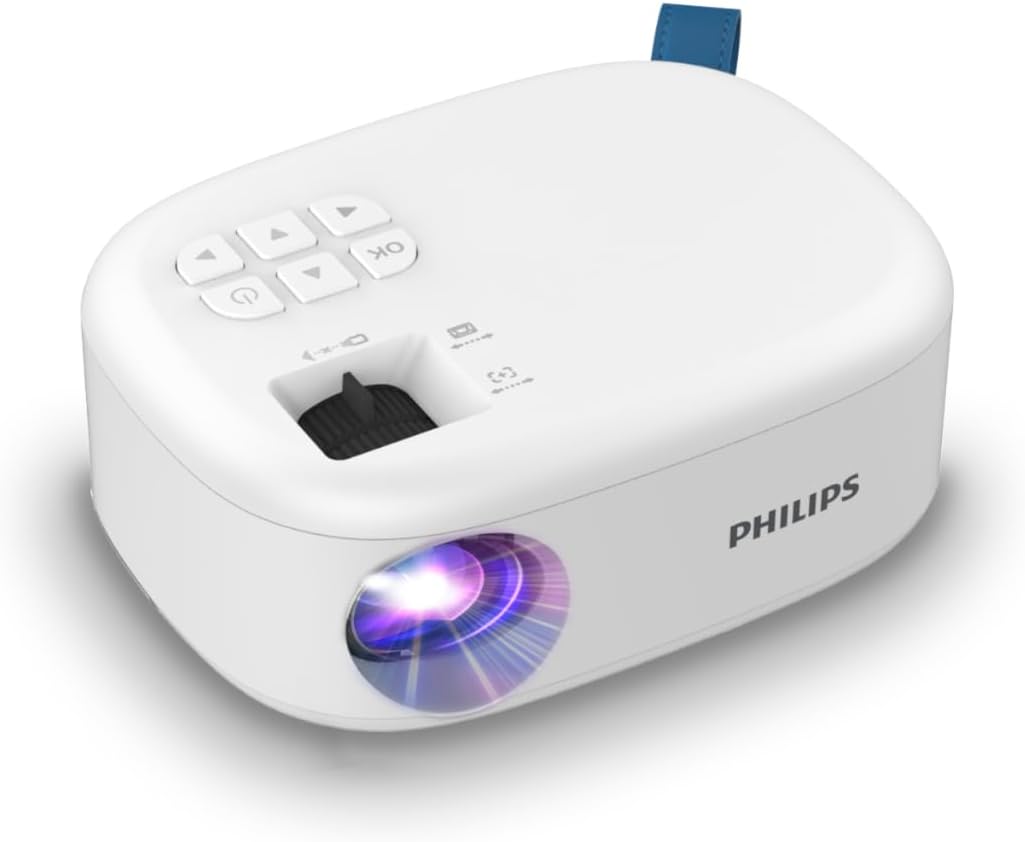
Figure 3: Top view of the projector with control panel and focus wheel.
5. Connecting Devices
- HDMI: Connect your laptop, TV box, Amazon Fire TV Dongle, or Android TV dongle to the HDMI port using the provided HDMI cable.
- USB: Plug a USB stick or hard drive into the USB port to play movies, photos, or music directly from the integrated multimedia player.
- Wi-Fi Screen Mirroring: For wireless projection from your smartphone or laptop, navigate to the Wi-Fi screen mirroring option in the projector's menu. Note: DRM protected content (e.g., Netflix, Amazon Prime) cannot be streamed via Wi-Fi screen mirroring. An HDMI connection is required for such content.
Operating Instructions
1. Navigation and Menu
Use the navigation buttons (up, down, left, right) and the OK button on the projector's control panel or remote control to navigate through the on-screen menu. The menu allows you to select input sources, adjust image settings, and configure network connections.
2. Source Selection
From the main menu, select the desired input source (e.g., HDMI, USB, Screen Mirroring) corresponding to your connected device.
3. Multimedia Playback (USB)
When a USB storage device is connected, select the USB source. The projector's built-in media player will display folders and files. Navigate to your desired media (video, photo, or audio) and press OK to play.
4. Screen Mirroring
Activate the screen mirroring function on the projector. Follow the on-screen instructions to connect your mobile device or computer. Ensure both devices are on the same Wi-Fi network for a stable connection.
Maintenance
1. Cleaning the Lens
Gently wipe the projector lens with a soft, lint-free cloth specifically designed for optical surfaces. Do not use abrasive cleaners or solvents.
2. General Care
- Keep the projector in a clean, dust-free environment.
- Avoid exposing the projector to extreme temperatures or humidity.
- Ensure ventilation openings are not blocked to prevent overheating.
- When not in use, store the projector in a protective case or cover.
Troubleshooting
| Problem | Possible Cause | Solution |
|---|---|---|
| No image projected | Power issue, incorrect input source, device not connected properly. | Check power connection. Select correct input source (HDMI, USB). Ensure cables are securely connected. |
| Image is blurry | Focus not adjusted, projector too close/far, keystone not corrected. | Adjust the focus ring. Reposition the projector. Use digital keystone correction. |
| Wi-Fi screen mirroring not working | DRM protected content, devices not on same network, network interference. | DRM protected content (e.g., Netflix, Amazon Prime) cannot be mirrored; use HDMI. Ensure both devices are connected to the same 2.4GHz or 5GHz Wi-Fi network. Try restarting both devices. |
| No sound | Volume too low, external audio device not connected, audio format not supported. | Increase projector volume. Check audio connections if using external speakers. Ensure audio format is compatible. |
Specifications
| Feature | Detail |
|---|---|
| Brand | PHILIPS |
| Model Number | NPX113 |
| Resolution | True HD 720p |
| Connectivity | HDMI, USB, Dual Band Wi-Fi (2.4/5GHz) |
| Compatible Devices | Laptop, Smartphone, TV Box, Amazon Fire TV Dongle, Android TV Dongle |
| Item Weight | 2.2 pounds |
| Package Dimensions | 7.87 x 7.87 x 7.87 inches |
| Color | White Matt |
| Special Features | Portable |
| Power Source | DC |
Warranty and Support
For warranty information and technical support, please refer to the official PHILIPS website or contact PHILIPS customer service. Keep your purchase receipt for warranty claims.
Online resources and FAQs may also be available on the manufacturer's support pages.


