1. Product Overview
The DOOGEE V30 is a rugged smartphone designed for durability and high performance, featuring advanced connectivity, a powerful camera system, and a long-lasting battery.
Key Features
- Built-in eSIM Global Network: Seamless global connectivity with support for multiple phone numbers and data plans.
- 6.6" FHD+ 120Hz Display: Immersive visual experience with a high refresh rate and vibrant colors.
- 108MP AI Triple Camera: High-resolution main camera, 32MP front camera, 20MP night vision, and 8MP wide-angle/macro lens for versatile photography.
- 10800mAh Battery & 66W Fast Charging: Extended usage time with rapid charging capabilities.
- 360° Full Protection: IP68/IP69K and MIL-STD-810H certified for water, dust, and drop resistance.
- MediaTek Dimensity 900 Processor: Efficient performance for demanding applications and multitasking.

Image: Front and back view of the DOOGEE V30 Rugged Smartphone, highlighting its robust design and camera module.
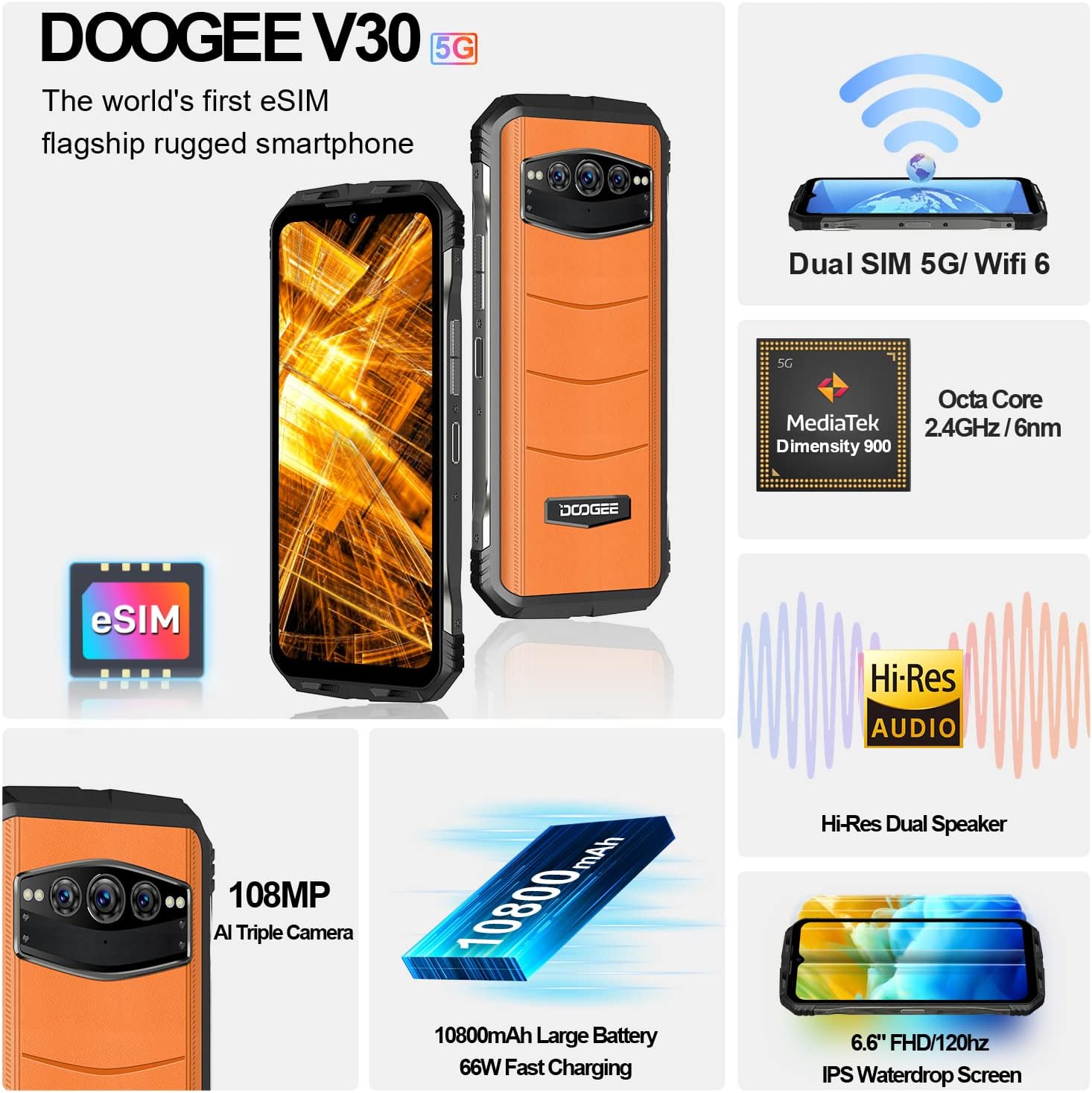
Image: An overview of the DOOGEE V30's key features including eSIM, Dual SIM, MediaTek Dimensity 900, Hi-Res Audio, 108MP camera, 10800mAh battery, and 6.6" FHD+ display.
2. Setup Guide
2.1 What's in the Box
Before you begin, ensure all components are present:
- DOOGEE V30 Unlocked Rugged Smartphone X1
- Type C Cable x1
- 66W Fast Charger x1
- Anti-explosion film (pre-applied) x1
- Anti-explosion film x1 (spare)
2.2 SIM Card and eSIM Setup
The DOOGEE V30 supports both physical SIM cards and eSIM technology.
- Physical SIM Card Installation: Locate the SIM card tray on the side of the device. Use the provided SIM ejector tool to open the tray. Insert your Nano-SIM card(s) into the designated slots, ensuring the gold contacts face downwards. Close the tray securely.
- eSIM Activation: The DOOGEE V30 features built-in eSIM functionality. To activate an eSIM profile, navigate to Settings > Network & internet > SIMs. You can typically scan a QR code provided by your carrier or manually enter activation details. This allows for multiple phone numbers and data plans without physical SIM cards.

Image: Illustration of the DOOGEE V30's eSIM toolkit interface, showing options to scan, choose from album, or input download for eSIM activation.
2.3 Initial Charging
Before first use, it is recommended to fully charge your DOOGEE V30. Use the provided 66W Fast Charger and Type C cable for optimal charging speed.
- Connect the Type C cable to the charging port at the bottom of the phone.
- Connect the other end of the cable to the 66W Fast Charger.
- Plug the charger into a power outlet.
- The phone will indicate charging status on the screen. A full charge typically takes approximately 2 hours.

Image: Visual representation of the DOOGEE V30's 10800mAh battery capacity and 66W super fast charging, showing 50% charge in 30 minutes.
3. Operating Your DOOGEE V30
3.1 Basic Navigation
- Power Button: Located on the side, press and hold to power on/off or restart. A short press will lock/unlock the screen.
- Volume Buttons: Adjust media volume, call volume, and ringtone volume.
- Touchscreen Gestures: Swipe, tap, pinch-to-zoom for navigation and interaction with apps.
3.2 Camera Usage
The DOOGEE V30 features a versatile camera system:
- 108MP AI Main Camera: For high-resolution photos with enhanced detail.
- 32MP Front-facing Camera: For clear selfies and video calls.
- 20MP Night Vision Camera: Utilizes infrared sensors to capture images in low-light or complete darkness.
- 8MP Wide Angle & Macro Camera: For expansive landscape shots or detailed close-ups.
To access the camera, tap the Camera icon on your home screen or app drawer. Select different modes (Photo, Video, Night Vision, Portrait, Pro, etc.) from the interface.

Image: Comparison of 48MP and 108MP image quality, demonstrating the enhanced detail of the DOOGEE V30's 108MP AI main camera.
3.3 Display and Audio
Experience superior visuals and sound with your DOOGEE V30:
- 6.6" FHD+ Display: Enjoy crisp, clear visuals with 2408*1080 resolution and 401 PPI.
- 120Hz Refresh Rate: Provides smoother scrolling and more fluid animations, especially noticeable in gaming and video playback.
- Dual Hi-Res Speakers: Delivers rich, immersive audio for music, videos, and calls.

Image: Visual comparison of 90Hz and 120Hz refresh rates on the DOOGEE V30's 6.6" FHD+ display, highlighting the smoother experience of 120Hz, alongside the Hi-Res Audio logo.
3.4 Performance
The DOOGEE V30 is powered by the MediaTek Dimensity 900 processor, ensuring efficient and responsive performance. It comes with 8GB of RAM, expandable virtually by an additional 7GB, and 256GB of internal storage, expandable up to 2TB via TF card.
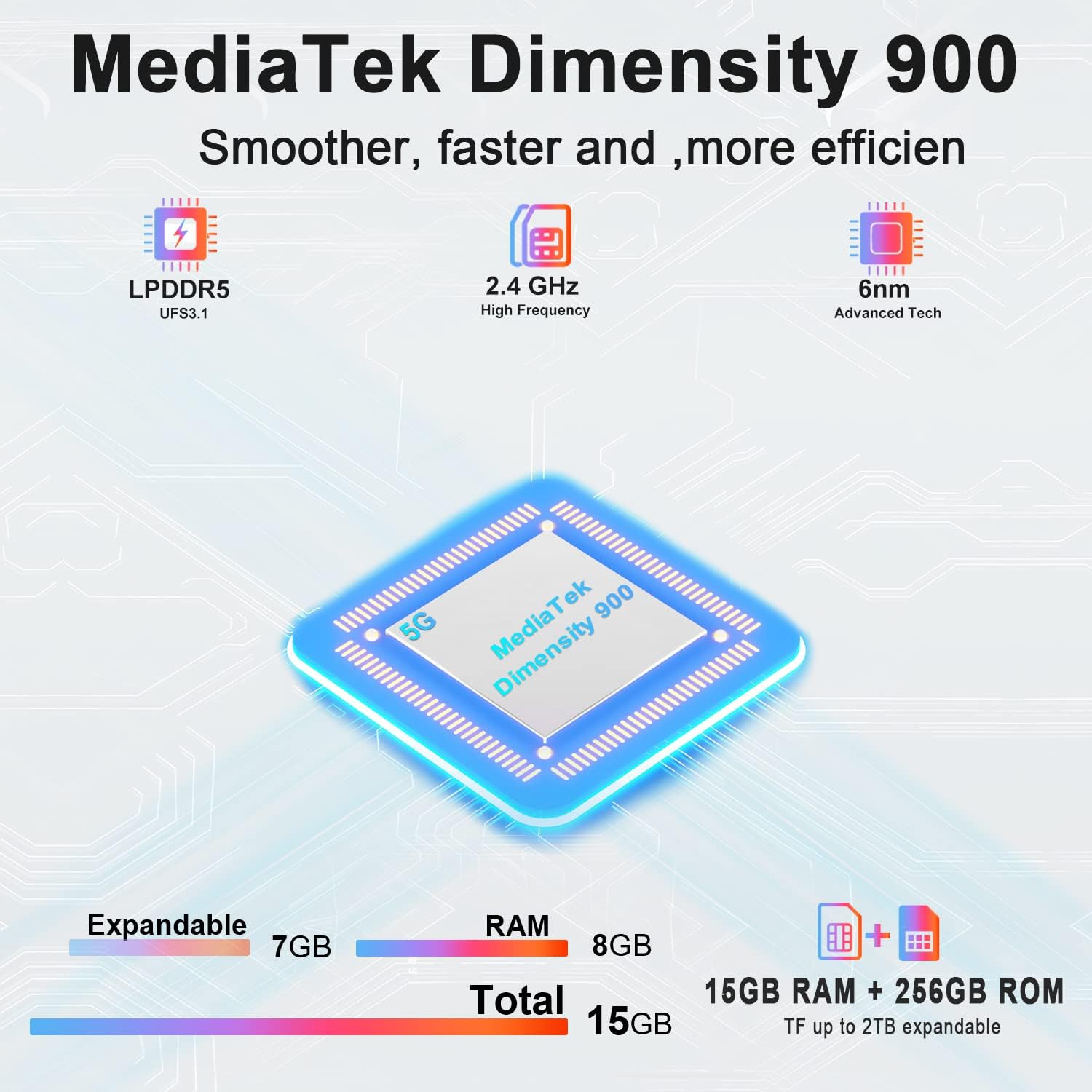
Image: Diagram illustrating the MediaTek Dimensity 900 processor's features, including LPDDR5, UFS3.1, 2.4 GHz high frequency, and 6nm advanced tech, along with the 15GB (8GB+7GB expandable) RAM and 256GB ROM.
4. Care and Maintenance
4.1 Durability Features
The DOOGEE V30 is built to withstand harsh environments, certified with:
- IP68: Water-resistant up to 1.5 meters for 30 minutes.
- IP69K: Resistant to high-pressure, high-temperature water jets.
- MIL-STD-810H: Military-grade standard for resistance against drops, shocks, and extreme temperatures.
While rugged, avoid intentional abuse or exposing the device to conditions beyond its specified limits.

Image: Demonstrations of the DOOGEE V30's ruggedness, including its MIL-STD-810H compliance, IP68 waterproof rating (30 minutes, 1.5m deep), and IP69K dustproof rating (360°).
4.2 Cleaning Instructions
- Use a soft, lint-free cloth to wipe the screen and body.
- For stubborn smudges, slightly dampen the cloth with water or a screen cleaner.
- Avoid using harsh chemicals, abrasive materials, or compressed air.
- Ensure all ports are dry before charging or connecting accessories.
4.3 Battery Care
- Avoid extreme temperatures (hot or cold) as they can degrade battery life.
- Do not fully discharge the battery regularly; try to keep it above 20%.
- Use only the original or certified chargers and cables.
5. Troubleshooting Common Issues
| Problem | Possible Cause | Solution |
|---|---|---|
| Phone does not power on | Low battery; System crash | Charge the phone for at least 10 minutes. Press and hold the power button for 10-15 seconds to force restart. |
| Cannot connect to network | SIM card issue; Network settings; Out of coverage | Ensure SIM card is correctly inserted. Check network settings (APN). Try restarting the phone. Contact your carrier. |
| Screen unresponsive | Software glitch; App conflict | Force restart the phone. If issue persists, try factory reset (backup data first). |
| Battery drains quickly | Background apps; High screen brightness; Poor signal | Close unused apps. Reduce screen brightness. Disable unnecessary features (GPS, Wi-Fi, Bluetooth). Check for app updates. |
| Camera issues (e.g., yellow filter) | Software bug; Specific camera mode | Clear camera app cache/data (Settings > Apps > Camera). Check for system updates. If a specific filter is applied, try changing camera modes or resetting camera settings. |
6. Technical Specifications
| Feature | Specification |
|---|---|
| Model Name | V30 |
| Operating System | Android 12.0 |
| Processor | MediaTek Dimensity 900 (2.4 GHz CPU Speed) |
| RAM | 8 GB (expandable with 7GB virtual RAM) |
| Memory Storage Capacity | 256 GB (expandable up to 2TB via TF card) |
| Screen Size | 6.58 Inches FHD+ (2408 x 1080 Resolution) |
| Refresh Rate | 120Hz |
| Main Camera | 108MP AI Triple Camera (includes 20MP Night Vision, 8MP Wide Angle & Macro) |
| Front Camera | 32MP |
| Battery Power Rating | 10800 mAh |
| Charging Time | Approx. 2 Hours (with 66W Fast Charger) |
| Connectivity Technologies | 5G Cellular, NFC, GPS, eSIM/Dual SIM |
| Wireless Carrier | Unlocked for All Carriers |
| Product Dimensions | 6.67 x 3.2 x 0.63 inches |
| Item Weight | 9.5 ounces (270 Grams) |
| Special Features | eSIM/Dual SIM 5G, 108MP AI Triple Camera, 8GB+7GB Virtual Expandable RAM, Dual Band Navigation(L1+L5), 120Hz Refresh Rate |
| Durability Standards | IP68/IP69K, MIL-STD-810H |
7. Warranty and Support
DOOGEE is committed to providing excellent customer service for your V30 Rugged Smartphone.
- Warranty: Your DOOGEE V30 comes with a 2-year free warranty from the date of purchase. This warranty covers manufacturing defects and malfunctions under normal use.
- Money Back Guarantee: Enjoy a 30-day money-back guarantee without reason, along with free returns.
- Customer Support: For any issues or inquiries, a professional support team is available 24/7 to assist you. Please refer to the contact information provided with your purchase or visit the official DOOGEE website for support options.
For more information and to explore other DOOGEE products, visit the DOOGEE Store on Amazon.


