1. Introduction
This manual provides detailed instructions for the proper use and maintenance of your Rolton K300 Portable Megaphone Voice Amplifier. Please read this manual thoroughly before operating the device to ensure optimal performance and longevity.
2. Product Overview
The Rolton K300 is a versatile portable voice amplifier designed for various applications, including teaching, public speaking, tour guiding, and outdoor events. It features a 5W output, FM radio, MP3 player functionality, and recording capabilities.

Figure 2.1: Front view of the Rolton K300 Portable Megaphone Voice Amplifier.
2.1 Device Components and Controls
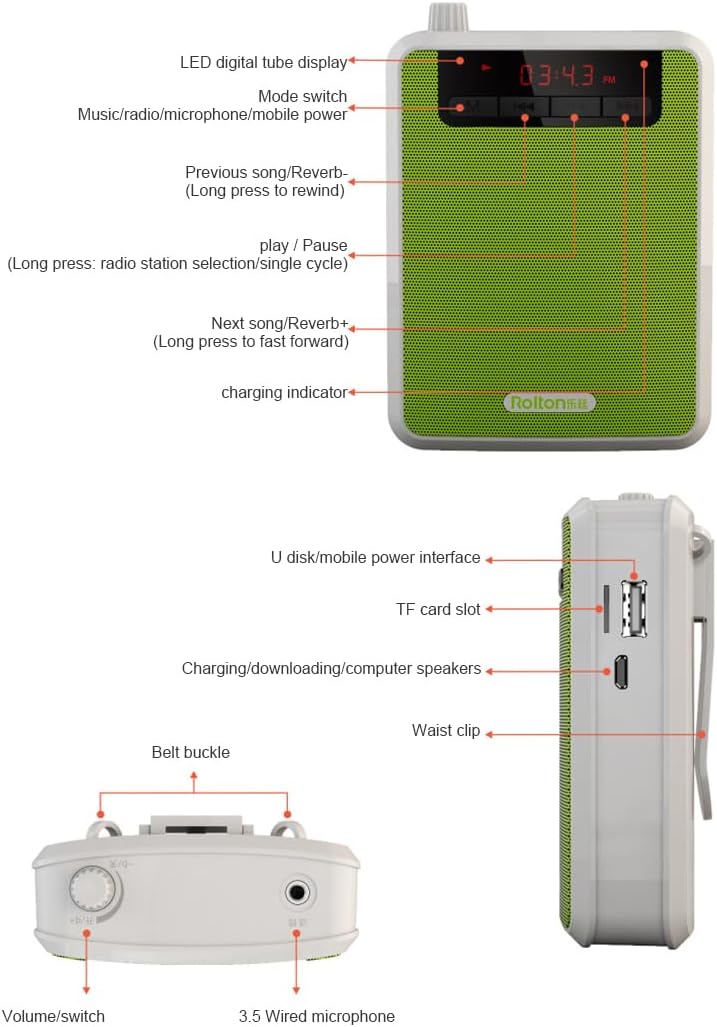
Figure 2.2: Detailed diagram of the Rolton K300 controls and ports.
- LED Digital Tube Display: Shows time, frequency, and mode information.
- Mode Switch (M): Press to cycle through different modes (Music/Radio/Microphone/Mobile Power).
- Previous Song/Rewind (<<): Short press for previous song/station. Long press to rewind.
- Play/Pause/Radio Station Selection/Single Cycle (►/||): Controls playback and radio functions.
- Next Song/Fast Forward (>>): Short press for next song/station. Long press to fast forward.
- Charging Indicator: Illuminates during charging.
- U Disk/Mobile Power Interface: USB port for USB drives or charging other devices.
- TF Card Slot: For inserting a MicroSD (TF) card for media playback.
- Charging/Downloading/Computer Speakers Port: Micro USB port for charging the device, data transfer, or connecting as a computer speaker.
- Belt Buckle/Waist Clip: For attaching the device to clothing or a belt.
- Volume/Switch Knob: Rotates to adjust volume and acts as the power on/off switch.
- 3.5mm Wired Microphone Port: For connecting the included wired microphone.
3. Setup
3.1 Initial Charging
Before first use, fully charge the device. The Rolton K300 features a built-in 3.7V/1800mAh lithium battery.
- Connect the provided USB charging cable to the Charging/Downloading/Computer Speakers Port on the device.
- Connect the other end of the USB cable to a standard USB power adapter (not included) or a computer USB port.
- The charging indicator will illuminate.
- A full charge typically takes 3-5 hours. The device can provide approximately 12 hours of microphone mode operation on a full charge.

Figure 3.1: Battery capacity and charging duration.
3.2 Connecting the Wired Microphone
The Rolton K300 comes with a high-sensitivity wired microphone designed for clear voice amplification.
- Insert the 3.5mm plug of the wired microphone into the 3.5mm Wired Microphone Port on the device.
- Position the microphone approximately 1cm from your mouth for optimal sound pickup.
- Ensure the microphone cable is not tangled or strained. The cable is designed with double-layer PVC for durability and shielding.

Figure 3.2: Wired microphone design and placement.
4. Operating Instructions
4.1 Power On/Off and Volume Control
To power on the device, rotate the Volume/Switch Knob clockwise until you hear a click and the display illuminates. Continue rotating clockwise to increase the volume. To power off, rotate the knob counter-clockwise until it clicks off.
4.2 Mode Selection
Press the M (Mode Switch) button to cycle through the available modes:
- Microphone Mode: For voice amplification.
- MP3 Player Mode: For playing audio from a U disk or TF card.
- FM Radio Mode: For listening to FM radio stations.
- Mobile Power Mode: To use the device as a power bank (via the U Disk/Mobile Power Interface).
4.3 Voice Amplification
- Ensure the wired microphone is connected.
- Turn on the device and select Microphone Mode using the M button.
- Adjust the Volume/Switch Knob to your desired amplification level.
- Speak into the microphone.

Figure 4.1: Rolton K300 used for voice amplification in an educational environment.
4.4 MP3 Playback
- Insert a U disk into the U Disk/Mobile Power Interface or a TF card into the TF Card Slot with MP3 audio files.
- Turn on the device and select MP3 Player Mode using the M button.
- Use the ►/|| button to play or pause.
- Use the << and >> buttons to navigate between tracks. Long press to rewind or fast forward.
4.5 FM Radio
- Turn on the device and select FM Radio Mode using the M button.
- To auto-scan and save stations, long press the ►/|| button. The device will scan and store available FM stations.
- Use the << and >> buttons to switch between saved stations.
4.6 Recording Function
The Rolton K300 supports recording. Ensure a U disk or TF card is inserted to save recordings.
- In Microphone Mode, press and hold the ►/|| button to start recording.
- Press the ►/|| button again to stop and save the recording.
- Recordings are saved to the inserted U disk or TF card.
5. Maintenance
- Cleaning: Use a soft, dry cloth to clean the device. Do not use liquid cleaners or abrasive materials.
- Storage: Store the device in a cool, dry place away from direct sunlight and extreme temperatures.
- Battery Care: To prolong battery life, avoid fully discharging the battery frequently. Charge the device regularly, even if not in use for extended periods.
- Microphone Care: Handle the wired microphone gently. Avoid pulling or bending the cable excessively.
6. Troubleshooting
| Problem | Possible Cause | Solution |
|---|---|---|
| No power/Device does not turn on | Battery is discharged | Charge the device fully (refer to Section 3.1). |
| No sound from microphone | Microphone not connected properly; Volume too low; Not in Microphone Mode | Ensure microphone is securely plugged in. Increase volume. Press 'M' to select Microphone Mode. |
| MP3 files not playing | No U disk/TF card inserted; Files not in MP3 format; Not in MP3 Player Mode | Insert U disk/TF card with MP3 files. Ensure files are MP3 format. Press 'M' to select MP3 Player Mode. |
| Poor FM radio reception | Weak signal; Interference | Move to an area with better signal. Re-scan stations. |
7. Specifications
- Product Type: Portable Megaphone Voice Amplifier
- Model Number: K300
- Output Power: 5W
- Battery: 3.7V/1800mAh Lithium Battery
- Charging Time: 3-5 hours
- Operating Time (MIC mode): Approximately 12 hours
- Material: Metal
- Features: Voice Amplification, FM Radio, MP3 Player (U disk/TF card), Recording Function, Mobile Power Function
- Origin: Mainland China
8. Warranty and Support
This product comes with a 12-month warranty. If you encounter any issues with the product, such as damage or incorrect items, please contact customer support through the Amazon platform. We aim to respond to inquiries within 24 hours.